

Signing up for a course platform takes two minutes. Getting your money back after you have built half a course on the wrong one is a very different story.
Teachable’s trial is short, it wants a card up front, and its cheapest plan quietly takes a cut of every sale you make. Here is exactly what the Teachable free trial includes, what it costs once it ends, and how to walk away before you are billed.
Quick verdict
Teachable is still one of the fastest routes from a course idea to someone actually paying you for it: no hosting, no checkout code, no video delivery to wire up yourself. What it is not is a relaxed evaluation window. A week disappears quickly, and the plan you land on afterwards matters far more than the trial itself, because the entry tier takes a percentage of every sale.
Best for: first-time creators who want a course live this month and would rather pay a platform than assemble a stack of WordPress plugins.
Not ideal for: anyone already doing steady sales volume on the entry plan, or teams that need deep analytics and full control over design.
Teachable free trial: the short answers
Teachable currently runs a 7-day free trial on its paid plans, and you choose which plan you are trialling at signup. Payment details are required to start, so the trial rolls into a paid subscription automatically unless you cancel first. Paid plans also carry a 30-day money-back guarantee, the more forgiving of the two safety nets.
Treat those numbers as a snapshot. Teachable has reworked its tiers more than once and retired its free plan in 2025, so confirm the current terms on the official Teachable pricing page before you hand over a card.
| What you are checking | Where Teachable stands |
|---|---|
| Trial length | 7 days on paid plans |
| Credit card required? | Yes, up front |
| Free forever plan? | No, discontinued in 2025 |
| Money-back guarantee | 30 days on paid plans |
| Auto-converts to paid? | Yes, unless you cancel |
| Transaction fee on entry plan | 7.5% of each sale |
What you actually get during the trial
The trial unlocks the full feature set of whichever plan you picked, not a stripped-back sandbox: build courses, upload video, design sales pages, attach a domain, set pricing and publish for real. Anything you create carries over if you stay. Seven days is enough if you go in with a plan, so work this checklist:
- Upload your worst video file. Your longest, heaviest lesson, not a 30-second test clip. Encoding time and playback quality are the late regrets.
- Build one complete sales page in the page editor and try to match your brand. Design limits show up here fastest.
- Run a test purchase using a coupon, so you see the exact checkout your students will meet.
- Connect your email tool and decide whether you still need a separate list provider.
- Open the analytics. Reporting depth is the most common complaint about Teachable, so find out early if it tells you enough.
The transaction fee that catches people out
This is the single biggest reason to think past the trial. Teachable’s entry Starter plan carries a 7.5% transaction fee on every sale. The higher tiers drop that to 0% when you sell through Teachable’s own gateway. On top of either, standard card processing applies, in the region of 2.9% + 30c on US cards and 3.9% + 30c on international ones.
Run the numbers before the cheap plan tempts you. On annual billing, Starter sits near $29/month and the tier above it near $69/month, a gap of roughly $40. A 7.5% cut costs you that same $40 once you sell about $530 a month. Past that point, the cheaper plan is the expensive one.
Starter genuinely suits a first course, a small audience, or a coach testing demand. If you already have a list and expect sales in month one, start your trial on the tier above it and skip the fee entirely.
What Teachable costs once the trial ends
At the time of writing, Teachable sells four tiers, with annual billing running roughly 20-25% below monthly:
- Starter around $39/month monthly, or about $29/month annually. Carries the 7.5% transaction fee.
- Builder around $89/month monthly, or about $69/month annually. No Teachable transaction fee on its own gateway; this is where most working creators end up.
- Growth around $189/month monthly, or about $139/month annually. More admin seats and advanced tooling.
- Custom quoted by their sales team, aimed at larger course businesses.
Teachable moves these figures, so check the live page rather than trusting any article, this one included. Student caps on the lower tiers also lift once your platform sales pass a threshold.
How to cancel before you are charged
Because the trial takes a card, cancelling is a task with a deadline. It lives in your school’s admin area under the billing settings, and Teachable’s support team can process it for you if the option is not where you expect.
- Set a calendar reminder for day five, not day seven. Support tickets take time to answer.
- Open your school admin and look under Settings > Billing.
- Cancel or downgrade, wait for the confirmation email, then screenshot it.
If you miss the window, the 30-day money-back guarantee is your fallback, but a refund request is slower and less certain than cancelling on time.
Features worth testing while the trial runs
Page editor
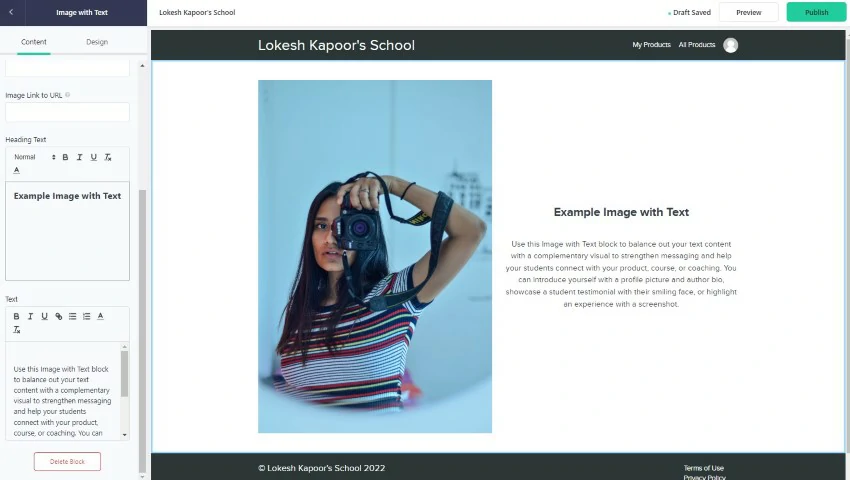
The block-based editor builds website pages, sales pages and thank-you pages without code, and it is flexible enough for a launch page that does not look generic. Drop your real copy in on day one: every template looks good until your own words are in it. More on Teachable pages here.
Custom domain
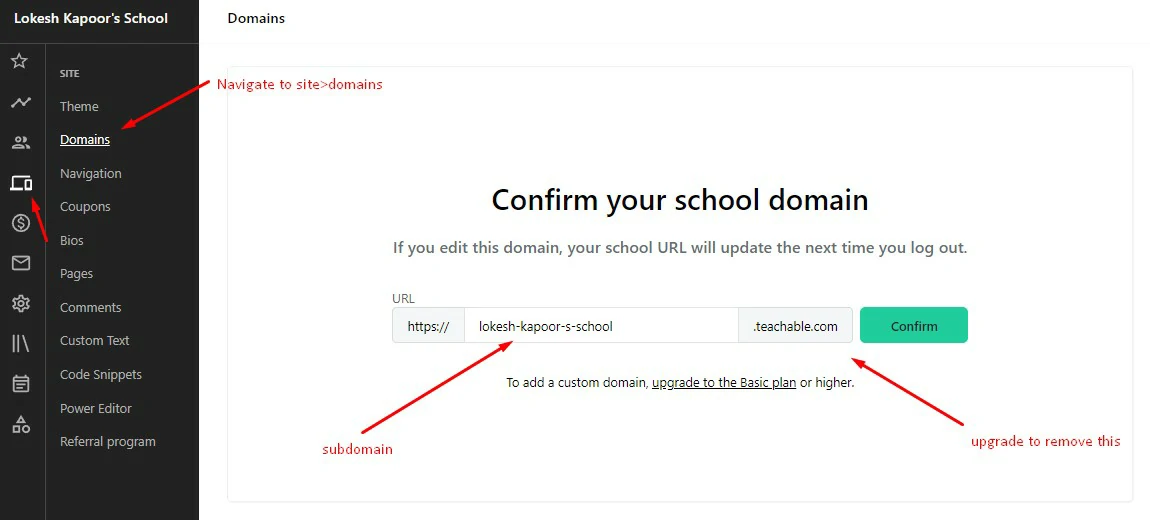
You get a Teachable subdomain immediately and can point your own domain at the school instead. Do this during the trial, because DNS changes are the one step capable of eating a day you do not have.
Coupons and pricing options
Coupons, payment plans and bundles are built in, which is how most creators run launches and early-bird offers. Create one and buy your own course with it to see the whole checkout flow.
Theme and custom code
Fonts, colours, navigation links and the video player are editable from the theme section. Anything deeper needs custom HTML, CSS and JavaScript snippets, which sit on the higher plans. Worth knowing before you promise yourself a bespoke design.
Users, email and affiliates
One dashboard covers students, authors, admins and affiliates, with search and filters. Teachable sends email campaigns to students directly, and its built-in affiliate system lets other people sell your course for a commission.
Pros and cons
What Teachable does well
- Quick to launch, with hosting, video and checkout all handled for you
- Unlimited video hosting and no separate bandwidth bill
- Coupons, payment plans, affiliates and completion certificates built in
- Clean dashboard that beginners do not get lost in
- Handles EU VAT on sales made through its own gateway
Where it frustrates people
- The 7.5% entry-plan fee punishes exactly the people who chose that plan for the price
- Analytics and reporting stay shallow next to dedicated tools
- Theme customisation hits a ceiling unless you write your own CSS
- Payouts on some gateway settings arrive on a delay
- No free plan any more, so there is no zero-cost way to park a course between launches
Should you trial an alternative at the same time?
Running two trials side by side is the fastest way to settle this. Three worth putting next to Teachable:
- Thinkific is the closest like-for-like rival, with a softer entry point. Pick it if the transaction fee is your main objection.
- Kajabi replaces your email tool, funnels and website too. Pricier on paper, cheaper than three subscriptions if you would buy all three anyway.
- Podia is simpler for creators selling a mix of courses, downloads and memberships without a full marketing suite.
If none of those pull you away after a week, Teachable is the safe answer.
Frequently Asked Questions
How long is the Teachable free trial?
Teachable currently offers a 7-day free trial on its paid plans, and you pick the plan you want to trial at signup. Terms have changed before, so confirm the current length on the official Teachable pricing page.
Do you need a credit card for the Teachable free trial?
Yes. Teachable asks for payment details up front, so the trial converts into a paid subscription automatically when it ends. If you only want a look around, set a cancellation reminder for day five.
Does Teachable still have a free plan?
No. Teachable retired its free tier in 2025, so the trial is now the only way to use the platform without paying. If a permanently free plan matters, Thinkific is the closer fit among the main alternatives.
Can you cancel Teachable during the free trial?
Yes. Cancel from your school admin under the billing settings before the trial ends, and keep the confirmation email. Miss the deadline and the 30-day money-back guarantee is your fallback, though refunds are slower than cancelling on time.
Does Teachable charge transaction fees on sales?
The entry Starter plan takes 7.5% of each sale. Higher tiers drop that to 0% when you sell through Teachable own gateway. Standard card processing applies on every plan regardless, around 2.9% plus 30 cents on US cards.
Is Teachable worth it for a complete beginner?
For a first course, yes. It handles hosting, video and checkout so you can focus on teaching, and the dashboard is easy to navigate. The value case weakens once you sell regularly on the entry plan, because the fee costs more than an upgrade.
Teachable vs Thinkific: which trial should you take first?
Take Thinkific first if you want to build without a deadline or a card on file. Take Teachable first if speed to launch matters most and you already expect to pay for a plan. Running both in one week is the fastest way to decide.
The verdict
Launching your first course: take the trial on the entry plan, get one course live, and accept the transaction fee as the price of starting cheap. Already have an audience: trial the tier above Starter instead, because the fee maths turns against it faster than most people expect. Want a marketing stack as well as a course: spend the week on Kajabi and come back only if that felt like overkill.
One warning worth repeating: the trial takes your card and converts on its own. Set the cancellation reminder in the same hour you sign up, before you get absorbed in building.
Next step: check the current trial length and prices on Teachable’s pricing page, decide which tier to test before you sign up, then block two evenings to build a real lesson rather than a placeholder.
The Review
PROS
- Fastest route from course idea to a live, paid checkout
- Unlimited video hosting with no separate bandwidth bill
- Coupons, payment plans, affiliates and certificates built in
- Beginner-friendly dashboard that does not need a manual
CONS
- 7.5% transaction fee on the entry Starter plan
- Analytics and reporting stay shallow
- Theme customisation hits a ceiling without custom CSS
- No free plan, and the 7-day trial needs a card up front




