You just need a contact form. Or a quote request, a survey, maybe a payment field. So you open the WordPress plugin directory, type “form,” and get buried under a thousand options that all claim to be the best — half of them free, half of them quietly desperate to upsell you to a $299 “Elite” plan.
Here’s the catch nobody mentions: the wrong form plugin can bloat your site, leak spam into your inbox, or lock the one feature you actually need behind a paywall. The “best” one depends entirely on whether you want a simple free contact form or a full data-collection machine.
We’ve built forms on live WordPress sites with most of these. Below are the best form builder plugins for WordPress, sorted by what each is genuinely good at — free and simple, powerful and paid, payments, surveys — so you install one, not five. Let’s get into it.
📌 Quick Picks
- Best overall / easiest: WPForms — beginner-friendly with a free Lite version.
- Best free, full-featured: Fluent Forms or Forminator — genuinely generous free tiers.
- Best for developers & complex forms: Gravity Forms.
- Best for data, calculations & surveys: Formidable Forms.
- Best dead-simple free contact form: Contact Form 7.
Best Form Builder Plugins for WordPress 2026
Here’s the shortlist at a glance. “Free version” means a usable free plugin, not just a trial. Pricing tiers are relative and renew annually — always confirm the current price on the plugin’s official site before you buy.
| Plugin | Best for | Free version | Paid tier |
|---|---|---|---|
| WPForms | Beginners, all-rounder | Yes (Lite) | Mid–Premium |
| Fluent Forms | Best free, fast & light | Yes (generous) | Budget |
| Forminator | Free payments, quizzes, polls | Yes (full-featured) | Free / Mid |
| Gravity Forms | Developers, complex forms | No | Mid–Premium |
| Formidable Forms | Data, calculations, surveys | Yes (Lite) | Premium |
| Ninja Forms | Pay-per-add-on flexibility | Yes | Mid |
| Contact Form 7 | Simple free contact forms | Yes (100% free) | Free |
WPForms — Best Overall for Most People
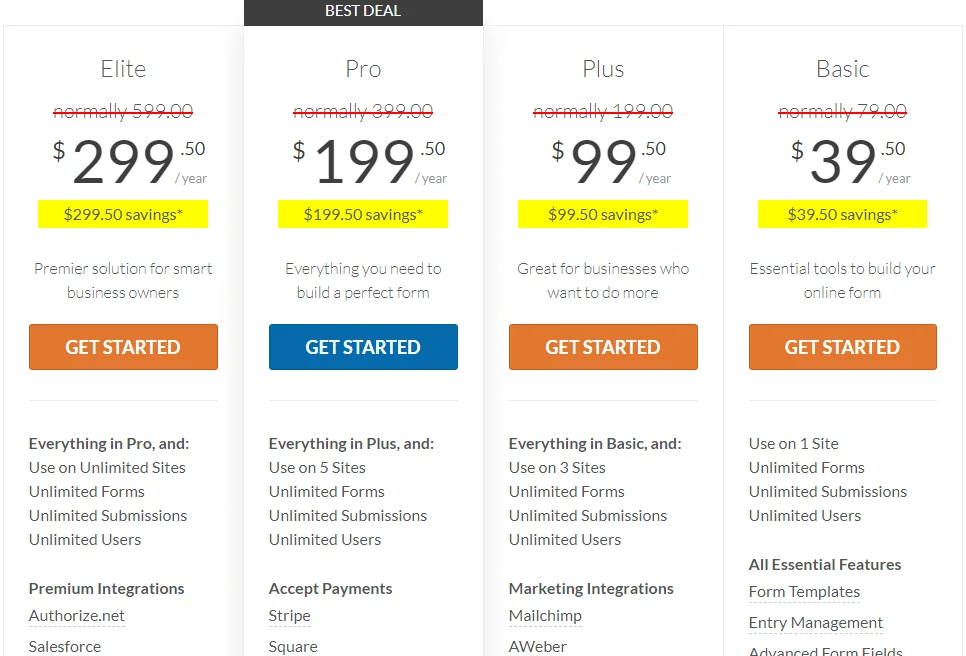
If you want a form live in five minutes without touching code, start here. WPForms nails the beginner experience: a clean drag-and-drop builder, ready-made templates, conditional logic, payments and marketing integrations. With 6+ million active installs it’s the most popular premium form plugin going, and the free WPForms Lite covers basic contact forms.
Best for: beginners and small businesses who want easy and reliable. Watch out: the in-dashboard upsells are relentless, and the genuinely useful features (surveys, payments, advanced logic) sit on higher tiers. Full breakdown in our WPForms review.
Fluent Forms — Best Free & Lightweight
Fluent Forms is the one we point people to when budget and site speed both matter. It’s built to be lightweight, so it won’t drag your load times the way heavier builders can, and the free version is unusually generous — conditional logic, multiple field types and integrations that rivals charge for. The paid tiers are some of the most affordable around.
Best for: performance-conscious sites and anyone who wants a lot without paying much. Watch out: the interface is a touch more utilitarian than WPForms.
Forminator — Best Free for Payments & Quizzes
Forminator, from WPMU DEV, is the rare plugin that gives away features others paywall — accept Stripe and PayPal payments, build quizzes, run polls and calculation forms, all on the free version. If “free” is non-negotiable but you still need real functionality, it’s hard to beat.
Best for: tight budgets that still need payments, quizzes or calculators. Watch out: it can feel heavier than Fluent Forms, and support leans toward the WPMU DEV ecosystem.
Gravity Forms — Best for Developers
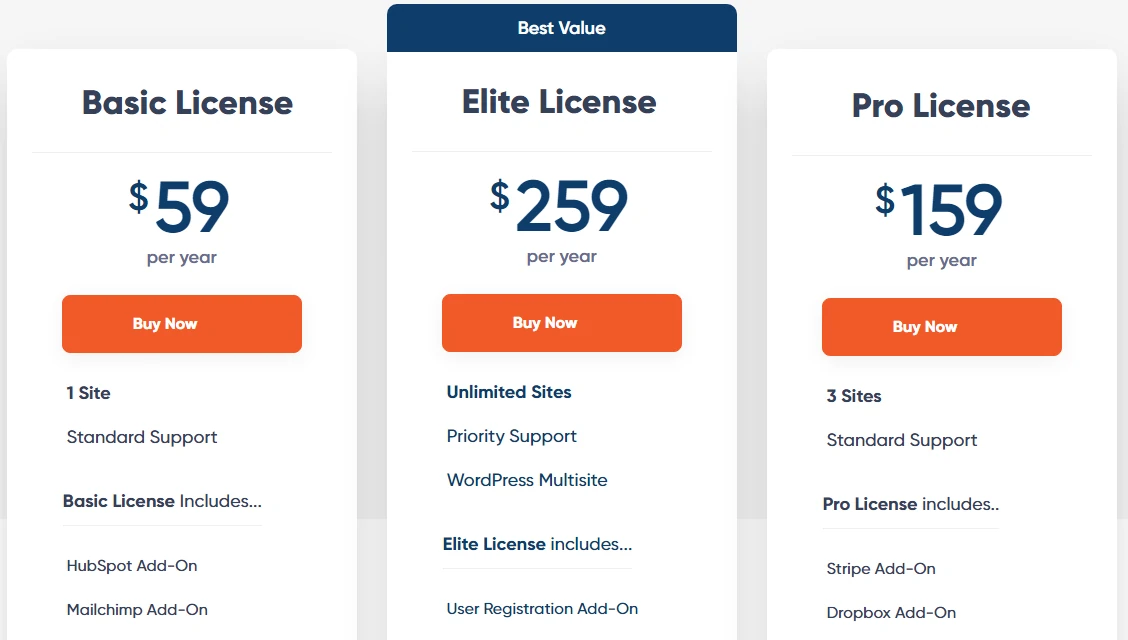
Gravity Forms is the pro’s choice — rock-solid, endlessly extensible, and able to build just about any form you can imagine, from multi-page applications to payment and quiz systems. Its huge add-on ecosystem and developer-friendly hooks are why agencies lean on it for client work.
Best for: developers, agencies and genuinely complex forms. Watch out: there’s no free version, and the power comes with a steeper learning curve than WPForms.
Formidable Forms — Best for Data & Calculations

Formidable is the one that thinks beyond simple forms. It’s built for data: calculated fields, multi-page forms, surveys with graphs, and front-end views that turn submissions into directories, listings or calculators. If you want to do something with the data you collect, this is the most capable option here.
Best for: calculators, surveys and data-driven applications. Watch out: the advanced features are a Premium-tier expense, and it’s overkill for a basic contact form.
Ninja Forms — Flexible Pay-Per-Add-On
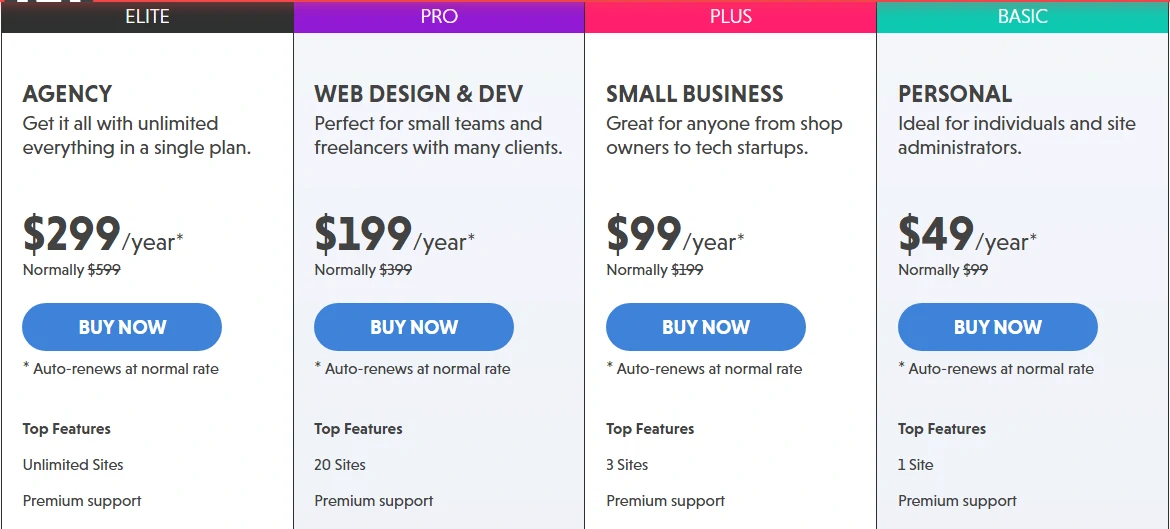
Ninja Forms’ pitch is flexibility: a free core plugin, then buy only the add-ons you actually need instead of a pricey all-in-one bundle. It’s a fair model if you need just one or two extras, with a solid drag-and-drop builder underneath.
Best for: users who want one or two specific features without a big bundle. Watch out: add-on costs add up fast if you need several, and the builder is a little less polished for absolute beginners.
Contact Form 7 — Simplest Free Contact Form
Contact Form 7 is the original, and it’s still everywhere for one reason: it’s completely free, lightweight, and does exactly one job — email contact forms — well. It’s open-source with a massive add-on community, so you can extend it when you outgrow the basics.
Best for: a simple, free contact form on a budget or developer site. Watch out: the setup is markup-based (not drag-and-drop), there’s no built-in spam protection (pair it with Akismet or a CAPTCHA), and no entry storage by default. Beginners usually prefer WPForms Lite or Fluent Forms.
How to Choose the Right Form Plugin
- Free or paid? For a basic contact form, Fluent Forms, Forminator, WPForms Lite or Contact Form 7 cost nothing. Pay only when you need payments, surveys or advanced logic.
- Mind the bloat. Every plugin adds weight. Lighter builders like Fluent Forms are kinder to your load times — and you only need one form plugin, not three.
- Check spam protection. Make sure it supports CAPTCHA/Akismet, or your inbox will fill with junk — Contact Form 7 especially needs this added.
- Taking payments? Forminator (free), WPForms and Gravity Forms all handle Stripe/PayPal — confirm it’s on the tier you’re buying.
- Already on a page builder? If you run Elementor Pro, its built-in form widget may cover simple needs without a separate plugin.
Building out your site? Our roundups of the best live chat plugins, popup makers and WooCommerce plugins pair well with this one. Prefer a standalone form tool? See our Typeform review.
Frequently Asked Questions
What is the best free form builder plugin for WordPress?
Fluent Forms and Forminator offer the most generous free versions, including features like conditional logic and payments that rivals charge for. WPForms Lite and Contact Form 7 are also free but more limited. For a free contact form most beginners are happiest with Fluent Forms or WPForms Lite.
Do form plugins slow down a WordPress site?
They can, but a single well-built one barely registers. Lighter plugins like Fluent Forms are designed for speed, while heavier builders add more weight. The bigger mistake is installing several form plugins at once — pick one, and your load times will be fine.
WPForms vs Contact Form 7 — which should I use?
WPForms is the easier, more powerful choice with a visual drag-and-drop builder, templates and entry storage, ideal for beginners. Contact Form 7 is completely free and lightweight but markup-based with no spam protection or entry storage by default. Most non-developers prefer WPForms.
Which WordPress form plugin is best for accepting payments?
Forminator accepts Stripe and PayPal payments for free, which is rare. WPForms and Gravity Forms also handle payments well but on their paid tiers. Confirm the payment add-on is included in the specific plan you buy before purchasing.
Is Contact Form 7 still a good choice?
Yes, for simple needs. It’s free, light and reliable for basic email contact forms, especially on developer-managed sites. Just remember to add spam protection like Akismet or a CAPTCHA, since it has none built in, and it won’t store submissions by default.
How many form plugins should I install?
Just one. A single form plugin can power every form on your site, and stacking multiple builders slows your site and creates conflicts. Choose the one that fits your needs, and use its templates and add-ons rather than installing another plugin.
The Bottom Line
You only need one form plugin — so match it to the job. For most people, WPForms is the easiest path to a good-looking form fast. Want full features without spending a rupee? Fluent Forms (light and fast) or Forminator (free payments and quizzes). Building something complex or client work? Gravity Forms. Crunching data or surveys? Formidable. Just a plain contact form on a dev site? Contact Form 7 still does the job.
One warning before you install: more plugins isn’t more power — it’s more weight and more security surface. Pick the single one that fits, add spam protection, and start with the free version or a low tier. You can always upgrade once you’ve hit a real limit — that’s how we’d do it, and it saves paying for an “Elite” plan you’ll never fully use.