

Pick the wrong platform to host your courses and you’ll spend the next year fighting your tools instead of teaching. LifterLMS takes the opposite bet from hosted names like Teachable and Kajabi: it runs on your own WordPress site, so you own the content, the student list, and every dollar that comes in.
That ownership is the whole appeal, and it’s also the catch. This LifterLMS review covers what you actually get, what the add-ons really cost, and who’s better off on a hosted platform instead.
Quick verdict: LifterLMS is the strongest pick if you already run WordPress and want to own your course platform outright with no per-student fees. Just budget for hosting and a few paid add-ons, and plan a setup weekend before your first course goes live.
Best for: WordPress users, coaches, and training businesses that want full ownership and unlimited students.
Not ideal for: Non-technical creators who want to launch this week and never touch hosting, updates, or a theme.
LifterLMS Overview

LifterLMS was founded in 2014 by Chris Badgett and Thomas Patrick Levy, and runs under Codebox LLC in Jackson Hole, Wyoming. Because it’s a WordPress plugin rather than a walled garden, it installs into your existing site and leaves you with full customization control and complete ownership of your content, student list, and data.
| Attribute | Details |
|---|---|
| Product Name | LifterLMS |
| Official Website | lifterlms.com |
| Developers | Chris Badgett & Thomas Patrick Levy (Codebox LLC) |
| USPs | Self-hosted WordPress solution, one-time payment, complete data ownership, unlimited courses & students |
| Category | Learning Management System (LMS) / Course Creation Platform |
| Integrations | WooCommerce, Stripe, PayPal, Mailchimp, ConvertKit, Zapier, AffiliateWP, BuddyPress |
| Best For | Course creators, membership sites, training companies, coaches, educational institutions |
| Support Options | Email support, documentation, community forums, priority support (paid plans) |
| Documentation | Comprehensive knowledge base, video tutorials, developer documentation |
| Company Headquarter | Jackson Hole, Wyoming, USA |
| Starting Price | Free (Core Plugin) / $149.50/year (Earth Bundle) |
| Alternatives | LearnDash, Teachable, Thinkific, Kajabi, TutorLMS, MemberPress |
| Affiliate Program | Yes |
| Affiliate Commission | 20% recurring commission on Earth/Universe bundle subscriptions |
| Money-Back Guarantee | 30-day money-back guarantee |
| License Type | GPL (Free version) / Proprietary (Paid add-ons) |
LifterLMS Features
Here’s what matters most in LifterLMS once you get past the marketing page:
Email Notifications
The automated email system helps keep students engaged, with customizable templates for:
- Enrollment confirmations
- Course completion celebrations
- Quiz results
- Drip content unlock notifications
- Payment reminders
- Certificate awards
Unlimited Courses & Membership Levels
You can create unlimited courses with no restrictions. Unlike platforms that charge per course or cap your student count, LifterLMS puts no ceiling on your growth, so you can build full catalogs from beginner to advanced and organize them into membership tiers.
The membership side is deep: free trials, payment plans, recurring subscriptions, and lifetime access, which you can combine into tiered membership sites where different plans unlock different courses.
LifterLMS Course Builder
The drag-and-drop course builder lets you set up the broad framework of a course first, then dive into the granular parts as needed.
Creating a Course
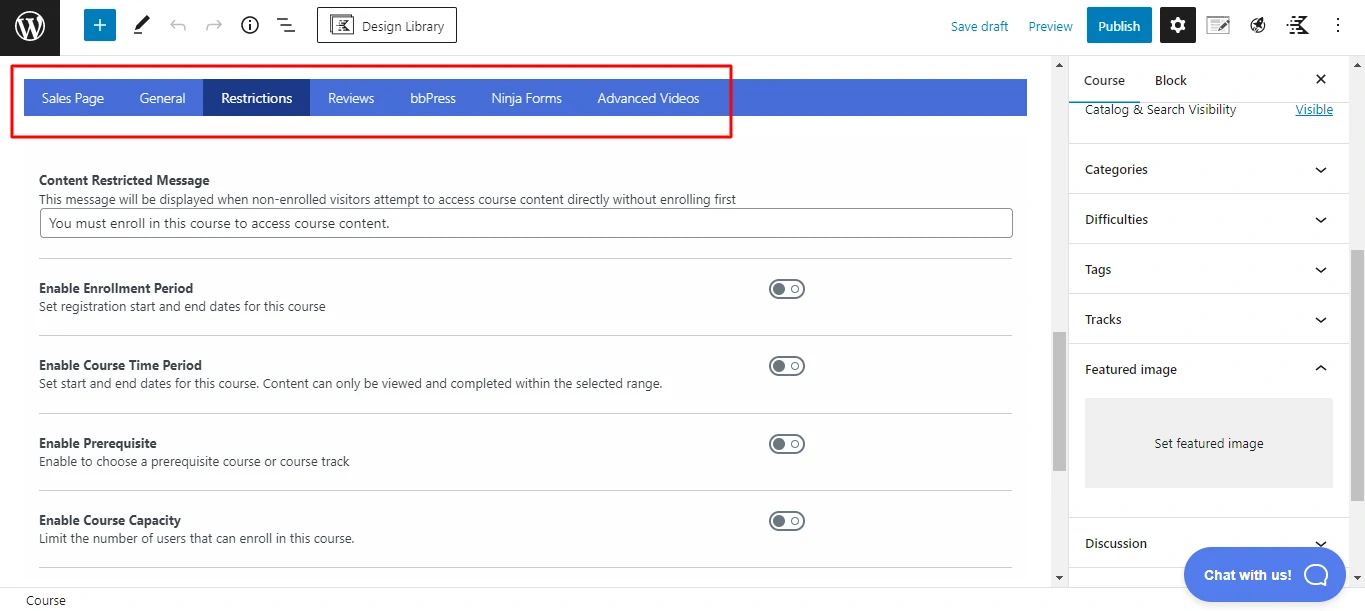
When you create a course, the native WordPress block editor opens for the course overview and basic parameters. Below it sits the Course Options meta box, where you set details such as:
- Estimated completion time.
- Prerequisites.
- A featured video.
- Scheduling.
- Maximum capacity
This is also where you configure payment options (covered below). When you’re ready to build content, click Launch Course Builder in the bottom-right corner.
Drag-and-Drop Course Builder
You get two tiers of material to structure your courses:
- Lessons are the actual course content.
- Sections divide teachings into distinct categories/units.
Using the buttons and drag-and-drop, you set the high-level structure with lessons and sections. Here’s what a basic course structure looks like:
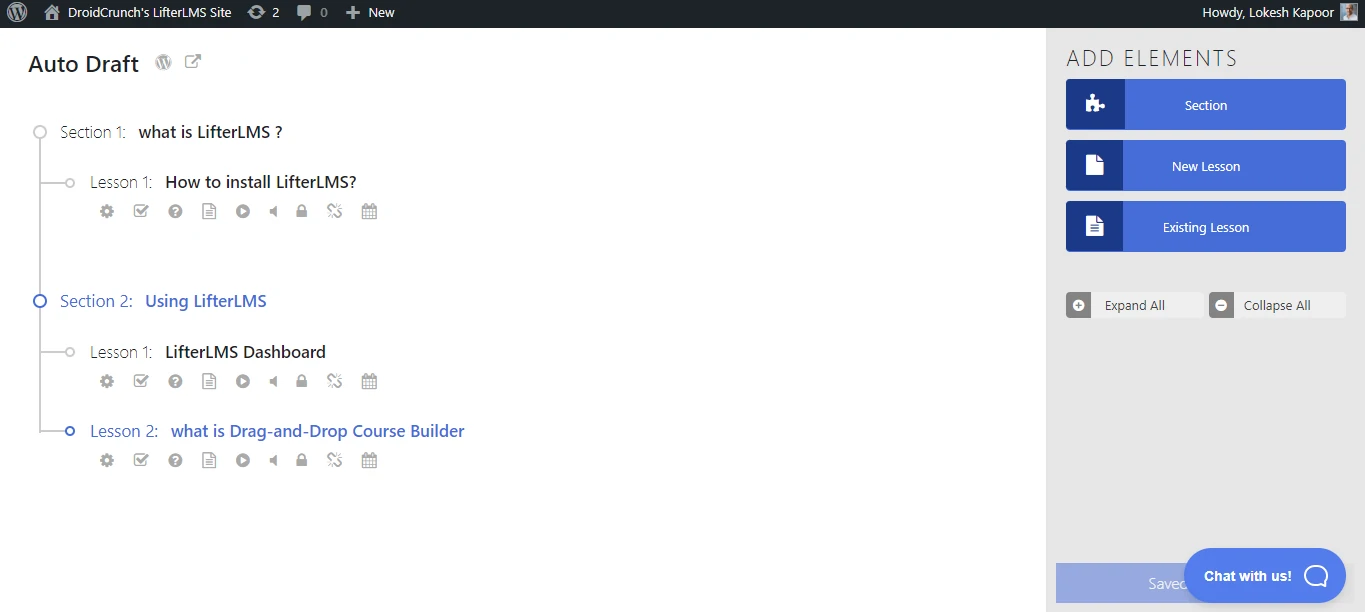
Each lesson shows a row of icons beneath it (and more on hover) to quickly view or edit its content. Some flag whether a lesson has video or audio; others let you add a quiz or assignment or open the content editor. To add text, you open the full lesson editor:
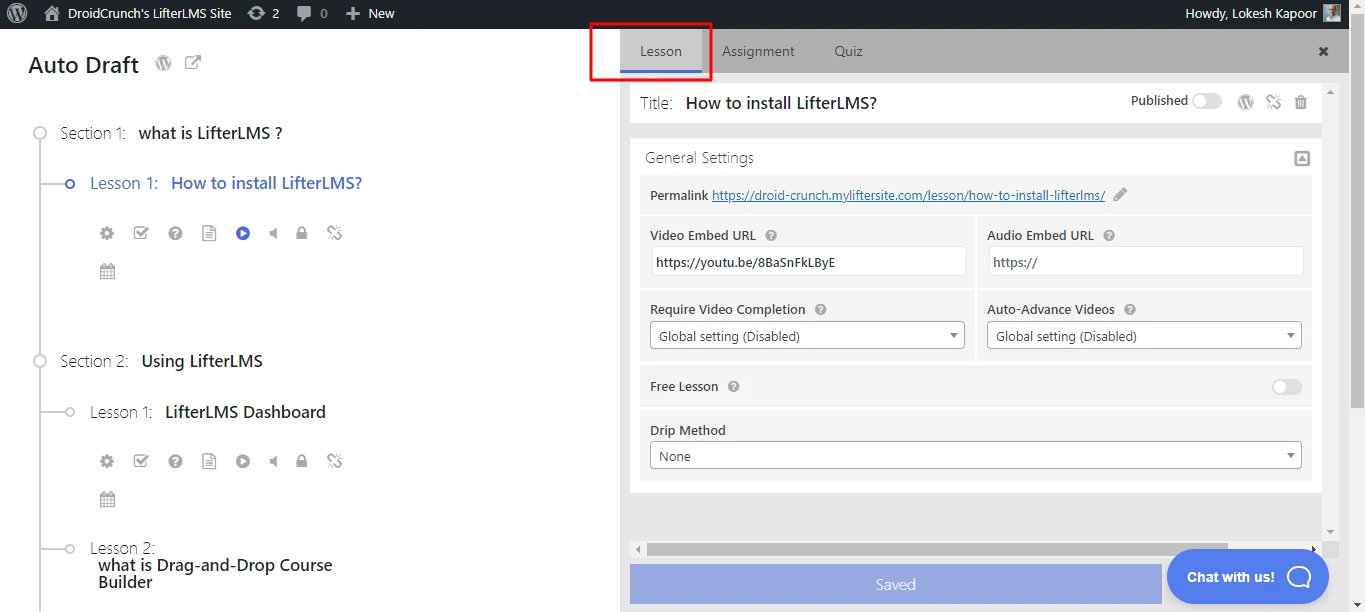
Adding Lesson Content
The lesson content editor gives you the native block editor for text and images, plus a Lesson Parameters box for attaching video or audio. For a video course, drop the video into the Video Embed URL box and add companion text below:
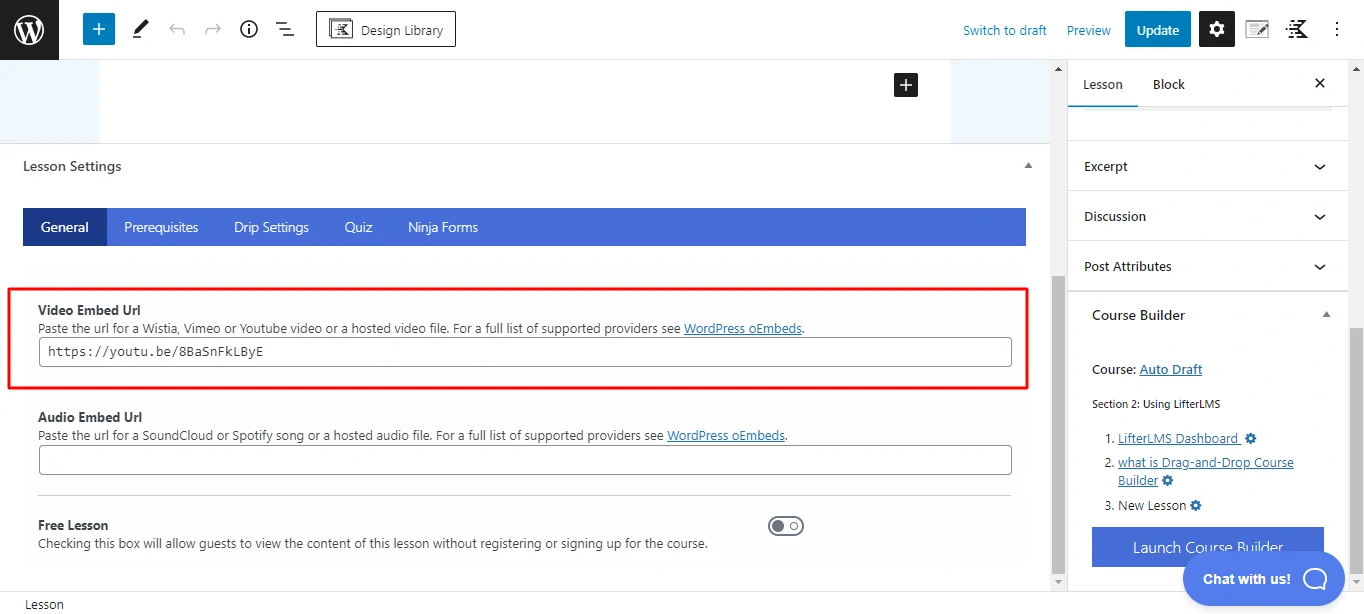
Prerequisites, a drip schedule, and other options live in the Lesson Settings box, and the sidebar shows where the lesson fits and links back to the full course builder.
Creating Quizzes
To add a quiz, click the quiz icon on a lesson in the course builder; a slide-out appears where you set up the quiz or an assignment:
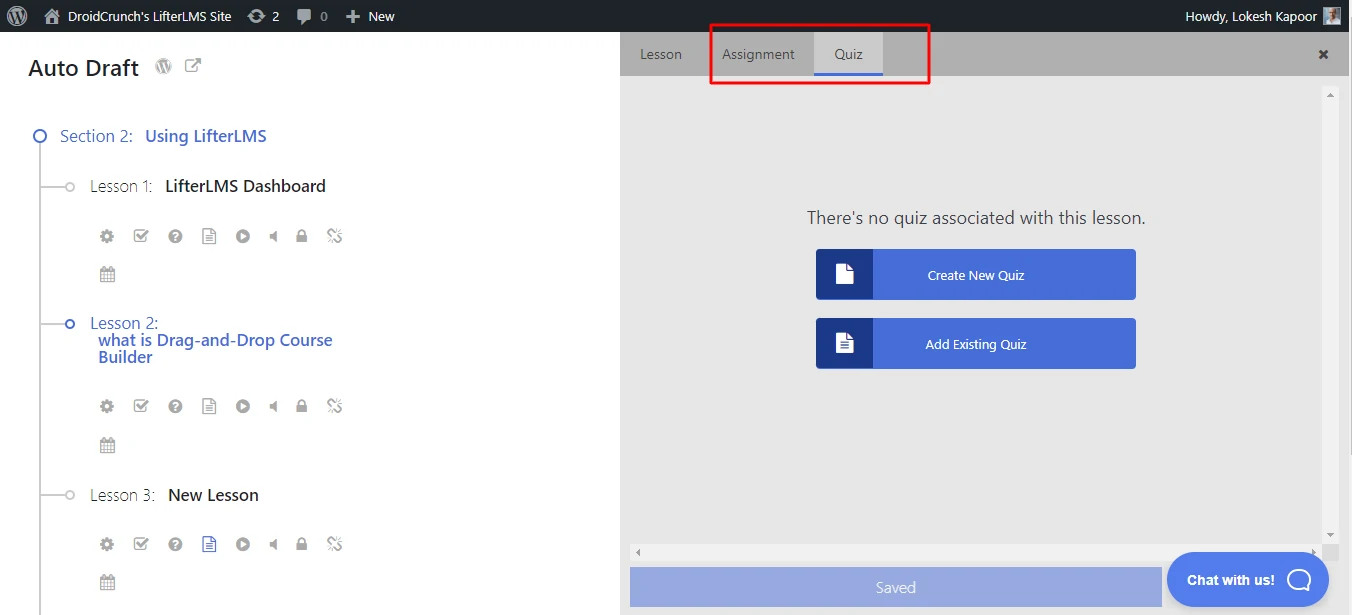
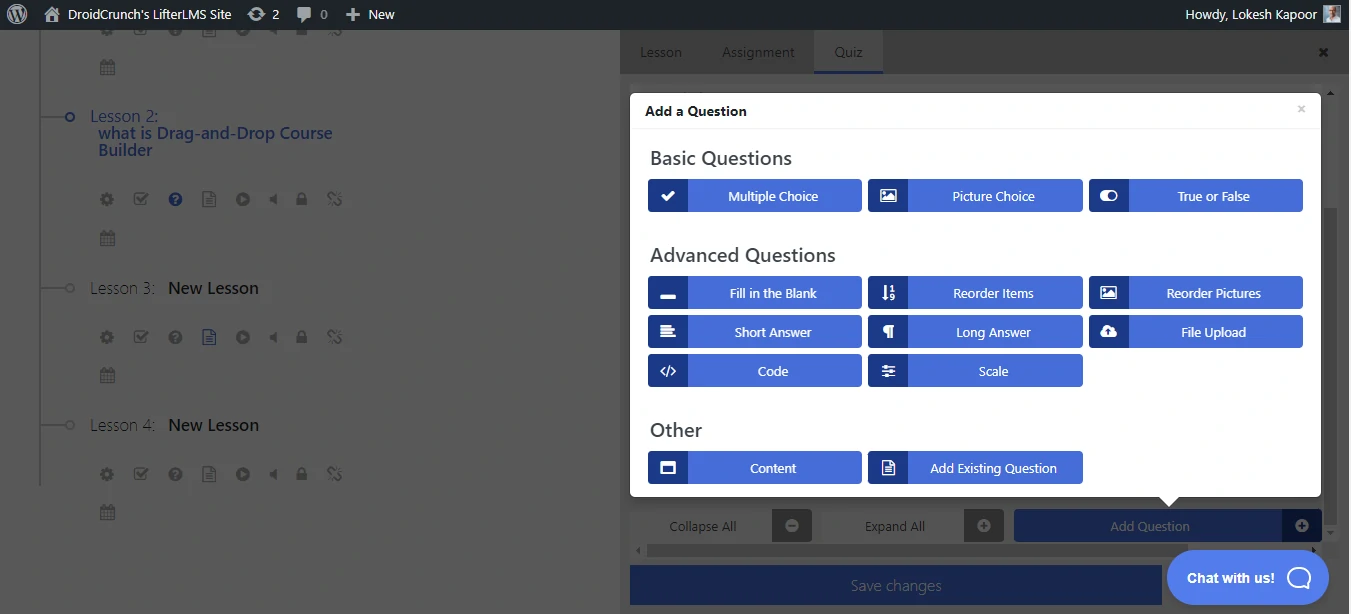
You can configure passing grades, time limits, attempt limits, and more, then add questions of various types. Basic question types are in the free edition; the Advanced Quizzing add-on is required for the advanced ones:
Content Drip & Prerequisites
Drip content is essential for structured programs. You can schedule lessons to unlock at set intervals—daily, weekly, or based on enrollment date—which stops students rushing ahead and keeps them on pace.
The prerequisite system lets you lock advanced lessons until students complete foundational modules and pass the required assessments.
LifterLMS Payment Options
Most people build courses to sell them. Here’s how LifterLMS handles the money side.
Payment for Course Access
You charge for course access by creating Access Plans while editing a course’s parameters. Each plan gives you three payment choices:
- Free
- One-time payment
- Recurring payment (on a custom schedule).
Access can be lifetime or time-limited, and recurring plans can include a free or reduced trial. Since one course can carry several access plans, you get plenty of pricing flexibility—monthly payments, a discounted annual rate, or a one-time purchase for lifetime access.
Selling Memberships
Beyond individual courses, LifterLMS lets you sell site memberships, which add pricing options you can use to:
- Access to course packages can be sold.
- Give members access to discounted course fees.
- Make courses available only to members.
Sell Private Coaching Upsells
The Private Areas add-on lets you sell private coaching upsells to existing students, creating a private space for specific learners where you can:
- Make specific material for them.
- Hold private conversations.
- Provide feedback tailored to the user. etc
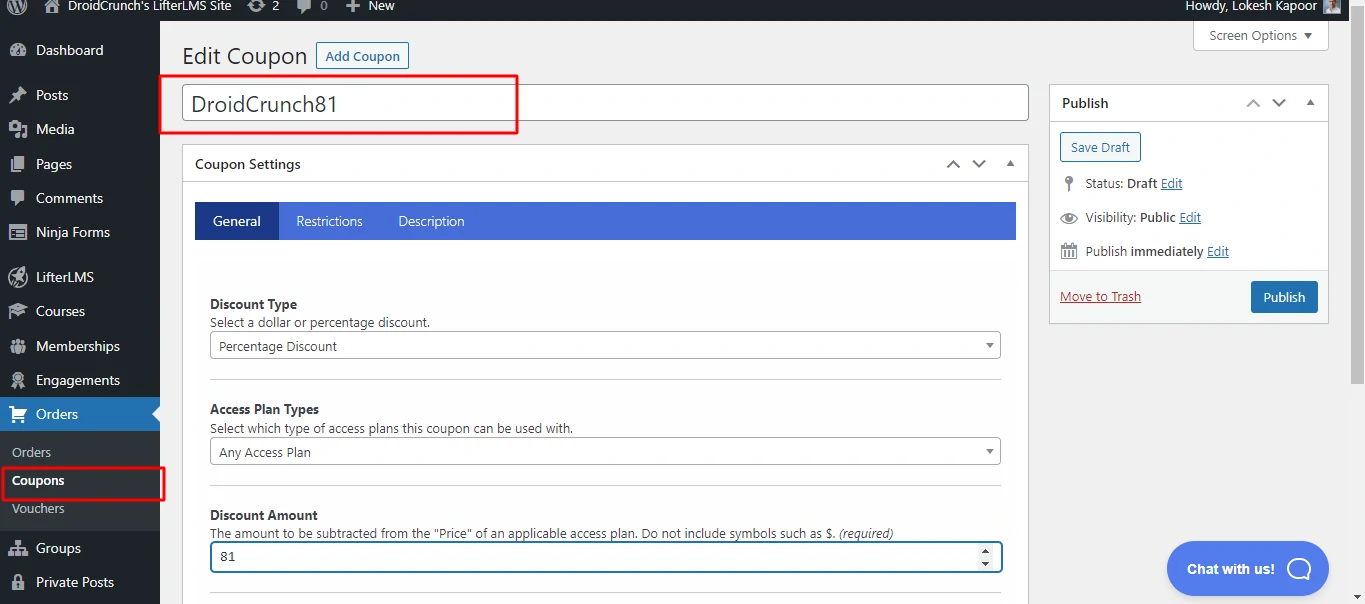
Offering Coupons
LifterLMS has built-in coupons and vouchers for promotions. A coupon can be a percentage or flat-rate discount, and you can restrict its use by conditions such as:
- Specific courses or subscriptions are available.
- Plans for one-time versus regular access.
- Date of expiration.
- There is a use restriction.
Gamification Elements
Badges, certificates, and achievement points make courses more engaging. Students get custom certificates on completion to share on LinkedIn, and badges reward milestones like finishing a hard module or keeping high quiz scores.
Detailed Analytics & Reporting
The reporting dashboard tracks the numbers that matter:
- 📈 Student enrollment and completion rates
- 📉 Quiz performance and average scores
- 💵 Revenue reports and sales trends
- 👥 Individual student progress
- ⏱️ Time spent on lessons
These reports make it easy to spot which lessons students struggle with, so you can improve the content or add support where it’s needed.
Student Management
Student management runs from a single dashboard, where you can:
- Manually enroll or unenroll students
- Reset student progress
- Award or revoke certificates
- Send bulk emails to specific cohorts
- Grant special access or extensions
Customization & Branding
Since LifterLMS is a WordPress plugin, customization is close to unlimited. Page builders like Elementor plus custom CSS let you match course pages to your brand, and the templating system covers:
- Course catalogs
- Checkout pages
- Student dashboards
- Certificate designs
- Email notifications
Integrations
LifterLMS plays well with the broader WordPress ecosystem. Common integrations include:
- Email marketing tools (Mailchimp, ConvertKit) for automated student communications
- WooCommerce for advanced e-commerce functionality
- BuddyPress to add social learning features
- Zapier to connect with hundreds of other apps
- AffiliateWP to launch an affiliate program
Access Control & Security
Built-in security features help protect content from unauthorized sharing. You can set up:
- Login requirement for all course content
- Prevention of concurrent logins
- Time-limited access for specific courses
- Automatic account deactivation for subscription lapses
LifterLMS Pricing
Here’s how LifterLMS pricing breaks down for 2026 (check the official site for the latest, since plans change):

Free Core Plugin
The free core plugin in the WordPress repository covers basic course creation, quizzes, and student management—genuinely useful for testing the waters. Advanced features need one of the paid bundles.
Earth Bundle – $149.50/year
This is their most popular paid package. For $149.50 a year (about $12.50 per month), you get:
- ✅ All premium add-ons (20+ extensions)
- ✅ Advanced quizzes with question banks
- ✅ Assignments and instructor grading
- ✅ Advanced video integration
- ✅ Social learning features
- ✅ Private coaching areas
- ✅ Priority support
- ✅ 1 site license
Best for: Solo entrepreneurs, coaches, and small course creators who need full functionality without breaking the bank.
Universe Bundle – $249.50/year
For agencies and multi-site operators, the Universe Bundle at $249.50 per year adds:
- ✅ Everything in Earth Bundle
- ✅ Unlimited site licenses
- ✅ Advanced reporting dashboard
- ✅ Priority support with faster response times
- ✅ White-label options
Best for: Web design agencies, course developers managing multiple client sites, or businesses running courses across several domains.
Infinity Bundle – $749.50/year
To eliminate recurring costs entirely, the Infinity Bundle offers:
- ✅ Lifetime access to all current and future add-ons
- ✅ Unlimited site licenses
- ✅ Lifetime priority support
- ✅ Lifetime updates
- ✅ One-time payment, no renewals
Best for: Established course businesses planning long-term operations or those who prefer one-time investments over subscriptions.
Pricing Comparison Table
| Plan | Price | Sites | Add-ons | Support | Best For |
|---|---|---|---|---|---|
| Free | $0 | Unlimited | Core only | Community | Testing/Basic courses |
| Earth Bundle | $149.50/year | 1 | All 20+ add-ons | Priority | Solo creators |
| Universe Bundle | $249.50/year | Unlimited | All add-ons | Priority+ | Agencies/Multiple sites |
| Infinity Bundle | $749.50/year | Unlimited | All forever | Lifetime | Long-term businesses |
Which Bundle to Pick
For most creators starting out, the Earth Bundle at $149.50/year is the sensible pick—it unlocks all 20+ add-ons on a single site, which is everything a solo course business needs. Step up to the Universe Bundle only if you run courses across multiple sites.
Agencies running courses across many client sites get the most from the Infinity Bundle: $749.50 spread across projects is cheap per site.
LifterLMS Pros & Cons
Here’s an honest look at where LifterLMS is strong and where it isn’t:
✅ Pros
Complete Ownership & Control 🎯
You own your content, student data, and revenue—no platform can shut down or change terms on you.
No Per-Student or Per-Course Limits 📈
Scale to any number of courses or students with fixed costs and no enrollment tiers.
One-Time/Annual Pricing 💵
Annual (or lifetime) pricing beats $50–200/month hosted platforms over the long term.
Comprehensive Feature Set 🛠️
Quizzes, certificates, gamification, memberships, payments, and analytics are all included.
WordPress Flexibility 🔧
Themes, page builders, and custom code let your course site look exactly how you want.
Strong Integration Ecosystem 🔗
Plays nicely with popular WordPress plugins and external tools to round out your stack.
Built-in Affiliate System 💰
Run your own affiliate program to grow through student referrals and partnerships.
❌ Cons
WordPress Required 🖥️
You handle hosting, updates, security, and the occasional plugin conflict—harder for non-technical users.
Initial Setup Learning Curve 📖
Configuring everything takes time and some technical comfort; hosted platforms are more plug-and-play.
Core Features Behind Paywall 💳
The free version is limited—assignments, advanced quizzes, and private coaching need a paid bundle.
Design Depends on Your Theme 🎨
Out of the box it’s less polished than hosted rivals; expect a good theme and some custom CSS.
No Built-in Marketing Tools 📧
Unlike all-in-one platforms like Kajabi, you’ll bring your own email, funnel, and automation tools.
Mobile App Not Included 📱
Courses are mobile-responsive, but there’s no dedicated branded app like some competitors offer.
Support Response Times Vary ⏰
Priority support is solid, but at busy times replies can take 24–48 hours.
Performance Depends on Hosting ⚡
Being self-hosted, your speed and uptime are only as good as your host.
LifterLMS Alternatives
LifterLMS isn’t the only player in the course space. Here are six solid alternatives worth considering. If you’d rather skip hosting entirely, hosted platforms like Podia and Graphy are also worth a look. Prices below were accurate at the time of writing—check each vendor for current rates.
1. LearnDash
LearnDash is LifterLMS’s primary WordPress-LMS competitor. At $199/year for a single site, it offers similar drip content, quizzes, and certificates with a slightly more polished interface, but it’s pricier and keeps more capabilities behind paid add-ons.
2. Teachable

Teachable is a fully hosted solution starting at $59/month, with no WordPress or technical setup—hosting, security, and updates are handled for you. Templates look good and payments are clean, but monthly fees add up, you don’t own the platform, and customization is limited next to WordPress.
3. Thinkific
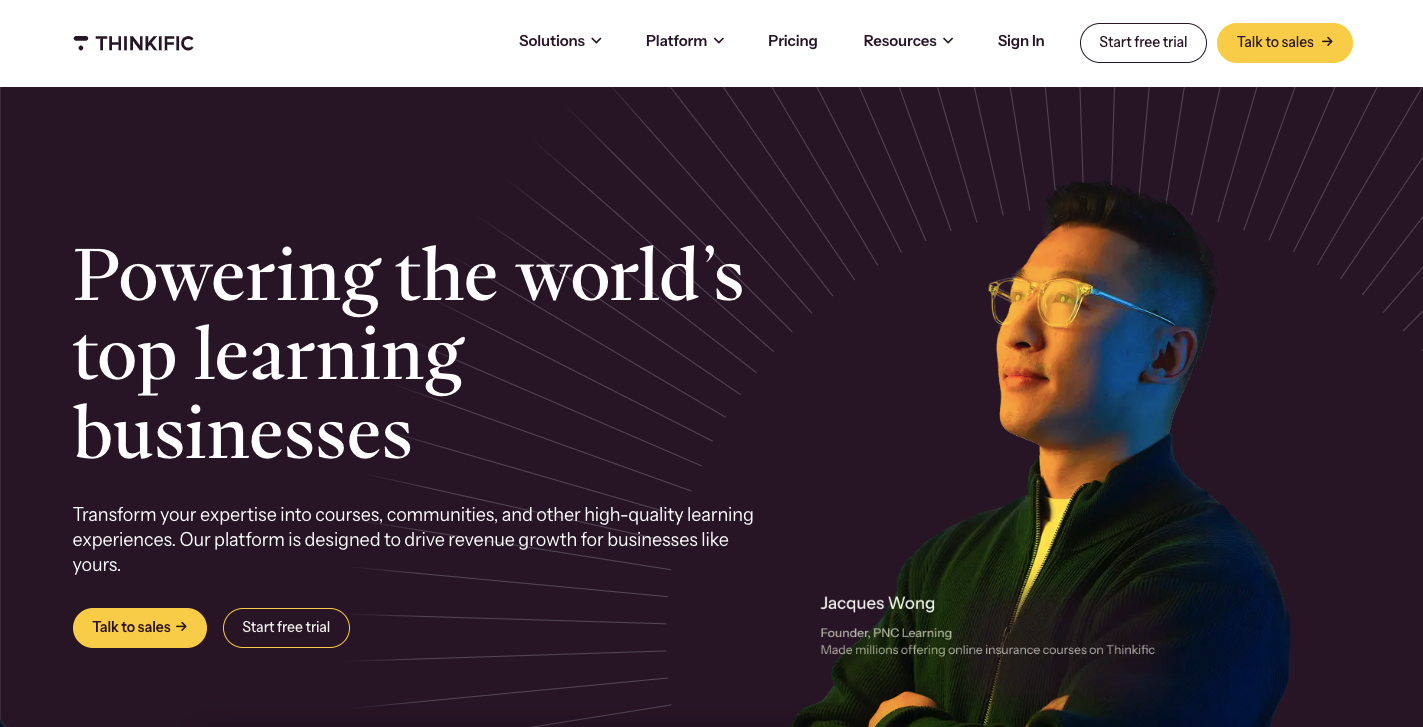
Similar to Teachable, Thinkific is a hosted platform with a free plan (transaction fees apply) and paid plans from $29/month. It’s user-friendly with a clean student experience, but like any hosted tool you’re locked into its ecosystem with limited branding and customization.
4. Kajabi
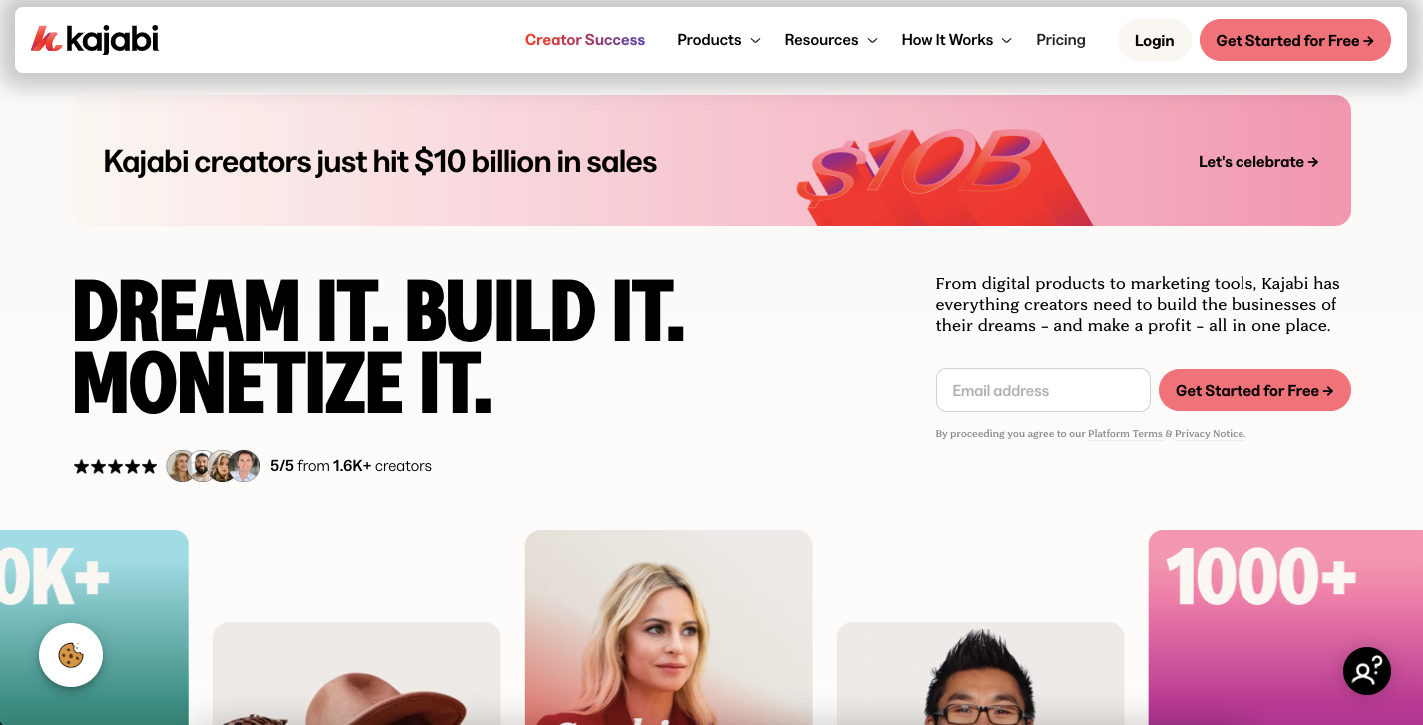
Kajabi is the premium option here, starting at $89/month. It’s an all-in-one platform covering course hosting plus website building, email marketing, and sales funnels—great if you want everything under one roof, but steep for beginners and redundant if you already run separate email and website tools.
5. TutorLMS

TutorLMS is another WordPress-based alternative with a generous free version and premium plans from $99.50/year, sitting between LifterLMS and LearnDash on price. It has a modern interface, a front-end course builder, and video-conferencing integration; being newer means a smaller community but some fresh approaches.
6. MemberPress
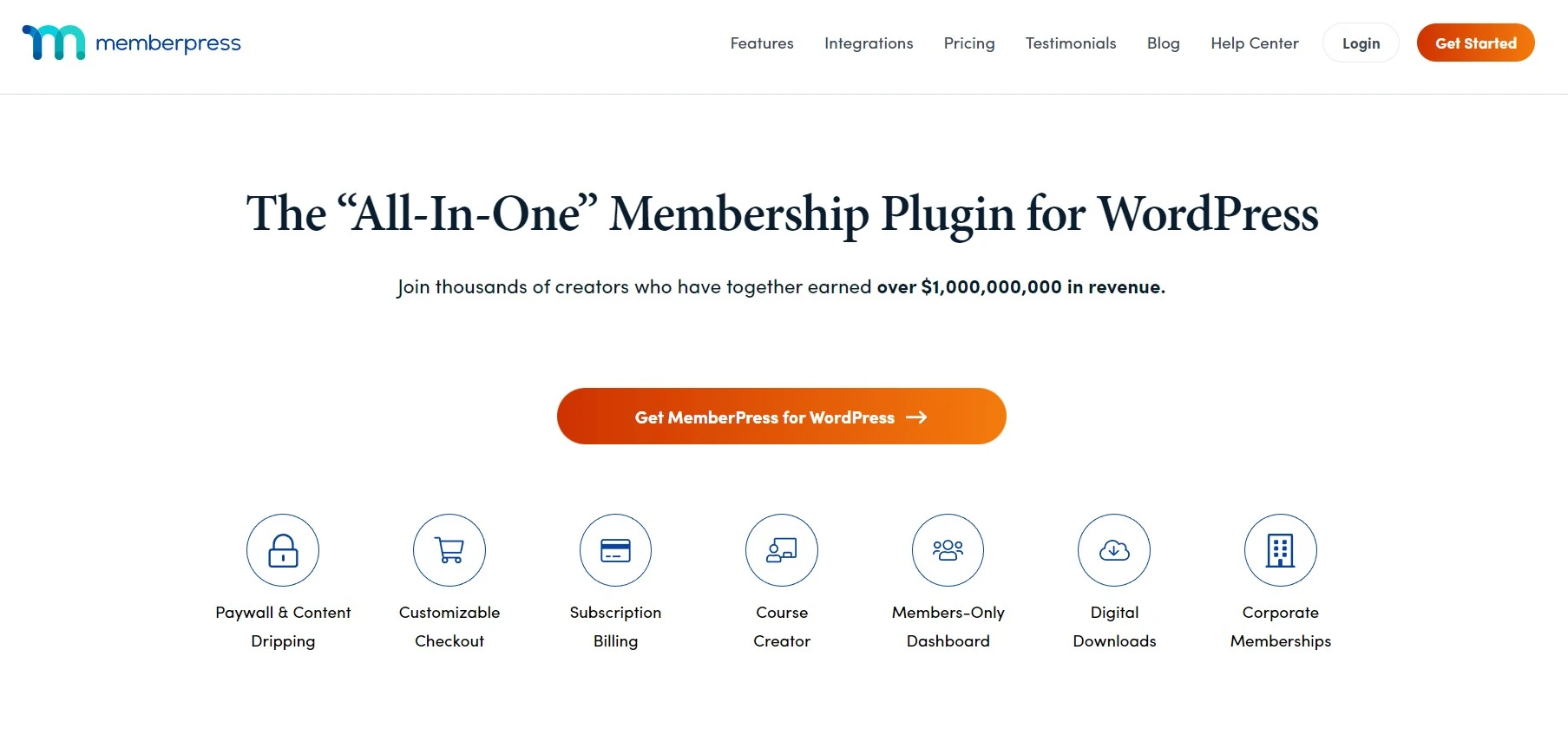
Primarily a membership plugin, MemberPress adds course functionality through its Courses add-on. From $199.50/year, it’s ideal for combining membership features with course delivery, though it lacks the quiz and assessment depth of a dedicated LMS.
FAQs
Is LifterLMS completely free?
The core LifterLMS plugin is free and available in the WordPress repository. However, it includes only basic features. To access advanced functionality like assignments, advanced quizzes, private coaching, and integrations, you need to purchase one of their paid bundles starting at $149.50/year.
Can I sell courses with LifterLMS?
Absolutely! LifterLMS includes built-in e-commerce functionality supporting one-time payments, recurring subscriptions, payment plans, and free trials. It integrates with Stripe and PayPal for payment processing, allowing you to sell courses directly from your WordPress site without additional plugins.
Does LifterLMS work with any WordPress theme?
Yes, LifterLMS is designed to work with any properly coded WordPress theme. However, some themes are specifically optimized for LifterLMS and provide better out-of-the-box styling. You can customize the appearance using your theme’s settings, page builders like Elementor, or custom CSS.
How many courses can I create with LifterLMS?
There are no limits on the number of courses, lessons, or students you can have with LifterLMS. Whether you have 5 courses or 500, 100 students or 100,000, the pricing remains the same. This unlimited scalability is one of LifterLMS’s biggest advantages.
Does LifterLMS provide certificates?
Yes, certificate functionality is included. You can design custom certificates that students receive upon course completion. Certificates can include merge tags for student names, completion dates, course titles, and instructor signatures. Students can download and share their certificates.
What payment gateways does LifterLMS support?
The Universe Bundle includes integrations with Stripe and PayPal, the two most popular payment processors. Additional integrations are available for Authorize.net and other gateways through extensions. You can also use WooCommerce for even more payment options.
Can I migrate from another LMS to LifterLMS?
While there’s no automated migration tool, it’s possible to move your content to LifterLMS. You’ll need to manually recreate courses or use export/import methods depending on your current platform. The LifterLMS support team can provide guidance for major migrations. Many users successfully transition from platforms like Teachable, LearnDash, or custom solutions.
Conclusion
How we evaluated: this review draws on hands-on time in the free LifterLMS plugin and course builder, the vendor’s public documentation and pricing, and how the feature set compares with alternatives like LearnDash, Teachable, and Thinkific. We did not run a large paid course or a months-long cohort on it, and we did not load-test it at scale, so treat the performance and support-speed notes as directional rather than benchmarked.
Buy it if you already run WordPress (or are happy to) and want to own your platform outright: unlimited courses and students, no per-enrollment fees, and full control over content, data, and design. Solo creators and coaches are best served by the Earth Bundle; agencies and multi-site operators by the Universe or Infinity bundles.
Skip it if you want to launch this week without touching hosting, themes, or updates. A hosted platform like Teachable gets you live faster, and Kajabi makes sense if you also need email and funnels in one place—you’ll just pay monthly and give up ownership.
One warning: the free core plugin is deliberately limited, and how polished your course pages look depends on your theme and hosting. Budget for a paid bundle, decent hosting, and a setup weekend before your first course goes live.
Next step: install the free core plugin and build one test course. If it clicks, start the paid trial to unlock the add-ons you actually need.
The Review
LifterLMS
LifterLMS is a great learning management software that allows you to build and sell courses right from your WordPress website. It supports various builders, themes and plugins. Its interactive course builder allows you to create course modules faster. Management of courses and lessons is way superior to any other LMS plugin available in the market. It gives you satisfaction and value for money spent on the plugin.
PROS
- Full ownership with no revenue share
- Deeply customizable on your own WordPress site
- Strong course builder and drip content
- Membership and engagement tools included
- Large add-on ecosystem
CONS
- You own the hosting, maintenance and security burden
- Add-ons and the bundle get expensive fast
- Real setup learning curve
- Performance depends entirely on your host




