

Your best leads go cold in the gap between clicking a button and getting a human on the line. 11sight tries to close that gap with a one-click video or audio call — no downloads, no meeting IDs, no scheduling ping-pong.
Whether that is worth paying for depends entirely on whether your visitors will actually press the button. Here is what 11sight does well, where it falls short, and who should skip it.
Quick verdict
11sight does one job properly: turning a website visitor, an email signature or a QR code into a live video or voice call with a real person in seconds. If your revenue depends on catching people at the moment of interest — high-ticket B2B, dealerships, real estate, insurance, premium support — that speed is worth paying for. If your buyers are happy to book a slot for next Tuesday, a calendar link and Zoom do the same job for less.
- Best for: B2B sales teams, dealerships and service businesses that lose deals to slow follow-up.
- Not ideal for: internal meetings, webinars or large group calls. Zoom, Teams and Whereby all beat it there.
How we evaluated 11sight
This review is based on hands-on time in the 11sight dashboard — setting up an account, configuring call buttons, opening vMeet rooms and joining a call as an outside visitor — plus vendor documentation and public user feedback. The screenshots are from that account. We did not run a long-term deployment across a live sales team, so we cannot speak to enterprise support quality or call performance under heavy load.
What 11sight actually does
Strip away the marketing language and 11sight is a click-to-call layer for sales and support. You get a personal call link and an embeddable button. Drop it on a pricing page, an email signature, a social bio or a printed QR code, and anyone who taps it lands in a browser video or audio call with whoever is on duty. Around that sit the parts that make calls countable: routing, logging, recording, screen sharing, mobile apps and persistent vMeet rooms. Think live-chat widget that opens into a face, not conferencing suite.
11sight features that matter
The published feature list is long, but almost all of it clusters into four areas. These are the ones worth weighing up when you decide:
One-click calling and call handling
- Embeddable call buttons for a whole site, a landing page or one specific post
- One personal link for email signatures, social bios and QR codes
- Browser calls with no download and no sign-up for the person calling you
- Audio-only mode as a fallback when the connection is poor
- Routing, forwarding and transfer between agents, with caller ID and tagging
- Recording with playback, screen sharing and on-screen pointing
- Android and iOS apps for answering away from the desk
vMeet rooms, reporting and integrations
- Persistent virtual rooms that guests join by typing a name, no account needed
- Real-time chat, presentation streaming and per-room access controls
- Call volume, duration and button analytics on the main dashboard
- Connections into common CRM and marketing tools, plus a WordPress plugin
How to use 11sight
Getting started is quick. A trial account gives you 30 days, and once your profile is set up the dashboard shows recent calls and button analytics in one view.
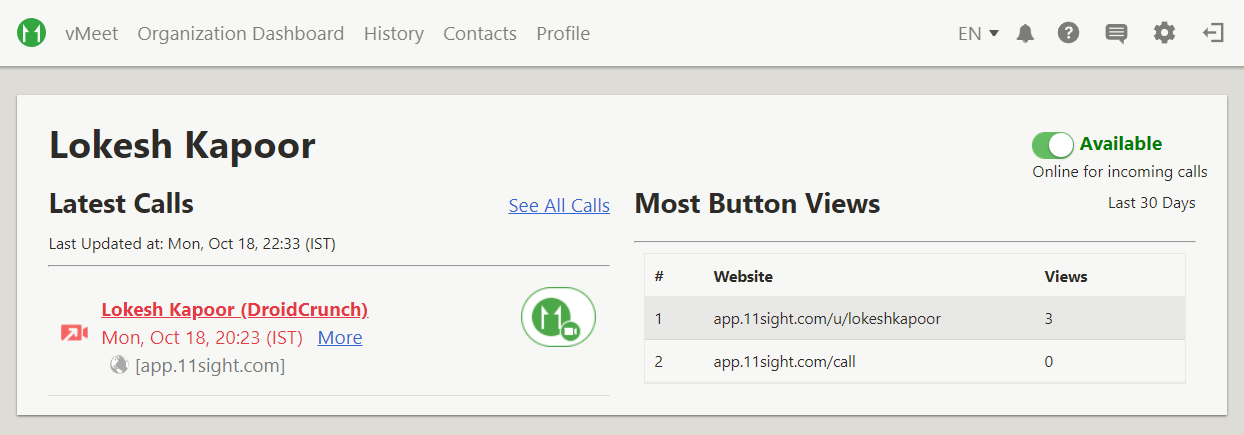
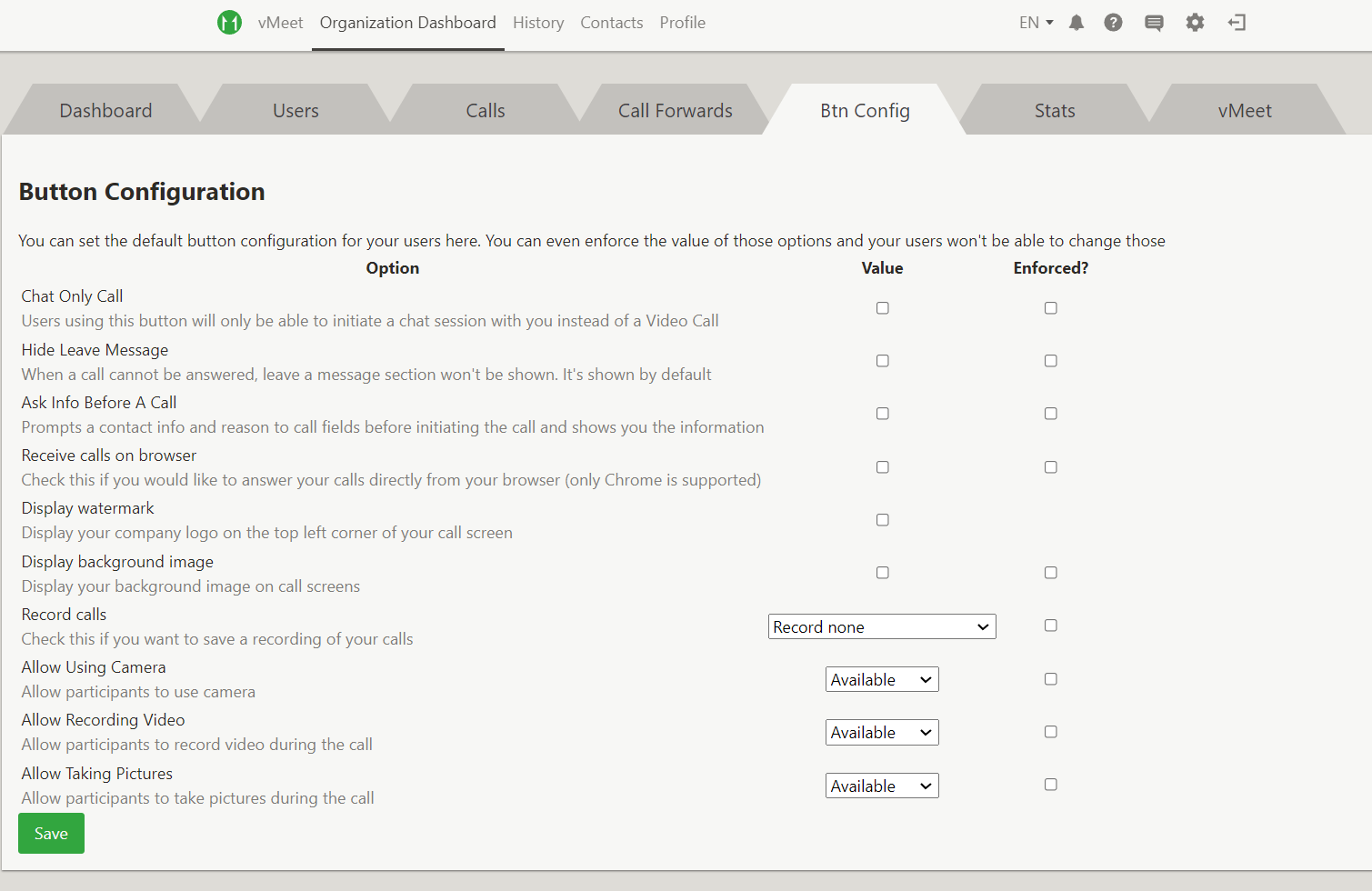
The Organization Dashboard rolls it all up: statistics, users, calls, forwards, button configuration and vMeet rooms.
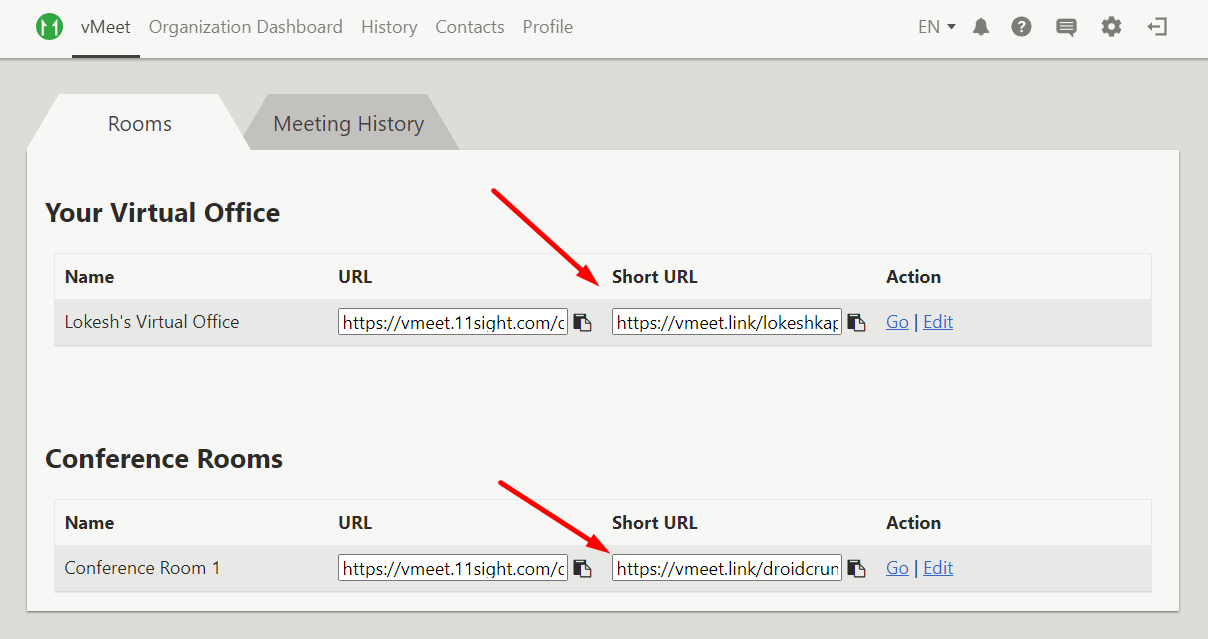
vMeet creates persistent rooms, each with a link you can share on your site, in a bio or in an email footer.
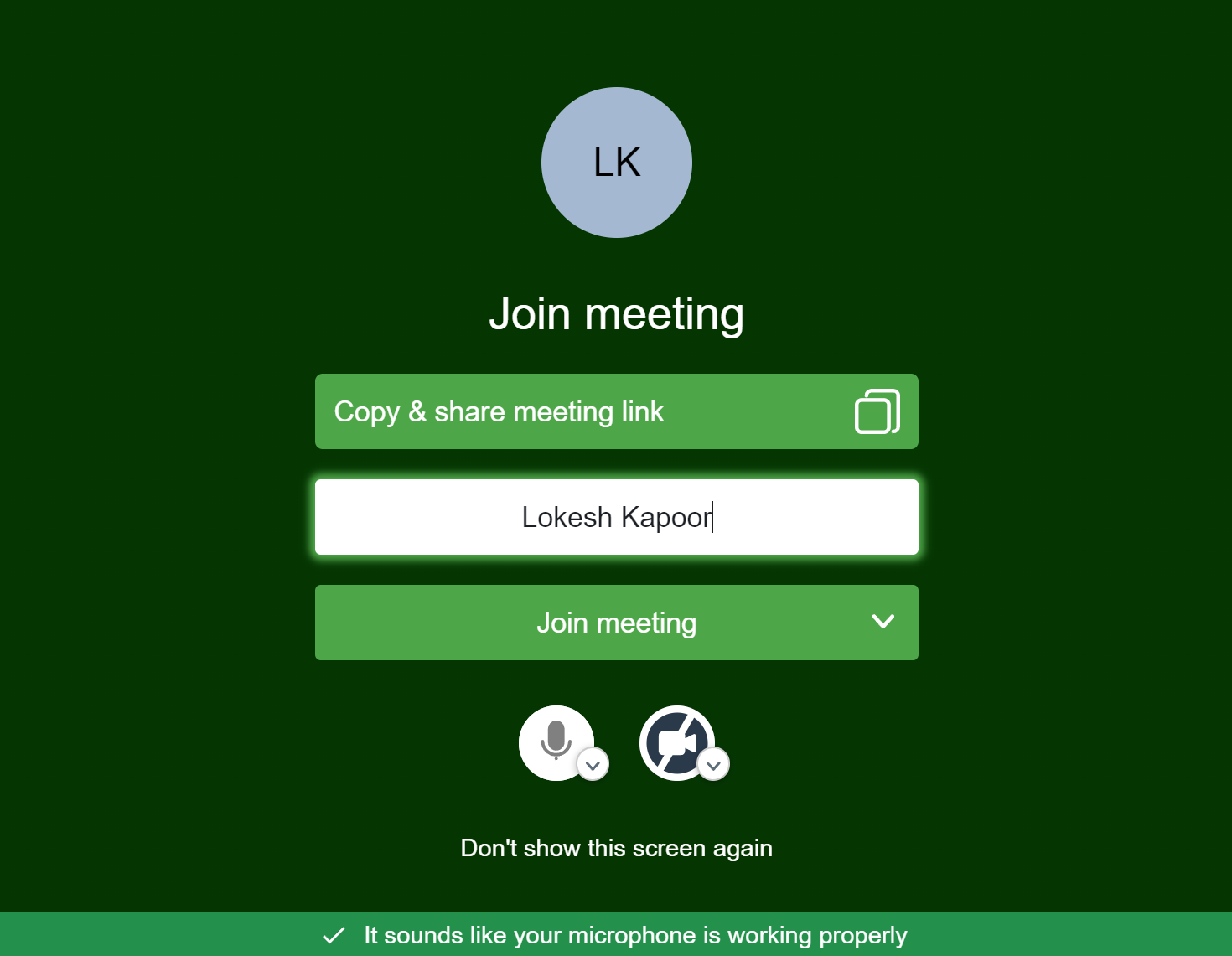
Visitors join without an 11sight profile. They type a name and they are in, which removes the biggest drop-off point in most call flows.
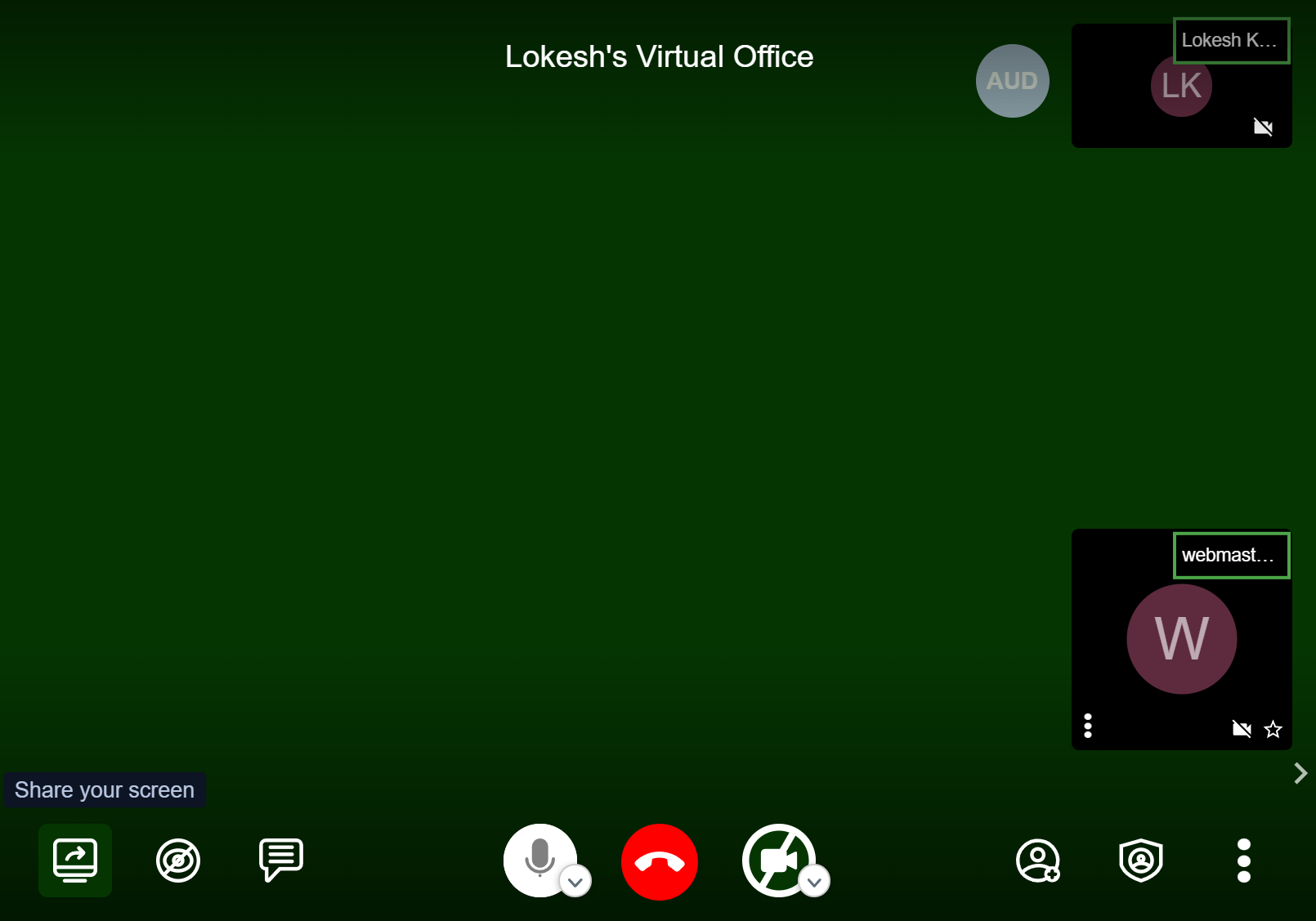
Live calls cover screen share, video sharing, user controls, security settings and chat. Audio-only mode is the useful one: on poor mobile data, dropping video keeps the conversation alive instead of ending it.
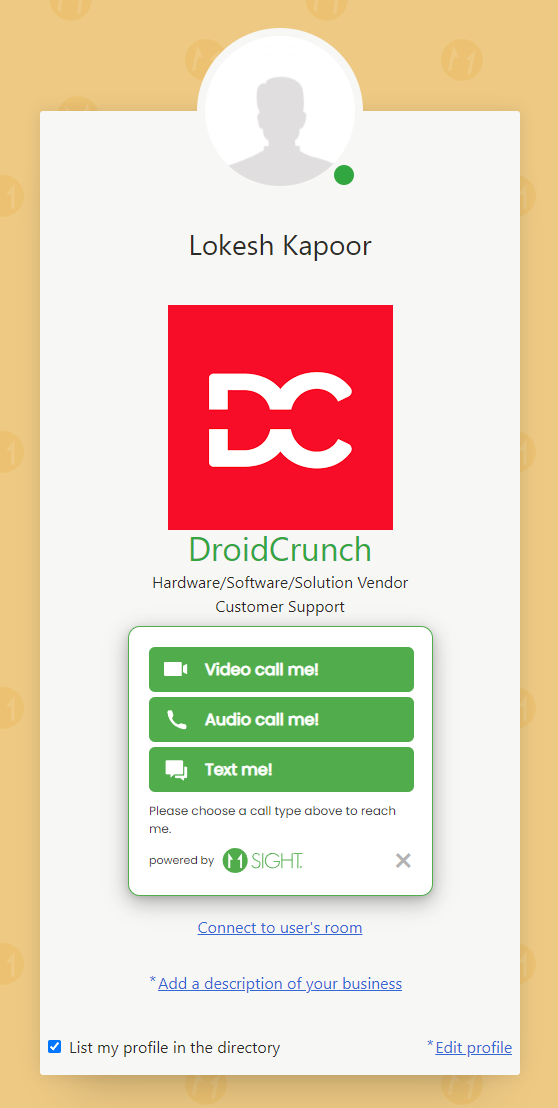
One link handles voice, video or text, so prospects never have to pick a channel before reaching you.
Installing the 11sight WordPress plugin
Install the plugin from Plugins > Add New, or upload the zip to /wp-content/plugins/ and activate it. Then open Settings > 11Sight, enter your credentials and pull in your buttons. From there you can switch a button on site-wide or paste the inline shortcode into a specific page or post.
11sight pricing: what you should expect to pay
11sight bills per seat rather than per company, and that shapes the maths more than any feature does. When we last checked, the remote engagement package started at roughly $50 per month for the first user with about $10 per month for each extra user, with meeting rooms and recording as separate add-ons. A free trial lets you test the call flow on your own site first.
Treat those numbers as a ballpark and check the official pricing page before budgeting, since tiers on tools this size get repackaged often. The point survives any repricing: a five-person rota costs roughly five times a solo setup, so 11sight is good value when calls close deals and quietly expensive when they do not.
What 11sight does well
These are the things that genuinely earn their keep:
- Zero friction for the caller. No app, no account, no meeting ID. They tap once and they are on a call with you. That one detail is the entire product, and it works.
- Setup takes minutes. Generate a button, paste the snippet or install the WordPress plugin, and you can be taking calls the same afternoon.
- It works wherever your audience already is. The same link drops into an email footer, a chat message or a QR code on a poster.
- Calls turn into data. Logging, recording and button analytics show which page actually produces conversations instead of leaving you guessing.
- Screen sharing and on-screen pointing make it usable for live product walkthroughs, not just talking heads.
Where 11sight falls short
These are the objections worth taking seriously before you put a card down:
- It only pays off if the other side plays along. The model assumes your visitor wants to talk to a human right now, and plenty of buyers actively avoid that. If your audience prefers to read and decide later, the button sits unused while the subscription renews.
- Per-agent pricing punishes coverage. Every person on the rota adds monthly cost, so teams that want someone always available pay for seats that are idle most of the day.
- The use case is narrow. This is a sales and support call layer, not a conferencing platform. It will not replace Zoom or Teams for internal meetings, webinars or large group calls.
- Beyond video, it is thin. The engagement features wrapped around the calls are functional rather than deep. If you want chatbots, sequences and rich CRM automation, this bolts onto that stack rather than being it.
- An unanswered call button is worse than no button. The tool creates an expectation of immediacy that a small team can struggle to honour. You need a staffing plan before you need the software.
- Polish lags newer rivals. The web app feels utilitarian, reviewers commonly report awkwardness with the tabs at the top of the app in Chrome, and button styling is limited. Call quality also depends on the weakest connection, so lag or blur happens in front of your prospect.
11sight alternatives worth comparing
Most tools sold as 11sight alternatives are not competitors at all — remote IT support software solves a different problem. These are the ones you would realistically weigh against it.
| Tool | Strongest at | Does the caller need an account? | Pricing model |
|---|---|---|---|
| 11sight | Instant one-click calls from a button, link or QR code | No | Per agent, per month |
| Whereby | Branded browser meeting rooms with a fixed link | No | Per host or per room |
| Zoom | General meetings, webinars and large calls | No, guests can join | Free tier plus per host |
| Chili Piper | Routing inbound leads to the right rep immediately | No | Per seat, enterprise-leaning |
| Calendly plus Zoom | Scheduled calls booked in advance | No | Free tier plus per seat |
Whereby — the closest like-for-like on ease of joining
Whereby is the closest like-for-like. You get a permanent branded room link, guests join in the browser with no account, and non-technical clients cope with it first time. What it does not do is instant inbound calling, so a visitor who clicks arrives in an empty room unless you were expecting them.
- Best for: consultants and agencies running scheduled client calls under their own branding.
- Not ideal for: capturing a stranger on your pricing page who wants to talk right now.
Zoom — better meetings, no click-to-call
Zoom wins on reliability, call quality and familiarity, and the free tier covers a lot of short calls. But it is built around scheduled meetings with IDs and invites, so a calendar link plus Zoom gets you booked conversations rather than immediate ones.
- Best for: teams that need one tool for internal meetings, webinars and client calls alike.
- Not ideal for: converting anonymous website traffic into live conversations.
Calendly plus Zoom — the free-ish baseline to beat
This is the honest benchmark. A scheduling link and a meeting tool cost close to nothing and handle most B2B conversations perfectly well. 11sight only justifies its price if the delay between interest and conversation is demonstrably costing you deals.
- Best for: anyone whose buyers are happy to book a slot rather than talk immediately.
- Not ideal for: impulse-driven, high-intent categories where the lead goes to whoever answers first.
Frequently Asked Questions
Is 11sight worth the money for a small sales team?
It is worth it if you can point to deals lost because nobody answered fast enough. For a small team selling something high-value, one recovered deal usually covers a year of seats. If your leads happily book a slot for next week, a scheduling link does the same job for less.
How much does 11sight cost per user?
11sight prices per agent per month, with the first seat costing more than each additional one, plus optional add-ons for meeting rooms and recording. Tiers change, so check the official pricing page. The model matters more than the number: coverage across a rota multiplies your bill.
Does 11sight offer a free plan or a free trial?
There is no meaningful permanent free tier, but there is a trial so you can test a real call button before paying. Run it on your highest-intent page rather than your homepage, and count the calls you actually receive.
Do customers need to download an app or create an account to call me?
No. Anyone who taps your call button or link joins from their browser, and guests enter a vMeet room by typing a name. Your agents need accounts and can use the Android or iOS apps, but the caller does not.
11sight vs Zoom: which one should I choose?
They solve different problems. Zoom is better for scheduled meetings, webinars and internal calls. 11sight is better at turning an anonymous visitor into a live conversation in one tap, with no invite and no meeting ID. Many teams end up running both.
Can I cancel 11sight, or am I locked into a contract?
Monthly subscriptions can normally be cancelled from your account, while annual plans are paid up front and are the ones to be careful with. Run a month first, check real call volume, and confirm current cancellation terms with 11sight before committing.
Is 11sight suitable for beginners with no technical skills?
Yes. Setup is a strength: create an account, generate a button, then paste a snippet or install the WordPress plugin. The hard part is not technical at all, it is deciding who answers the calls and when.
Verdict: should you buy 11sight?
Buy it if you sell something considered and high-value where the first business to answer usually wins — dealerships, real estate, insurance, B2B services, premium support. In those categories, getting a face on screen seconds after someone shows interest is a real edge, and the seat cost is trivial next to one recovered deal.
Think twice if you are a small agency or consultancy: the branded call link is useful, but Whereby covers most of that for less. Skip it if you mainly need meetings, or if nobody can reliably answer — an ignored call button costs more trust than no button at all.
One warning: do not roll this out across the whole team on an annual plan on day one. Per-seat pricing plus low adoption is the failure mode almost everyone hits, and you will be paying for idle seats for eleven more months.
Your next step: start the trial with one agent, put a single call button on your highest-intent page, and count the calls over 30 days. Multiply your close rate by that number. If it beats the cost of the seats you would need, buy it. If not, keep the calendar link.
The Review
11Sight
11Sight is a great solution to connect with your prospective customers in all possible ways including text, audio, and videos. It allows you to generate links for Virtual conferences and virtual offices. With a one-link solution, you can allow your visitors to easily connect with you. 11Sight is best for the Marketing teams, salespeople, and agencies that want to increase sales, customer satisfaction, and collaboration.
PROS
- One tap to a live call, no app or account for the caller
- Live in an afternoon, including the WordPress plugin
- Same link works in email, bios and QR codes
- Call logging, recording and button analytics
- Audio-only fallback keeps calls alive on weak connections
CONS
- Narrow use case: not a conferencing tool for meetings or webinars
- Per-agent pricing gets expensive as you add coverage
- Only pays off if your visitors actually want to call you
- Thin beyond video, and the interface feels dated
 Appsumo




