

Most WordPress page builders make you pick a side: pretty pages or fast pages. Pick pretty and you ship a homepage dragging a wall of CSS and JavaScript behind it. Pick fast and you’re back to hand-writing code.
Zion Builder says you shouldn’t have to choose. This Zion Builder review covers what it does genuinely well, where its small ecosystem will bite you, and who should skip it entirely. Short version first.
Zion Builder Review: The Quick Verdict
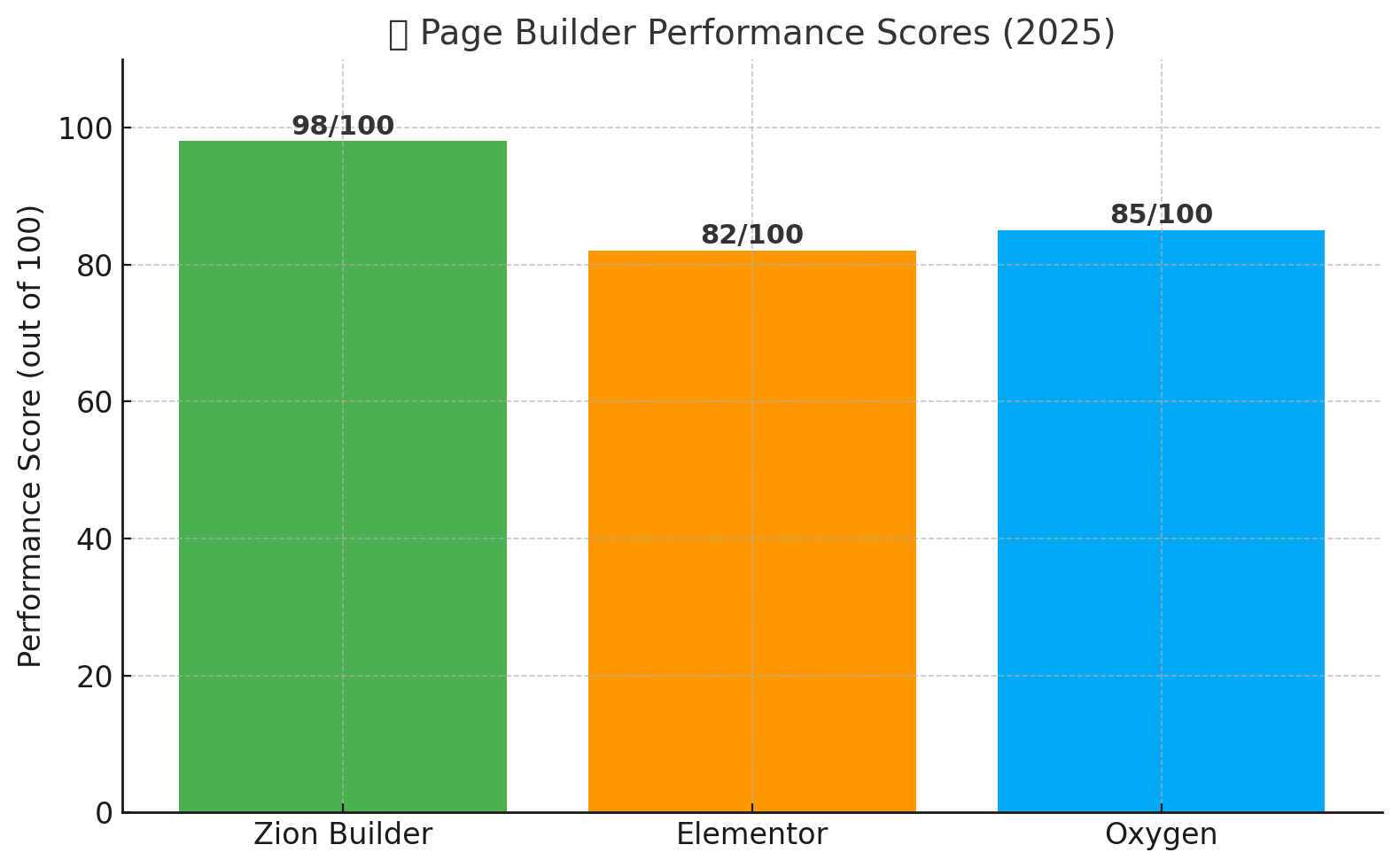
Zion Builder is a genuinely fast, well-engineered page builder that outputs cleaner markup than most of its rivals and undercuts Elementor Pro on price. The catch is everything around the plugin: far fewer third-party add-ons, far fewer tutorials, and far fewer people who have already hit the bug you’re about to hit.
- Best for: developers, freelancers and small agencies who care about page weight, work happily from written documentation, and want a full theme builder without an ongoing Elementor Pro bill.
- Not ideal for: beginners who learn from video, marketers who need a deep library of third-party widgets and CRM integrations, or anyone handing a site to a non-technical client.
How we evaluated Zion Builder
This review draws on hands-on time in the free version, the plugin’s public documentation and changelog, its WordPress.org listing, and the vendor’s own feature and pricing pages, cross-checked against what users report in support threads. We did not run a controlled speed benchmark against rival builders on identical hosting, and we did not ship a large production site on a Pro licence. Treat the performance points below as directional, not lab-verified.
Zion Builder Overview
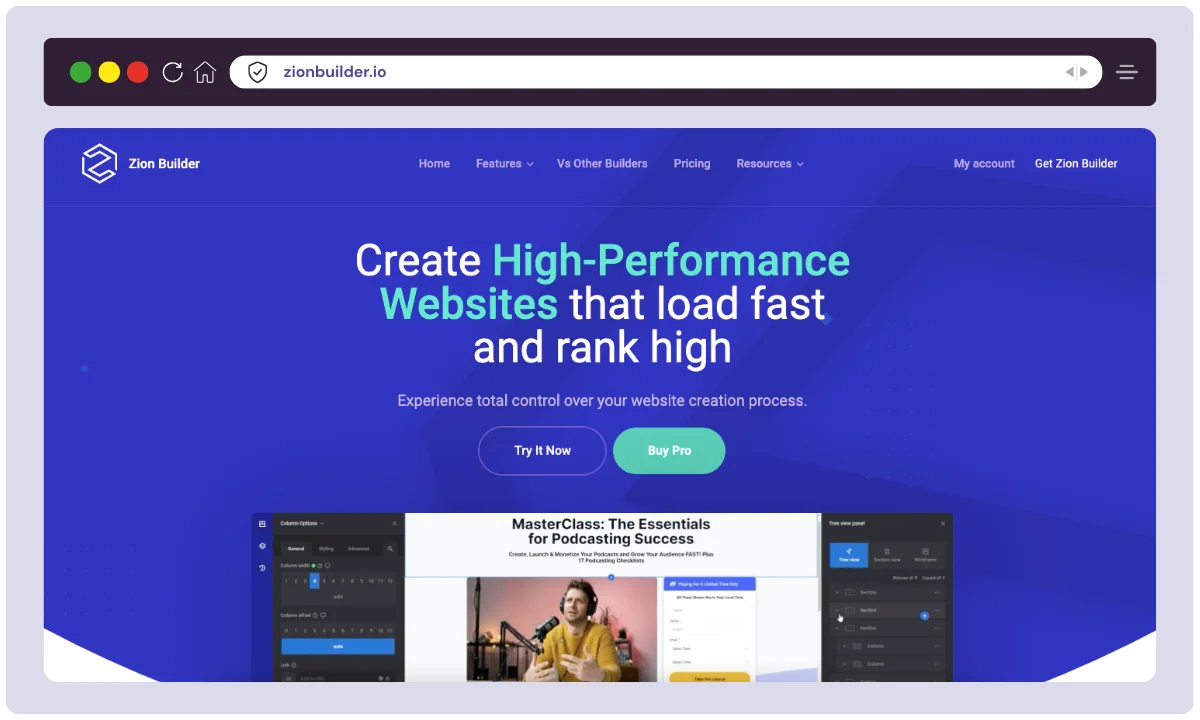
Zion Builder is a WordPress page builder from Hogash Studio, the team behind the Kallyas theme. It launched in 2020 as a lighter, more developer-friendly answer to Elementor and WPBakery.
It runs on Vue.js, which keeps the editor responsive, and is designed around a minimal DOM with modular asset loading — the combination that attracts developers tired of builders shipping half a megabyte of CSS to render a hero section.
Hogash is a small independent studio, not a venture-backed company, and that cuts both ways. Updates ship regularly and community requests genuinely land in the product. But there is no large partner network and no army of outside developers building add-ons for it.
The free plugin lives on WordPress.org, and the paid tiers add full theme building, WooCommerce template editing, dynamic content from custom fields, and advanced styling controls. The feature list is competitive. The install base is not — it is a small fraction of Elementor’s, and that single fact drives most of the drawbacks covered later in this Zion Builder review.
| Product Name | Zion Builder |
| Official Website | https://zionbuilder.io |
| Developer | Hogash Studio (also behind the Kallyas theme) |
| First Launched | 2020 |
| Category | WordPress page builder plugin |
| Built With | Vue.js editor, modular asset loading, minimal DOM output |
| Key Integrations | WooCommerce, ACF, Meta Box, Google Fonts, Adobe Fonts |
| Best For | Developers, freelancers, small agencies, performance-focused site owners |
| Not Ideal For | Video-tutorial learners; teams needing a large third-party add-on market |
| Support Options | Email and ticket support, documentation, community forum |
| Free Version | Yes — available on WordPress.org |
| Starting Price | Free; paid plans from $39/yr at the time of writing (verify current pricing) |
| Money-back Guarantee | 30 days |
| License Type | GPL |
| Main Alternatives | Elementor, Bricks, Oxygen Builder, Divi, Beaver Builder |
Zion Builder Features
Performance-First Architecture
This is the reason to consider Zion Builder at all. It loads assets modularly, so a page only pulls the CSS and JavaScript for the elements actually on it, and the markup it outputs is noticeably leaner than the nested-div soup some builders produce. Fewer wrapper elements means less CSS to fight when you write custom styles, and a lighter page for visitors on slow connections.
Live Visual Editor
You design on the live frontend and see every change instantly, rather than guessing in a backend approximation. The Vue-based editor stays responsive on long pages, which is where heavier builders start to lag.
Powerful Theme Builder
A paid feature, and the main reason to upgrade. It covers headers, footers, single-post templates, category and tag archives, 404 and search pages — enough to run a site on a bare starter theme and control everything yourself.
WooCommerce Builder
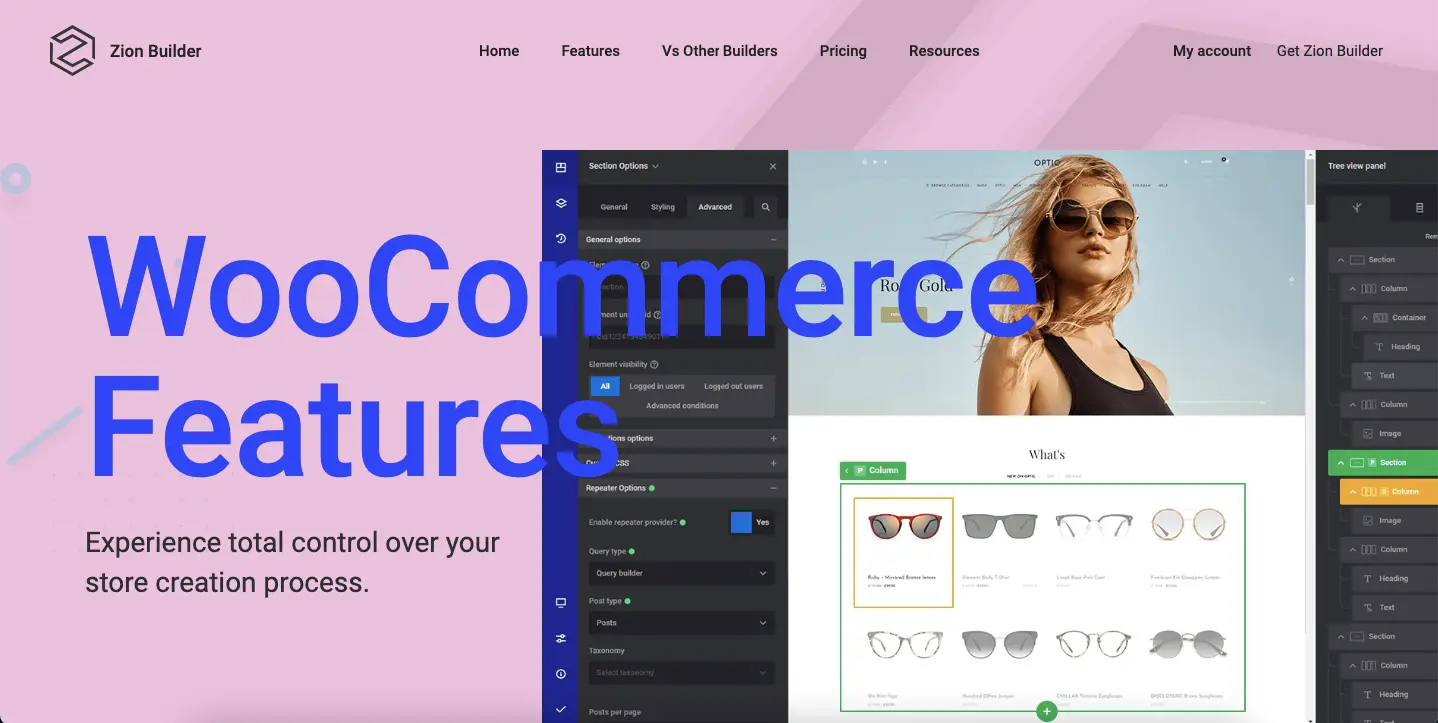
Also paid. It lets you build custom single-product and shop-archive layouts instead of accepting default WooCommerce templates. Solid for straightforward stores; check your requirements first if you rely on subscription or booking extensions.
Global Classes for Site-Wide Styling
Rather than styling every button individually, you define a class once and reuse it everywhere. Change the class, and every element using it updates across the site. This is the feature that separates a builder you can maintain from one you dread editing eighteen months later, and Zion handles it well. All element settings also sit in a single options panel instead of being scattered across nested menus.
Extensive Elements & Template Library
You get the elements you would expect — text, images, sliders, tabs, accordions, modals, forms — plus a library of pre-built sections and page layouts you can import and edit. Be realistic about scale here: the library is useful but modest next to what Elementor and Divi ship, so expect to design more from scratch.
Dynamic Data Capability
Templates pull post titles, featured images, author bios, custom fields (ACF and Meta Box) and other metadata straight from the database. Without this, a theme builder is just a page builder with extra steps.
Granular Responsive Controls
Styling, spacing, visibility and layout can each be set per breakpoint for desktop, tablet and mobile. Standard for the category, and implemented cleanly here.
User Role Manager
Administrators can decide which user roles reach the builder and what they may edit. If you hand sites to clients, this is the feature that prevents an expensive support call.
How to Install Zion Builder (Free & Pro)
Free version (via the WordPress plugin repository)
1. Log in to your WordPress dashboard at yourdomain.com/wp-admin.
2. Go to Plugins > Add New.
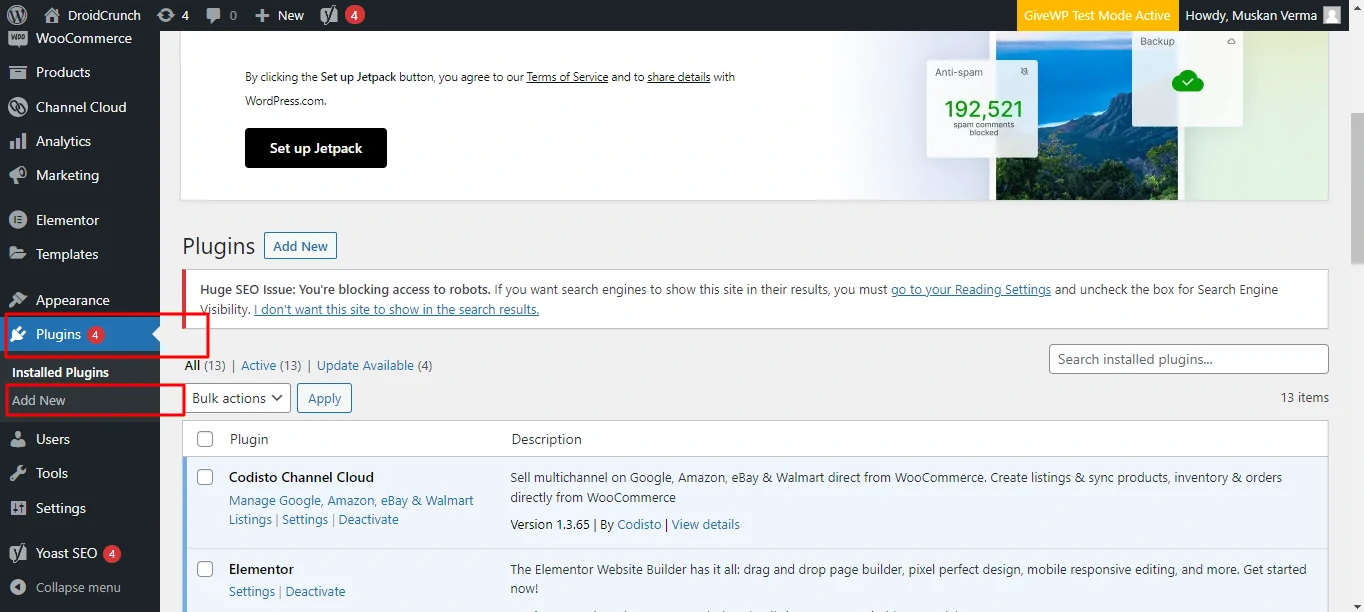
3. Search for Zion Builder, click Install Now, then Activate. Every page and post now shows an Edit with Zion Builder button.
Pro version (after purchase)
- Download the Pro
.zipfrom your account at zionbuilder.io. - Go to Plugins > Add New > Upload Plugin, choose the file, install and activate it.
- Open Zion Builder > License and paste the key from your account.
- Under Zion Builder > Settings > Builder Options, switch on the modules you need, such as Theme Builder and WooCommerce templates.
One practical note: enable only the modules you actually use. Leaving every module on partly undoes the lean-loading advantage you bought the plugin for.
Zion Builder Alternatives
Zion Builder is not the only fast builder available, and for some projects it is not the right one. Here is how it stacks up in 2026 against the five builders you are most likely weighing it against.
| Feature / Builder | Elementor | Oxygen Builder | Divi | Beaver Builder | SeedProd |
|---|---|---|---|---|---|
| Performance | Moderate (heavier DOM output) | 🚀 High (minimal code, no bloat) | Medium (more animations = heavier) | Good (lightweight, stable) | Very Fast (Landing page focused) |
| Theme Builder | ✅ Yes (Pro) | ✅ Full control (Pro) | ✅ Yes | ❌ Limited | ✅ Full-site editing |
| WooCommerce Support | ✅ Yes (Pro) | ✅ Yes | ✅ Yes | ✅ Basic support | ✅ Yes (Pro) |
| Templates & Blocks | 300+ templates | Fewer, dev-focused | 2000+ layouts | 100+ modules | 150+ landing page templates |
| Ease of Use | Very beginner-friendly | Best for developers | Friendly with learning curve | Beginner-friendly | Extremely simple |
| Price (starting) | Free / $59/yr (Pro) | $129 one-time (unlimited sites) | $89/yr (1 site) or $249 lifetime | $99/yr (1 site) | $39.50/yr (1 site) |
| License Type | GPL | GPL | GPL | GPL | GPL |
| Best For | Beginners & marketers | Developers, coders | Designers & agencies | Small business owners | Marketers & conversion-focused |
| Affiliate Program | ✅ Yes (30%) | ✅ Yes | ✅ Yes | ✅ Yes | ✅ Yes |
| Money-back Guarantee | ✅ 30 days | ✅ 60 days | ✅ 30 days | ✅ 30 days | ✅ 14 days |
Zion Builder wins on performance and output quality. It loses on ecosystem size to Elementor and Divi, and on raw developer control to Oxygen.
Pricing of Zion Builder
As of 2026, Zion Builder is priced below most of its direct competitors, with a real free tier and paid plans that unlock the Theme Builder, WooCommerce templates and dynamic content. Prices below were accurate at the time of writing — always confirm on the official pricing page before buying.
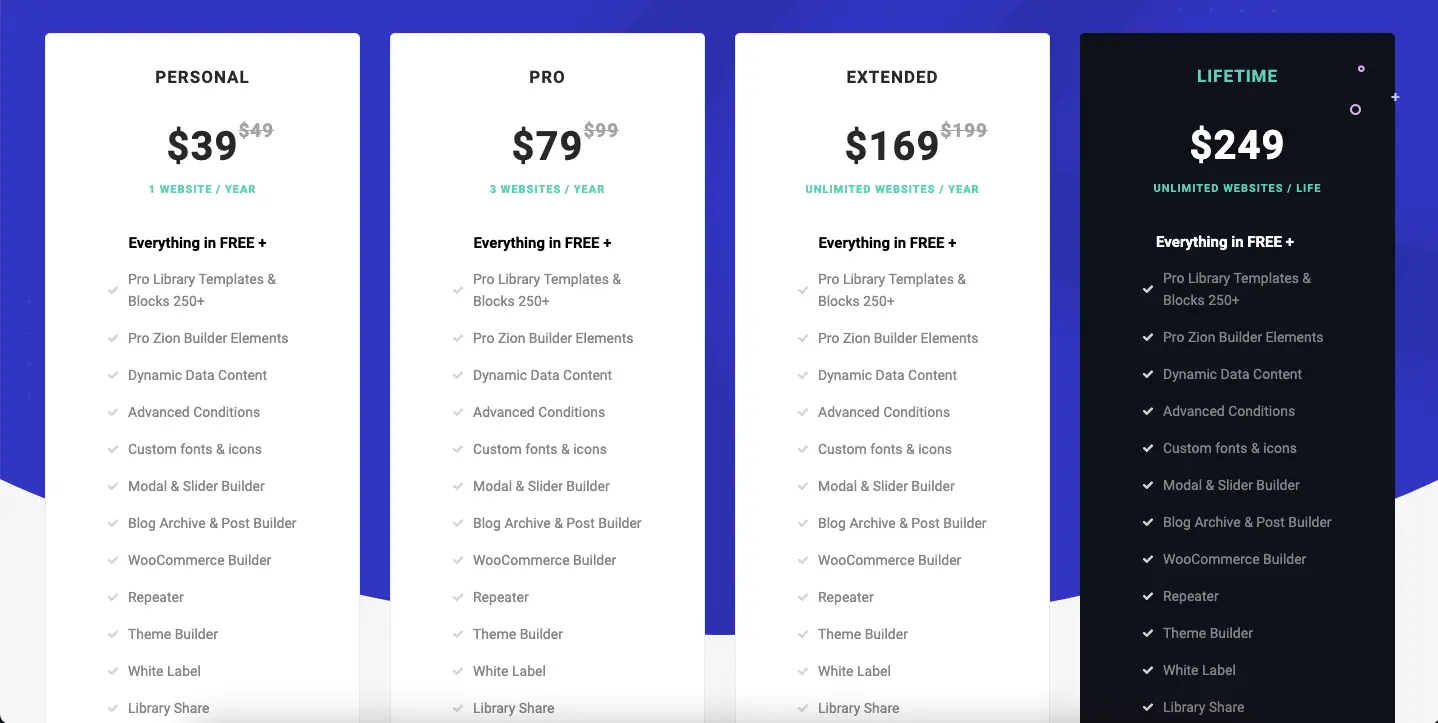
| Plan | Sites Covered | Price | Includes |
|---|---|---|---|
| Free | 1 site (core features) | $0 | Visual editor, 40+ elements, basic templates, 100+ free library blocks |
| Personal | 1 site / year | $39/yr | Pro elements & library, theme builder, WooCommerce support, modals/sliders, dynamic content |
| Pro | 3 sites / year | $79/yr | Includes Personal plan features for up to 3 sites |
| Extended | Unlimited sites / year | $169/yr | Full features across unlimited sites |
| Lifetime | Unlimited (one‑time) | $249 one-off | All Pro features, lifetime updates on unlimited sites |
Which Plan Should You Choose?
- One blog or personal site: Personal.
- Two or three client sites: Pro.
- An agency running many sites: Extended.
- Confident you will keep using it for years: Lifetime.
One caution on the Lifetime plan: a one-time payment is only good value if the company is still shipping updates in five years. That is a reasonable bet with a small, established studio, but it is still a bet.
Who Zion Builder Is Actually For
Freelancers and small agencies
The strongest fit. You can hand clients a site that scores well on PageSpeed without stripping out features, reuse saved sections across projects, and use the Role Manager to stop a client from dragging the header into the footer. The unlimited-site tiers work out cheaper than per-site licences once you pass a handful of builds.
Small business owners building their own site
Workable, with a caveat. The editor is clean enough to learn, and the WooCommerce builder lets you design product pages that do not look like every other store. But if you get stuck at 11pm, you will be reading documentation rather than watching someone walk you through it on YouTube.
Bloggers and content sites
Good fit if you want custom single-post and archive templates without a heavy theme. Dynamic data pulls titles, author details, featured images and custom fields into templates automatically, so you design the layout once and publish into it forever.
Performance-minded developers
This is the audience Zion was built for. Per-element custom CSS, ACF and Meta Box support, global classes and lean output mean you can use a visual editor without inheriting markup you would be embarrassed to hand over.
Where Zion Builder Falls Short
The trade-off with Zion Builder is not the software. It is the size of everything surrounding the software.
The third-party ecosystem is small
This is the big one. Elementor has a whole industry of add-on packs, template kits and specialist widgets built around it — if you need a pricing table with a specific behaviour or a particular booking widget, someone has almost certainly already built it. With Zion Builder, that market barely exists. When the built-in elements do not cover a requirement, your options are a general-purpose WordPress plugin, custom code, or changing the design. Budget for that.
Fewer tutorials and a quieter community
Search a problem with a mainstream builder and you get forum threads, blog posts and video walkthroughs. Search the same problem with Zion Builder and you will often land on the official documentation and little else. The docs are decent, but self-teaching from written docs is slower, and it is a genuine barrier if you learn by watching someone else do it first.
Fewer native integrations
Zion covers the essentials — WooCommerce, ACF, Meta Box, the major font libraries. What it does not have is the long tail of one-click connections to email platforms, CRMs and marketing tools that competitors list on their feature pages. Check that your specific stack is supported before you commit, not after.
Leaving is expensive
True of every page builder, but it matters more when you back a smaller player. Pages are stored in Zion’s own format, so deactivating the plugin leaves shortcode remnants rather than clean content. Migrating away means rebuilding by hand — weigh that before you build fifty pages on it.
Zion Builder vs Elementor in one paragraph
Zion wins on output quality and price. Elementor wins on ecosystem, learning resources and how easily you can hire someone to take over. If you want a fast site you control, pick Zion. If you want help to be one search away, pick Elementor.
Frequently Asked Questions
Is Zion Builder worth paying for when there is a free version?
The free version covers the visual editor and core elements, which is enough for standard pages. You are paying for the Theme Builder, WooCommerce templates and dynamic content. If you only need a few pages, stay free. If you want control over headers, footers and archives, upgrade.
How does Zion Builder compare to Elementor?
Zion Builder produces leaner code and costs less. Elementor has a far larger ecosystem of add-ons, templates and tutorials, plus more native marketing integrations. Choose Zion for output quality and price, and Elementor for support resources and third-party extensions.
What happens to my site if I stop paying for Zion Builder?
Your site stays online and your pages keep rendering. What you lose is updates, new features and support. Over time an unmaintained builder becomes a security concern, so treat a lapsed licence as a temporary state rather than a long-term plan.
Is Zion Builder good for beginners?
It is usable for beginners, but the learning resources are thin. The editor itself is clean and logical. The catch is that when you get stuck you will be reading documentation rather than following a video, which suits some people and frustrates others.
Can I switch from Elementor or Divi to Zion Builder?
Not automatically. Page builders store layouts in their own formats, so moving from Elementor or Divi means rebuilding pages in Zion Builder by hand. Plan any migration around a redesign rather than treating it as a straight swap.
Does Zion Builder actually make my website faster?
It helps, but it is not magic. Zion loads only the assets a page needs and outputs less markup than heavier builders, which reduces page weight. Hosting, image sizes and your other plugins still affect speed more than the builder alone.
Is the Zion Builder lifetime plan a safe buy?
It is reasonable value if you build several sites, with one caveat: lifetime means the lifetime of the product, not yours. Hogash is a small studio with a long track record, but a one-time payment always carries more risk than an annual renewal.
Final Verdict on Zion Builder
Buy it if you are a freelancer, developer or small agency who cares about page weight, is comfortable learning from written documentation, and wants a full theme builder without an ongoing Elementor Pro subscription. On those terms it is one of the better-value builders available.
Skip it if you learn from video, need one-click connections to a particular CRM or email platform, or expect to hand the finished site to a non-technical owner who will search the web for help.
One warning: the ecosystem gap is not something you can work around later. Before committing, write down the three most unusual things your site needs to do. If two of them would need a third-party widget, pick a bigger builder now rather than discovering the problem at page forty.
Next step: install the free version on a staging site and rebuild one existing page with it. An hour of that will tell you more than any review, and it costs nothing.
The Review
Zion Builder
Zion Builder is a fast, lightweight WordPress page builder offering a clean Vue.js-based interface, global styling, and full theme/WooCommerce editing. With modular loading and minimal code output, it ensures blazing performance and a smooth user experience—perfect for developers and creators seeking speed, flexibility, and design control.
PROS
- Genuinely lean code and minimal DOM output
- Modular asset loading keeps page weight down
- Global class system makes sites maintainable
- Full theme builder for less than most rivals
- Capable free version on WordPress.org
- Works with any WordPress theme
CONS
- Very small third-party add-on ecosystem
- Few tutorials and a quiet community
- Fewer native integrations than competitors
- Pages lock into Zion’s format, so leaving means rebuilding
Zion Builder DEALS
We collect information from many stores for best price available




