Every SEO tool you’ve ever paid for is, at some level, doing one thing: reading Google’s search results so you don’t have to refresh the page a thousand times. Rank tracking, competitor research, SERP feature monitoring — it all starts with scraping Google search results. The catch? Google is very, very good at spotting bots, and one careless scraper earns you CAPTCHAs, rate limits, and a temporary ban before lunch.
Here’s the honest version most guides skip: you can collect SERP data reliably, but only if you stop hammering Google like a script and start behaving like a search engine’s worst nightmare — a normal, boring, human-looking user. This guide walks through how Google detects scrapers and the exact, safe-by-design setup that keeps your data flowing. Let’s get into it.
⚡ Quick Answer
To scrape Google search results safely: first ask whether an official API (Google’s Custom Search JSON API or a SERP API) covers your need — it’s the zero-ban path. If you must scrape the live SERP, use residential or ISP proxies, rotate IPs, rotate user agents with consistent headers, randomize request timing (5–15s, never fixed), persist cookies/sessions, target the right geography, and scale up slowly while watching your CAPTCHA rate. Authenticity beats volume.
⚠️ Scrape responsibly. Automated scraping conflicts with Google’s robots.txt and Terms of Service. Collect only public, non-personal SERP data, respect rate limits, and understand the legal context of search-engine scraping in your region. Where possible, prefer the official Custom Search JSON API. For commercial projects, get legal advice first.
Who This Guide Is For (and What You’ll Need)
This is for SEO professionals tracking rankings, marketers running competitor and SERP-feature research, and developers building data pipelines that need Google results at scale. If you just want to check a few keywords occasionally, an incognito search or a rank-tracker subscription is simpler — this guide is for repeatable, automated collection.
What you’ll need:
- A pool of residential or ISP proxies (see our best residential proxy providers).
- A scraping stack — Python (
requests/httpx) for raw HTML, or Playwright/Selenium for JavaScript-rendered SERPs. - An HTML parser (BeautifulSoup, lxml) — and patience for Google’s frequently-changing markup.
- Logging for success, CAPTCHA, and block rates so you can adapt.
Why Businesses Scrape Google Search Results

SERP data is the raw material of modern SEO and competitive intelligence. The usual reasons teams collect it:
- Rank tracking — monitor keyword positions over time and measure whether your SEO is actually working.
- Competitor analysis — see which keywords rivals rank for, where they win snippets, and where your content gaps are.
- SERP-feature monitoring — track featured snippets, People Also Ask, and local packs that drive clicks.
- Trend & market research — spot emerging topics and shifts in search intent early.
What’s Actually on a Google SERP

Before you scrape, know what you’re extracting. A modern SERP is far more than ten blue links — it mixes organic listings, ads, featured snippets, local packs, images, shopping, video, and knowledge panels. Decide which elements you actually need; that decision shapes your whole parser.

Organic results (title, URL, description) are the bread and butter for rank tracking. Featured snippets and People Also Ask are gold for content research — they reveal the exact phrasing and questions Google rewards. Knowing these blocks exist saves you from a parser that silently misses half the page.
How Google Detects Automated Scraping

To scrape safely, understand what trips the alarm. Google weighs several signals together:
- IP reputation — datacenter and known-proxy ranges start with a poor score; spammy IPs get watched or blocked fast.
- Request frequency — humans search at irregular intervals; a burst of hundreds of queries from one source is an instant red flag.
- Browser fingerprinting — user agent, screen size, fonts, language, and capabilities; identical fingerprints across sessions scream automation.
- Session behavior — no cookies, no natural navigation, sessions that are too short or too repetitive all raise suspicion.
How to Scrape Google Search Results Safely: 8 Steps
Step 1: Consider the Official API First
The safest scrape is the one you don’t have to do. Google’s Custom Search JSON API returns results legitimately with zero ban risk, and managed SERP/scraper APIs handle proxies and CAPTCHAs for you. They cost money and have limits, but for many teams that’s cheaper than maintaining an anti-bot arms race. Scrape the raw SERP yourself only when an API genuinely can’t give you what you need.
Step 2: Use Residential or ISP Proxies
Proxies distribute your requests across many IPs so no single address looks hyperactive — and the type matters. Residential proxies use real ISP-assigned IPs and blend in best. ISP proxies pair residential-grade reputation with datacenter speed. Datacenter proxies are fast and cheap but easiest for Google to flag.
| Proxy type | Detection risk | Best for |
|---|---|---|
| Residential | Lowest | Large-scale, long-term SERP collection |
| ISP | Low | Speed + reputation balance |
| Datacenter | Highest | Small, low-risk or budget jobs |
Step 3: Rotate IPs — But Realistically
Rotating across a pool keeps any one IP from generating excessive traffic, and it gets more important as volume grows. But don’t overdo it — swapping IP on every single request, mid-session, can look as unnatural as never rotating. Balance rotation with believable session continuity. Our rotating vs static proxies guide breaks down when to use each.
Step 4: Rotate User Agents, Keep Headers Consistent
Reusing one User-Agent for thousands of requests is a clean bot signature, so rotate through realistic browser/device strings. But rotation alone isn’t enough — the rest of your headers (Accept-Language, Accept, sec-ch-ua) must stay internally consistent with that User-Agent. A Chrome-on-Windows UA sending Safari-style headers is a contradiction Google notices.
Step 5: Use Browser Automation for JS-Heavy SERPs
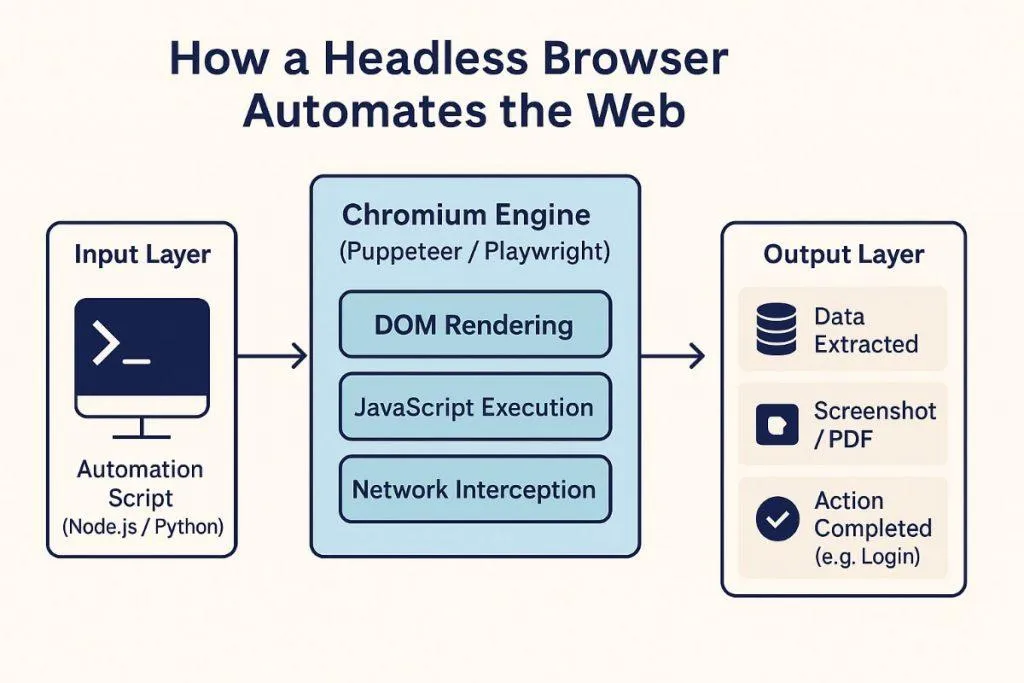
Google leans heavily on JavaScript, so raw HTML requests sometimes miss content. Tools like Playwright, Selenium, and Puppeteer render the page like a real browser. The catch: headless browsers have their own fingerprints, and Google actively hunts them. Run them with realistic settings — real window size, enabled JavaScript, persisted cookies, human-like scrolling — or use stealth plugins to avoid the obvious headless tells.
Step 6: Throttle and Randomize Request Rates
Aggressive request volume is the fastest way to get blocked — even premium proxies can’t save a scraper that fires nonstop. Add randomized delays, and scale volume gradually instead of launching at full throttle. Here’s a minimal Python pattern combining rotating proxies, rotating user agents, and randomized timing:
import requests, random, time, urllib.parse

PROXIES = [
    "http://user:[email protected]:7000",  # rotating residential
]
USER_AGENTS = [
    "Mozilla/5.0 (Windows NT 10.0; Win64; x64) Chrome/137.0 Safari/537.36",
    "Mozilla/5.0 (Macintosh; Intel Mac OS X 10_15_7) Chrome/137.0 Safari/537.36",
]

def google_serp(query, gl="us", hl="en"):
    qs = urllib.parse.urlencode({"q": query, "gl": gl, "hl": hl, "num": 10})
    url = "https://www.google.com/search?" + qs
    proxy = random.choice(PROXIES)
    headers = {
        "User-Agent": random.choice(USER_AGENTS),
        "Accept-Language": hl + "-" + gl.upper() + "," + hl + ";q=0.9",
    }
    return requests.get(url, headers=headers,
                        proxies={"http": proxy, "https": proxy}, timeout=20)

for keyword in keywords:
    resp = google_serp(keyword)
    if resp.status_code == 200:
        parse(resp.text)          # extract organic results, snippets, PAA
    time.sleep(random.uniform(5, 15))   # randomized, human-like
💡 Real-world tip: start with one keyword every 10–15 seconds, watch your success rate for a day, and only then scale up. Slow and steady almost always collects more total data than fast and banned.
Step 7: Persist Sessions, Cookies & Geography
Real users keep cookies and run several related searches in one session; scrapers that reset state every request look artificial. Maintain session continuity — it’s more authentic and often yields more stable results. Geography matters too: Google personalizes results by location, so use proxies in the right country/city and set the gl and hl parameters to match. Mismatched IP geography and language is a classic tell.
Step 8: Validate Data and Monitor Continuously
Even a good scraper hits partial pages and layout changes — Google tweaks its markup constantly. Validate every run (check URLs, ranking positions, duplicates, empty fields) and watch your operational metrics so you can react before a small issue becomes a full block.
| Metric | What it tells you |
|---|---|
| Success rate | Overall scraper health |
| CAPTCHA rate | How suspicious you look right now |
| Block / error rate | Whether detection is escalating |
| Parse-failure rate | Google changed its SERP markup |
| Proxy failure rate | Proxy pool quality |
Common Mistakes to Avoid
- Scraping from a cloud server with no proxy. Datacenter IPs are pre-flagged — instant CAPTCHAs.
- Fixed delays. Exactly 5 seconds every time is a bot fingerprint. Randomize the gap.
- Rotating IPs but reusing one fingerprint. Same UA, headers, and viewport across IPs defeats the point.
- Ignoring the official API. Sometimes the API is cheaper and safer than the scraper you’re about to build.
- Free proxies. Slow, unreliable, already blacklisted — see common proxy errors.
Tools & Alternatives We Recommend
- Official / managed: Google’s Custom Search JSON API, or a managed scraper API that handles proxies and CAPTCHAs for you.
- Proxies: our roundups of the best residential and ISP proxy providers.
- Tooling & fundamentals: our best web scraping tools guide and the role of proxies in web scraping.
✅ How we know: we haven’t run an industrial Google SERP-scraping operation ourselves, so this guide is research-based — but it builds on our hands-on testing of residential, ISP, and datacenter proxies across real data-collection projects. The Google-specific detection details reflect documented anti-bot behaviour, not guesswork.
Frequently Asked Questions
Is scraping Google search results legal?
Scraping publicly available data sits in a legal grey area and varies by country, but it does breach Google’s Terms of Service. Collect only public, non-personal data, respect rate limits, and get legal advice before any commercial project.
What is the safest way to scrape Google?
The safest route is Google’s official Custom Search JSON API or a managed SERP API, which carry no ban risk. If you scrape the live SERP, combine residential proxies, IP rotation, randomized timing, and human-like behavior to stay under the radar.
Can Google ban my IP for scraping?
Yes. Sending too many requests from one IP triggers CAPTCHAs, temporary rate limits, and longer blocks. Distributing traffic across rotating residential or ISP proxies is the main way to avoid single-IP bans.
Do I need proxies to scrape Google?
For anything beyond a handful of queries, yes. Without proxies all requests come from one IP, which Google flags quickly. Proxies also let you collect accurate location-specific results from different regions.
Which proxy type is best for scraping Google?
Residential and ISP proxies are best because they use real, trusted IPs that blend in with normal traffic. Datacenter proxies are cheaper and faster but far easier for Google to detect and block.
Should I use the Google API instead of scraping?
Often, yes. The official Custom Search JSON API and SERP APIs return data legitimately with no ban risk and far less maintenance. They cost money and have limits, but for many teams that beats running an anti-bot arms race.
Why do I keep getting CAPTCHAs when scraping Google?
Rising CAPTCHAs mean Google already finds your traffic suspicious. Usual causes are too many requests, datacenter or free proxies, fixed timing, and repeated identical fingerprints. Slow down, upgrade proxies, and randomize behavior.
Can I scrape country-specific Google results?
Yes. Use proxies located in the target country and set the gl (country) and hl (language) parameters to match. Keeping IP geography, language, and time zone consistent is essential for accurate localized SERP data.
Does browser automation like Selenium get detected?
It can. Headless browsers have their own fingerprints that Google actively looks for. Run them with realistic window sizes, persisted cookies, enabled JavaScript, and stealth settings to reduce the obvious automation signals.
How many Google searches can I scrape before getting blocked?
There is no fixed number; it depends on proxy quality, timing, and how human your traffic looks. Start small, randomize delays, watch your CAPTCHA rate, and scale gradually rather than chasing a hard limit.
Final Verdict
Scraping Google search results safely is less about clever tricks and more about discipline: look like a real, geographically-consistent human, never like a script in a hurry. Proxies are the foundation, but timing, fingerprints, sessions, and gradual scaling decide whether you collect data for months or get blocked by lunch.
Where to start by use case: if you need clean data with zero hassle, use the official API or a managed scraper API. For full control at scale, build your own with residential proxies and the steps above. On a tight budget, start tiny with one good proxy and slow timing.
One honest warning: stay on the right side of the line — public, non-personal data only, respect rate limits, and get legal advice for commercial use. Next step: pick one keyword, run it through a quality residential proxy with a 10–15s delay, confirm your CAPTCHA rate stays near zero, then scale.