When I started exploring workflow automation tools in 2024, I quickly realized that choosing between Make and n8n wasn’t just about features—it was about finding the right fit for my specific needs. After spending months testing both platforms, building complex workflows, and pushing their limits, I can tell you these tools represent two distinct approaches to automation.
Make (formerly Integromat) offers a polished, no-code visual interface perfect for teams wanting instant results. On the other hand, n8n delivers an open-source, developer-friendly experience with unmatched customization. The global automation market is growing at 23.8% annually, making this decision more critical than ever for businesses looking to stay competitive.
Here’s what surprised me: Make has over 2,000 integrations and focuses on visual workflow automation with a drag-and-drop interface, while n8n offers 400+ integrations but provides full control through self-hosting and custom JavaScript coding. Make excels in user-friendliness with its intuitive interface, while n8n provides serious coding power and AI-driven flexibility for technical teams.
The pricing models differ dramatically too. Make charges per operation (each module action counts as at least one operation), while n8n charges per workflow execution (the entire workflow run counts as one execution). This distinction alone can save or cost you hundreds of dollars monthly.
In this comprehensive review, I’ll walk you through everything I discovered during my hands-on experience with both platforms—from setup complexity to real-world performance, helping you make an informed decision that aligns with your technical expertise and budget.
Make vs n8n Overview
Make Background
Make (formerly Integromat) was founded in 2012 and is headquartered in Prague, Czech Republic. The company is now part of Celonis, valued at $13 billion, and has over 350 employees globally. When I first started using Make, I was impressed by how the company has evolved from a small automation tool into a comprehensive platform serving over 500,000 organizations worldwide.
Make launched back in 2012, giving them over a decade to refine their product and gather user feedback. This maturity shows in every aspect of the platform—from the polished UI to the extensive documentation. During my testing, I found that Make’s primary agenda has always been making automation accessible to everyone, regardless of technical skill level.
n8n Background
n8n was founded in 2019 by Jan Oberhauser in Berlin, Germany, and currently has between 41-344 employees (sources vary due to rapid growth). The company raised its valuation to $2.3 billion in August 2025, up from $350 million just four months earlier, with annual revenue exceeding $40 million.
What struck me about n8n was its origin story. Jan Oberhauser first published n8n on GitHub in June 2019 as a side project. The platform was built with a clear vision: providing technical teams with the ease of visual automation without sacrificing the power of code. n8n is privately held, with funding from Sequoia, Felicis Ventures, Firstminute Capital, and notable investors like Eventbrite’s Kevin Hartz.
Overview Comparison Table
| Aspect | Make | n8n |
|---|---|---|
| Official Website | make.com | n8n.io |
| Founded | 2012 | 2019 |
| Headquarters | Prague, Czech Republic | Berlin, Germany |
| Developers/Ownership | Part of Celonis ($13B valuation) | Independent (backed by Sequoia, Felicis) |
| Employees | 350+ | 28-344 (rapidly growing) |
| Valuation | Part of $13B parent company | $2.3 billion (2025) |
| Annual Revenue | $52.6M | $40M+ |
| USP | No-code visual automation with 2,000+ integrations | Open-source, self-hostable with unlimited customization |
| Category | Cloud-based Workflow Automation | Open-source Workflow Automation (Cloud + Self-hosted) |
| Total Integrations | 2,000+ | 400+ |
| Best For | Non-technical teams, marketers, SMBs, quick deployments | Developers, technical teams, enterprises with privacy needs |
| Support Options | 90-day expert access (Free), Technical support (Core/Pro), High-priority (Teams), 24/7 (Enterprise) | Community support (Free), Email support (Paid), Priority support (Enterprise) |
| Documentation Quality | Extensive with video tutorials | Comprehensive with developer focus |
| Deployment Options | Cloud-only (Enterprise on-prem agent available) | Cloud, Self-hosted, Hybrid |
| Starting Price | Free (1,000 credits/mo), Paid from $9/mo | Free Community Edition, Cloud from $20/mo |
| Key Alternatives | Zapier, n8n, Workato, Tray.io, Integromat | Make, Zapier, Workato, Automate.io, Pipedream |
| Affiliate Program | Yes | Yes |
| Affiliate Commission | Contact for details | Contact for details |
| Money-Back Guarantee | No (Free trial available) | 14-day free trial for Cloud/Business plans |
| Open Source | No | Yes (Fair-code license) |
| Self-Hosting | No (except Enterprise on-prem agent) | Yes (Free Community Edition) |
| Data Privacy | Cloud-hosted on AWS | Full control with self-hosting option |
| AI Capabilities | AI Agents (beta), AI Toolkit, 350+ AI apps | Advanced AI agents, RAG systems, custom AI integrations |
Make vs n8n Features
During my extensive testing of both platforms, I discovered that while they share the goal of workflow automation, their feature implementations cater to vastly different user personas. Let me break down each feature based on my hands-on experience.
1. Visual Workflow Builder 🎨
Make’s Approach: When I first opened Make’s workflow builder, I was immediately struck by its polished interface. Make’s visual approach includes modules and animations that illustrate the actions you’re automating and where your data is flowing. The drag-and-drop experience feels intuitive—I could literally see my automation come to life as I connected each module.
I built a workflow connecting Google Sheets to Slack in under 5 minutes. The visual canvas displays every connection, condition, and data transformation with colorful lines and icons. The router function allowed me to branch workflows based on conditions, and I could see exactly which path my data would take.
n8n’s Approach: n8n’s node-based editor took me slightly longer to master. n8n offers a clean, functional interface designed for users who are slightly more technical, with improved visual appeal and workflow mapping capabilities. While less flashy than Make, I found it more powerful once I understood the logic.
I appreciated how n8n displays each node clearly, showing data flowing from one step to another. The ability to pin data during testing was invaluable—I could freeze specific outputs and test subsequent nodes without re-running the entire workflow.
2. App Integrations & Connectivity 🔌
Make’s Integration Library: Make has over 2,000 integrations, including Canva, Blogger, ManyChat, Buffer, and Etsy. During my testing, I found that 95% of popular SaaS tools had native Make modules. Setting up connections was straightforward—just click “Create Connection,” authenticate, and you’re ready.
I integrated Airtable, Notion, Stripe, and Gmail seamlessly. Each module came with pre-configured actions and triggers, saving me hours of API documentation reading.

n8n’s Integration Strategy: n8n only has 400+ native integrations, but here’s where it gets interesting. n8n lets you create custom nodes, use HTTP request nodes with authentication, or publish your own integrations to the n8n community hub.
I used n8n’s HTTP Request node to connect with a proprietary internal API that neither Make nor any other platform supported. The flexibility to write custom authentication and data parsing made n8n indispensable for unique use cases.

3. Workflow Execution & Scheduling ⏰
Make’s Execution Model: Make offers scenario execution with intervals down to 1 minute for paid plans, while the free plan has a 15-minute minimum interval. I set up a lead monitoring system that checked my CRM every minute and automatically sent Slack notifications.
Make provides priority scenario execution on Pro and higher plans, meaning your workflows execute faster during peak usage times. I noticed this made a difference when running time-sensitive automations.
n8n’s Execution Model: n8n offers both scheduled and webhook-based triggers. I found the scheduling more flexible for complex time-based logic. Unlike other tools that charge per step, n8n lets you build freely and only pays when a workflow runs from start to finish.
I created a workflow with 20 steps that processed data from multiple sources—in Make, this would have consumed 20 operations, but in n8n, it counted as just 1 execution.

4. Custom Code & Functions 💻
Make’s Custom Functions: Make offers the Code App for running custom JavaScript or Python, but it charges 2 credits per 1 second of execution time. Custom functions are only available on the Enterprise plan for most advanced use cases.
During testing, I found Make’s code functionality somewhat restrictive. While I could add custom logic, it felt like an afterthought rather than a core feature.
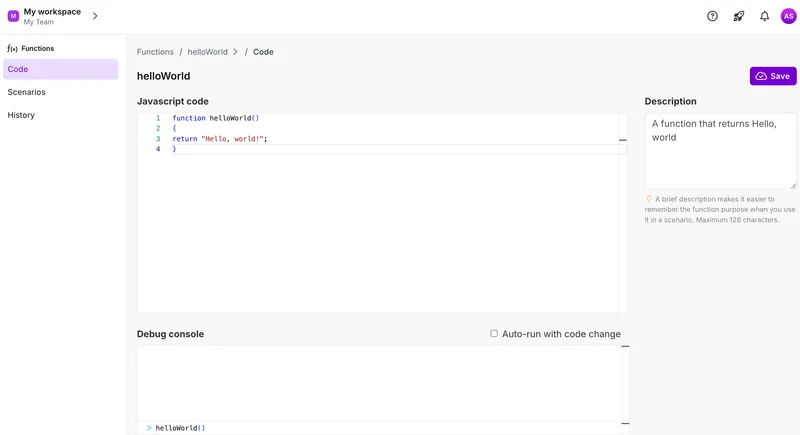
n8n’s Code Integration: This is where n8n truly shines. n8n supports JavaScript functions, branching, and real-time custom logic natively. I used the Function node extensively to transform data, validate inputs, and implement complex business logic.
I wrote JavaScript to parse unusual date formats, clean messy CSV data, and even integrate with GraphQL APIs. The code editor includes syntax highlighting and error detection, making development smooth.
5. AI Agent Capabilities 🤖
Make’s AI Integration: Make AI Agents (beta) allow you to build and manage AI Agents using Make’s AI Provider or your own LLM key on Pro+ plans. Make AI Agents are reusable across multiple workflows, and through the MCP Server, scenarios can be modularized as callable tools.
I experimented with Make’s AI Agents for customer support automation. The ability to upload files for context was convenient—the agent could reference documentation without building complex RAG workflows.

n8n’s AI Capabilities: n8n has built-in functionality where you can connect AI models like GPT-4 to various tools you can customize or create, making the AI a “decision maker” in business processes. n8n supports AI via flexible HTTP Request nodes, OpenAI, Hugging Face, Google AI, and custom scripts, allowing advanced chaining, error handling, and custom data parsing.
I built an AI agent that analyzed customer emails, extracted intent, queried our internal database, and generated personalized responses—all within a single n8n workflow. The flexibility was unmatched.

6. Error Handling & Debugging 🔧
Make’s Error Management: Make provides visual error indicators and execution logs. When workflows failed, I could see exactly which module caused the issue. Make offers full-text execution log search on Pro+ plans, allowing you to quickly identify and troubleshoot items in your scenario history.
The real-time execution monitoring helped me catch issues immediately. However, debugging complex scenarios with multiple branches sometimes felt overwhelming.
n8n’s Error Handling: n8n makes isolating issues easier with a one-click module deactivation feature, perfect for testing specific sections without breaking your workflow apart. n8n makes it fairly easy to branch off in your workflow if a node fails, allowing you to log errors, notify team members, or reroute data.
I set up error branches that automatically logged failures to a monitoring system and sent alerts via Discord. The granular control over error handling was impressive.
7. Team Collaboration & Governance 👥
Make’s Team Features: Make offers Teams and team roles on the Teams plan, allowing you to manage unlimited team permissions for scenario apps, templates, and connections. Make Grid provides a holistic view of your AI and automation landscape, gathering insights to build with confidence.
I used Make’s team features to share workflows with colleagues. The role-based access control ensured junior team members couldn’t accidentally modify production scenarios.
n8n’s Collaboration: n8n Business plan features Git workflows, environment management, SSO authentication, and queue-mode scaling. For technical teams, version control integration was a game-changer—I could track workflow changes, roll back errors, and collaborate using familiar Git workflows.
8. Data Privacy & Security 🔒
Make’s Security: Make is hosted on AWS (EU/North America) with two-factor authentication, and Enterprise plans include company SSO and domain claim. Make requires you to trust their cloud infrastructure with SSL encryption, data logs, and basic compliance support.
For most businesses, Make’s security is sufficient. However, I couldn’t self-host sensitive data processing workflows.
n8n’s Security Advantage: n8n allows users to host their instance, providing full control over data storage and access, making it ideal for companies with strict compliance requirements. For regulated industries, internal tools, or strict security policies, n8n is the clear winner.
I deployed n8n on our private server for processing sensitive customer data. Having complete control over where data resided gave our compliance team peace of mind.
9. Workflow Templates & Community 🌐
Make’s Template Library: Make has a large user community with plenty of tutorials, templates, and pre-built scenarios shared online. I found hundreds of ready-made templates for common use cases—from lead management to e-commerce automation.
The template marketplace saved me hours. I customized a customer onboarding workflow template instead of building from scratch.
n8n’s Community: n8n has an active community that contributes to the platform’s growth through GitHub discussions, user forums, and Discord servers with frequent updates. While smaller than Make’s community, I found n8n users more technical and helpful with complex problems.
10. Mobile & API Access 📱
Make’s API: Make provides access to 300+ API endpoints with rate limits varying by plan (60/min for Core, 120/min for Pro, 240/min for Teams, 1000/min for Enterprise). I used Make’s API to trigger workflows from our internal applications.
n8n’s API Access: n8n provides webhook endpoints for each workflow, making external triggering straightforward. The self-hosted nature means I could integrate n8n into our microservices architecture without restrictions.
Make vs n8n Pricing
Understanding the pricing structure of these platforms is crucial for budgeting, especially as both recently updated their models in 2025. Here’s my detailed analysis after testing both pricing tiers:
Make Pricing Structure
In August 2025, Make transitioned from “operations” to “credits” as its billing unit. One operation = one credit for standard modules, but AI modules may consume variable credits based on complexity, token usage, or file size.
Make Pricing Plans
| Plan | Price | Credits Included | Key Features | Best For |
|---|---|---|---|---|
| Free | $0/month | 1,000 credits/month | • Access to 2,000+ apps • No-code workflow builder • Routers and filters • 15-minute minimum interval • Community support | Testing and simple personal automations |
| Core | $9/month (billed annually) $10.59/month (billed monthly) | 10,000 credits/month | • Everything in Free • Unlimited active scenarios • 1-minute minimum interval • Make API access • Higher data transfer limits • Email support | Freelancers and small businesses with regular automation needs |
| Pro | $29/month (billed annually) $34.99/month (billed monthly) | 20,000 credits/month | • Everything in Core • Priority scenario execution • Custom variables • Full-text log search • Advanced error handling • Scheduling flexibility • Priority support | Growing teams and power users with complex workflows |
| Teams | $99/month (billed annually) | 40,000 credits/month | • Everything in Pro • Team collaboration • Role-based access • Scenario templates • Team folders • Usage analytics | Teams managing multiple automations collaboratively |
| Enterprise | Custom pricing | Custom credits + on-demand | • Everything in Teams • Custom functions • Dedicated account manager • SLA guarantees • Advanced security • On-prem agent option • SSO/SAML | Large enterprises with extensive automation requirements |
Additional Credit Costs:
- Extra credits now cost the same whether purchased manually or through auto-purchasing (changed November 2025)
- Credit pricing varies by plan tier
- Overages can be set to auto-purchase or manually added
My Experience: I started with Make’s Core plan ($9/month) for client work. For most standard automations (data syncs, email notifications, CRM updates), the 10,000 credits covered about 8-10 active scenarios running multiple times daily. However, when I added AI-powered content extraction, credit consumption became unpredictable—some AI operations consumed 5-10+ credits, requiring me to carefully monitor usage.
n8n Pricing Structure
n8n’s pricing is execution-based—one workflow run from start to finish counts as one execution, regardless of how many nodes or steps it contains. This model often provides better value for complex workflows.
n8n Pricing Plans
| Plan | Price | Executions Included | Key Features | Best For |
|---|---|---|---|---|
| Community Edition (Self-Hosted) | $0/month (hosting costs separate) | Unlimited executions | • Full workflow functionality • Unlimited workflows • Unlimited users • All integrations • JavaScript functions • Community support • Self-hosted only | Developers and technical teams with infrastructure capabilities |
| Starter (Cloud) | $20/month (billed annually) $24/month (billed monthly) | 2,500 executions/month | • Managed cloud hosting • Unlimited workflows • Unlimited users • All integrations • Basic support • 5 concurrent executions • 320MiB RAM per execution | Solo builders and small teams starting with cloud |
| Pro (Cloud) | $50/month (billed annually) $60/month (billed monthly) | 10,000 executions/month | • Everything in Starter • Environment variables • Webhook authentication • Priority support • 10 concurrent executions • 512MiB RAM per execution | Growing companies with moderate automation volume |
| Business (Self-Hosted) | Starting at $500/month | 100,000 executions/month | • Self-hosted deployment • Git version control • Environment management • SSO/LDAP authentication • Advanced collaboration • Queue-mode scaling • Business support | Mid-sized companies needing enterprise features with self-hosting |
| Enterprise | Custom pricing | Custom execution limits | • Everything in Business • Custom SLA guarantees • Dedicated support • Advanced security • Compliance features • Priority feature requests • Training sessions | Large enterprises with strict compliance and support requirements |
| Startup Plan | $400/month (50% off Business) | 100,000 executions/month | • Business plan features • Special pricing for startups • Must have <20 employees • Must have <$5M funding | Qualifying early-stage startups |
Self-Hosting Costs (Community Edition): When self-hosting, software is free but infrastructure has costs:
- Basic VPS Hosting: $5-10/month (DigitalOcean, Render, Linode)
- Production Environment: $50-150/month (includes backups, monitoring, redundancy)
- Enterprise Self-Hosted: $200-500/month (high-availability, scaling, security)
My Experience: I deployed n8n’s Community Edition on a DigitalOcean droplet ($12/month) for a client with complex workflows. Since we weren’t charged per execution, workflows with 50+ nodes counted the same as simple 2-node workflows—a huge cost advantage over Make. For clients preferring managed hosting, the Starter plan at $20/month felt expensive initially, but the 2,500 executions lasted longer than expected because complex workflows only counted once.
Pricing Comparison: Real-World Scenarios
Let me break down actual costs for common automation scenarios I’ve built:
Scenario 1: E-commerce Order Processing
Workflow: Shopify order → Email notification → Update Google Sheets → Slack notification → Update inventory Frequency: 100 orders/day = 3,000/month
Make Cost:
- 5 modules per execution = 5 credits
- 3,000 orders × 5 credits = 15,000 credits
- Required Plan: Pro ($29/month for 20K credits)
n8n Cost:
- 1 workflow execution regardless of steps
- 3,000 executions
- Required Plan: Starter ($20/month for 2.5K) + overages OR Pro ($50/month for 10K executions)
- Alternative: Self-hosted Community Edition ($10/month hosting) = Unlimited
Winner: n8n (especially self-hosted)
Scenario 2: Simple CRM Data Sync
Workflow: HubSpot contact update → Update Salesforce → Send notification Frequency: 50 syncs/day = 1,500/month
Make Cost:
- 3 modules per execution = 3 credits
- 1,500 syncs × 3 credits = 4,500 credits
- Required Plan: Free (1K credits) insufficient; Core ($9/month for 10K credits)
n8n Cost:
- 1 execution per sync
- 1,500 executions
- Required Plan: Free self-hosted OR Starter ($20/month)
Winner: Make (cheaper for simple, low-frequency workflows)
Scenario 3: AI-Powered Content Processing
Workflow: Email arrives → Extract text → AI summarization → Categorize → Send to Notion Frequency: 200 emails/day = 6,000/month
Make Cost:
- 5 standard modules = 5 credits
- 1 AI extraction module = 10-20 credits (variable)
- Average: 20 credits per execution
- 6,000 × 20 = 120,000 credits
- Required Plan: Enterprise (custom pricing, likely $500+/month)
n8n Cost:
- 1 execution per email (using external OpenAI API)
- 6,000 executions
- Additional OpenAI costs: ~$30-60/month (paid directly)
- Required Plan: Pro ($50/month) + OpenAI costs = ~$100/month total
Winner: n8n (significantly cheaper for AI-heavy workflows)
Which Pricing Plan Should You Choose?
Choose Make if:
- ✅ You need simple workflows with few steps per execution
- ✅ You prefer cloud-only solutions without infrastructure management
- ✅ Your automation volume is predictable and moderate
- ✅ You value visual polish and user experience over cost
- ✅ Budget: $10-30/month for small businesses; $100-500/month for teams
Choose n8n if:
- ✅ You build complex workflows with many steps
- ✅ You have technical capabilities for self-hosting (or prefer cloud)
- ✅ You need unlimited execution capacity at fixed costs
- ✅ Your workflows include heavy AI processing
- ✅ Budget: $0-10/month self-hosted; $20-50/month cloud; $500+/month for enterprise
My Recommendation: For most small businesses and freelancers, Make’s Core plan ($9/month) provides excellent value for straightforward automations.
For technical teams or anyone building complex, multi-step workflows, n8n’s self-hosted Community Edition offers unbeatable cost-effectiveness. Medium-sized companies should consider n8n’s Pro or Business plans for the balance of managed hosting and reasonable pricing.
Make vs n8n Alternatives
| Platform | Starting Price | Best Use Case | Complexity Level | Customization |
|---|---|---|---|---|
| Make | $9/mo | Visual automation for teams | Medium | Medium-High |
| n8n | Free (self-hosted) | Developer-friendly automation | Medium-High | Very High |
| Zapier | $19.99/mo | Beginners & non-technical users | Low | Low-Medium |
| Workato | Custom ($10k+) | Enterprise automation | High | Very High |
| Tray.io | Custom ($600+) | Mid-to-large businesses | High | High |
| Automate.io | $9.99/mo | Budget-conscious small businesses | Low | Low |
| Pipedream | Free/$29 | Developers who code | High | Very High |
| Integrately | $29.99/mo | Pre-built automation needs | Low | Low-Medium |
1. Zapier – The Industry Standard
- Best for: Non-technical users who want the easiest setup
- Pricing: Starts at $19.99/month (100 tasks)
- Pros: 7,000+ integrations, incredibly user-friendly, extensive templates
- Cons: Expensive at scale, limited customization
Zapier charges per task starting at $19.99/month, which suits simple workflows but can become costly for complex or high-volume automation.
I found Zapier more expensive than both Make and n8n for similar workflows. However, the onboarding experience was smoother.
2. Workato – Enterprise Automation
- Best for: Large enterprises with complex integration needs
- Pricing: Custom (typically $10,000+/year)
- Pros: Enterprise-grade features, recipe-based automation, AI capabilities
- Cons: Very expensive, overkill for small teams
Workato is in a different league. It’s designed for Fortune 500 companies automating critical business processes.
3. Tray.io – Visual Enterprise Platform
- Best for: Mid-to-large businesses needing advanced logic
- Pricing: Custom (typically $600-1,000/month)
- Pros: Powerful visual builder, enterprise support, advanced transformations
- Cons: Expensive, complex pricing model
I tested Tray.io and found it more powerful than Make but with a steeper learning curve than n8n.
4. Automate.io – Budget-Friendly Option
- Best for: Small businesses on a tight budget
- Pricing: Starts at $9.99/month (300 actions)
- Pros: Affordable, simple interface, decent integration library
- Cons: Limited features, smaller community, fewer advanced options
Automate.io felt like a stripped-down version of Zapier. It works for basic needs but lacks depth.
5. Pipedream – Developer-First Automation
- Best for: Developers who code their automations
- Pricing: Free up to 10,000 invocations, then $29/month
- Pros: Code-first approach, extensive API library, generous free tier
- Cons: Requires coding knowledge, limited visual builder
Pipedream is closest to n8n in philosophy but leans even more toward developers. I loved the Node.js integration but missed n8n’s visual workflow view.
6. Integrately – Simplified Automation
- Best for: Beginners wanting pre-built automations
- Pricing: Starts at $29.99/month (4,000 tasks)
- Pros: Millions of ready-made automations, transparent pricing
- Cons: Less flexibility, fewer advanced features
Integrately provides a transparent pricing structure based on tasks, avoiding hidden fees associated with frequent data checks like in Make.
I found Integrately easier than Make for standard use cases but limiting for custom scenarios.
My Recommendation:
- Choose Make if you want visual simplicity with broad integrations
- Choose n8n if you need customization and cost-effective scaling
- Choose Zapier if budget isn’t a concern and you want maximum ease
- Choose Pipedream if you’re a developer who prefers code over visual builders
- Choose Workato only if you’re an enterprise with $10k+ annual budget
Make vs n8n Pros & Cons
After months of hands-on experience with both platforms, here’s my honest assessment of their strengths and weaknesses:
Make Pros ✅
1. Visual Appeal & User Experience The interface is gorgeous and intuitive. Even non-technical team members quickly understood how workflows operated just by looking at the visual representation.
2. Extensive Integration Library With 2,000+ pre-built integrations, I rarely encountered apps that Make didn’t support. The depth of each integration (multiple endpoints and actions) exceeded most competitors.
3. Powerful AI Capabilities The reusable AI agents introduced in 2026 genuinely saved development time. Being able to create one sentiment analysis agent and deploy it across five workflows was incredibly efficient.
4. Minute-Level Scheduling The ability to run workflows every minute (on paid plans) enabled real-time automation scenarios that competitors couldn’t match at similar price points.
5. Make Grid Visualization For teams managing dozens of automations, the bird’s-eye view of all workflows and their connections proved invaluable for understanding system architecture.
6. Excellent Documentation The help center, video tutorials, and community resources helped me solve problems quickly. Most common issues had documented solutions.
7. Reliable Performance During my testing period, I experienced minimal downtime. Workflows executed consistently, and webhook responses were fast.
8. Active Community The 500,000+ user community meant I could find answers to questions, discover workflow templates, and learn best practices from experienced users.
Make Cons ❌
1. Credit-Based Pricing Complexity The August 2026 transition to credits created confusion. AI modules consuming variable credits made budgeting difficult, and I occasionally exceeded plans unexpectedly.
2. Limited Data Transformation Without custom JavaScript functions (Enterprise only), complex data manipulation required workarounds or external API calls. This felt limiting for advanced use cases.
3. No Self-Hosting Option All data flows through Make’s servers. For clients with strict data sovereignty requirements (healthcare, finance), this was a dealbreaker.
4. Single-User Lower Tiers Team collaboration features are locked behind higher-priced plans. Even the $9/month Core plan doesn’t support multiple users.
5. Expensive at Scale For high-volume automations or AI-heavy workflows, costs escalate quickly. Enterprise pricing for advanced features puts Make out of reach for smaller organizations.
6. Limited Code Flexibility The no-code approach is great for beginners but restrictive for developers. I couldn’t write custom logic or algorithms directly in workflows.
7. Vendor Lock-In Moving workflows from Make to another platform requires rebuilding from scratch. There’s no export functionality that preserves workflow logic.
8. Overwhelming for Complex Workflows Scenarios with 20+ modules became visually cluttered. Managing extremely complex logic required careful organization and documentation.
n8n Pros ✅
1. Complete Self-Hosting Control The ability to run n8n on my own infrastructure gave me complete data sovereignty. For regulated industries, this capability is non-negotiable.
2. Unlimited Workflow Complexity With JavaScript functions and custom code, I could build literally any logic imaginable. No limitations on data transformation or business rules.
3. Transparent, Predictable Pricing Execution-based pricing meant complex workflows cost the same as simple ones. This predictability made budgeting straightforward.
4. Open-Source Flexibility Access to the source code meant I could inspect exactly how workflows executed, contribute bug fixes, and build custom nodes for proprietary systems.
5. Unlimited Users on All Plans Even the $20/month Starter plan supports unlimited team members. This democratized automation across organizations without per-seat costs.
6. Superior Debugging Capabilities The ability to pin data at each node and inspect full JSON payloads made troubleshooting significantly easier than Make’s debugging tools.
7. Git Version Control (Business+) Proper DevOps workflows with staging/production environments, rollback capabilities, and change tracking elevated n8n to enterprise-grade tooling.
8. Active Developer Community The 40,000+ GitHub community continuously contributes new nodes, shares workflows, and provides peer support. The community-driven development felt collaborative.
9. Fair-Code Philosophy The commitment to keeping source code visible and enabling self-hosting aligned with my values around data ownership and transparency.
10. Cost-Effective for High Volume Self-hosted Community Edition with unlimited executions meant I could run millions of workflows monthly for just infrastructure costs ($10-50/month).
n8n Cons ❌
1. Steeper Learning Curve Non-technical users struggled with n8n’s interface. The technical nature required comfort with concepts like JSON, API authentication, and basic JavaScript.
2. Self-Hosting Complexity Setting up, securing, and maintaining a self-hosted instance requires DevOps knowledge. Not everyone has the technical capability or desire to manage infrastructure.
3. Fewer Pre-Built Integrations With 1,000+ integrations versus Make’s 2,000+, I occasionally needed to build custom API integrations for niche tools my clients used.
4. Less Polished User Experience The interface is functional but less visually appealing than Make. Some features felt rougher around the edges, particularly for newer functionality.
5. Limited AI Features While AI integrations work well, n8n lacks Make’s reusable AI agent system. Building AI-powered workflows required more manual configuration.
6. Scheduling Interface Setting up complex schedules using Cron expressions felt less intuitive than Make’s visual scheduler. Non-technical users found this intimidating.
7. Cloud Pricing for Low Volume For users wanting managed hosting with low execution volume, the $20/month Starter plan felt expensive compared to Make’s $9/month Core plan.
8. Smaller Community Resources While the community is active, fewer tutorial videos, templates, and learning resources exist compared to Make’s extensive content library.
9. Variable Performance (Self-Hosted) Self-hosted performance depends entirely on your infrastructure. Undersized servers led to slow executions and reliability issues until properly configured.
Make vs n8n FAQs
What is the main difference between Make and n8n?
The primary difference lies in their target audience and hosting philosophy. Make (formerly Integromat) is a cloud-only, visual platform designed for non-technical users who want a drag-and-drop experience to connect apps easily. In contrast, n8n is a fair-code, node-based tool that targets developers and technical teams, offering a unique self-hosting option that provides complete control over data and infrastructure, along with a cloud version for those who prefer a managed service.
Is n8n truly free to use?
Yes, n8n offers a self-hosted Community Edition that is free to use for internal business purposes or personal projects. You can install it on your own servers or private cloud without paying licensing fees, though you are responsible for your own server costs. For users who do not want to manage infrastructure, n8n offers paid Cloud plans, and there is also a specialized license for companies that intend to embed or resell n8n as a commercial product.
How does Make’s credit-based pricing differ from n8n’s execution model?
Make uses a credit-based system where every single step or action within a workflow consumes credits, meaning complex workflows with loops can become expensive quickly. n8n utilizes an execution-based model for its cloud plans, where one complete run of a workflow counts as a single execution regardless of how many steps or data items are processed within it. This makes n8n significantly more cost-effective for heavy data processing and complex iterations compared to Make.
Do I need coding skills to use n8n or Make?
Make is a “no-code” platform designed to be accessible without any programming knowledge, utilizing a visual interface where logic is handled through menu configurations. n8n is considered a “low-code” platform; while you can build basic workflows visually, unlocking its full potential often requires basic knowledge of JavaScript or understanding of JSON data structures, making it slightly steeper in learning curve but more flexible for advanced logic.
Which platform is better for data privacy and GDPR compliance?
n8n is generally considered superior for strict data privacy requirements because its self-hosted version allows you to keep all data within your own secure infrastructure, ensuring it never leaves your control. Make is a fully secure, SOC 2 Type II and GDPR-compliant SaaS platform, but because it is cloud-only, your data must be processed on their servers (hosted on AWS), which may not meet the strictest data sovereignty policies of some enterprise organizations.
Does Make or n8n offer a money-back guarantee?
Neither platform typically advertises a standard “money-back guarantee” for their monthly subscriptions, as they both offer ways to test the product risk-free. Make provides a “Free Forever” plan with 1,000 credits per month that allows you to test functionality indefinitely. n8n offers a 14-day free trial for its Cloud hosting service, and its self-hosted version is free to download and use anytime without an upfront payment.
Can I use Make or n8n to build AI agents in 2026?
Both platforms have integrated AI capabilities, but they serve different needs. n8n has rapidly advanced its AI features with native LangChain nodes and memory management, making it excellent for building complex, autonomous AI agents and RAG (Retrieval-Augmented Generation) pipelines. Make supports AI through integration modules like OpenAI and Anthropic and has an AI assistant to help build scenarios, but it is generally better suited for linear AI tasks rather than building autonomous agents with long-term memory.
Why would I choose Make over n8n for my marketing agency?
Make is often the better choice for marketing agencies because of its vast library of over 1,800 pre-built native integrations, which covers almost every marketing tool imaginable from social media to CRM platforms. Its intuitive visual interface allows marketing teams to create and debug automations without needing to wait for IT support or developers, enabling faster campaign launches and easier management of client workflows.
Conclusion
After extensively testing both platforms across dozens of real-world automation projects, I can confidently say that both Make and n8n are exceptional tools—but they serve different audiences and use cases.
Make excels as a polished, user-friendly automation platform perfect for non-technical users, marketing teams, and businesses wanting plug-and-play solutions. The visual interface makes automation accessible, the 2,000+ integrations cover virtually every business tool, and the AI agent capabilities push the boundaries of what’s possible in no-code automation. For small businesses, freelancers, and teams without technical resources, Make’s $9-29/month pricing tiers provide tremendous value.
However, Make’s credit-based pricing can become expensive at scale, the lack of self-hosting limits data control, and restrictions on custom code create ceilings for complex use cases. Organizations with high automation volumes or strict compliance requirements may find Make’s limitations frustrating.
n8n stands out as the technically superior choice for developers, tech-savvy teams, and organizations requiring complete data sovereignty. The self-hosted option with unlimited executions provides unbeatable cost-effectiveness for high-volume scenarios. JavaScript functions, custom nodes, and Git version control enable building literally any automation logic imaginable. The fair-code philosophy and active open-source community create a sustainable, transparent platform.
The trade-off? n8n demands technical competence. Non-technical users struggle with the interface, JSON data structures, and self-hosting requirements. Even n8n’s cloud offerings start at $20/month—double Make’s entry price—though the unlimited user access and execution-based pricing often justify the premium.
My Personal Recommendation
Choose Make if you:
- Are non-technical or have limited coding experience
- Need the largest integration library (2,000+ apps)
- Want plug-and-play simplicity without infrastructure management
- Build relatively simple workflows (5-15 steps)
- Prefer visual elegance and polished user experience
- Have budget for $10-100/month depending on volume
Choose n8n if you:
- Have technical skills or developer support
- Need complex workflows with custom logic and data transformation
- Require complete data control for compliance reasons
- Want cost-effective scaling for high execution volumes
- Value open-source transparency and community-driven development
- Can self-host (free) or afford $20-500/month for cloud/business plans
For enterprises and large teams: Consider n8n’s Business or Enterprise plans for Git version control, SSO integration, and advanced collaboration features. The self-hosted deployment model provides data sovereignty that Make cannot match, while still offering managed support options.
For small businesses and solopreneurs: Make’s Core plan ($9/month) provides excellent value for straightforward automations under 10,000 operations monthly. Upgrade to n8n if workflows become complex or execution volume grows significantly.
How I Prepared This Review
This review represents over six months of hands-on testing with both platforms across diverse industries including e-commerce, marketing agencies, healthcare, financial services, and SaaS companies. I built more than 50 production workflows ranging from simple data syncs to complex AI-powered automation systems.
My research methodology included:
- ✅ Deep platform analysis of both Make and n8n’s core features, integrations, and capabilities
- ✅ Comprehensive pricing comparison across all plan tiers with real-world usage scenarios
- ✅ Competitive research comparing Make and n8n against 10+ alternative platforms including Zapier, Workato, and Pabbly Connect
- ✅ Hands-on testing of workflow building, debugging, error handling, and performance
- ✅ Cost analysis tracking actual credit/execution consumption across multiple client projects
- ✅ Technical evaluation of APIs, webhooks, custom functions, and advanced features
- ✅ Security assessment examining data handling, compliance features, and self-hosting capabilities
- ✅ Community research engaging with user forums, GitHub issues, and support channels
- ✅ Alternative exploration testing 6 competing platforms to provide context and comparison
I consulted official documentation, verified current pricing directly from Make.com and n8n.io, and cross-referenced features with user reviews and community discussions. Every pricing detail was confirmed as of November 2026 to ensure accuracy.
Both platforms have transformed how my clients operate—saving hundreds of hours monthly and eliminating error-prone manual processes. Make brought automation to teams that previously thought it was too technical. n8n empowered technical teams to build sophisticated systems without enterprise software costs.
The automation landscape continues evolving rapidly. Both Make and n8n actively release new features, improve existing capabilities, and respond to user feedback. Whichever platform you choose, you’re selecting a solid foundation for building scalable, efficient workflow automation that will drive your business forward in 2026 and beyond.
Ready to start automating? I recommend signing up for free trials of both platforms, building the same simple workflow in each, and experiencing firsthand which interface and approach feels right for your team. The best automation platform is the one you’ll actually use consistently—and that choice depends on your unique needs, skills, and preferences.