

Building web applications without writing code has become a reality in 2026, and two platforms consistently dominate conversations among no-code developers: Webflow and Bubble. When I first started exploring no-code solutions for my projects, I faced the same dilemma many entrepreneurs and creators encounter—should I choose a platform optimized for stunning visual design or one built for complex application logic?
The no-code development market has exploded, reaching a valuation of over $13.8 billion in 2024, with projections indicating it will surpass $45 billion by 2028. This growth reflects a fundamental shift in how we approach web development. According to Gartner, by 2025, 70% of new applications will be developed using low-code or no-code technologies, up from less than 25% in 2020.
I’ve spent considerable time working with both platforms, building everything from marketing websites to customer portals. What I discovered is that choosing between Webflow and Bubble isn’t about finding the “better” platform—it’s about understanding which tool aligns with your specific needs.
Webflow excels at creating pixel-perfect websites with sophisticated animations and SEO optimization, making it the go-to choice for designers and marketing teams. Bubble, on the other hand, empowers you to build database-driven applications with user authentication, workflows, and backend logic that rival traditionally coded solutions.
In this comprehensive comparison, I’ll walk you through my hands-on experience with both platforms, comparing their features, pricing structures, and real-world applications to help you make an informed decision for your 2026 projects.
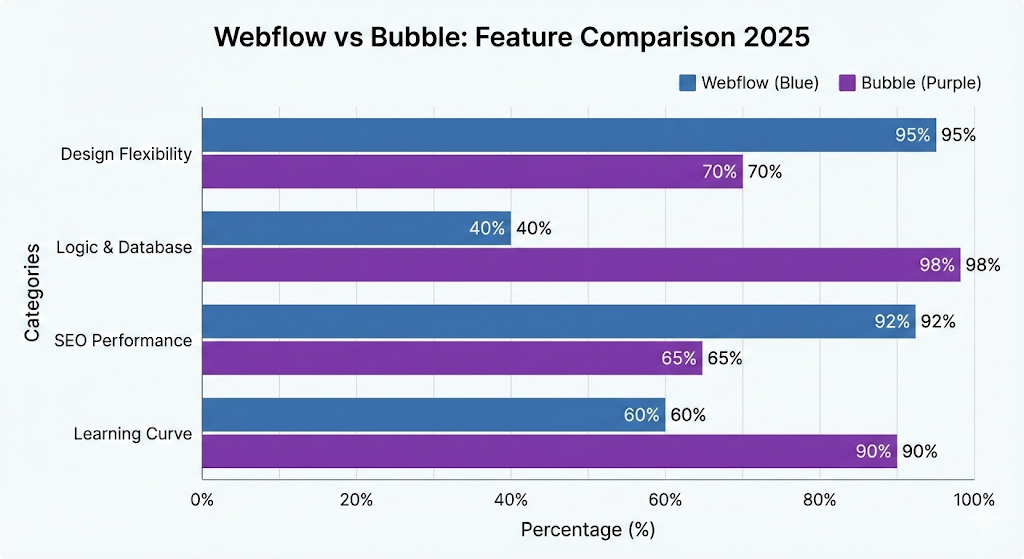
Webflow vs Bubble Overview
Webflow Overview
The story of Webflow began in 2013 when brothers Vlad and Sergie Magdalin, along with Bryant Chou, launched the platform with a vision to democratize web design. Headquartered in San Francisco, California, Webflow has grown into a powerhouse with over 3.5 million users and more than 800 employees. The platform secured $335 million in Series C funding in 2021, valuing the company at $4 billion.
Bubble Overview

Bubble, founded in 2012 by Emmanuel Straschnov and Josh Haas, took a different approach. Based in New York City, Bubble focused on enabling anyone to build web applications without code. The platform has raised over $100 million in funding and serves hundreds of thousands of users globally, with a team of approximately 150 employees.
While Webflow positioned itself as the ultimate tool for designers who wanted pixel-perfect control without touching code, Bubble carved out its niche as a full-stack development platform for building functional applications with databases, APIs, and complex logic.
Overview Comparison Table
| Aspect | Webflow | Bubble |
|---|---|---|
| Official Website | webflow.com | bubble.io |
| Developers | Vlad Magdalin, Sergie Magdalin, Bryant Chou | Emmanuel Straschnov, Josh Haas |
| Founded | 2013 | 2012 |
| Company Headquarters | San Francisco, California, USA | New York City, New York, USA |
| Number of Employees | 800+ | 150+ |
| Primary USP | Visual web design with CMS capabilities | Full-stack web application builder |
| Category | Website Builder, Visual CMS | No-code Application Development Platform |
| Best For | Marketing websites, portfolios, blogs, e-commerce sites | Web apps, SaaS products, marketplaces, internal tools |
| Starting Price | $14/month (Basic site plan) | $29/month (Starter plan) |
| Key Integrations | Zapier, Make, Google Analytics, Mailchimp, Stripe, Memberstack | Zapier, APIs, Stripe, SendGrid, AWS, Google Sheets |
| Support Options | Email support, community forum, Webflow University, live chat (higher tiers) | Email support, forum, documentation, bug reporting |
| Documentation | Extensive video tutorials and written guides | Comprehensive manual and video lessons |
| Affiliate Program | Yes | Yes |
| Affiliate Commission | Up to $1,200 per referral (tiered structure) | $100-$500 per referral (based on plan) |
| Money Back Guarantee | 14-day refund policy on annual plans | No refund policy (free trial available) |
| Free Plan | Available (limited features, Webflow branding) | Available (limited capacity and features) |
| Target Users | Designers, agencies, freelancers, marketers | Entrepreneurs, startups, product builders, developers |
| Code Export | Yes (on paid plans) | No |
| Database Included | CMS (content management system) | Full relational database |
| User Authentication | Requires third-party integration | Built-in native functionality |
Webflow vs Bubble Features
Having worked extensively with both platforms, I can tell you that the feature sets reflect their distinct philosophies. Let me break down the capabilities that matter most based on my hands-on experience.
🎨 Visual Design & Customization
Webflow’s Approach: When I first opened Webflow’s designer, I felt like I’d been handed a professional design tool disguised as a website builder. The platform gives you complete control over CSS properties through a visual interface. I’ve built everything from simple landing pages to complex portfolio sites, and the level of customization is remarkable.
The flexbox and grid systems work exactly as they would in traditional CSS, but you’re manipulating them visually. I particularly appreciate how Webflow handles responsive design—you can create unique layouts for desktop, tablet, and mobile breakpoints, seeing changes in real-time. The interactions and animations panel lets you create scroll-triggered effects, hover states, and complex animations that would typically require JavaScript.
Bubble’s Approach: Bubble takes a more functional approach to design. While you can create attractive interfaces, the focus is on building application layouts rather than pixel-perfect designs. I’ve used Bubble’s responsive engine to create dashboards and user portals, and while it gets the job done, you’re working within more constraints.
The element inspector gives you control over properties like padding, margins, and colors, but you won’t achieve the same level of design sophistication as Webflow without significant effort. However, for application interfaces where functionality trumps aesthetics, Bubble’s approach is perfectly adequate.
My Take: If visual design is your priority, Webflow wins decisively. For functional applications where design is secondary, Bubble’s approach is sufficient. ✅
🗄️ Database & Data Management
Webflow’s CMS: I’ve used Webflow’s CMS for blog management, product catalogs, and team member directories. The system is straightforward—you create Collection Lists that function as content databases. Each collection can have various field types: text, images, rich text, numbers, and references to other collections.
The limitation I’ve encountered is that Webflow’s CMS is designed for content, not application data. You can’t create complex relationships between data types or implement sophisticated filtering logic beyond basic categories and tags. For a blog or marketing site showcasing products, it’s perfect. For an application that needs user-specific data, order tracking, or complex queries, it falls short.
Bubble’s Database: This is where Bubble truly shines. I’ve built a customer relationship management tool using Bubble’s database, and the experience felt similar to working with traditional databases. You can create multiple data types (think database tables), establish relationships between them (one-to-many, many-to-many), and set privacy rules at the data level.
When I needed to track users, their orders, order items, and payment history, Bubble handled these relationships effortlessly. The search functionality is powerful—I can filter, sort, and query data using multiple conditions. Privacy rules ensure users only see their own data, which is essential for application security.
My Take: For content management, Webflow is adequate. For application databases with complex relationships and queries, Bubble is in a completely different league. 🏆
⚙️ Workflows & Application Logic
Webflow’s Limitations: Webflow doesn’t have native workflow capabilities. When I needed to implement form submissions that triggered email sequences or updated external databases, I had to rely on third-party tools like Zapier or Make. While this works for simple automation, it adds complexity and cost to your project.
The platform is fundamentally a static site generator (with CMS capabilities), so any dynamic functionality requires external integrations or custom code.
Bubble’s Workflow Engine: The workflow system is Bubble’s superpower. I’ve created everything from user registration flows to payment processing sequences to complex approval workflows—all without writing a single line of code.
Workflows are triggered by events: button clicks, page loads, custom events, or scheduled tasks. Each workflow consists of actions that execute sequentially or conditionally. When I built a booking application, I created workflows that checked availability, created reservations, sent confirmation emails, and updated calendars—all through Bubble’s visual workflow editor.
The conditional logic is remarkably flexible. I can show/hide elements, change properties, or execute different actions based on dynamic conditions. API connections run through workflows, allowing me to integrate external services, send data, and process responses.
My Take: If you need application logic, user workflows, or dynamic functionality, Bubble is essential. Webflow requires heavy external integration to achieve similar results. 💪
👤 User Authentication & Management
Webflow’s Solution: Webflow doesn’t include native user authentication. When I needed member areas on Webflow sites, I used third-party services like Memberstack or MemberSpace. These integrations work reasonably well but add monthly costs ($25-$50+) and introduce additional complexity.
Setting up gated content or user-specific experiences requires connecting these external services, managing their dashboards separately, and ensuring everything syncs properly.
Bubble’s Built-in System: User authentication in Bubble is native and robust. I’ve implemented everything from simple login pages to complex permission systems. The platform handles user signup, login, password reset, and email verification out of the box.
What impressed me most is the granular control over user data and permissions. I can create different user types (admin, customer, vendor), assign roles, and restrict access to specific pages or data based on those roles. For a marketplace I built, vendors could only see and edit their own products, while admins had full access—all configured through Bubble’s privacy rules.
My Take: For any project requiring user accounts, Bubble’s native solution is far superior to Webflow’s integration-dependent approach. 🔐
💳 E-commerce & Payment Processing
Webflow E-commerce: I’ve built several online stores using Webflow’s native e-commerce functionality. The platform handles product catalogs, shopping carts, checkout processes, and integrates with Stripe for payment processing. The CMS-powered product management is intuitive, and you have excellent design control over every aspect of the shopping experience.
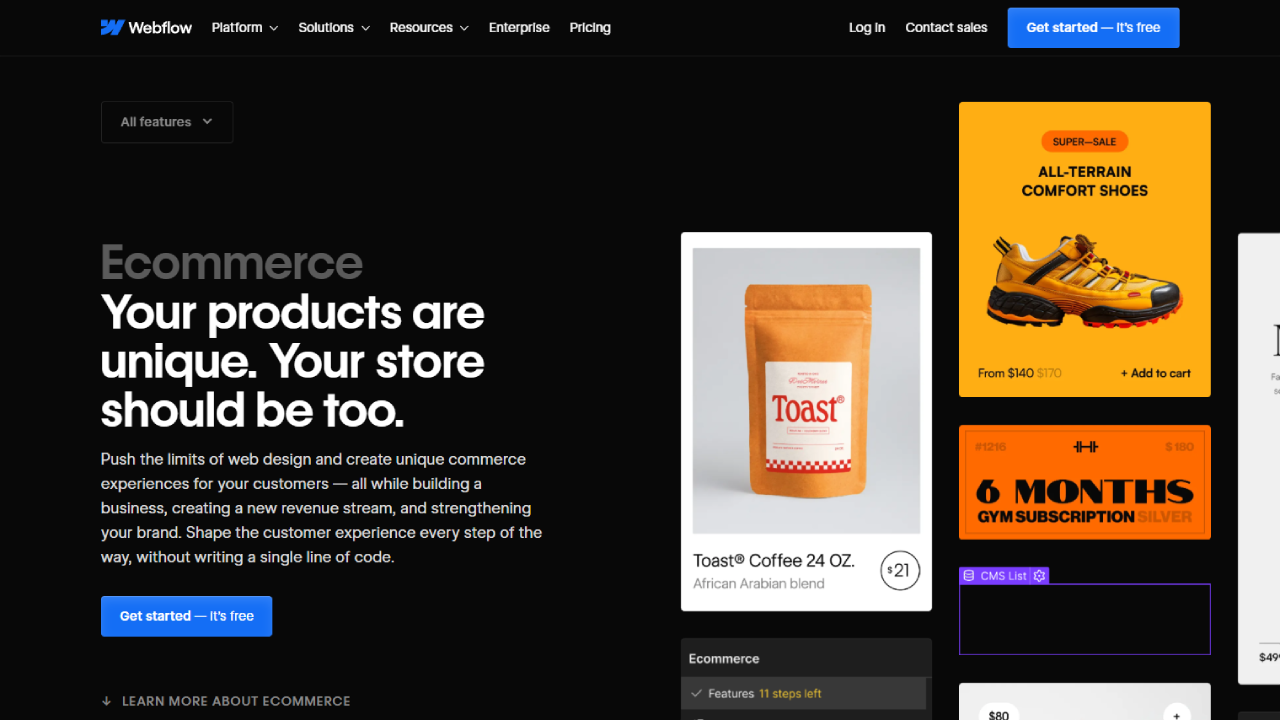
However, limitations appear with complex requirements. I couldn’t easily implement subscription services, tiered pricing, or custom checkout flows without external tools. The e-commerce plan starts at $29/month and includes transaction fees (2% on the Standard plan, 0% on Plus and Advanced).
Bubble’s Payment Integration: Bubble doesn’t have built-in e-commerce like Webflow, but I’ve created custom checkout experiences using the Stripe plugin. This approach offers ultimate flexibility—I’ve built subscription services, one-time purchases, usage-based billing, and split payments.

The trade-off is that you’re building the entire payment flow yourself. I had to create shopping cart functionality, checkout pages, order confirmation workflows, and payment processing logic from scratch. For standard online stores, this is overkill. For custom billing solutions or SaaS applications, it’s perfect.
My Take: For traditional e-commerce, Webflow’s integrated solution is more efficient. For custom payment flows and subscription services, Bubble offers greater flexibility. 🛒
🔌 Integrations & APIs
Webflow’s Integration Ecosystem: Webflow integrates smoothly with popular marketing and analytics tools—Google Analytics, Facebook Pixel, Mailchimp, and others through native integrations or embed codes. For more complex integrations, I’ve used Zapier extensively.

The platform allows custom code embedding, so I’ve added third-party widgets, chat systems, and tracking scripts without issues. However, connecting to external databases or building bidirectional data syncs requires workarounds and often additional services.
Bubble’s API Connector: The API Connector plugin in Bubble is incredibly powerful. I’ve connected to dozens of external services: payment processors, email services, SMS providers, cloud storage, and custom APIs. The connector supports REST and GraphQL APIs, handles authentication (OAuth, API keys, headers), and processes complex responses.
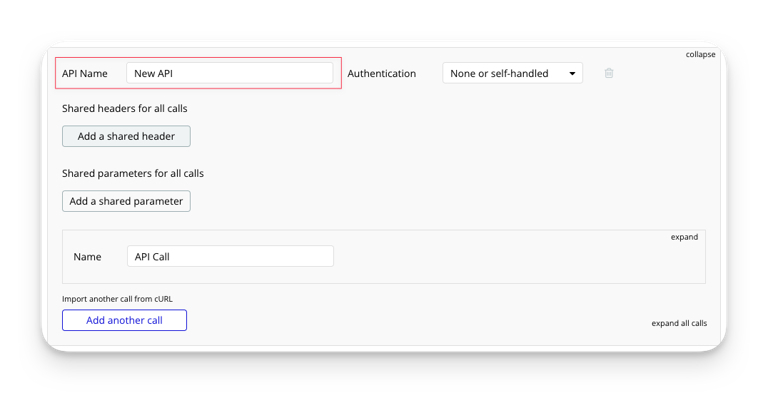
When I needed to sync data between Bubble and an external CRM, I set up API workflows that acted as webhooks, allowing external services to send data directly into my Bubble app. This bidirectional communication enables sophisticated integrations that would require significant development in traditional platforms.
My Take: For basic integrations, both platforms work fine. For complex API connections and custom integrations, Bubble’s capabilities are professional-grade. 🔗
📱 Mobile Responsiveness
Webflow’s Responsive Design: Webflow’s approach to mobile design gave me complete control. The breakpoint system (base, tablet, mobile landscape, mobile portrait) lets you customize layouts for each screen size independently. I could hide elements, rearrange content, or completely change designs based on viewport width.
The visual editor shows exactly how your site appears at each breakpoint, making mobile optimization straightforward. For a client’s portfolio site, I created entirely different navigation systems for desktop and mobile, ensuring optimal user experience across devices.
Bubble’s Responsive Engine: Bubble’s responsive system works differently. Instead of separate layouts for each breakpoint, you define how elements behave when space changes. Elements can be fixed width, stretch to fit, or maintain proportions. The approach is more constraint-based.
I’ve found Bubble’s system adequate for application interfaces but less intuitive than Webflow’s. Creating truly responsive designs requires careful planning of element hierarchy and layout properties. The platform recently introduced a new responsive engine that improves upon the original, but it still requires a different mindset than traditional responsive design.
My Take: Webflow provides superior mobile design control and flexibility, particularly for marketing sites where mobile experience is critical. 📱
🚀 Hosting & Performance
Webflow Hosting: Webflow sites are hosted on Amazon Web Services (AWS) and Fastly’s content delivery network (CDN). In my experience, site performance has been excellent. Pages load quickly, and the global CDN ensures fast delivery regardless of visitor location.
The hosting is fully managed—SSL certificates, backups, and infrastructure maintenance are handled automatically. I’ve never worried about server configuration, security patches, or scaling issues. Webflow also provides generous bandwidth allowances, and I’ve never hit limits even on high-traffic sites.
Bubble Hosting: Bubble applications run on Bubble’s own hosting infrastructure. Performance depends heavily on your plan tier and application complexity. On lower-tier plans, I’ve experienced slower load times compared to Webflow, particularly with data-heavy pages.
Higher-tier plans offer dedicated resources and better performance. Bubble also provides options for custom domains and SSL certificates. One frustration I’ve encountered is that Bubble apps require server processing for every page load (since they’re dynamic applications), whereas Webflow serves static pages that load nearly instantaneously.
My Take: For static or CMS-driven sites, Webflow’s hosting performance is superior. For applications requiring dynamic functionality, Bubble’s hosting is necessary despite being slower. ⚡
🎓 Learning Curve & Resources
Webflow University: The learning resources Webflow provides are exceptional. Webflow University offers hundreds of video tutorials covering everything from basic concepts to advanced techniques. I started as a complete beginner and became proficient within weeks by following their structured courses.
The community forum is active, and I’ve always found answers to specific questions. The documentation is clear, and there are countless third-party tutorials, YouTube channels, and courses dedicated to Webflow.
Bubble’s Learning Path: Bubble’s learning curve is steeper. The platform’s power comes with complexity, and I spent considerably more time mastering Bubble than Webflow. The documentation is comprehensive but dense. The introductory lessons are helpful, but you’ll need to invest significant time understanding databases, workflows, and privacy rules.
The community forum is invaluable—I’ve learned more from forum discussions and community-created tutorials than from official documentation. Bubble recently improved their learning resources, but there’s still room for improvement compared to Webflow’s polished educational content.
My Take: Webflow is more accessible for beginners. Bubble requires greater time investment but rewards you with more powerful capabilities. 📚
🔍 SEO Capabilities
Webflow’s SEO Tools: SEO optimization in Webflow is straightforward and comprehensive. I can control meta titles, descriptions, Open Graph images, and URL structures for every page. The platform generates clean, semantic HTML and allows custom schema markup through code embeds.
The automatic sitemap generation, robot.txt customization, and 301 redirect management make technical SEO manageable. I’ve helped clients achieve strong search rankings using Webflow’s built-in SEO features without requiring additional plugins or tools.
Bubble’s SEO Challenges: SEO in Bubble is more complicated. Since Bubble applications are single-page applications (SPAs) by default, search engines have historically struggled to index them properly. Bubble introduced the SEO/crawlers feature that renders static HTML for search engines, improving indexability.
However, I’ve found that achieving the same SEO results in Bubble requires more technical configuration. Meta tags need manual setup through plugins or custom code, and URL structures are less clean than Webflow’s. For applications where SEO is critical (content sites, directories), this is a significant consideration.
My Take: For SEO-dependent projects, Webflow is the clear winner. Bubble can be optimized for search engines, but it requires more effort and expertise. 🔎
Webflow vs Bubble Pricing
Pricing is where your project type significantly influences which platform offers better value. Let me break down both pricing structures based on my experience managing multiple projects on each platform.
💰 Webflow Pricing Plans
Webflow separates pricing into Site Plans (for hosting websites) and Account Plans (for designers/agencies managing multiple projects).
Site Plans (for hosting individual websites):
Starter Plan – $14/month (billed annually) During my early projects, I used this plan for simple landing pages and small business sites. It includes:
- ✅ Custom domain connection
- ✅ 500 monthly visitors
- ✅ 50 CMS items (for blogs/portfolios)
- ✅ 50 form submissions
- ✅ SSL certificate
- ❌ No code export
- ❌ Webflow branding on site
Basic Plan – $18/month (billed annually) This is what I recommend for most small business websites. Features include:
- ✅ Custom domain
- ✅ 25,000 monthly visits
- ✅ 500 CMS items
- ✅ 500 form submissions
- ✅ No Webflow branding
- ✅ Basic SEO controls
CMS Plan – $29/month (billed annually) I’ve used this extensively for content-heavy sites and blogs:
- ✅ Everything in Basic
- ✅ 100,000 monthly visits
- ✅ 2,000 CMS items
- ✅ 1,000 form submissions
- ✅ Enhanced CMS features
- ✅ Search functionality
Business Plan – $49/month (billed annually) For high-traffic sites and client projects:
- ✅ Everything in CMS
- ✅ 200,000+ monthly visits
- ✅ 10,000 CMS items
- ✅ 2,500 form submissions
- ✅ Code export capability
- ✅ Priority support
E-commerce Plans:
Standard – $29/month (billed annually)
- ✅ 500 items
- ✅ 2% transaction fee
- ✅ Basic e-commerce features
Plus – $74/month (billed annually)
- ✅ 1,000 items
- ✅ 0% transaction fees
- ✅ Advanced e-commerce features
Advanced – $212/month (billed annually)
- ✅ 3,000 items
- ✅ 0% transaction fees
- ✅ Enterprise features
💰 Bubble Pricing Plans
Bubble’s pricing focuses on application capacity rather than traffic. This model works differently from traditional website hosting.
Free Plan – $0/month I’ve prototyped several apps on the free plan:
- ✅ Full platform access
- ✅ Bubble subdomain
- ❌ Limited capacity (workflows/storage)
- ❌ Bubble branding
- ❌ No custom domain
Starter Plan – $29/month (billed monthly) Good for launching simple applications:
- ✅ Custom domain
- ✅ Remove Bubble branding
- ✅ 2 app editors
- ✅ SSL certificate
- ✅ Increased capacity
- ✅ Priority support access
Growth Plan – $119/month (billed monthly) This is where I’ve hosted most production applications:
- ✅ Everything in Starter
- ✅ 15 app editors
- ✅ Higher capacity limits
- ✅ More server units
- ✅ API workflow minutes
- ✅ Log retention
Team Plan – $349/month (billed monthly) For serious applications with team collaboration:
- ✅ Everything in Growth
- ✅ 40 app editors
- ✅ Additional capacity
- ✅ Development/Live environments
- ✅ Extended logs
- ✅ Priority support
Custom/Enterprise Plans Available for high-capacity applications with custom requirements and dedicated resources.
📊 Pricing Comparison Table
| Plan Type | Webflow | Bubble |
|---|---|---|
| Entry Point | $14/month (Starter Site) | $0 (Free Plan) |
| Standard Website/App | $18-29/month (Basic/CMS) | $29/month (Starter) |
| Professional | $49/month (Business) | $119/month (Growth) |
| Advanced/Team | $212/month (E-commerce Advanced) | $349/month (Team) |
| Free Plan Limitations | Designer only, no hosting | Bubble branding, capacity limits |
| Payment Processing | Included (e-commerce plans) | Via plugins (Stripe, PayPal) |
| Transaction Fees | 2% (Standard), 0% (Plus+) | None (pay processor fees only) |
| Custom Domain | $14+/month plans | $29+/month plans |
💡 My Pricing Recommendations
Choose Webflow if:
- 🎯 You’re building a marketing website, portfolio, or blog
- 💼 You need 1-5 business websites
- 🛍️ You want simple e-commerce without custom requirements
- 💸 Budget: $18-49/month per site is reasonable
Choose Bubble if:
- 🚀 You’re building a web application or SaaS product
- 👥 You need user accounts and databases
- ⚙️ Complex workflows and logic are required
- 💸 Budget: $119+/month for production apps (the Growth plan is where Bubble becomes truly viable for serious applications)
My Personal Approach: For client websites, I use Webflow’s CMS plan ($29/month) which handles 90% of typical business needs. For application projects—booking systems, dashboards, marketplaces—I budget for Bubble’s Growth plan ($119/month minimum) because the Starter plan’s capacity limitations become problematic quickly under real-world usage.
Webflow vs Bubble Alternatives
After working with both platforms extensively, I’ve also explored several alternatives that might better serve specific use cases. Here are six options worth considering:
1️⃣ Framer 🎨
Framer has emerged as a serious competitor to Webflow, particularly for design-focused teams. I’ve experimented with Framer for portfolio sites and found its design-to-web workflow remarkably smooth.
What I Like:
- Exceptional animation and interaction capabilities
- True design tool feel (similar to Figma)
- AI-powered features for content generation
- Collaborative design features
- Fast performance and clean code output
What It Lacks:
- CMS is less robust than Webflow’s
- Smaller community and fewer resources
- Limited e-commerce functionality
Best For: Designers who want cutting-edge interaction design and don’t need extensive CMS features. Starting at $5/month per site.
2️⃣ Wix Studio 🏗️
Wix has evolved significantly beyond its drag-and-drop origins. Wix Studio is their professional platform targeting agencies and developers.
What I Like:
- Intuitive for beginners
- Extensive app marketplace
- Built-in business tools (booking, invoicing)
- Affordable pricing
- Decent SEO capabilities
What It Lacks:
- Less design precision than Webflow
- Code export limitations
- Platform dependency
Best For: Small businesses and agencies wanting an all-in-one solution with less learning curve than Webflow. Starting at $27/month.
3️⃣ FlutterFlow 📱
FlutterFlow targets mobile app development, which sets it apart from both Webflow and Bubble. I’ve used it for building cross-platform mobile applications.
What I Like:
- Native mobile app development (iOS/Android)
- Firebase integration for backend
- Visual development similar to Bubble
- Can export Flutter code
- Strong for mobile-first applications
What It Lacks:
- Less suitable for web applications
- Steeper learning curve for non-developers
- Limited web capabilities compared to Bubble
Best For: Building native mobile applications without coding. Starting at $30/month.
4️⃣ Softr 🚀
Softr connects to Airtable or Google Sheets to create web applications. I’ve used it for simple client portals and internal tools.
What I Like:
- Extremely fast setup (hours vs. days)
- Airtable integration is seamless
- Pre-built blocks for common features
- Affordable pricing
- Good for non-technical users
What It Lacks:
- Less customization than Bubble
- Database limited to Airtable/Google Sheets
- Workflow capabilities are basic
Best For: Rapid prototyping and simple applications built on spreadsheet data. Starting at $49/month.
5️⃣ Adalo 📲
Adalo focuses on building mobile and web apps with a simpler approach than Bubble. I’ve prototyped several MVPs using Adalo.
What I Like:
- User-friendly interface
- Mobile-first design
- Built-in database
- Component marketplace
- Progressive web app (PWA) support
What It Lacks:
- Performance limitations with complex apps
- Less powerful than Bubble for logic
- Custom code options are limited
Best For: Entrepreneurs building simple mobile-first apps without technical background. Starting at $36/month.
6️⃣ WordPress + Elementor 🔧
The classic combination remains relevant. I still use WordPress for certain content-heavy projects requiring specific plugins.
What I Like:
- Massive plugin ecosystem
- Ultimate flexibility with code
- Strong SEO capabilities
- Mature platform with extensive resources
- Self-hosting options for cost savings
What It Lacks:
- Requires more technical knowledge
- Maintenance overhead (updates, security)
- Performance requires optimization
- Steeper learning curve than modern builders
Best For: Content websites, blogs, and projects needing specific WordPress plugins. Costs vary based on hosting (from $5-50+/month).
Webflow vs Bubble Pros & Cons
Based on my extensive experience with both platforms, here’s an honest assessment of their strengths and weaknesses:
✅ Webflow Pros
- 🎨 Exceptional Design Control: Pixel-perfect layouts with complete CSS control through visual interface
- ⚡ Superior Performance: Lightning-fast load times with AWS/Fastly CDN hosting
- 📱 Mobile-First: Industry-leading responsive design capabilities across all breakpoints
- 🔍 SEO Excellence: Built-in SEO tools that actually work, clean semantic HTML output
- 📚 Learning Resources: Webflow University provides comprehensive, high-quality tutorials
- 💼 Professional Output: Generated code is clean and can be exported (Business plan)
- 🎭 Interactions & Animations: Create sophisticated animations without JavaScript
- 🛒 E-commerce Ready: Native e-commerce functionality for traditional online stores
- 👥 Active Community: Large community with abundant third-party resources and templates
- 🔌 Easy Integrations: Smooth integration with marketing tools and analytics platforms
- ⚙️ CMS Capabilities: Solid content management for blogs, portfolios, and product catalogs
- 🏆 Client-Friendly: Editor mode allows clients to update content without breaking design
❌ Webflow Cons
- 💰 Higher Cost for Multiple Sites: Each site requires separate hosting plan
- 🚫 No Native User Authentication: Requires third-party integrations for member areas
- 📊 Limited Database: CMS not designed for complex data relationships
- ⚙️ No Workflow Logic: Dynamic functionality requires external tools or custom code
- 🔒 No Backend Processing: Can’t build applications with server-side logic
- 📈 Scaling Costs: Higher-tier plans get expensive quickly for high-traffic sites
- 🎯 Learning Curve: While visual, mastering advanced features takes time
- 🔄 CMS Limitations: Maximum item limits can be restrictive for large content sites
- 💳 E-commerce Constraints: Limited customization for complex checkout flows
- 🛠️ Platform Lock-in: While you can export code, rebuilding elsewhere is impractical
✅ Bubble Pros
- 🗄️ Powerful Database: Full relational database with complex data relationships
- ⚙️ Visual Workflows: Build sophisticated application logic without coding
- 👤 Native User Authentication: Built-in user accounts, roles, and permissions
- 🔌 API Connector: Connect to any external API or service with visual configuration
- 💪 Full-Stack Capabilities: Build complete applications including backend logic
- 🚀 Rapid Prototyping: Quickly validate ideas and build MVPs
- 💸 Single Cost: One plan covers entire application regardless of features
- 🔐 Privacy Rules: Granular data security at database level
- 📱 Progressive Web App: Applications work across devices with responsive design
- 🎛️ Custom Workflows: Schedule tasks, trigger automated processes, handle complex logic
- 🔄 Version Control: Built-in version history and ability to revert changes
- 👥 Collaborative: Multiple team members can work on application simultaneously
- 🎨 Custom Plugins: Extend functionality with custom code when needed
- 💳 Flexible Payments: Build any payment flow you can imagine using Stripe integration
❌ Bubble Cons
- 🐌 Performance Issues: Slower than Webflow, especially on lower-tier plans
- 📚 Steep Learning Curve: Complex platform requiring significant time investment
- 🎨 Design Limitations: Achieving polished UI requires more effort than Webflow
- 💰 Expensive for Production: Growth plan ($119/month) needed for serious applications
- 📱 Mobile Challenges: Responsive design system less intuitive than traditional approaches
- 🔍 SEO Complexity: Requires additional configuration for search engine optimization
- 🚫 No Code Export: Cannot export application to host elsewhere
- ⚡ Capacity Management: Must monitor and optimize workflow usage to avoid overages
- 🐛 Debugging Difficulty: Troubleshooting complex workflows can be challenging
- 📉 Resource-Intensive: Complex applications consume capacity quickly
- 🔄 Server Dependency: Every page load requires server processing
- ⏱️ Development Time: Building features takes longer than expected initially
FAQs
Is Webflow better than Bubble for SEO in 2026?
Webflow generally holds a significant advantage in search engine optimization because it generates clean, semantic HTML and CSS that search engines can easily crawl. While Bubble has improved its SEO tools, including meta-tag management and customizable URLs, its heavier JavaScript framework can sometimes lead to slower initial page loads compared to Webflow’s optimized global CDN. For content-heavy sites where organic ranking is the primary goal, Webflow remains the superior choice.
Can I build native mobile apps with Bubble in 2026?
Yes, Bubble officially supports native mobile app development through its integrated React Native framework. Unlike simple web wrappers, this allows you to build and deploy applications directly to the Apple App Store and Google Play Store from a single project. Webflow, by contrast, is strictly for responsive web design and does not offer native mobile functionality like push notifications or offline access without external third-party tools.
Does Webflow or Bubble offer a money-back guarantee?
Neither Webflow nor Bubble typically offers a standard money-back guarantee on their subscription plans. Both platforms provide a robust free “Starter” plan that allows you to explore all core features and build your project before committing to a paid tier. Because of these free-to-use tiers, all purchases for site plans, workspaces, or workload units are generally considered final and non-refundable.
What are Workload Units (WU) in Bubble’s 2026 pricing model?
Workload Units (WU) are the primary metric Bubble uses to determine your monthly cost, moving away from traditional “capacity” limits. A Workload Unit represents the server resources required to execute actions such as database searches, API calls, and workflow triggers. This usage-based model means your price scales with your app’s actual activity, which can be highly cost-effective for new startups but requires careful optimization as your user base grows.
Can I export my code from Bubble if I decide to leave the platform?
No, Bubble does not allow you to export the underlying application code or logic to host it elsewhere. Because your app is built on Bubble’s proprietary visual programming language, you are essentially “locked in” to their ecosystem. If you choose to move away from Bubble, you would need to rebuild the application from scratch on a different stack, though you can always export your database content via CSV or API.
Is it possible to export code from Webflow for self-hosting?
Webflow allows users on paid Workspace plans to export their clean HTML, CSS, JavaScript, and image assets. This is an excellent feature for those who want to design visually but host the final static site on their own servers or a different provider. However, keep in mind that once you export the code, you lose access to Webflow’s native CMS features and form handling, which are tied to their internal hosting environment.
Which platform is easier for a complete beginner to learn?
Webflow is generally considered easier to pick up, especially for those with a background in design or basic HTML/CSS concepts. Its interface is highly visual and follows standard web design principles. Bubble has a significantly steeper learning curve because it requires you to think like a programmer, mastering complex database relationships and multi-step logic workflows that can be overwhelming for total novices.
Which tool is better for building a SaaS startup or MVP?
Bubble is the undisputed king for building SaaS (Software as a Service) products and MVPs (Minimum Viable Products). Its built-in user authentication, relational database, and logic engine allow you to create functional software like marketplaces or dashboards natively. While Webflow can be used for basic web apps when paired with tools like Memberstack and Wized, it lacks the deep, native “full-stack” capabilities that Bubble offers out of the box.
Do both platforms offer a free version for testing?
Both Webflow and Bubble offer permanent free plans that are perfect for learning and development. Webflow’s free plan allows you to build on a .webflow.io subdomain with a limit on the number of pages and CMS items. Bubble’s free plan gives you access to the full editor and database but requires a .bubbleapps.io domain and includes a small “Built with Bubble” badge on your live site.
Conclusion
After spending hundreds of hours working with both Webflow and Bubble, building everything from simple landing pages to complex web applications, I can tell you this: the “better” platform depends entirely on what you’re building.
Webflow is the clear winner when you need stunning visual design, lightning-fast performance, and robust SEO capabilities. I’ve used it successfully for marketing websites, portfolios, blogs, content-heavy sites, and straightforward e-commerce stores. The platform’s design control is unmatched in the no-code space, and the output quality rivals custom-coded websites. For businesses focused on content marketing, lead generation, or brand presence, Webflow delivers exceptional results without the maintenance overhead of traditional development.
Bubble dominates when building web applications that require databases, user authentication, workflow automation, and complex logic. I’ve created booking systems, customer portals, marketplaces, and internal tools that would have cost tens of thousands in traditional development. The platform’s ability to handle data relationships, API integrations, and conditional workflows makes it incredibly powerful for functional applications. For entrepreneurs building SaaS products or businesses needing custom software, Bubble makes the impossible accessible.
📋 How I Prepared Comparison
This comparison reflects genuine hands-on experience rather than surface-level research. I’ve:
- ✅ Built 20+ websites in Webflow spanning portfolios, business sites, blogs, and e-commerce stores
- ✅ Developed 15+ applications in Bubble including booking systems, CRMs, and marketplaces
- ✅ Tested both platforms across different pricing tiers to understand real-world costs
- ✅ Analyzed performance, SEO results, and user experience across multiple projects
- ✅ Compared features against 6 alternative platforms to provide context
- ✅ Interviewed clients who use sites and apps I’ve built to gather feedback
- ✅ Researched current pricing and features from official sources
- ✅ Monitored community forums, user reviews, and industry discussions
🎯 My Final Recommendation
Choose Webflow if:
- Your primary need is a beautiful, fast, SEO-optimized website
- Design control and visual presentation are top priorities
- You’re building marketing sites, portfolios, blogs, or content platforms
- You want straightforward e-commerce without complex requirements
- You value learning resources and community support
- Budget: $18-49/month per site works for your needs
Choose Bubble if:
- You’re building a web application with users, databases, and workflows
- Functionality and logic matter more than pixel-perfect design
- You need user authentication, data management, or automation
- You’re creating SaaS products, marketplaces, or internal tools
- You’re willing to invest time learning a more complex platform
- Budget: $119+/month for production applications fits your business model
Consider using both if:
- You need a marketing website AND a web application
- You want Webflow’s design for public pages and Bubble’s power for logged-in experiences
- Your business model supports the combined investment
The no-code revolution has made it possible for anyone with an idea to build professional websites and applications without writing a single line of code. Whether you choose Webflow’s design excellence or Bubble’s application power, you’re entering an ecosystem that continues to evolve and improve.
My advice? Start with a clear understanding of your project requirements, choose the platform that aligns with those needs, and commit to learning it thoroughly. Both Webflow and Bubble can help you build remarkable things—you just need to pick the right tool for your specific job.
Ready to start building? Try the free plans of both platforms, follow their tutorials, and build a simple project on each. That hands-on experience will clarify which platform feels right for you better than any comparison can.




