

Your WooCommerce checkout is probably leaking money. Shoppers add to cart, hit that default two-column form, and vanish — and no amount of ad spend fixes a checkout that fights people.
SellKit’s pitch is that it patches the leak: a funnel builder, a rebuilt checkout, and order bumps in one plugin instead of five. This SellKit review covers what it does well, where it falls short, and who should skip it.
Quick verdict
SellKit is a genuinely capable checkout-and-funnel plugin for WooCommerce, and it bundles jobs you would otherwise buy four separate plugins for. The checkout optimisation side — skip cart, address autocomplete, inline validation, early email capture — is the part that earns its keep. The funnel builder is competent but not the deepest on the market, and the plugin leans heavily on Elementor for design work.
Best for: WooCommerce store owners already using Elementor who want checkout fixes and order bumps without stacking five plugins.
Not ideal for: Shopify or non-WooCommerce stores, block-theme purists who avoid Elementor, or anyone who needs deep multi-step marketing automation and email sequencing — SellKit is not an email platform.
How we evaluated SellKit
This review is built from sources you can check yourself: SellKit’s own documentation and public changelog, its listing and user reviews on WordPress.org, the vendor’s official pricing and refund pages, and the published feature sets of its direct competitors.
What this is not is a long-run production test. No conversion lift has been measured here against a control, and any plugin’s effect on revenue depends on your traffic, products and pricing. Treat every conversion claim — the vendor’s included — as unproven until you A/B test it on your own store.
What is SellKit?
SellKit is a WooCommerce plugin from Artbees, the team behind the Jupiter X theme, and it does two related jobs. First, it replaces the default WooCommerce checkout with a faster, configurable one. Second, it lets you build sales funnels — landing page, checkout, upsell, thank-you page — and wire them to specific products.
The checkout work is where most stores feel a difference: buyers can skip the cart page, addresses autocomplete via a geolocation API, fields validate inline rather than after submit, and email is captured at the start of checkout — which at least leaves you an abandoned-cart address to chase.
Sellkit Overview
That is the vendor’s own walkthrough, so take the framing with a pinch of salt — but it is the fastest look at the builder interface.
Who is SellKit actually for?
SellKit makes most sense if you run a WooCommerce store with a focused catalogue — digital products, courses, subscriptions, a handful of physical SKUs — where one well-built funnel can carry a real share of revenue. Dropshippers and single-product stores get good mileage for the same reason.
It makes less sense for large stores with thousands of SKUs, where per-product funnels are impractical and the checkout tweaks are the only part you would ever touch. If that is you, a dedicated checkout plugin is cheaper and lighter.
The funnel builder in practice
A funnel here is an ordered set of steps: landing or sales page, checkout, one or more upsell and downsell offers, then a thank-you page. You add steps, pick a template or start blank, and edit each page in Elementor or the block editor. Funnels can be global, applied to every checkout, or bound to specific products.
The upsell step is the one to understand before you buy. It fires after payment, so the buyer accepts with a single click and never re-enters card details. That only works if your payment gateway supports post-purchase charges — Stripe and PayPal do, several regional gateways do not. Check yours first, because this is the feature most people buy SellKit for.
What the free version gives you
SellKit has a free tier on WordPress.org, and it is more than a trial stub:
- Unlimited sales funnels
- Checkout forms (limited customisation)
- Custom thank-you pages
- One-click order bumps, upsells and downsells
- Basic funnel analytics
- Basic customer segmentation
- Ready-made funnel templates
- Community support only
Features of Sellkit Funnels Builder
Checkout optimisation
- Skip cart — send buyers straight from product to checkout
- Express checkout and product-specific checkout pages
- Address autocomplete via geolocation API
- Inline form validation instead of errors after submit
- Email captured at the start of checkout, not the end
- Pre-filled forms for returning and abandoning shoppers
- Custom checkout fields, plus reordering and hiding defaults
- Checkout expiry timers for scarcity offers
- Global checkout swap, so the new checkout applies store-wide
Revenue features
- One-click order bumps on the checkout page
- Post-purchase upsells and downsells
- Auto-applied coupons based on cart or customer rules
- Dynamic discounts tied to segmentation
- Smart notices triggered by customer behaviour
Design and analytics
- Drag-and-drop, mobile-responsive funnel builder
- Ready-made templates for cart, checkout, upsell, downsell and thank-you pages
- Funnel analytics: visits, bounce rate, orders, revenue, conversion rate and AOV
- Comparative charts across funnels and date ranges
Paid plans can be cancelled at any time, and SellKit’s official refund policy lets you request a refund within 30 days of placing your order — on first purchases only, not upgrades or renewals. Terms change, so read that page yourself before you buy rather than trusting a review.
On the integration side, SellKit ships tracking hooks for Facebook Pixel and Google Analytics, and it is built to pair with Elementor for page design. That Elementor dependency is worth flagging: you can use the block editor, but the templates and the smoothest workflow assume Elementor.
SellKit pricing: what you should expect to pay
SellKit runs a free tier plus paid annual plans, tiered mainly by how many sites you can activate on. Agency-level plans cover multiple client sites and add priority support.
This post has been around long enough that any figure we print will drift, and SellKit has also appeared on lifetime-deal marketplaces such as PitchGround at various points. Those lifetime offers are time-limited by nature and are usually gone. Check the official pricing page for current numbers before you buy, and be sceptical of any site quoting a lifetime price without a date on it.
One thing to weigh on lifetime deals: on a plugin that touches your checkout, you are betting the vendor still ships security updates years from now.
Is it cheaper than stacking plugins?
SellKit’s commercial argument is bundling. Separately you would buy a funnel builder, an order-bump plugin, a one-click upsell plugin, a dynamic-discounts plugin and a checkout-notices plugin — four or five licences, each another update to babysit and another potential conflict.
For most single-store owners the bundle works out cheaper, and the fewer-moving-parts argument is the stronger one. But if you only need one of those five jobs, a focused plugin will be cheaper and lighter.
SellKit alternatives worth comparing
SellKit competes in a crowded WooCommerce funnel niche. Here is how the realistic alternatives line up.
| Plugin | Core strength | Best for |
|---|---|---|
| SellKit | Checkout optimisation plus funnels in one plugin | Elementor users wanting both jobs covered |
| FunnelKit | Deepest funnel and automation feature set | Stores that also want built-in email automation |
| CartFlows | Largest template library, most tutorials | Beginners who want to copy a proven funnel |
| WPFunnels | Visual canvas-style funnel mapping | People who think in flowcharts |
| CheckoutWC | Checkout redesign only, no funnels | Stores that just want a better checkout |
FunnelKit — the most complete rival
Formerly WooFunnels, FunnelKit is the one that most directly overlaps SellKit and generally goes deeper: funnels, order bumps, one-click upsells, plus a built-in automation engine for abandoned-cart and post-purchase emails. If you want your funnel tool to also send the follow-up sequence, this is the stronger pick.
Best for: stores replacing both a funnel plugin and an email tool. Not ideal for: anyone who finds large plugins overwhelming, or who only wants checkout tweaks.
CartFlows — the beginner-friendly default
CartFlows has been around longest and it shows in the template library and the sheer volume of tutorials. If you have never built a funnel before, you will find a walkthrough for whatever you are stuck on. It is less focused on checkout micro-optimisation than SellKit.
Best for: first-time funnel builders who want to copy a template. Not ideal for: stores whose main problem is checkout friction rather than funnel structure.
WPFunnels — visual mapping
WPFunnels builds funnels on a drag-and-drop canvas, so you see the whole flow as a diagram rather than a list of steps. That is a genuine usability win when a funnel gets branching and conditional. Smaller ecosystem than the two above.
Best for: multi-branch funnels you need to reason about visually. Not ideal for: simple one-product flows, where the canvas is overkill.
CheckoutWC — checkout only
CheckoutWC does one thing: it replaces the WooCommerce checkout with a cleaner multi-step or one-page design, with side cart and express payment support. No funnels, no upsells. If your diagnosis is purely checkout abandonment, this is the lighter, cheaper answer.
Best for: stores with good traffic and a bad checkout. Not ideal for: anyone who also wants order bumps and post-purchase offers.
How to use Sellkit
Setup is not difficult, but there is an order to it. Install and activate SellKit alongside WooCommerce, then work through the funnel builder from the dashboard.
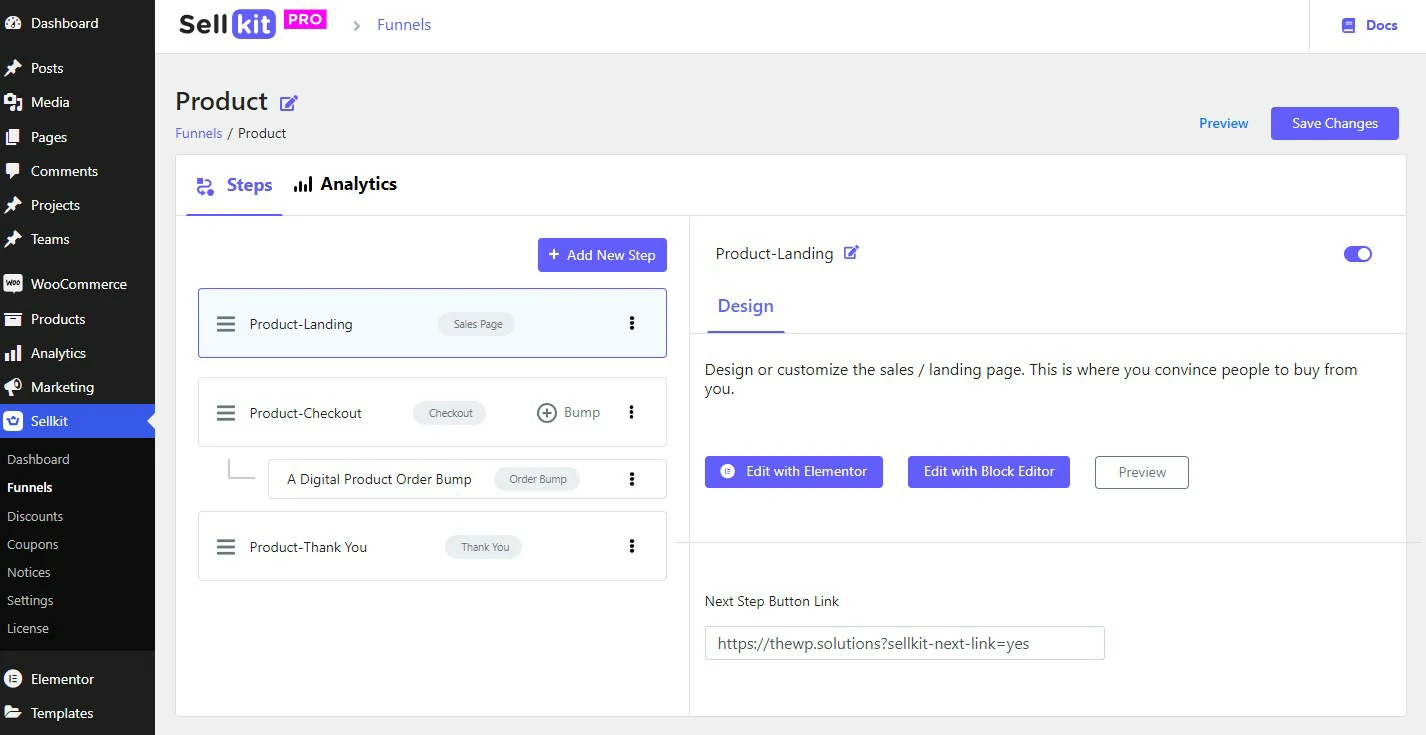
You build a funnel by adding steps in order — sales page, checkout page, upsell page, thank-you page — and each step gets its own editable template. Reordering is drag-and-drop.
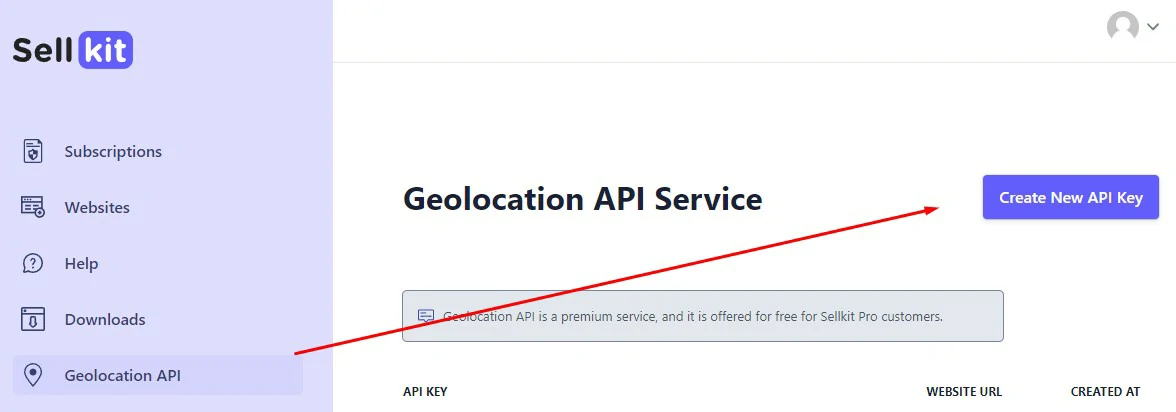
Do the settings work before you build anything. Under SellKit > Settings, connect Facebook Pixel and Google Analytics, and add a geolocation API key — without that key, address autocomplete simply will not fire, which is a common first-day complaint. You can generate the key free from your SellKit account dashboard.
Once the funnel is live, add the order bump to the checkout step and give it a week before you judge anything. Funnel analytics only becomes useful once you have enough sessions to see a pattern.
What we did not like about SellKit
No plugin that touches checkout is risk-free, and SellKit has four rough edges worth knowing before you install it on a live store.
- Elementor gravity. The block editor works, but the templates, the tutorials and the smoothest path all assume Elementor. On a block theme you will do more manual styling than the marketing suggests.
- Post-purchase upsells depend on your gateway. If your gateway does not support charging a saved payment method after the initial order, the headline upsell feature is dead on arrival. Verify before buying.
- Theme and plugin conflicts. Replacing the WooCommerce checkout template is intrusive. Heavily customised themes, multi-currency plugins and subscription extensions are the usual sources of friction — test on staging, never on live.
- Analytics are shallow. You get per-funnel visits, orders, revenue and AOV, but no built-in split testing. To know whether a change actually helped, you will need an external testing tool.
Support is also tiered: free users get community forums only, so budget for a paid plan if you expect hand-holding during setup.
Frequently Asked Questions
Is SellKit worth the money for a small store?
Only if you already have traffic. SellKit improves the conversion rate of visitors you already get; it does not bring new ones. With a handful of sessions a day, spend on traffic first.
Does SellKit have a free plan?
Yes. The free version includes unlimited funnels, order bumps, upsells and downsells, and templates. Checkout field customisation, deeper analytics, segmentation and direct support are paid-only. It is enough to test compatibility with your theme and gateway.
SellKit vs FunnelKit: which should I pick?
Pick FunnelKit if you want funnels plus built-in email automation in one plugin. Pick SellKit if checkout optimisation is the priority and you want something lighter to configure. Both cover order bumps and one-click upsells.
Do I need Elementor to use SellKit?
Not strictly. It works with the block editor, but the template library and most documentation assume Elementor, so expect more manual design work without it.
Can I cancel SellKit and get a refund?
Paid plans can be cancelled at any time, and SellKit’s official refund policy allows a refund request within 30 days of placing your order. That window covers first purchases only, not upgrades or renewals, so read the refund policy page on getsellkit.com before you buy.
Will SellKit break my existing WooCommerce checkout?
It can, because it replaces the default checkout template. Usual conflict sources are customised themes, subscription extensions and multi-currency plugins. Install on staging and place a full test order before going live.
Is SellKit suitable for beginners?
Reasonably. Building a funnel from a template is straightforward. What trips people up is settings: the geolocation API key for address autocomplete, and checking the gateway supports post-purchase upsells.
Verdict: should you buy SellKit?
Buy it if you run a WooCommerce store with a focused catalogue, you already build in Elementor, and your checkout is the obvious weak point. That combination is where SellKit earns back its licence fastest.
Consider FunnelKit instead if you also want abandoned-cart and post-purchase email automation in the same tool. Consider CheckoutWC if funnels are not your problem and you only want a better checkout. Skip all of it if your store gets very little traffic — a smoother checkout cannot convert visitors you do not have yet.
One warning before you install: SellKit overrides the WooCommerce checkout template, and that is exactly the page you cannot afford to break. Test on a staging copy with your real theme, gateway and any subscription or multi-currency plugins running, and place a test order end to end.
Next step: install the free version, build one funnel for your best-selling product, and confirm the post-purchase upsell actually charges through your gateway. If it does, upgrading is an easy decision. If it does not, you have saved yourself the money.
The Review
SellKit
A strong WooCommerce checkout optimiser with a competent funnel builder attached. Best for Elementor-based stores with a focused catalogue. Weakest on built-in testing and analytics depth.
PROS
- Checkout optimisation is genuinely good: skip cart, address autocomplete, inline validation, early email capture
- Bundles jobs that would otherwise need four or five separate plugins
- Free tier is usable enough to test compatibility before paying
- One-click order bumps and post-purchase upsells with no re-entry of card details
CONS
- Leans heavily on Elementor; block-theme users do more manual work
- Post-purchase upsells depend on your payment gateway supporting them
- No built-in split testing, so you cannot prove a change helped
- Replaces the WooCommerce checkout template, so theme and extension conflicts are a real risk




