

You have an app idea that will not go away. Then you price a developer, or count the months it takes to learn Flutter properly, and the idea quietly dies in a notes app.
Andromo is a no-code app builder aimed squarely at that gap. Point it at your blog, your YouTube channel or your Shopify store, and it produces a real Android and iOS app you can submit to both stores.
The question is what kind of app it can actually build, and whether the subscription pays for itself. Our roundup of the best app builders has the wider field. This is the close look at Andromo.
Our verdict in 30 seconds
Andromo is very good at one job: turning content you already have into a working mobile app in an afternoon. Feed cards for WordPress, YouTube, RSS and podcasts do most of the work, monetisation is built in rather than bolted on, and the Flutter output performs better than the web wrappers some rivals ship.
The limits are just as clear. Design freedom stops at the component set, there is no custom database or user account system, and there is no free tier, so you are paying from day one for something you may abandon in a month.
Best for: bloggers, podcasters, course creators, local businesses and Shopify sellers who want a branded mobile presence without a developer.
Not ideal for: marketplaces, social apps, anything needing user logins and a real database, or a designer with a specific interface in mind. Full score with pros and cons is in the review box below.
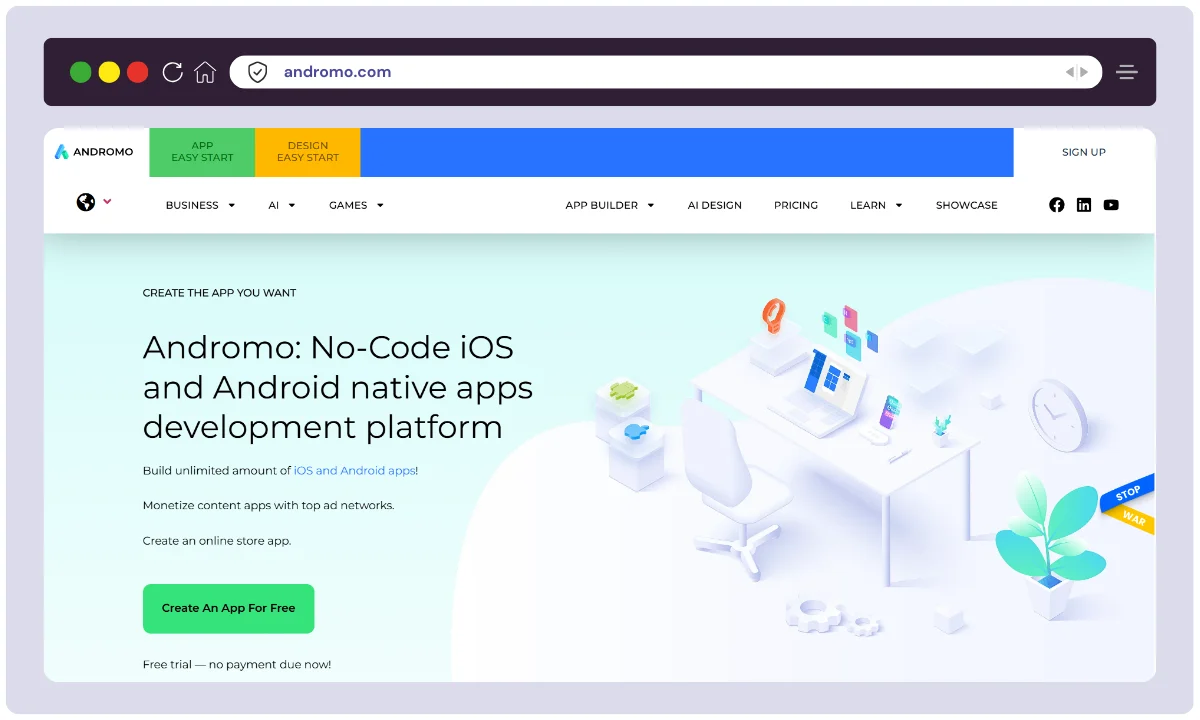
Andromo at a glance
- Product
- Andromo no-code app builder
- Official Website
- andromo.com
- Category
- No-code mobile app platform, Flutter based
- Starting Price
- About $24/mo on annual billing (Hobbyist) (checked July 2026)
- Free Plan
- No trial period advertised, no permanent free tier
- Standout Features
- Card-based visual builder, 30+ components, AdMob and paid-access monetisation, push notifications, cloud build to AAB and IPA
- Integrations
- WordPress, RSS, YouTube, Shopify, WooCommerce, AdMob, Firebase, Zendesk
- Output
- Android and iOS from one project, built in the cloud
- Best For
- Bloggers, podcasters, course creators, small businesses, Shopify sellers
- Support
- Email support, knowledge base, community forum
- Refunds
- No stated money-back guarantee. Use the trial before you commit
- Alternatives
- Appy Pie, Adalo, Glide, BuildFire, AppMySite
We may earn a commission when you buy through links on this page. This does not affect our reviews.
What Andromo does well
Andromo launched in 2011 as a way for non-programmers to make Android apps and rebuilt itself on Google Flutter, which is why one project now produces builds for both stores. If you want the broader argument about building visually versus by hand, our Webflow versus traditional HTML and CSS piece covers the same trade-off on the web side.
A builder that gets out of the way
Screens are cards. You add a gallery, a custom page, a form or a feed, arrange them, and that is the app. There is no timeline, no logic canvas and no database schema to design. That restraint is why a first-time user can map out a whole app in half an hour, and it is also why the ceiling arrives quickly.
Components that do the boring work
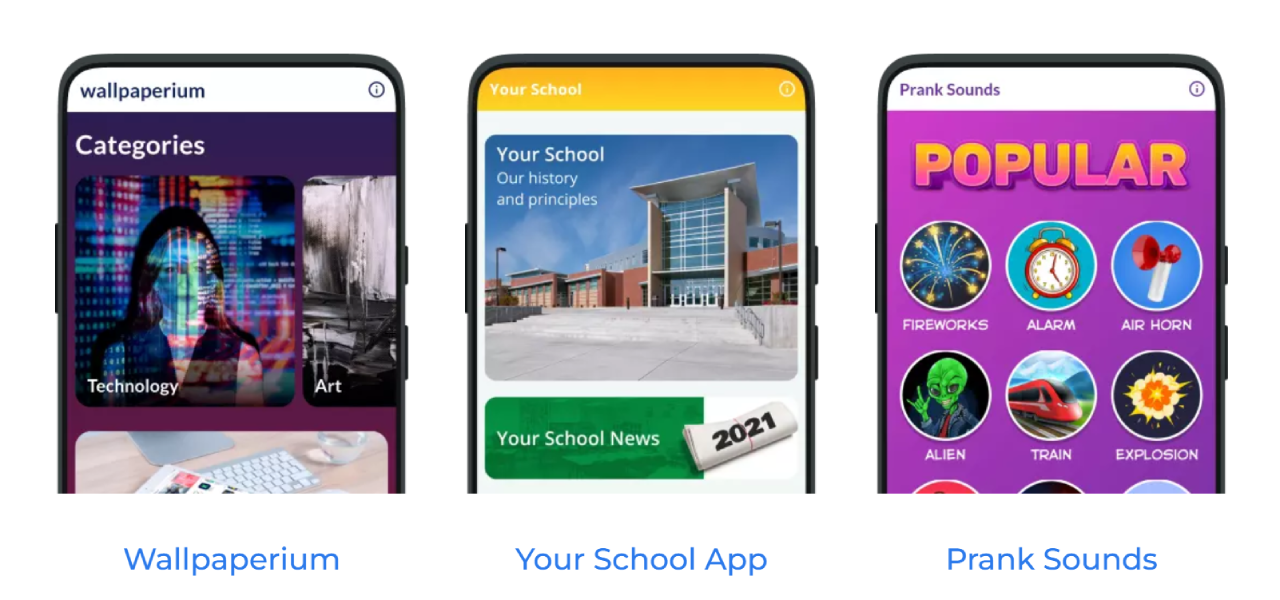
More than thirty prebuilt components cover the things content people actually need: a WordPress feed card, a YouTube list, an audio player for podcasts, PDF viewers, maps, contact forms. Each one is configured rather than coded, which is the whole point.
Monetisation is built in, not bolted on
AdMob banners and interstitials plug straight in, and Paid Access puts a wall in front of premium sections without any payment plumbing on your side. Most no-code builders leave you to solve this yourself, and it is genuinely the strongest reason to choose Andromo over Adalo or Glide. If revenue is the goal, pair it with the tactics in our guide on how to monetise your blog.
One warning worth stating plainly: interstitials on every screen change will earn you one-star reviews faster than they earn you money.
Push notifications you will actually use
Title, message, send. For a publisher or a local business this is the single feature that justifies having an app at all, because it is the only channel you own that lands on someone home screen.
Store integrations for Shopify and WooCommerce
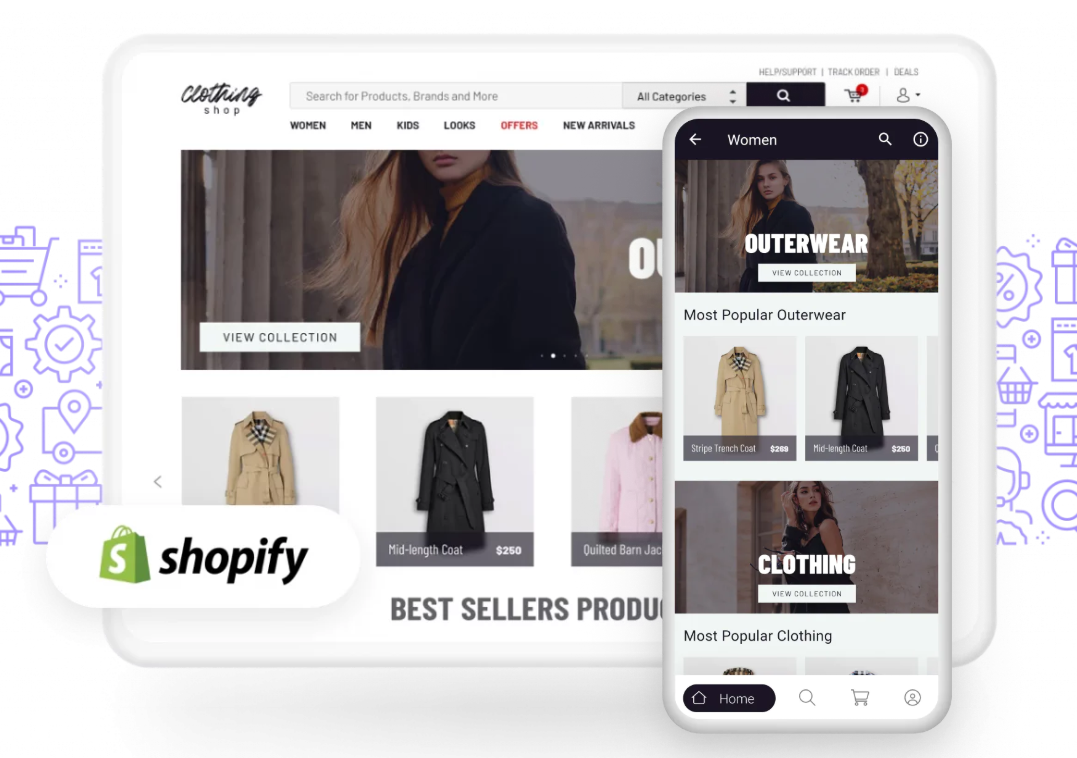
Connect a store and the catalogue cards pull products, images and prices into the app. It is a companion storefront rather than a full commerce platform, which suits an existing shop looking for a second channel and suits nobody starting from scratch.
Analytics and a genuinely automated build
Firebase connects under Services and gives you sessions, screens and retention. Compilation happens in Andromo cloud and hands back an AAB for Google Play and an IPA for the App Store. You never touch Android Studio or Xcode, which for the target audience is the difference between shipping and not.
Building an app in Andromo, step by step
The build itself is the easy part. Store approval is where the work is.
-
Step 1 of 11
Pick a template with Easy Start
Andromo opens with a set of starting points rather than a blank project. Choose the one closest to what you are making. Changing later is fiddly.

-
Step 2 of 11
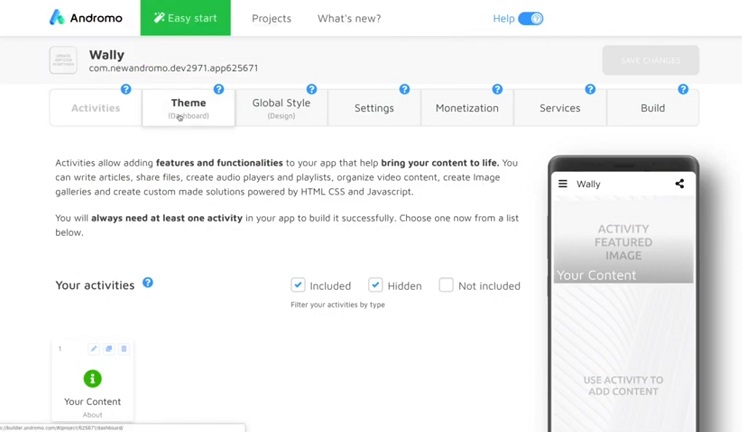
Set up the app in the dashboard
Name, icon, package name and the basic structure. Get the package name right now, because you cannot change it once the app is live on a store.
-
Step 3 of 11
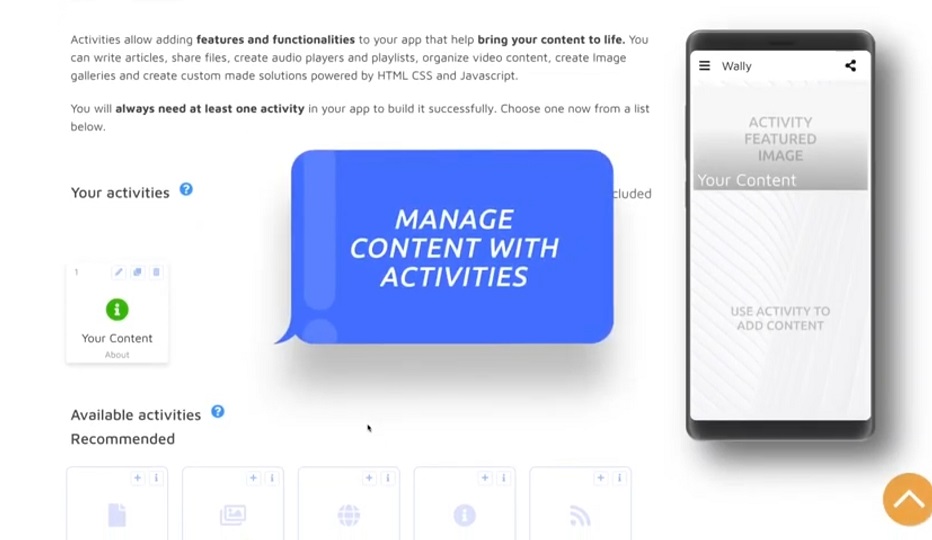
Add content with activities
Each screen is an activity: a WordPress feed, a YouTube list, an audio player, a custom page, a map, a form. This is where the app takes shape and where most of your time goes.
-
Step 4 of 11
Apply your theme
Colours, fonts, navigation style and dark mode. Match your brand here so the app does not look like a template, because it will if you skip this.
-
Step 5 of 11
Tidy the layout with the appearance tools
Reorder screens, adjust cards and preview on a phone frame. Five minutes here saves a rebuild later.
-
Step 6 of 11
Work through Settings before you build
Permissions, orientation, splash screen and store metadata. Missing entries here are the most common reason a first build gets bounced.
-
Step 7 of 11
Wire up monetisation
Connect AdMob for banners and interstitials, or switch on paid access for premium sections. Put interstitials on a natural break, not on every tap, unless you want one-star reviews.
-
Step 8 of 11
Connect analytics
Firebase under Services gives you sessions, screen views and retention. Without it you are guessing about what people actually open.
-
Step 9 of 11
Save and test
Install the build on a real handset before submitting. Emulators hide the small layout problems that reviewers notice immediately.
-
Step 10 of 11
Build in the cloud
Andromo compiles the project on its servers and produces store-ready files. Expect minutes rather than hours, and expect to rebuild a few times.
-
Step 11 of 11
Download and submit
You get an AAB for Google Play and an IPA for the App Store. Submission, review and any rejections are between you and the stores. Andromo does not handle that part.



What Andromo costs
There is no free plan, and that shapes the decision. You are committing money before you know whether the idea works.
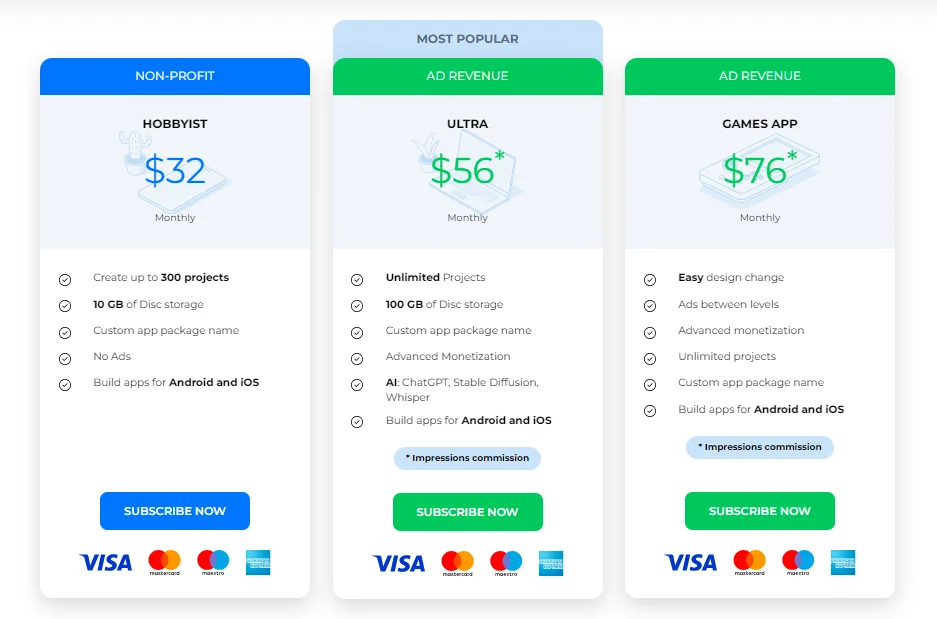
Andromo pricing
- Included: Android and iOS builds
- Included: 10 GB storage
- Included: Custom package name, no Andromo ads
- Not included: Advanced monetisation and AI tools
- Included: Unlimited projects
- Included: 100 GB storage
- Included: Advanced monetisation
- Not included: Game-specific ad placements
- Included: Everything in Ultra
- Included: Ads between levels
- Included: Impressions commission model
- Not included: Suitable for complex 3D games
- Included: Store catalogue sync
- Included: Push notifications and in-app chat
- Included: Assigned account manager
- Not included: Cheapest way in
Figures are the per-month equivalent on annual billing, checked July 2026 on andromo.com. Paying monthly costs roughly a third more on every tier. Andromo also runs specialised plans for services, WooCommerce, Shopify and resellers.
We may earn a commission when you buy through links on this page. This does not affect our reviews.
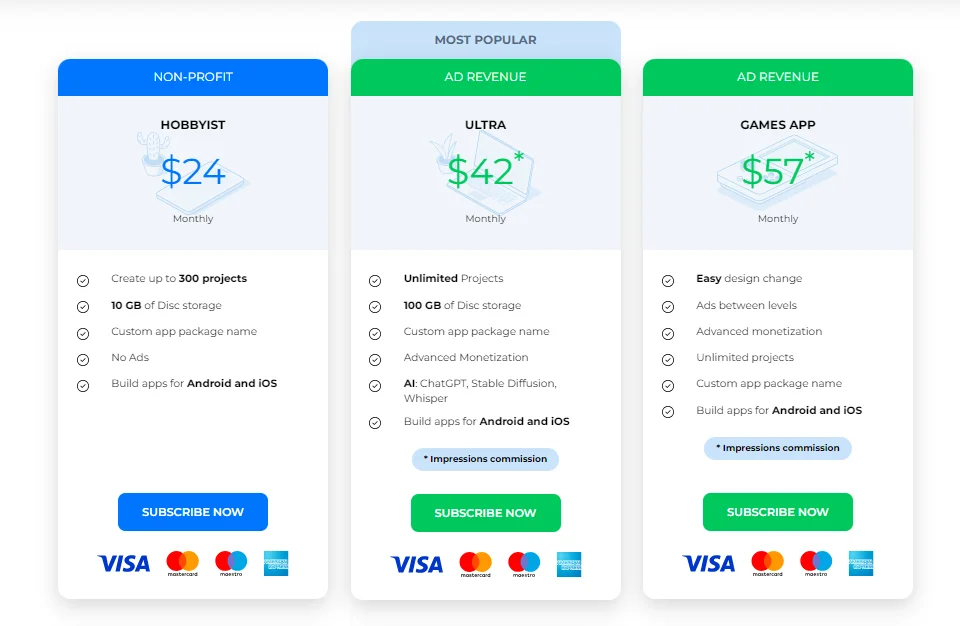
Two things to weigh. Annual billing cuts roughly a third off every tier, which is a real saving and a real commitment. And the subscription is ongoing: stop paying and you keep the app that is already live but lose the ability to rebuild or update it. Price twelve months, not one.
Where Andromo falls short
Design hits a ceiling fast. You get colours, fonts, icons and layout choices inside the component set. You do not get a custom interface. Apps built this way look like apps built this way.
No database, no user accounts. Anything involving profiles, user-generated content or a marketplace is out of scope. That is not a bug, it is the product boundary, and Adalo exists for exactly this reason.
Not for real games. The Games plan handles simple casual shells with ads between levels. A proper game needs a game engine.
Store approval is still your problem. Both Apple and Google reject apps that are thin wrappers with no added value. Andromo hands you the file and wishes you luck.
No free tier and no stated refund policy. Compare that with a free builder like the one in our Sketchware review before you subscribe.
Andromo vs the alternatives
The no-code app market splits by what you are building rather than by price. Pick the wrong category and no amount of budget helps. If you are weighing full web-app platforms instead, our Webflow versus Bubble comparison covers that end.
| Feature |
Appy PieBest for: Small business templates |
AdaloBest for: Custom databases and multi-user apps |
GlideBest for: Internal tools from a spreadsheet |
|
|---|---|---|---|---|
| Native builds for iOS and Android | Yes(winner for this row) | Yes | Yes | No |
| Usable free tier | No | Yes | Yes | Yes |
| Built-in ad monetisation | Yes(winner for this row) | Yes | No | No |
| Custom database and user accounts | No | No | Yes(winner for this row) | Yes |
| Design freedom | Limited to components | Limited | High(winner for this row) | Medium |
| Learning curve | Easy | Easy | Moderate | Easy |
We may earn a commission when you buy through links on this page. This does not affect our reviews.
Our read: Andromo if your app is content plus monetisation. Adalo if it needs accounts and a database. Glide if you want an internal tool from a spreadsheet by lunchtime. Appy Pie if you want the widest set of prebuilt business templates and do not mind the compromises.
Who gets real value out of Andromo
Publishers with an existing audience. Feed cards plus push notifications turn a blog or channel into something people keep on a home screen. Without an audience already, an app changes nothing.
Course and tutorial creators. Text pages, video, PDFs and a paid access wall cover a small course product without a learning platform subscription.
Local businesses. Services, hours, a map, a booking form and notifications for offers. A restaurant or a gym gets more from this than from another social account.
Shopify and WooCommerce sellers. A companion app is a second channel with a notification button attached. That is the whole business case, and for some stores it is enough.
If your idea needs logins, user profiles or anything a database would store, stop here and look at Adalo or Bubble instead. Andromo will waste your month.
Frequently Asked Questions
What does Andromo cost?
On annual billing the headline tiers work out at roughly 24 dollars a month for Hobbyist, 42 for Ultra and 57 for the Games plan. Paying monthly pushes those to about 32, 56 and 76. Store and service specific plans start near 57. Checked July 2026.
Do I need to know how to code?
No. The whole builder is visual. You add cards for a blog feed, a video list, a map or a form, style them, and Andromo compiles the project. Publishing to the stores is the part that needs patience, not the building.
What kind of apps is Andromo actually good for?
Content apps. Blog and podcast hubs, course and tutorial apps, event guides, small business info apps and Shopify or WooCommerce companion storefronts. It is not the tool for a social network, a marketplace with user accounts, or a real game.
Does Andromo build genuinely native apps?
It builds on Flutter and outputs an AAB for Google Play and an IPA for the App Store, so the result performs better than a web wrapper. It is still a generated app with the design limits that implies.
Can I make money from an Andromo app?
Yes, through AdMob banners and interstitials, a paid access wall on premium sections, or by driving store sales. Whether it earns anything depends entirely on how many people install it, which Andromo cannot help with.
Is there a free trial?
Andromo advertises a trial period on its pricing page, with a longer window on some tiers for advanced monetisation features. Terms have changed over the years, so confirm what you get at signup rather than trusting any review.
Will Apple and Google approve an Andromo app?
Both stores reject apps that are thin wrappers around a website with no added value. A content app with real functionality usually passes. A repackaged blog with a banner ad usually does not. Plan features accordingly.
How much design freedom do I get?
Enough to match your brand colours, fonts, icon and layout choices within the component set. Not enough to build a bespoke interface. If you have a specific design in mind, this is where you will hit the ceiling.
What happens to my app if I stop paying?
Builds and platform services depend on an active subscription, so an app already published to a store keeps running but you lose the ability to rebuild or update it. Treat the subscription as ongoing cost, not a one-off.
The bottom line
Andromo is a narrow tool that is honest about what it is. For a creator or small business with content already in hand, it turns a months-long project into an afternoon, and the built-in monetisation means the app has a route to paying for itself.
For anything that needs custom design or a real backend, it is the wrong purchase and no plan tier fixes that. Work out which side of that line your idea sits on before you subscribe. If it is a content app, this is one of the better no-code app builders you can buy. If it is not, save your money.
This review is based on Andromo official documentation, its published pricing checked in July 2026, and product screenshots. We have not shipped an Andromo-built app to the Play Store or App Store ourselves, so treat the store submission notes as general platform guidance rather than our own approval experience. Some links on this page are affiliate links.
The Review
Andromo
Andromo turns content you already have into a real Android and iOS app without code, and the built-in AdMob and paid-access monetisation is better than most no-code rivals offer. The trade-off is a hard ceiling: no custom database, no user accounts and limited design freedom. Excellent for publishers and small businesses, wrong for anything that needs a backend.
PROS
- Genuinely no-code, a first app takes an afternoon
- Flutter output means one project builds for Android and iOS
- AdMob and paid-access monetisation built in
- Strong content components for WordPress, YouTube, RSS and podcasts
- Shopify and WooCommerce catalogue sync
CONS
- Design freedom stops at the component set
- No custom database, user accounts or marketplace features
- No free plan and no stated refund policy
- Store approval and rejections are entirely your problem
- Stop paying and you lose the ability to rebuild or update




