

You spin up ten fresh social accounts for a client, log in from a clean datacenter proxy, and within a day half of them are locked with a “suspicious activity” flag. Swap to a mobile proxy and the same accounts hum along untouched. That gap — between an IP that screams “bot” and one that looks like a phone on the train — is the entire reason mobile proxies exist, and why they cost what they cost.
A mobile proxy routes your traffic through a real device on a cellular network, so websites see a carrier IP — the same kind of address millions of everyday phone users share. To an anti-bot system, that’s about the most trustworthy visitor there is. The catch? They’re the priciest proxies on the market, and plenty of people pay for that premium when a cheaper option would’ve done the job.
We’ve run mobile, residential, and datacenter proxies across our own scraping, SEO, and account-management projects, so this isn’t a spec sheet — it’s when mobile proxies are genuinely worth it, when they’re overkill, and what you’ll actually pay. Let’s skip the fluff and get to it.
Quick verdict: Mobile proxies are the most trusted (and most expensive) proxy type — unbeatable for managing social accounts, ad verification, and hammering sites with aggressive anti-bot walls. For general scraping or price monitoring, cheaper residential proxies usually do the same job for less. Pay the mobile premium only when trust is the thing you’re actually buying.
What is a mobile proxy?
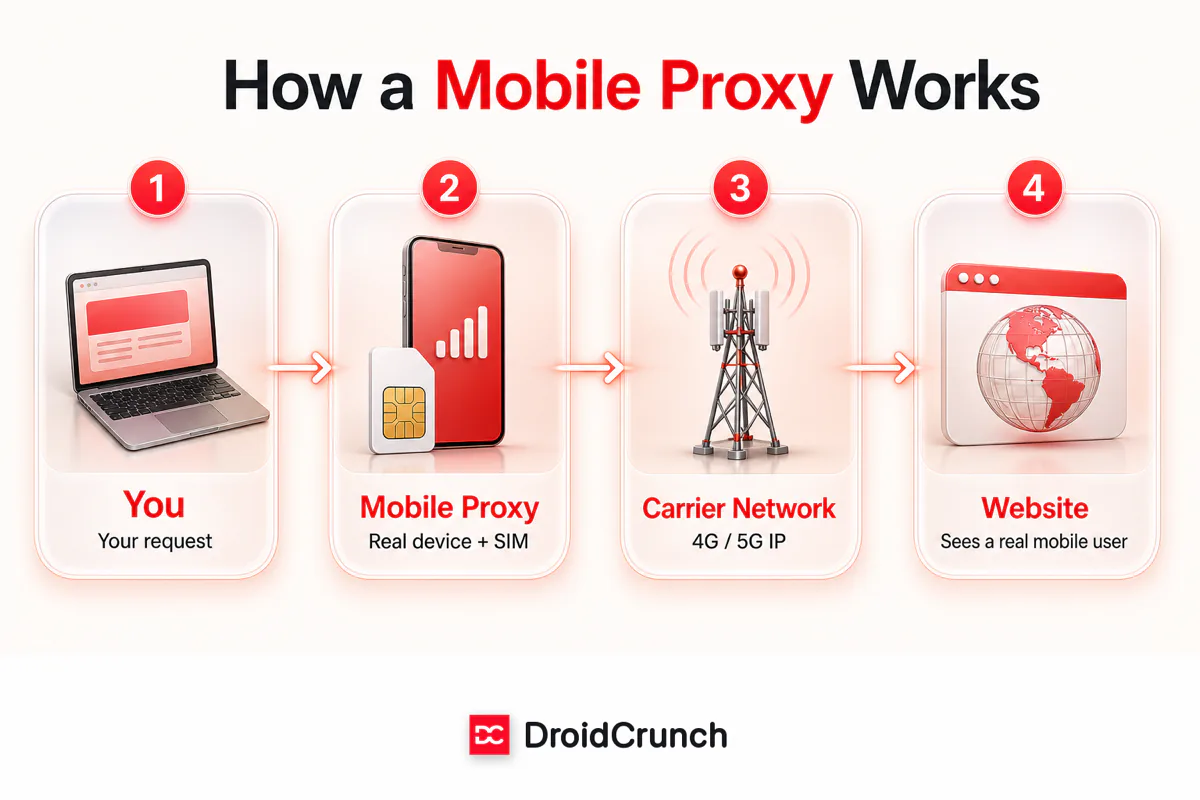
A mobile proxy routes your internet traffic through a real mobile device connected to a cellular network — 4G, LTE, or 5G — using an actual SIM card from a carrier like Verizon, Vodafone, Airtel, or Jio. Instead of your request arriving with a datacenter or home-broadband IP, it shows up wearing a mobile carrier’s address, exactly like a person scrolling on their phone.
The path looks like this: your request hits the mobile proxy, the proxy sends it out over its cellular connection, and the target site sees the carrier’s IP — never yours. Because the whole thing rides a genuine mobile network, it behaves like one too: the IP changes on its own, latency wobbles like a real connection, and everything about the fingerprint says “human on a phone.”
Why mobile IPs are almost never blocked
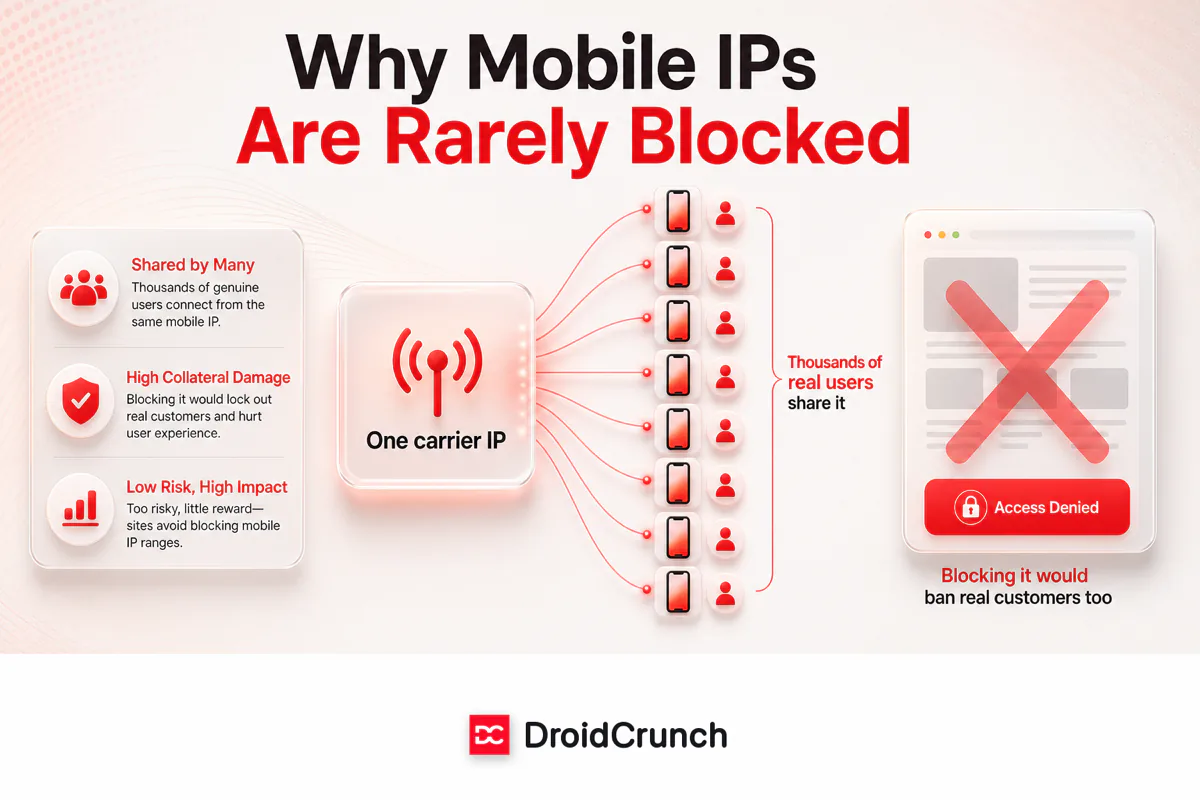
Here’s the single idea that makes mobile proxies special, and it’s worth understanding before you spend a cent. Mobile carriers don’t hand every phone its own public IP. They use carrier-grade NAT (CGNAT), which crams thousands of real subscribers behind a small pool of shared IP addresses. The phone in your pocket right now is almost certainly sharing its public IP with a crowd of strangers.
That’s the whole trick. If a website blocks a mobile IP to stop one bot, it also blocks the hundreds of genuine customers sharing that address — a support nightmare no site wants. So anti-bot systems treat mobile IPs with kid gloves. It’s the opposite of a datacenter IP, which belongs to one server and can be banned with zero collateral damage.
Mobile vs residential vs datacenter proxies
Mobile proxies only make sense once you see them next to the alternatives. All three hide your real IP; they differ in where that replacement IP comes from — and that source decides trust, speed, and price. Here’s the honest breakdown:
| Mobile | Residential | Datacenter | |
|---|---|---|---|
| IP source | Cellular carrier (4G/5G) | Home broadband ISP | Cloud server |
| Trust level | Highest — rarely blocked | High | Low — easily flagged |
| Speed | Good, can fluctuate | Good | Fastest |
| Cost | Highest ($$$) | Mid ($$) | Cheapest ($) |
| IP rotation | Built in (carrier + CGNAT) | Provider-managed | Static or provider-managed |
| Best for | Social accounts, ad verification, hard targets | General scraping, price monitoring | Speed-first, easy targets |

Our take: mobile isn’t “better” than residential across the board — it’s more trusted, which only matters on targets that fight back hard. For a plain price-monitoring scrape, paying mobile rates is like renting a Ferrari for the school run. Want the deeper residential picture first? See our ISP vs residential proxies guide.
What mobile proxies are actually good at
Skip the “20 use cases” lists — most are filler. Here’s where mobile proxies genuinely earn their premium, from our own use and what consistently works:
- Managing multiple social accounts. This is the flagship use. Instagram, TikTok, Facebook, and X watch login IPs closely, and a mobile IP is the most natural-looking way to run several accounts without tripping their defenses. It’s why agencies rely on proxies for social media management.
- Ad verification. To check that mobile ads render correctly and aren’t being hijacked, you need to see the web exactly as a phone user does — carrier IP included. Datacenter proxies get served a different (or cleaner) experience.
- Beating aggressive anti-bot walls. Ticketing sites, sneaker drops, and some marketplaces block datacenter and even residential IPs on sight. Mobile is often the only tier that gets through.
- Mobile-specific SEO and app testing. Checking how search results, prices, or an app behave for real mobile users in a given region — where a genuine carrier IP changes what you’re served.
Not ideal for: high-volume, bandwidth-heavy scraping of easy targets. Mobile data is metered and pricey, so blasting gigabytes through it burns money fast — that’s residential or datacenter territory.
How mobile proxy pricing actually works
Mobile proxy pricing confuses people because there’s no single model. You’ll meet three, and the right one depends entirely on how you use bandwidth:
- Bandwidth-based (per GB). You buy data — say 10, 50, or 100 GB. Simple and fair for light or predictable use, brutal if you scrape heavy. Expect a clear premium over residential per-GB rates.
- Dedicated port (per month). You rent a whole mobile IP/port for a flat monthly fee with unlimited bandwidth. Often runs from tens to a few hundred dollars per port depending on carrier and country. This is the winner for social media management and any heavy, ongoing job — the math flips in your favor fast.
- Pay-as-you-go. Buy resources only as needed. Best for occasional, bursty work where a monthly commitment would sit idle.
Real-world tip: if you’re managing accounts or running anything continuous, price out a dedicated port before a per-GB plan. Per-GB looks cheap until a busy month quietly triples your bill; an unlimited port makes the cost predictable.
Prices swing with the details: rare geographic locations cost more, 5G plans out-price 4G, dedicated beats shared, and premium carriers charge extra. Whatever you’re quoted, check the provider’s current pricing page — proxy rates move constantly, so treat any number you read (including ours) as a ballpark, not gospel.
4G vs 5G, dedicated vs shared: does it matter?
Two quick decisions trip people up. On 4G vs 5G: 4G is the widely available default and it’s plenty for almost everything — account management, verification, scraping. 5G buys lower latency and higher speed, which only pays off if you’re moving large volumes fast; otherwise you’re paying for headroom you won’t touch.
On dedicated vs shared: a dedicated mobile proxy is yours alone — stable, predictable, and the right call for anything business-critical or account-related (you don’t want a stranger’s behavior on your IP getting it flagged). Shared proxies split the cost and the IP across users, which is fine for casual, low-stakes tasks but riskier for sensitive work.
The catch: where mobile proxies fall short
We’re not here to sell you the most expensive option by default. Mobile proxies have real downsides:
- They’re expensive. Comfortably the priciest proxy type — often several times the cost of residential for the same bandwidth.
- Speed can wobble. Cellular networks get congested; you trade some consistency for that trusted IP.
- Bandwidth adds up fast. Metered mobile data makes big scraping jobs painful on the wallet.
- Overkill for easy targets. If a site isn’t actively fighting you, you’re paying for trust you don’t need.
Common mistake: buying mobile proxies “to be safe” for a job residential would handle at a third of the price. Match the proxy to how hard the target fights back — not to the biggest number on the pricing page.
How we look at it
Across our projects, mobile proxies pull their weight in exactly one situation: when the target’s trust check is the thing standing between you and the data — social platforms, ad checks, the sites that slam the door on everything else. For those, nothing else comes close, and the premium is money well spent. For everything else, we reach for residential first and only step up to mobile if the blocks start. Some links here are affiliate links — if you buy through them we may earn a commission at no extra cost to you, and it never changes our verdict.
Frequently asked questions
Are mobile proxies better than residential proxies?
Not universally — they are more trusted, not automatically better. Mobile IPs are the hardest to block, which matters on tough targets like social platforms and ticketing sites. For general scraping or price monitoring, cheaper residential proxies usually do the same job. Match the proxy to how hard the target fights back.
Why are mobile proxies so expensive?
Because providers run real mobile devices, SIM cards, and cellular data plans, and carrier bandwidth is metered and costly. You are also paying for the trust premium: carrier IPs are the least likely to get blocked, and that reliability commands a higher price than datacenter or residential.
Do mobile proxies rotate IP addresses automatically?
Often, yes. Cellular networks naturally reassign IPs, and most providers add scheduled rotation on top. You can usually rotate on a timer or per request for scraping, or hold a sticky session when you need one consistent IP, such as staying logged into an account.
Are 5G mobile proxies worth it?
Only if you move large volumes of data quickly. 5G adds speed and lower latency but costs more, and 4G is already plenty for account management, ad verification, and most scraping. Pay for 5G when throughput is the bottleneck, not by default.
Can mobile proxies prevent social media account bans?
They dramatically lower the risk but do not guarantee it. A mobile IP makes your logins look like normal phone activity, which is why agencies use them to run multiple accounts. Bans also depend on behavior, so pair a dedicated mobile proxy with sensible, human-like activity.
Dedicated or shared mobile proxy – which should I choose?
Choose dedicated for anything business-critical or account-related, so no one else’s behavior can get your IP flagged. Shared proxies are cheaper and fine for casual, low-stakes tasks, but you give up stability and control. For social media management, dedicated is worth it.
How much do mobile proxies cost?
It depends on the model. Bandwidth plans charge per GB at a clear premium over residential, while dedicated ports charge a flat monthly fee — often tens to a few hundred dollars — for unlimited data. Prices shift with carrier, country, and 4G versus 5G, so always check the provider’s current pricing page.
The bottom line
Mobile proxies are the trust kings of the proxy world — carrier IPs shared by thousands of real phones that anti-bot systems don’t dare block. That makes them the best tool on the market for managing social accounts, verifying ads, and cracking the hardest targets. It also makes them the most expensive, which is exactly why they’re not the default answer.
So choose by the job, not the price tag: mobile when trust is what you’re buying, residential for most general scraping, datacenter when speed and cost beat stealth. Start on a small plan or a single port, test it against your real target, and scale only once it proves out — that’s how we do it, and it has saved us from plenty of expensive mistakes. Next, compare paid options in our guide to the best residential proxy providers, or browse all our proxy guides.




