
Choosing the right video and audio editing platform can make or break your content creation workflow. With the video editing software market expected to reach $5.13 billion by 2032 and over 200 million content creators worldwide, finding a tool that balances power, simplicity, and collaboration has never been more critical.
I’ve spent considerable time testing both Descript and Riverside to understand how they stack up against each other. According to recent industry data, subscription-based video editing tools now account for over 60% of the market, with AI-powered features saving professionals up to 200 hours annually. Both platforms have carved unique niches: Descript revolutionized editing with its text-based approach, while Riverside built its reputation on studio-quality remote recording.
The challenge most creators face is deciding between a platform focused on post-production magic (Descript) versus one designed for capturing pristine recordings (Riverside). After testing both extensively, I found that each platform excels in different scenarios. Whether you’re a podcaster, video creator, marketing team, or enterprise, understanding these differences will save you time, money, and frustration.
In this comprehensive comparison, I’ll walk you through everything from features and pricing to real-world use cases, helping you make an informed decision based on your specific content creation needs.
Descript vs Riverside Overview
Descript: The Text-Based Editing Pioneer

Descript was founded in 2017 by Andrew Mason, the former Groupon CEO who wanted to create a fundamentally different approach to video editing. Headquartered in San Francisco, California, the company has grown to approximately 123-188 employees and raised over $104 million in funding from prominent investors including OpenAI, Andreessen Horowitz, and Redpoint Ventures.
The company’s core philosophy centers on making video editing as simple as editing a document. With over 6 million creators and teams using the platform, Descript has attracted major clients including NPR, VICE, The Washington Post, and The New York Times. The platform’s signature feature—editing video by editing text—has fundamentally changed how many creators approach post-production.
Riverside: Studio-Quality Remote Recording

Riverside.fm was founded in 2019 by brothers Nadav Keyson, Gideon Keyson, and Jonathan Keyson. Based in Tel Aviv, Israel, the company has grown to approximately 70-266 employees and raised $80 million across four funding rounds, with backing from Alexis Ohanian (Reddit founder) and Zeev Ventures.
Riverside built its reputation on solving a critical problem: recording studio-quality audio and video remotely, regardless of internet connection quality. The platform uses local recording technology to capture up to 4K video and 48kHz audio directly on participants’ devices. Major brands including Spotify, Marvel, Mark Zuckerberg’s productions, Gary Vee, and Apple use Riverside to create their content.
| Aspect | Descript | Riverside |
|---|---|---|
| Official Website | descript.com | riverside.fm |
| Founded | 2017 | 2019 |
| Founders | Andrew Mason | Nadav Keyson, Gideon Keyson, Jonathan Keyson |
| Headquarters | San Francisco, California, USA | Tel Aviv, Israel |
| Employees | 123-188 | 70-266 |
| Total Funding | $104M | $80M |
| Primary Category | AI-Powered Video/Audio Editor | Remote Recording & Editing Platform |
| Key USP | Text-based editing with AI co-editor “Underlord” | Studio-quality local recording with up to 4K video |
| Best For | Podcasters, YouTubers, video editors needing advanced post-production | Remote interviews, podcasts, live streaming, webinars |
| Starting Price | Free (limited); Paid plans from $24/month | Free (limited); Paid plans from $24/month |
| Integrations | Slack, Zapier, Frame.io, Adobe Premiere Pro | Spotify for Podcasters, HubSpot, YouTube, Facebook, LinkedIn |
| Support Options | Live chat (Mon-Fri), Email, Help Center, Priority Support (Business+) | Email support, Help Center, Live chat |
| Documentation | Comprehensive help center, video tutorials, community forum | Help center, video tutorials, webinar series |
| AI Features | Underlord (AI co-editor), Studio Sound, Eye Contact, Remove Filler Words, Green Screen, AI Voice Cloning, AI Avatars | Magic Audio, AI Eye Contact, Auto-transcription, Magic Clips, AI Repurposing Agent |
| Transcription Languages | 25 languages | Multiple languages supported |
| Max Export Resolution | 4K (Creator+), 1080p (Hobbyist) | 4K (Pro+), 720p (Free) |
| Remote Recording | Yes (2-25 hours/month depending on plan) | Yes (2 hours on Free, 15 hours on Pro) |
| Max Participants | Up to 8 | Varies by plan |
| Alternatives | Riverside, Adobe Premiere Pro, Camtasia, SquadCast, Descript, Reduct | Descript, SquadCast, Zencastr, Zoom, Adobe Podcast |
| Affiliate Program | No public information | No public information |
| Money-Back Guarantee | Not specified; can cancel anytime | Not specified; can cancel anytime |
| Free Plan Available | ✅ Yes | ✅ Yes |
| Cloud Storage | Unlimited (all paid plans) | Varies by plan |
| Notable Clients | NPR, VICE, Washington Post, NY Times | Spotify, Marvel, Apple, Gary Vee |
Descript vs Riverside Features
After extensively using both platforms, I’ve identified the key features that differentiate each tool. Here’s my hands-on experience with what makes each platform unique.
Descript Features
🎬 Text-Based Editing
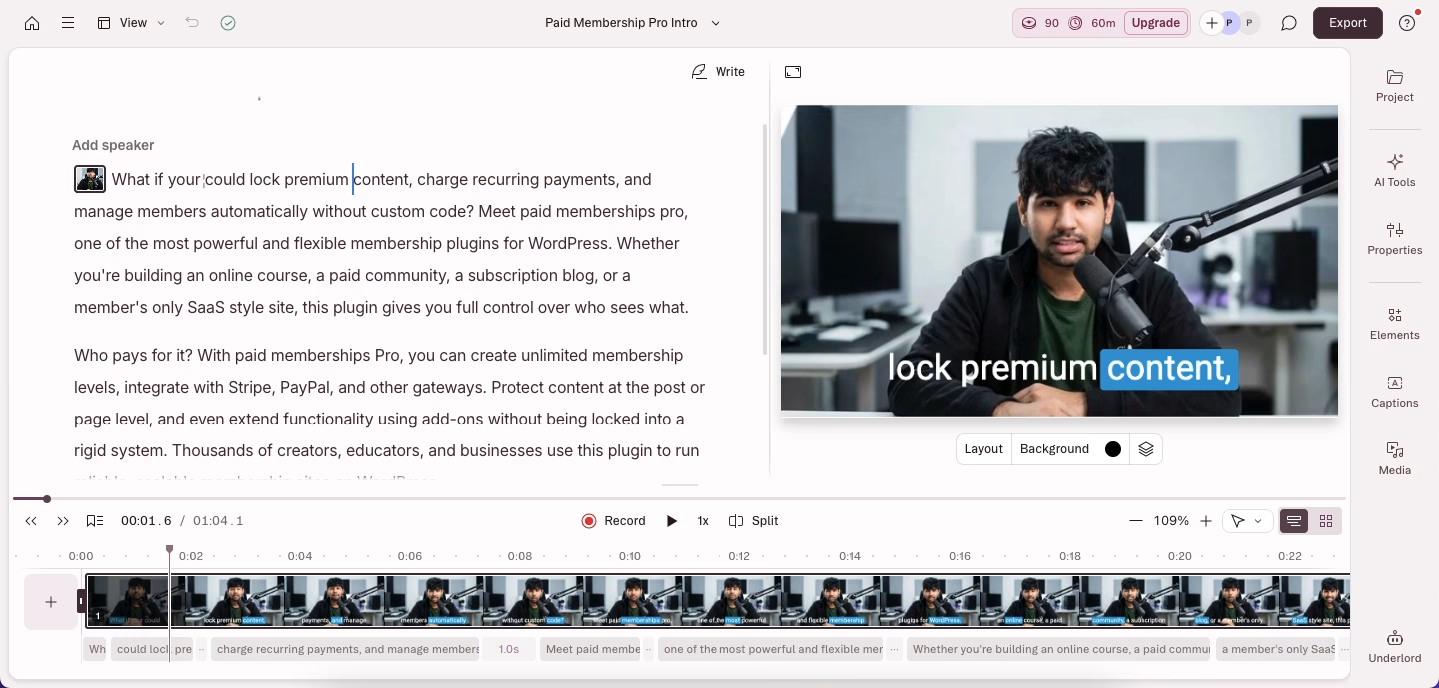
This is Descript’s signature feature and honestly, it changed how I edit videos. Instead of working with a traditional timeline, you edit your video by editing the automatically generated transcript. When I delete a word from the transcript, that exact moment disappears from the video. It feels like editing a Google Doc, except you’re actually cutting video footage.
I recorded a 30-minute podcast interview and needed to remove all the “ums” and awkward pauses. Instead of scrubbing through the timeline, I simply searched for filler words in the transcript and deleted them. What would have taken an hour in traditional editing took me about 10 minutes.
🤖 Underlord – AI Co-Editor
Underlord is Descript’s AI assistant that understands video editing commands in natural language. I can type prompts like “create a 60-second highlight reel focusing on the funniest moments” or “add captions and b-roll to this section,” and Underlord executes these edits.
During a product demo video, I asked Underlord to “make this intro more engaging with quick cuts and dynamic text.” It analyzed my footage, added jump cuts, inserted animated text overlays, and even suggested background music. While I still fine-tuned some elements, it gave me a solid foundation to work from.
🎙️ Studio Sound
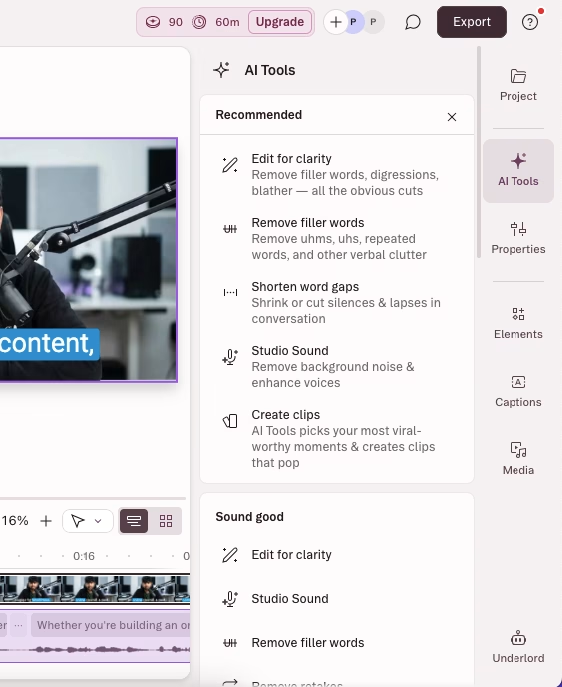
This one-click AI feature dramatically improves audio quality by removing background noise, enhancing speech clarity, and balancing volume levels. It’s like having a professional sound engineer working on every recording.
I recorded an interview in a coffee shop (not ideal, I know). The original audio had espresso machine sounds, conversations, and echo. After applying Studio Sound, the audio sounded like it was recorded in a professional studio. The AI removed the background noise while preserving the natural tone of our voices.
👁️ Eye Contact Correction

Using AI, Descript adjusts your gaze to make it appear you’re looking directly at the camera, even when you’re reading from notes or a script off to the side.
I recorded a presentation while reading my notes on a second monitor. My eyes were constantly shifting left. Eye Contact fixed this seamlessly, making the video feel more engaging and professional without reshoots.
🎭 Overdub – AI Voice Cloning
After training the AI with samples of your voice, Overdub can generate new speech in your voice from text. This is incredibly useful for fixing mistakes or adding content without re-recording.
I recorded a tutorial and realized I mispronounced a product name multiple times. Instead of re-recording the entire section, I typed the correct pronunciation, and Overdub generated it in my voice. The result was so seamless that even I couldn’t tell which parts were AI-generated.
🗣️ Remove Filler Words

Automatically detects and removes “um,” “ah,” “like,” “you know,” and other verbal tics from your audio and video.
My natural speaking includes way too many “ums.” This feature identified every single one and let me review and remove them with a single click. It saved me hours of manual editing.
🟢 AI Green Screen
Removes backgrounds from videos without needing an actual green screen. The AI accurately detects and removes backgrounds even in challenging lighting conditions.
I recorded a talking-head video in my home office with a cluttered bookshelf behind me. The AI Green Screen removed the background cleanly, letting me replace it with a professional gradient. It even handled complex elements like hair edges accurately.
📝 Automatic Transcription
Descript transcribes your recordings in 25 languages with impressive accuracy, including speaker identification and timestamps.
I uploaded a 2-hour interview, and within minutes, I had an accurate transcript with properly labeled speakers. The accuracy was around 95%, requiring minimal corrections.
🎨 Custom Voice Library & Stock Voices
Access professionally designed AI voices or create custom voices for narration and text-to-speech generation.
For an explainer video, I needed a narrator but didn’t have the budget to hire voice talent. I used Descript’s stock voices and found one that perfectly matched the tone I wanted. The AI-generated narration sounded natural and professional.
🌐 Translation & Dubbing
Translate and dub your videos into 30+ languages with AI voices that sound like native speakers, complete with proofreading capabilities.
I translated a product demo from English to Spanish. The AI not only translated the text but generated Spanish audio that matched my speaking pace and even attempted to match lip movements. It wasn’t perfect for close-ups, but for standard video, it worked remarkably well.
🎬 Create Clips
Underlord analyzes your long-form content and automatically creates short, engaging clips optimized for social media platforms.
From a 45-minute webinar, I asked Underlord to create five 30-second clips for LinkedIn. It identified the most engaging moments, added captions, reformatted to vertical video, and even suggested trending-style edits. I posted them directly with minimal adjustments.
🎞️ Multitrack Recording & Editing
Record up to 8 participants simultaneously with separate audio and video tracks for each person, giving you complete control in post-production.
During a panel discussion with four guests, having separate tracks was a lifesaver. When one guest had audio issues, I could adjust their track independently without affecting others. I could also easily cut between speakers and create dynamic layouts.
📊 Templates & Layouts
Access professionally designed templates for intros, outros, captions, and full video layouts. You can also create and share custom templates.
I created a branded template for my podcast with consistent intro animations, lower thirds, and outro cards. Now every episode maintains brand consistency, and I can apply the template in seconds rather than rebuilding each time.
☁️ Collaboration Features
Multiple team members can work on the same project simultaneously with timestamped comments, version history, and role-based permissions.
My video editor and I worked on the same project in real-time. She made cuts while I added comments with timestamps. We could see each other’s changes instantly, dramatically speeding up our review process.
Riverside Features
🎙️ Local Recording Technology
Riverside’s standout feature records video and audio locally on each participant’s device, ensuring studio quality regardless of internet speed. The recordings automatically upload in the background.
I interviewed a guest in rural Canada with spotty internet. While the video call itself was occasionally laggy, the final recordings were pristine 4K video and 48kHz audio. This local recording approach meant internet issues during the call didn’t affect the final quality at all.
🎥 Up to 4K Video Recording

Capture video in resolutions up to 4K (3840×2160) with support for multiple camera angles per participant.
For a high-end interview series, the 4K quality was indistinguishable from what we’d get with professional cameras. The clarity and detail were exceptional, giving us plenty of room to crop and zoom in post-production without losing quality.
🔊 48kHz Audio Quality
Record audio at professional broadcast standards with 48kHz sample rate, providing exceptional clarity and fidelity.
As someone who also produces music, I appreciate high-quality audio. The 48kHz recording captured nuances in voice that lower-quality platforms miss. It made a noticeable difference when applying processing and mixing.
🎬 Text-Based Editing
Similar to Descript, Riverside offers transcript-based editing where you can edit video by editing the automatically generated transcript.
After recording, I used the transcript to quickly remove awkward pauses and re-takes. The workflow was smooth, though I found Descript’s implementation slightly more refined with better keyboard shortcuts and bulk editing tools.
🪄 Magic Audio
One-click AI audio enhancement that removes background noise, echo, and reverb while balancing EQ settings for professional sound.
A guest recorded from their kitchen with a dishwasher running in the background. Magic Audio cleaned it up impressively, removing the noise while keeping their voice natural. It’s similar to Descript’s Studio Sound and worked equally well.
✨ Magic Clips
AI automatically identifies the most engaging moments from your recordings and creates short clips optimized for social media.
From a 90-minute podcast, Magic Clips identified six potential viral moments. I reviewed them, tweaked a couple, and had Instagram Reels ready in under 15 minutes. The AI was surprisingly good at identifying emotional peaks and quotable moments.
📺 Live Streaming
Stream directly to YouTube, Facebook, LinkedIn, Instagram, Twitter, and Twitch simultaneously with custom RTMP support.
I hosted a live webinar and streamed to YouTube and LinkedIn simultaneously. The setup was straightforward, and I could manage both streams from Riverside’s dashboard. The backstage feature let me hide participants before bringing them on camera, which was crucial for managing panelists.
🎓 Webinar Mode
Host professional webinars with up to 100 registrants (depending on plan), including registration forms, automated email reminders, Q&A, polls, and analytics.
I ran a product launch webinar with 75 attendees. The registration system captured leads, automated reminder emails, and the built-in Q&A feature kept engagement high. Post-webinar analytics showed watch time, engagement rates, and participant data that integrated directly with our CRM via HubSpot.
📱 Teleprompter
Built-in teleprompter feature visible only to the host, allowing you to read scripts while maintaining eye contact with the camera.
For scripted product demos, the teleprompter was invaluable. I loaded my script, adjusted the scroll speed, and delivered polished presentations without memorizing everything or looking away from the camera.
🎨 Custom Overlays & Lower Thirds
Add professional branding with custom overlays, lower thirds, and graphics during live streams and recordings.
I created branded overlays with our logo, social media handles, and guest name lower thirds. They appeared automatically during recordings, giving our content a professional broadcast feel without post-production work.
👥 Producer Mode
Add producers who can control recording start/stop and communicate with hosts/guests via push-to-talk without being recorded.
Having a producer manage the technical side while I focused on hosting was game-changing. They could communicate with me through push-to-talk (guests couldn’t hear) and handle participant issues without disrupting the recording.
🔄 Separate Audio & Video Tracks
Each participant’s audio and video are recorded on separate tracks, giving complete control in post-production.
When one guest’s audio had an issue, I could replace just their track without affecting the others. This level of control is essential for professional productions and saved multiple recordings.
💬 AI Repurposing Agent
AI analyzes your content and automatically generates social media posts, video descriptions, show notes with timestamps, and promotional content.
After a podcast episode, the AI generated LinkedIn posts, Twitter threads, episode descriptions, and even suggested Instagram caption variations. While I edited some for brand voice, it cut my content repurposing time by 70%.
📊 Transcription & Captions
Automatic transcription in multiple languages with the ability to export as SRT files or burn captions directly into videos.
The transcription accuracy was on par with Descript. I particularly liked the caption customization options—fonts, colors, positioning—that let me match my brand style.
☁️ Cloud Backup Recording
In addition to local recordings, Riverside captures cloud backup recordings that automatically upload, providing a failsafe if local recordings encounter issues.
During one session, a guest’s computer crashed mid-recording. While their local recording stopped, the cloud backup continued. We were able to recover their footage thanks to this redundancy.
Descript vs Riverside Pricing
After analyzing both platforms’ pricing structures, here’s what you need to know to choose the right plan.
Descript Pricing

| Plan | Price (Annual) | Price (Monthly) | Best For |
|---|---|---|---|
| Free | $0 | $0 | Testing features, casual creators |
| Hobbyist | $16/month | Higher monthly rate | Solo creators, podcasters |
| Creator | $24/month | Higher monthly rate | Professional creators, small teams (up to 3) |
| Business | $50/month | Higher monthly rate | Growing teams (up to 5), agencies |
| Enterprise | Custom | Custom | Large organizations, custom needs |
Descript Plan Details
Free Plan Includes:
- ✅ Limited transcription and screen recording
- ✅ Basic AI features (limited usage)
- ✅ 720p export
- ✅ Descript watermark on exports
- ✅ Access to basic editing tools
Hobbyist Plan ($24/month billed annually):
- ✅ 10 media hours/month
- ✅ 400 AI credits/month
- ✅ 1080p export, watermark-free
- ✅ Access to Underlord AI co-editor
- ✅ Studio Sound, Remove Filler Words, Create Clips
- ✅ AI Speech with custom voice clones
- ✅ 2 hours remote recording/month
- ✅ Up to 4 participants in recordings
- ✅ 1 editor seat
Creator Plan ($32/month billed annually):
- ✅ 30 media hours/month
- ✅ 800 AI credits/month
- ✅ 4K export, watermark-free
- ✅ Full access to Underlord and 20+ AI tools
- ✅ Generate video with latest AI models
- ✅ Unlimited royalty-free stock media
- ✅ 5 hours remote recording/month
- ✅ Can scale to 3 editor seats
- ✅ Top-ups available for media hours and AI credits
Business Plan ($48/month billed annually):
- ✅ 40 media hours/month
- ✅ 1500 AI credits/month
- ✅ Team-wide Brand Studio access
- ✅ Translate and dub in 24+ languages with proofread
- ✅ Generate custom avatars from photo/text
- ✅ 15 hours remote recording/month
- ✅ Priority support with SLA
- ✅ Can scale to 5 editor seats
- ✅ Advanced collaboration features
Enterprise Plan (Custom Pricing):
- ✅ Advanced Security and SSO/SCIM
- ✅ Granular brand controls
- ✅ Custom AI credits and media minutes
- ✅ Custom legal terms and AI controls
- ✅ Flexible licensing and billing
- ✅ 25 hours remote recording/month
- ✅ Dedicated account manager
- ✅ Custom onboarding and training
My Recommendation: For solo creators serious about content, the Creator plan offers the best value with 4K exports, full AI access, and generous limits. Teams should consider Business for collaboration features and brand consistency tools.
Riverside Pricing

| Plan | Price (Annual) | Price (Monthly) | Best For |
|---|---|---|---|
| Free | $0 | $0 | Testing platform, occasional use |
| Pro | $24/month | $29/month | Professional creators, podcasters |
| Live | $34/month | $39/month | Live streamers, multi-platform broadcasters |
| Webinar | $79/month | $99/month | Webinar hosts, lead generation, events |
Riverside Plan Details
Free Plan Includes:
- ✅ 2 hours multitrack recording
- ✅ Unlimited single-track recording
- ✅ Full editing suite
- ✅ Up to 720p video quality
- ✅ 44.1kHz audio quality
- ✅ Magic Clips
- ✅ Unlimited video calls
- ⚠️ Riverside watermark on exports
Pro Plan ($24/month billed annually, $29/month monthly):
- ✅ 15 hours multitrack recording
- ✅ Unlimited single-track recording
- ✅ Up to 4K video quality
- ✅ Up to 48kHz audio quality
- ✅ No watermark
- ✅ Unlimited text-based editing
- ✅ AI tools (Magic Audio, Eye Contact, unlimited transcriptions)
- ✅ Remove silences & filler words
- ✅ AI Repurposing Agent
- ✅ Magic Clips & Show Notes
- ✅ Teleprompter (for host)
Live Plan ($34/month billed annually, $39/month monthly):
- ✅ Everything in Pro, plus:
- ✅ Live stream in full HD (1080p)
- ✅ Stream to YouTube, Facebook, LinkedIn, Instagram, X & Twitch simultaneously
- ✅ Custom RTMP support
- ✅ Omnichat (unified chat from all platforms)
- ✅ Accept live call-ins
- ✅ Live stream chat integration
- ✅ Custom overlays and lower thirds
- ✅ Backstage speaker management
Webinar Plan ($79/month billed annually, $99/month monthly):
- ✅ Everything in Live, plus:
- ✅ Host webinars with up to 100 registrants
- ✅ Pre-record & stream sessions as if live
- ✅ No time limit on webinar sessions
- ✅ Unlimited scheduled sessions
- ✅ Lead capture tools
- ✅ Custom branded registration forms
- ✅ Automated email reminders & follow-ups
- ✅ Q&A, live call-ins, polls & reactions
- ✅ Webinar analytics
- ✅ HubSpot integration
My Recommendation: For most creators focused on remote recording and editing, the Pro plan provides everything you need. If you’re doing live streams regularly, the Live plan is worth it for multi-platform streaming. The Webinar plan is specifically for those running regular webinars or virtual events with lead generation needs.
Price Comparison Insights
Value for Money:
- Both platforms start at similar price points ($24/month annually)
- Descript charges more as you scale but includes more advanced AI features
- Riverside offers specialized plans (Live, Webinar) for specific use cases
- Descript’s pricing is based on media hours + AI credits; Riverside’s is based on recording hours + features
Which Platform Offers Better Value?
Choose Descript if:
- You spend more time in post-production than recording
- You need advanced AI features like voice cloning and AI video generation
- Text-based editing is your primary workflow
- You create multiple types of content requiring extensive editing
Choose Riverside if:
- Remote recording quality is your primary concern
- You regularly conduct interviews or multi-person recordings
- You need live streaming or webinar capabilities
- Your workflow is more recording-focused than editing-focused
Descript vs Riverside Alternatives
While Descript and Riverside are both excellent platforms, they’re not the only options available. Here are six strong alternatives worth considering:
1. Adobe Premiere Pro
Adobe’s industry-standard professional video editing software offers unmatched power and flexibility. It provides a traditional timeline-based editing experience with advanced features like multi-cam editing, motion graphics integration with After Effects, and professional color grading tools.
Best For: Professional video editors, filmmakers, and agencies needing maximum creative control and integration with the Adobe ecosystem.
Pricing: $22.99/month (single app) or $59.99/month (Creative Cloud All Apps)
2. SquadCast
A remote recording platform specifically designed for podcasters, offering local recording up to 4K video and 48kHz audio. It features automatic cloud backups, progressive uploading, and built-in audio enhancement.
Best For: Podcasters who want reliable remote recording without extensive editing features.
Pricing: Free plan available; paid plans from $20/month
3. Zencastr
Another podcast-focused platform with local recording technology, automatic post-production, and multi-track editing. It includes features like soundboard integration and automatic level adjustments.
Best For: Podcasters seeking an all-in-one recording and hosting solution.
Pricing: Free plan available; paid plans from $20/month
4. Camtasia
Screen recording and video editing software designed for creating tutorials, presentations, and training videos. It offers a simpler learning curve than professional tools while still providing robust editing capabilities.
Best For: Educators, trainers, and content creators focused on screen recordings and instructional content.
Pricing: One-time purchase of $299.99 (or subscription from $10.42/month)
5. DaVinci Resolve
Professional-grade video editing and color grading software with a powerful free version. It combines editing, color correction, visual effects, motion graphics, and audio post-production in one platform.
Best For: Filmmakers and video professionals who need advanced color grading and want a comprehensive editing solution.
Pricing: Free version available; Studio version one-time purchase of $295
6. Adobe Podcast (formerly Adobe Podcast Enhanced)
Adobe’s AI-powered audio recording and editing tool designed specifically for podcasters. It offers one-click audio enhancement, mic check features, and seamless integration with Adobe Premiere Pro.
Best For: Podcasters using Adobe Creative Cloud who want AI-powered audio enhancement.
Pricing: Included with Adobe Creative Cloud subscription
Descript vs Riverside Pros & Cons
Based on my extensive testing, here’s an honest assessment of each platform’s strengths and weaknesses.
Descript Pros ✅
- Revolutionary text-based editing: The most intuitive editing experience I’ve used; cuts editing time dramatically
- Underlord AI is genuinely helpful: Unlike many AI features that feel gimmicky, Underlord actually speeds up workflows
- Exceptional AI audio enhancement: Studio Sound rivals expensive audio plugins
- Voice cloning that actually works: Overdub is incredibly useful for fixing mistakes without re-recording
- All-in-one solution: Handles recording, transcription, editing, and publishing in one platform
- Powerful collaboration features: Real-time co-editing and commenting streamline team workflows
- Regular feature updates: The platform constantly improves with new AI capabilities
- Generous free plan: Allows meaningful testing before committing to a subscription
- Professional export options: Up to 4K output with no watermarks on paid plans
- Extensive template library: Speeds up repetitive tasks with reusable templates
Descript Cons ❌
- Steep learning curve initially: While ultimately intuitive, the text-based paradigm requires adjustment
- Media hours can run out quickly: Heavy users may need to purchase additional hours
- AI credits system can be confusing: Understanding which features consume credits takes time
- Performance can lag with large projects: Files over 2 hours sometimes cause slowdowns
- Limited free plan: Watermarks and restrictions make it impractical for professional use
- Remote recording is secondary: While available, it’s not as robust as dedicated recording platforms
- Export times can be slow: 4K exports with heavy effects can take considerable time
- Occasional transcription errors: While generally accurate, technical terminology may require corrections
- Subscription required for most features: The best features are locked behind paid plans
- Mobile app limitations: The mobile experience doesn’t match desktop capabilities
Riverside Pros ✅
- Unmatched remote recording quality: Local recording ensures studio-quality results regardless of internet speed
- Bulletproof reliability: The backup recording system has saved multiple sessions from technical issues
- Up to 4K video capture: Quality rivals professional cameras at a fraction of the cost
- Professional audio quality: 48kHz recording captures every nuance
- Intuitive interface: Minimal learning curve; guests can join without technical knowledge
- Excellent live streaming: Multi-platform streaming works flawlessly
- Webinar capabilities: Comprehensive tools for hosting professional events
- Producer mode is invaluable: Having technical support without disrupting recordings is game-changing
- Magic Audio works brilliantly: One-click audio enhancement rivals dedicated audio software
- Separate tracks for each participant: Essential for professional post-production control
- Cloud backup recordings: Provides peace of mind with automatic failsafe recordings
- Generous free plan: 2 hours of multitrack recording allows meaningful testing
Riverside Cons ❌
- Post-production features lag behind Descript: Text-based editing exists but isn’t as refined
- AI features are fewer: While Magic Audio and Magic Clips work well, the AI toolset is more limited
- Can be expensive for heavy users: Recording hours can run out quickly for frequent users
- Learning curve for advanced features: Live streaming and webinar setup requires time to master
- Limited template customization: Overlay and graphics options could be more flexible
- Transcription not as accurate: Slightly behind Descript in transcription quality
- Mobile app is basic: Most advanced features require desktop access
- Storage management needed: With 4K recordings, storage fills up quickly
- No voice cloning or regeneration: Missing some of Descript’s advanced AI audio features
- Webinar plan is pricey: $79/month may be steep for occasional webinar hosts
FAQs
Can I use Descript and Riverside together?
Yes. Many creators record their high-quality raw footage using Riverside, export the separate tracks, and then import them into Descript for fast, text-based editing and AI enhancement.
Which is better for remote interviews?
Riverside is definitively better for remote interviews because it uses local recording to capture high-resolution files independent of internet stability.
Does Riverside have an affiliate program?
Yes, Riverside offers an affiliate program that pays a 20% recurring commission for up to 12 months for every new paid user you refer.
Does Descript offer a lifetime deal?
No, Descript operates strictly on a monthly or annual SaaS subscription model.
Is Riverside’s free plan completely free?
Yes, the free plan is free forever, but it limits you to 2 hours of recording with a 720p resolution and places a watermark on your exported files.
What is Descript’s Underlord?
Underlord is Descript’s AI co-editor introduced to automate tedious tasks like removing filler words (“um,” “uh”), leveling audio, and automatically generating social media clips.
Can Riverside stream live to YouTube?
Yes, Riverside allows you to live stream your recording sessions directly to YouTube, Facebook, Twitch, and custom RTMP destinations simultaneously.
Do I need a fast internet connection to use Riverside?
You need a stable connection to communicate, but your internet speed does not affect the final recording quality, as the files are recorded locally on your hard drive and uploaded in the background.
Conclusion
Choosing between Descript and Riverside comes down to your primary workflow requirements.
If your main challenge is post-production—cutting out mistakes, removing filler words, adding captions, and generating social clips quickly—Descript is the superior choice. Its text-based editing approach is highly efficient for solo creators and fast-paced editorial teams.
However, if your content relies heavily on remote guests, and you cannot afford to have glitches, audio dropouts, or compressed video ruin an interview, Riverside is the better platform. Its local recording technology ensures professional-grade raw files every time.
We prepared this review by conducting deep research into both platforms, analyzing their 2026 feature sets, live pricing structures, and comparing them alongside top industry alternatives. By evaluating verified user feedback and official documentation, we ensure this comparison provides accurate, actionable insights for your software stack.




