

You need proxies that won’t get your scraper blocked. You don’t need a $500-a-month contract to get them.
That’s the gap NinjaProxy says it fills. But choose a small provider on price alone, and the fine print can quietly cancel your refund.
For this NinjaProxy review, we used its dashboard hands-on in 2023, then re-checked every plan, price and policy for 2026.
Whether its cheap residential proxies are a real bargain comes down to one paragraph most reviews never read.
NinjaProxy doesn’t pay us, and our links to its site aren’t affiliate links. Some links to other providers, like IPRoyal, may earn DroidCrunch a commission at no extra cost to you. That never changes our verdict, and our affiliate disclosure explains how it works.
Quick verdict: is NinjaProxy worth your money?
NinjaProxy is a small US provider that sells almost every proxy type, from shared datacenter IPs to 4G/5G mobile. Its best deal is a pay-per-GB wallet with residential traffic at a flat $1.80 per GB.
The weak spot is trust. It publishes no uptime figures or pool sizes, and its sales promises don’t always match its own legal pages.
Best for: small scraping teams and developers who want cheap residential traffic by the gigabyte, or a few static ISP IPs.
Not ideal for: teams that need an uptime guarantee, strict no-logs privacy, or mobile IPs outside the US and UK.
We score it 7.1 out of 10. The full breakdown, pros and cons are in the review box on this page.
NinjaProxy at a glance
- Product
- NinjaProxy
- Official website
- ninjasproxy.com
- Category
- Proxy provider for scraping and automation
- Our rating
- Starting price
- $9/month for 1 ISP IP, or a $10 wallet top-up (checked Sep 2026)
- Free plan or trial
- No
- Proxy types
- Shared, private and premium datacenter, IPv6, static ISP, 4G/5G mobile, rotating pay-per-GB
- Protocols
- HTTP and SOCKS5 on every product
- Standout features
- Flat-rate residential wallet, sticky sessions up to 60 minutes, country targeting
- Best for
- Small scraping teams and developers on a budget
- Support
- Contact form, or a booked call for volume buyers
- Money-back guarantee
- 3 days, first purchase only, with conditions
- Alternatives
- IPRoyal, Webshare
What’s changed since our 2023 NinjaProxy review?
Nearly everything. NinjaProxy has a new owner, a new way to pay and a far more careful way of talking about itself.
Our 2023 review repeated the claims NinjaProxy made back then: 225,000+ shared IPs, 99% uptime and 1 Gbps servers. None of those numbers appear on its site today.

- A new owner. Kevin Miller bought NinjaProxy when it came up for sale, citing 30+ years in IT and network security. The company is based in the USA.
- Pay-per-GB billing. One wallet now pays for rotating residential and datacenter traffic, alongside the per-IP plans.
- New products. IPv6 proxies and a rotating gateway with sticky sessions and country targeting joined the lineup.
- Metrics, but no numbers yet. A metrics page defines how NinjaProxy will measure uptime and success rates. The live figures are still marked as scaffolded, with the data feed pending.
Is less marketing a bad sign? Not really. We’d rather read no number than a made-up one.
It does mean you can’t judge NinjaProxy’s performance on paper. So here’s what we could check, and what we couldn’t.
How we reviewed NinjaProxy (and what we didn’t test)
Short version: hands-on in 2023, then a document-by-document re-check for 2026.
We signed up and used NinjaProxy’s client area for our original review. The screenshot below comes from that session, so today’s portal will look different.
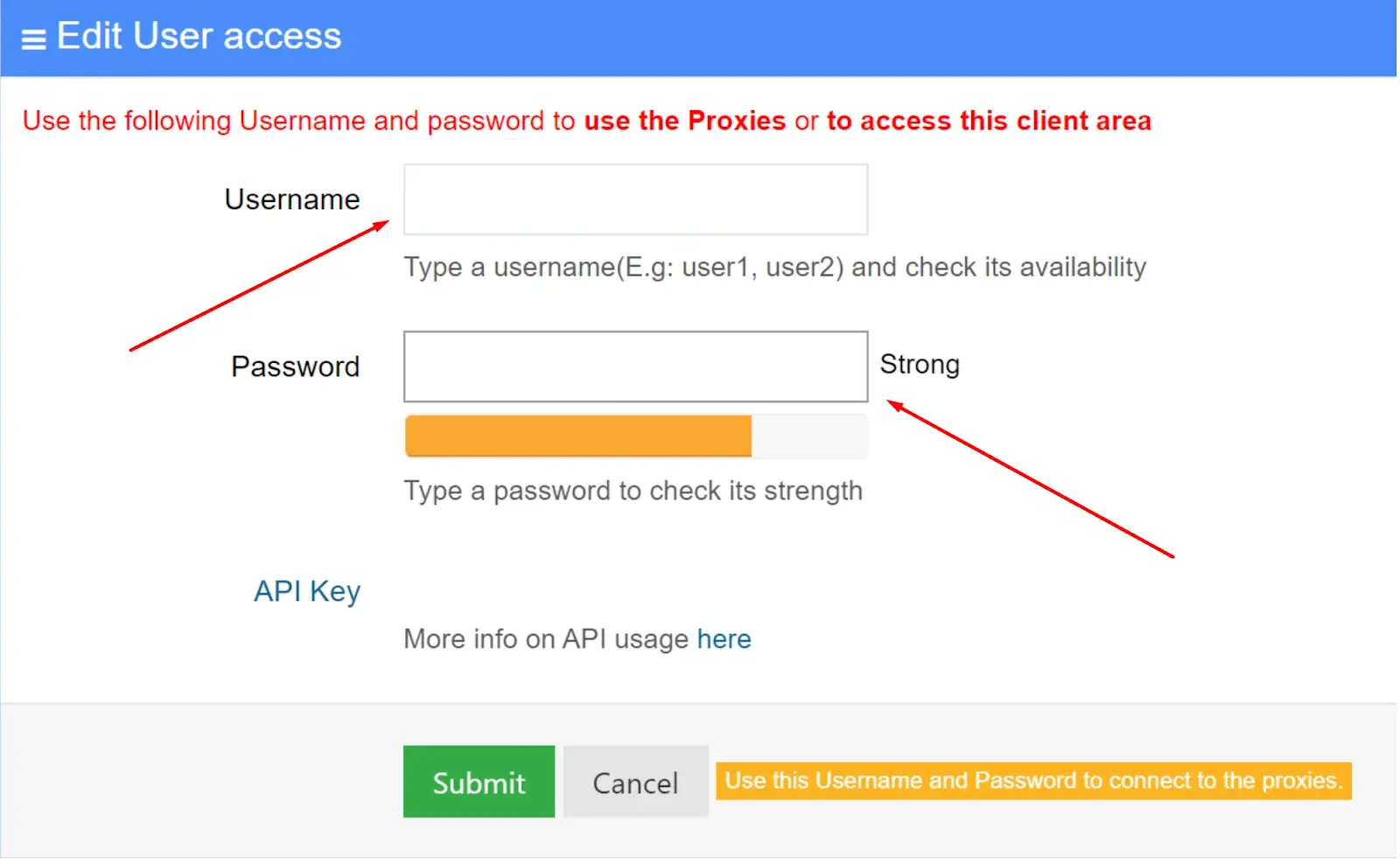
For this update, we went through NinjaProxy’s pricing, capability matrix, metrics and legal pages on September 28, 2026. We checked IPRoyal and Webshare on their own sites the same day.
What we didn’t do: benchmark speed, success rates or IP quality in 2026. NinjaProxy doesn’t publish those numbers either. So our reliability score rests on its public commitments and on user reviews, not on tests we never ran.
Seven products, one question: which one do you need?
NinjaProxy sells seven products: a pay-per-GB rotating gateway plus six per-IP plans covering datacenter, IPv6, ISP and mobile proxies.
Every product supports HTTP and SOCKS5. The per-IP plans are static, so your exit IP only changes when you swap it in the portal. The mobile IPs rotate on a timer, and the gateway rotates on every request.
The pay-per-GB wallet: rotating IPs without a subscription
The pay-per-GB wallet is NinjaProxy’s most interesting product. You top up from $10, then pay $1.80 per GB for residential traffic or $0.60 per GB for datacenter traffic.
NinjaProxy lists no volume tiers, so the rate stays flat whether you add $10 or $275. The balance doesn’t expire either, which suits scraping jobs that come in bursts.
By default, the gateway gives you a new IP on every request. Add a session ID to your username to keep one IP for 10 minutes. A duration flag stretches that to 60.
You can also force residential or datacenter routing and pin a country. For example, --session-42--provider-res--geo-country-us on the end of your username holds one US residential IP.
Datacenter plans: shared, private or premium?
NinjaProxy sells three grades of static datacenter IP, in packs of 10, 25 or 50. All three come with unlimited bandwidth.
- Shared ($15 for 10 IPs): up to five users share each IP. Fine for testing and easy targets, risky for anything that bans hard.
- Private ($28.50 for 10 IPs): one user per IP, so nobody else’s scraping burns your reputation.
- Premium ($45 for 10 IPs): NinjaProxy’s highest tier, sold as clean-reputation IPs for heavily protected sites.
Our take: private is the sweet spot. At $2.85 an IP, it removes the noisy-neighbour problem without premium pricing.
NinjaProxy publishes nothing that shows premium IPs perform better. Test a private pack first before you pay 58% more.
Static ISP proxies: one home-style IP from $9
ISP proxies give you an IP assigned by a real internet provider. To a website, you look like a home user who never moves.
They cost $9 a month for one IP, $43.75 for five or $85 for ten.
That’s the right tool for a few social or store accounts, where a steady, clean IP beats volume. It’s pricier than IPRoyal, though, which advertises ISP proxies from $1.80 each.
Check locations before you buy. NinjaProxy’s ISP page mentions 100+ countries, but its capability matrix says your country list depends on your account. Ask support which locations you’ll get.
IPv6 proxies: cheap at scale, if your targets accept them
IPv6 proxies are the cheapest way to get lots of IPs from NinjaProxy. Packs cost $20 for 100, $47.50 for 250 or $90 for 500.
That works out to 18 cents an IP on the biggest pack. The catch is compatibility. Plenty of websites still don’t accept IPv6 connections, so confirm your targets do first.
4G/5G mobile: the priciest option, for a reason
Mobile proxies route your traffic through real carrier IPs in the USA and UK. They cost $150 a month for one IP, $700 for five or $1,350 for ten.
Sites are slow to block mobile IPs, because carriers share each one across many real phones. That trust is what you’re paying for.
The IP changes about every 15 minutes, and there’s no sticky option. That spreads risk across accounts, but it’s awkward for logins that expect one steady address. IPRoyal’s mobile proxies start at $117 a month.

Still torn between types? Our guides to ISP vs residential proxies and rotating vs static proxies explain the trade-offs in plain English.
How to set up NinjaProxy in five steps
From your first payment to a verified request
-
Step 1 of 5
Pick a product and pay
Buy a per-IP plan, or top up the pay-per-GB wallet from $10. Start small, because the refund terms are strict.
-
Step 2 of 5
Copy your credentials
Log in to the customer portal. Per-IP plans list your proxies, while the wallet gives you a gateway endpoint, a username and an API key.
-
Step 3 of 5
Add routing flags to the username
On the gateway, append –session-ID to keep one IP, –provider-res to force residential and –geo-country-us to pin a country.
-
Step 4 of 5
Check your exit IP
Send one request through the proxy to ip.ninjasproxy.com. It returns the IP a target site will see, so you know the route works.
-
Step 5 of 5
Plug it into your tools
Use the same host, port and credentials in your scraper, Python script or anti-detect browser. Then run a small batch against your real target before you scale.
What does NinjaProxy actually cost?
NinjaProxy starts at $9 a month for one ISP IP, $15 for 10 shared datacenter IPs, or a $10 wallet top-up.
NinjaProxy plans and prices
Entry prices from ninjasproxy.com, checked September 28, 2026
- Included: Datacenter traffic at $0.60/GB
- Included: New IP on every request
- Included: Sticky sessions up to 60 minutes
- Included: Balance never expires
- Not included: Unlimited bandwidth
- Included: 25 IPs $67.50, 50 IPs $108.75
- Included: Unlimited bandwidth
- Included: Static IPs you keep
- Not included: IP rotation
- Included: 5 IPs $43.75, 10 IPs $85
- Included: Unlimited bandwidth
- Included: Static IPs you keep
- Not included: IP rotation
Plans bill monthly. Shared datacenter starts at $15 for 10 IPs, premium datacenter at $45 for 10, IPv6 at $20 for 100 and 4G/5G mobile at $150 for one IP. First purchases get a 3-day money-back guarantee, with conditions covered below.
We may earn a commission when you buy through links on this page. This does not affect our reviews.
Our pick is the pay-per-GB wallet, because it’s where NinjaProxy undercuts bigger names on small budgets.
Take 10 GB of residential traffic. On NinjaProxy, that’s $18, and it never expires.
Webshare‘s 10 GB plan costs $27.50 a month. IPRoyal charges $52.50 for the same 10 GB at its pay-as-you-go rate.
At serious volume, the gap closes. IPRoyal drops to $1.75 per GB on custom plans and Webshare to $1.40 at 3,000 GB a month. NinjaProxy lists no volume discount at all.
The per-IP plans are fair rather than cheap. Private datacenter IPs at $2.85 each are reasonable. One ISP IP at $9, or one mobile IP at $150, costs more than IPRoyal’s advertised starting prices.
The fine print: what the sales pages don’t tell you
Remember that paragraph most reviews skip? It’s in NinjaProxy’s refund policy, and it changes how you should buy.
The pricing page promises a 3-day money-back guarantee, no questions asked. The refund policy adds two conditions: a verified technical fault on NinjaProxy’s side, and less than 500MB of data used.
Under that wording, a target site blocking your IPs may not count as NinjaProxy’s fault. A busy first day can also push you past 500MB. So treat your first payment as a test budget, and keep it small.

Three more lines deserve a look before you pay:
- Logging. The pricing FAQ promises a strict no-log policy. The Acceptable Use Policy says NinjaProxy logs the sites you visit for about 30 days, or longer at its discretion.
- Connection limits. Bandwidth is unlimited, but the same policy lets NinjaProxy cap simultaneous connections at its discretion. If it takes that action, fees you’ve paid in advance aren’t refunded.
- Billing disputes. You have 30 days to raise one, and disputing a valid charge can cost a $50 to $150 admin fee. Talk to support before you call your bank.
Is the logging a deal-breaker? For scraping public data, probably not. If you picked NinjaProxy for privacy, though, trust the legal page over the FAQ.
Don’t expect an uptime guarantee, either. The service level agreement, last updated in January 2025, covers only contact-form support and remote help. It names no uptime figure, no credits and no response time.
One more rule matters for scrapers. The Acceptable Use Policy bans automated requests that break a site’s terms of service or robots.txt. It also bans getting around a site’s rate limits or access controls.
Read that twice if you scrape at scale. Plenty of scraping setups use rotating IPs precisely to slip past rate limits. Make sure your use case fits the policy first.
How does NinjaProxy compare with IPRoyal and Webshare?
NinjaProxy is the cheapest of the three for small residential jobs. IPRoyal advertises lower per-proxy prices for static ISP and datacenter proxies, and Webshare wins on free testing and big-volume discounts.
| Feature | |||
|---|---|---|---|
| 10 GB residential | $18, never expires | $52.50, never expires | $27.50 a month |
| Residential at volume | $1.80/GB flat | $1.75/GB (custom plans) | $1.40/GB (3,000 GB) |
| Cheapest datacenter | $15 for 10 shared IPs | From $1.39 per proxy | $2.99 for 100 proxies |
| Static ISP | $9 per IP | From $1.80 per proxy | From $0.23 per IP |
| Free plan | No | No | Yes |
We may earn a commission when you buy through links on this page. This does not affect our reviews.
Pick NinjaProxy for small, irregular residential jobs, because its flat $1.80 rate and lasting balance beat both rivals’ small plans.
Pick IPRoyal if you need static ISP or datacenter proxies, because its advertised per-proxy prices start well below NinjaProxy’s. Its residential traffic doesn’t expire either.
Pick Webshare if you want to test before paying, because its free plan includes 10 proxies. It also gets cheapest per GB once you pass about 500 GB a month.
Weighing the two rivals? Our IPRoyal vs Webshare comparison goes deeper, and our IPRoyal review covers the full lineup.
Who should skip NinjaProxy?
NinjaProxy suits budget scraping in small batches. It’s the wrong pick if you recognise yourself below:
- You need proof before you pay. NinjaProxy publishes no success rates or uptime figures. Compare the options in our best residential proxy providers guide and test two side by side.
- You run many social accounts. Mobile IPs are US and UK only and rotate every 15 minutes. Read our guide to avoiding social media bans before you pick a proxy type.
- You need strict privacy. The Acceptable Use Policy allows about 30 days of logs of the sites you visit, whatever the FAQ says.
- You buy residential traffic by the terabyte. NinjaProxy’s rate never drops, while Webshare’s falls to $1.40 per GB at 3,000 GB.
Frequently asked questions
Is NinjaProxy legit?
Yes, NinjaProxy is a real US-based provider, and we first tested it in 2023. On Trustpilot, it holds a TrustScore of 4.1 out of 5 from 110 reviews. Praise focuses on speed and quality, while complaints mention unstable or invalid proxies and a lack of support.
Is ninjasproxy.com the official NinjaProxy website?
Yes. The brand is NinjaProxy, but the website is ninjasproxy.com, with an extra s, and the customer portal sits at customer.ninjasproxy.com. Check the spelling before you pay or log in, because the missing s is an easy mistake to make.
Does NinjaProxy offer a free trial?
No, there’s no free plan or free trial. The cheapest test is a $10 top-up, enough for about 5.5 GB of residential or 16 GB of datacenter traffic. Larger top-ups come in presets of $35, $80, $150 and $275.
How do I request a refund from NinjaProxy?
Use the contact form within 3 days of your first purchase, and include the email address on your account. Only first-time customers qualify. Approved refunds go back through Paddle, NinjaProxy’s payment processor, within 5 business days.
Which NinjaProxy proxies work best with anti-detect browsers?
All NinjaProxy products work over HTTP and SOCKS5, and it publishes setup guides for Octo Browser, BitBrowser and MoreLogin. For one browser profile per account, a static ISP IP is the safer match. An IP that changes mid-session can trigger security checks.
Does NinjaProxy support city or ISP targeting?
On the rotating gateway, yes. Country targeting goes in the username, while city, ISP and ASN targeting work through HTTP headers such as X-Target-City. Static products are tied to the location of the IP you’re assigned instead.
What happens when my NinjaProxy wallet runs out?
New connections can be refused. NinjaProxy’s docs say balance and concurrency limits can reject connections even when your settings are right. Top-ups are credited automatically after payment, so add credit before a long scraping run rather than halfway through it.
Can I pay for NinjaProxy with crypto?
Yes, NinjaProxy lists PayPal, credit cards and cryptocurrency as payment options. Wallet top-ups go through a Paddle checkout that takes major cards, including Visa, Mastercard, American Express and UnionPay. We found no annual plans, and the per-IP plans bill monthly.
Is NinjaProxy good for scraping Google or Amazon?
It can work, but NinjaProxy publishes no success rates for specific sites, so you’ll need to test. Use wallet residential traffic for heavily protected targets. Check each site’s terms first, since the Acceptable Use Policy bans scraping that breaks them.
The bottom line: is NinjaProxy worth it in 2026?
Here’s our NinjaProxy review in one line: great value for small residential jobs, thin on proof.
Pick NinjaProxy’s pay-per-GB wallet for bursty scraping on a budget. Its residential proxies cost a flat $1.80 per GB, and the credit never expires. Choose IPRoyal for cheap static ISP and datacenter IPs, or Webshare for a free start and big-volume discounts.
One warning: refunds need a verified fault and under 500MB used, so don’t prepay for a month you haven’t tested.
Your next step: top up $10 and check your exit IP at ip.ninjasproxy.com. Then run one small batch against your real target before you scale.
The Review
NinjaProxy
NinjaProxy sells nearly every proxy type, and its pay-per-GB wallet is one of the cheapest ways to buy small amounts of residential traffic, at a flat $1.80 per GB that never expires. The trade-off is proof: no published uptime or success rates, strict refund conditions and a logging clause that contradicts its no-log promise.
PROS
- Flat $1.80/GB residential traffic from a $10 top-up
- Wallet balance never expires
- Every proxy type, all with HTTP and SOCKS5
- Sticky sessions up to 60 minutes with country targeting
- Unlimited bandwidth on per-IP plans
- Public capability matrix and metrics methodology
CONS
- No published uptime, success rates or pool sizes
- Refunds need a verified fault and under 500MB used
- Policy allows about 30 days of site logs despite a no-log claim
- ISP and mobile IPs cost more than IPRoyal's
- Mobile IPs are US and UK only, with no sticky option
- No free plan or trial
NinjaProxy DEALS
We collect information from many stores for best price available




