Can you connect Claude to WordPress in about 30 seconds? WPVibe says yes, and its setup screen backs that up.
There’s a reason it’s that quick. Your requests travel through WPVibe’s own servers.
We installed it on a clean test site and probed what it adds to WordPress. Then we read the fine print on its daily cap.
This WPVibe review explains what the relay buys you and what it costs. It also shows when a self-hosted WordPress MCP server is the better call.
Quick verdict: who is WPVibe for?
WPVibe is the easiest way we found to put an AI assistant inside a WordPress site, and it has sensible guard rails. You pay for that ease with a vendor in the middle of every request.
- Best for: non-technical site owners and agencies who want the fewest steps and a visible approval trail.
- Not ideal for: anyone who wants requests to stay between their AI client and their own server, or who tests on local sites without HTTPS.
The full score, pros and cons are in the review box below.
WPVibe at a glance
- Product
- WPVibe (by SeedProd)
- Official page
- wordpress.org/plugins/vibe-ai
- Category
- Hosted MCP connector for WordPress
- Price
- Free plan. Paid plans from $99/year
- Free plan
- Yes 100 tool calls a day per account
- Key features
- In-chat approvals, Approval Log, draft theme sandbox, WP-CLI-style commands
- Connection
- Through WPVibe’s hosted relay
- Builders
- Elementor, Bricks, Breakdance, Beaver Builder, Divi
- Requirements
- Public HTTPS site, WordPress 6.0+
- Best for
- Beginners and agencies who want quick setup
- Alternatives
- Easy MCP AI, Royal MCP, AI Engine
How we tested it (and what we didn’t)
We installed WPVibe 1.21.0 on a clean WordPress 7.1.3 site with PHP 8.3. A small helper plugin read the results for us.
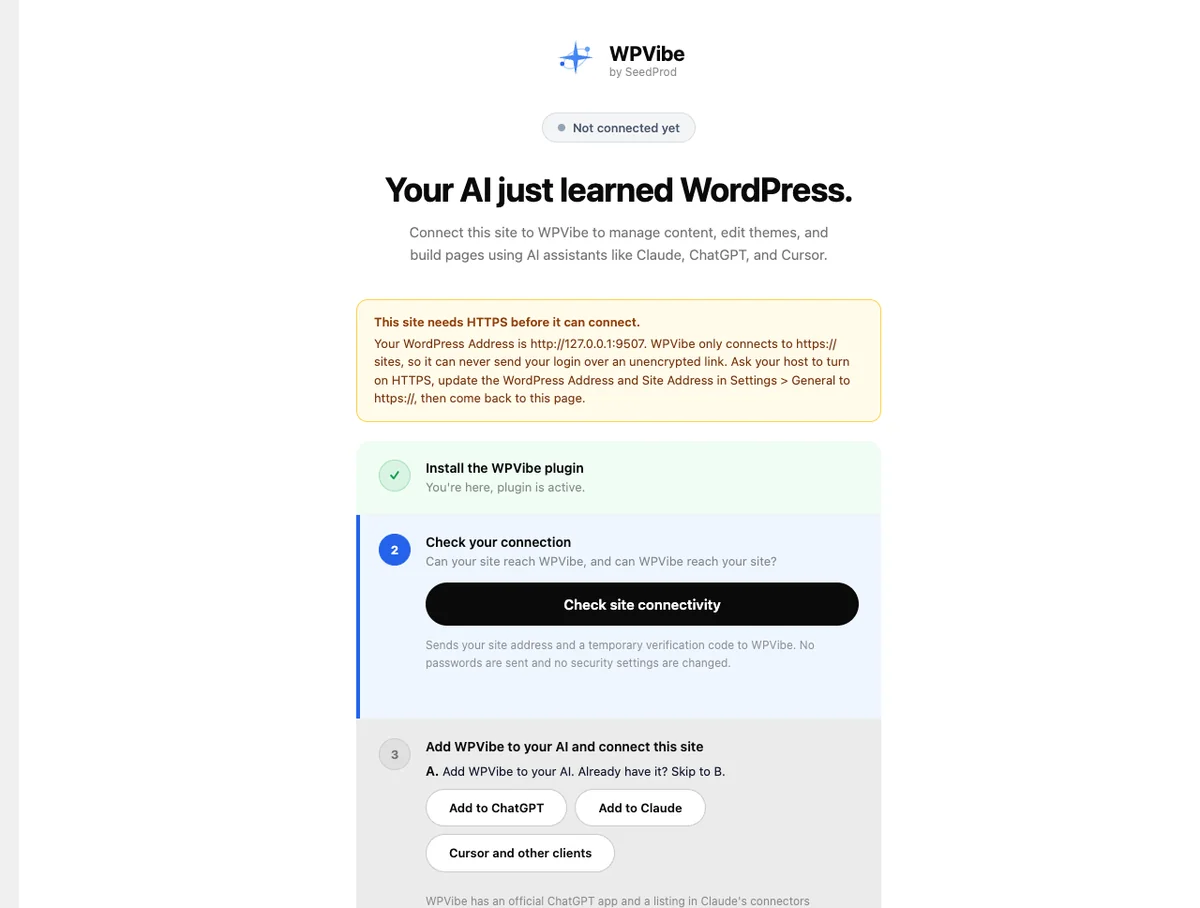
WPVibe refused to connect, because our test site ran on plain HTTP. That’s by design, so we couldn’t send tool calls through its relay.
Instead we checked what the plugin adds to WordPress and tried its local endpoints without a login. We also worked through its listing, FAQ and pricing page.
So the score leans on design and documentation, not on hands-on tool calls.
How does WPVibe connect Claude to WordPress?
WPVibe sits between your AI client and your site. Claude or ChatGPT talks to WPVibe’s server, which passes each call to your WordPress REST API.

To make that work, WPVibe stores your site’s Application Password on its own Cloudflare-hosted servers, encrypted with AES-256-GCM. You never type a password into a chat, and you can revoke access in one click. Our guide to API keys, OAuth and tokens explains why that matters.
The relay is also why setup is so short. There’s no config file, and WPVibe is listed in ChatGPT’s app directory, which our ChatGPT apps guide covers.
Prefer a self-hosted server? Our guide to connecting an MCP server walks through Claude, Cursor and ChatGPT.
What did WPVibe add to our test site?
Two database tables and more than 30 REST routes. The tables hold an audit log and operation receipts.
The routes are where the power lives. They read, write and delete theme files, edit content, run WP-CLI-style commands and manage a draft theme.
So we called them without logging in. Every one we tried returned a 401 that named the capability it needed, such as edit_themes or manage_options. That’s the right answer.
One practical touch: since version 1.13.0, WPVibe also sends its credential in an X-WPVibe-Authorization header. Hosts that strip the normal Authorization header still work, and a wp-config.php constant turns the fallback off.
How to connect WPVibe to Claude or ChatGPT
-
Step 1 of 5
Install WPVibe on a public HTTPS site
It won’t connect over plain HTTP, and its servers must be able to reach your site. Local and password-protected staging sites are out.
-
Step 2 of 5
Run the connection check
The check sends your site address and a temporary verification code to WPVibe. No passwords or security settings change at this step.
-
Step 3 of 5
Add WPVibe to your AI client
Use Add to Claude or Add to ChatGPT on the plugin screen, or paste the server URL into Cursor and other MCP clients.
-
Step 4 of 5
Approve the connection in wp-admin
Sign in to WordPress in the same browser and approve. WPVibe creates and stores the Application Password for you.
-
Step 5 of 5
Keep an eye on the Approval Log
Every destructive action lands here, whether you approved it or approvals were bypassed. Entries can’t be edited or deleted from the dashboard.


Is WPVibe careful with a live site?
On paper, yes. Its safety design is one of the better ones we’ve read, even though we couldn’t exercise it ourselves.
- Approval in the chat: deleting users, writing to the database or uninstalling plugins pauses for an Approve or Decline panel with a dry-run preview.
- Soft defaults: new posts start as drafts, and deletes go to the trash rather than disappearing.
- A sandbox for code: theme edits happen in a draft copy of your theme, with a preview link before anything goes live.
- An allowlist for commands: its WP-CLI-style commands run in PHP from a fixed list, so they work on shared hosting without SSH.
One thing to watch: approvals can be bypassed. The Approval Log records whenever that switch is turned on or off, so check it now and then.
What does WPVibe cost?
The plugin is free, and so is the starter plan. The WPVibe pricing page meters tool calls per account, not per site.
- Free: $0. 100 tool calls a day, every tool and skill, and unlimited sites.
- Pro: $99 a year, about $8.25 a month. 500 calls a day, plus priority support.
- Power: $299 a year, about $24.92 a month. 2,000 calls a day.
- Agency: $599 a year, about $49.92 a month. 5,000 calls a day, client invites and allowances, and per-client usage reports.
- Scale: $899 a year for 10,000 calls a day.
Prices checked 24 October 2026, in US dollars and billed yearly. WPVibe says your rate stays locked while you’re subscribed, with a 14-day refund on first purchases.
The allowance runs on a rolling 24 hours, shared by every site on your account. Connecting sites and loading skills don’t count, and neither do failed calls.
Our take: 100 calls a day suits light use. AI agents often make several calls per task, so a busy editing day can use it up faster than you’d expect.
The catch: a vendor in the middle
Every tool call and every response travels through WPVibe’s servers. That’s the trade you make for the short setup.
WPVibe’s FAQ says your content stays on your server. That’s true of where it’s stored, not of where it travels.
It also means three dependencies a self-hosted server doesn’t have: WPVibe’s uptime, its plan limits and its handling of your stored credentials. For many owners that’s a fair deal. For client sites with strict data rules, it may not be.
WPVibe alternatives worth a look
- Easy MCP AI: free and self-hosted, with no daily cap, an audit log and SEO data tools.
- Royal MCP: self-hosted, with a 72-hour undo token for every destructive write.
- AI Engine: connects directly by default, with an optional gateway if you’d rather not set it up yourself.
- Elementor MCP: free and built into Elementor 4.3 and later. Our Elementor review covers the builder.
Frequently asked questions
Is WPVibe free?
Yes, the plugin and the starter plan are free. The free plan gives one account 100 tool calls a day across unlimited sites, with every tool included. Paid plans raise the daily allowance, starting at $99 a year for 500 calls a day.
Does WPVibe send my content to its servers?
It passes through them. Your posts stay stored in your own database, but every tool call and every response travels through WPVibe’s relay, which also stores your site’s encrypted Application Password. Self-hosted servers such as Easy MCP AI and Royal MCP skip that hop.
Why won’t WPVibe connect to my local site?
WPVibe only connects over HTTPS, and its servers must be able to reach your site from the internet. A localhost install, a plain HTTP site or a password-protected staging site will stop at the connection check. Use a public HTTPS staging site instead.
Does WPVibe work with Elementor?
Yes, according to WPVibe. It writes Elementor pages through Elementor’s own save pipeline, so the result opens in the builder normally. It lists dedicated support for Elementor Pro theme templates too, along with Bricks, Breakdance, Beaver Builder and Divi.
What counts toward the WPVibe daily limit?
Successful tool calls, counted over a rolling 24 hours for your whole account. Connecting a site, listing your sites and loading or saving skills don’t count, and failed actions don’t count either. Opening extra free accounts to get more calls breaks WPVibe’s terms.
Can WPVibe delete my content?
It can, but destructive actions pause for an approval panel with a dry-run preview, and deletes go to the trash. Approvals can be bypassed, though, and the Approval Log records when that happens. Check that log if more than one person manages the site.
WPVibe or Easy MCP AI: which should I choose?
Choose WPVibe if setup speed matters most and you’re happy with a relay. Choose Easy MCP AI if you want everything on your own server with no daily cap. It costs nothing, but you’ll spend more time on its settings before trusting it.
Can agencies white-label WPVibe?
Yes. White-label mode is free on every plan, so clients see a clean wp-admin. The Agency plan adds client invites, per-client allowances and usage reports with CSV export, and it keeps WPVibe’s pricing hidden from your clients.
Should you use WPVibe?
Pick WPVibe if you want the quickest route from Claude or ChatGPT to your site, and a hosted relay doesn’t bother you. Its approval design is careful, and the free plan is enough to see if it fits.
If requests should stay between you and your host, pick a self-hosted WordPress MCP server. Easy MCP AI and Royal MCP both fit.
Either way, connect a staging copy first. Watch the Approval Log for a week before you point it at your live site.
The Review
WPVibe makes connecting Claude or ChatGPT to WordPress about as simple as it gets, with in-chat approvals, an append-only log and support for the big page builders. The price is a hosted relay: every request and response passes through WPVibe’s servers, the free plan stops at 100 tool calls a day, and sites without public HTTPS can’t connect at all.
PROS
- Setup is install, authorize and paste one URL
- Approval panel with dry-run previews for destructive actions
- Append-only Approval Log in wp-admin
- Posts default to drafts and deletes go to the trash
- Unlimited sites and free white-label mode on every plan
CONS
- Every request passes through WPVibe’s servers
- Free plan stops at 100 tool calls a day per account
- Needs a public HTTPS site, so no local testing
- Your site’s credentials are stored on WPVibe’s infrastructure