

Export or Add Keywords to List
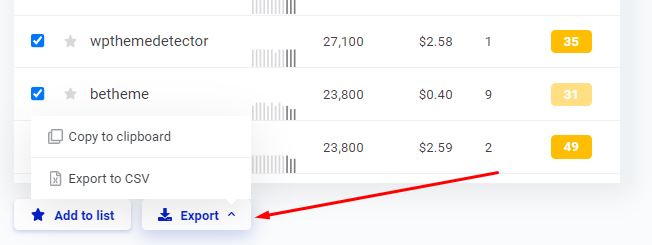
Select any keywords worth keeping and drop them into a saved list inside the tool, or export the lot to CSV for a writer or client.
Change Time of Average Search Volume
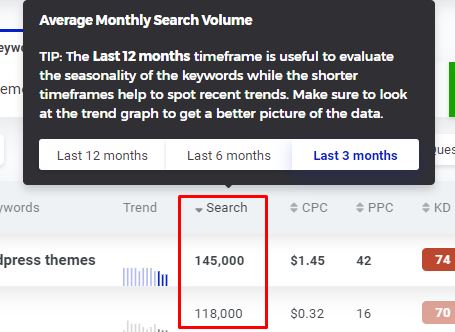
Switch the average monthly volume window between the last 3, 6 or 12 months. Twelve smooths out noise; three is the one to use when you suspect a term is seasonal or newly trending.
Change Currency of CPC
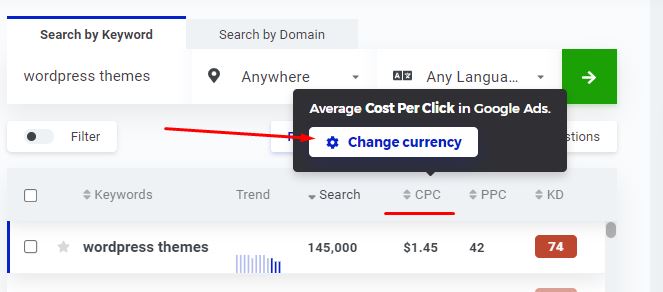
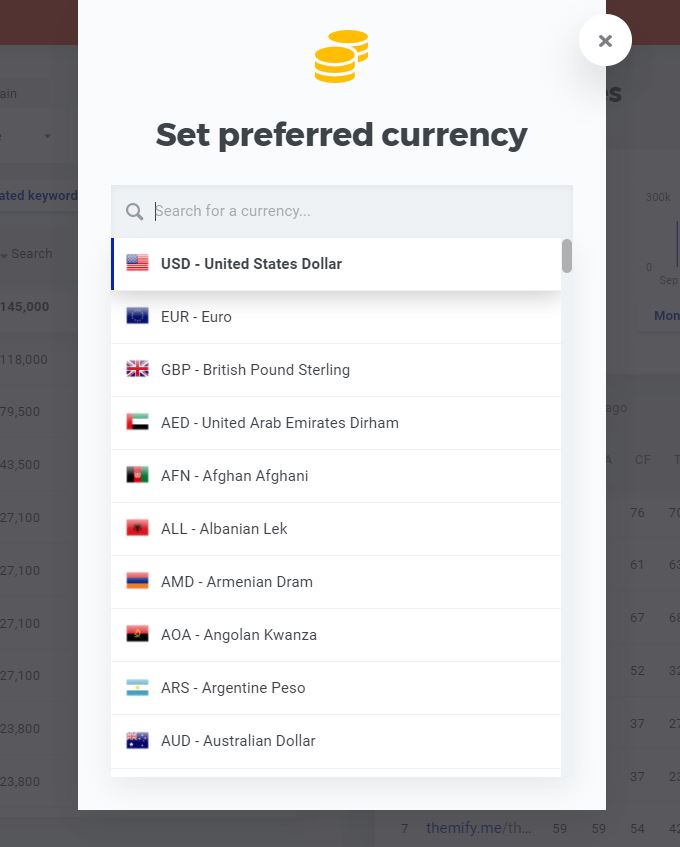
CPC can be shown in the currency you actually bill in. Hover over the CPC column, click the change currency button and pick from the popup.
Monthly Searches and Trends Over Time
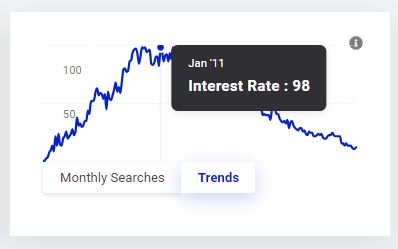
Beyond KD, the monthly searches graph and trend line show whether a keyword is growing, flat or quietly dying.
Traditional Keyword Research
Plug in a seed keyword and KWFinder returns the actual search terms your audience types, each with volume, difficulty and CPC attached. This is the bread-and-butter workflow and the thing the tool does best.
The catch is suggestion depth. Lower Mangools plans cap how many suggestions you see per search, so a broad seed term returns a truncated slice rather than the full list. In a crowded niche you notice that ceiling within a week.
Competitor Keyword Research
Feeding a competitor domain into KWFinder instead of a seed keyword shows you what they already rank for. It is the fastest shortcut there is for a new site: let someone else prove a topic has traffic before you spend a week writing about it.
Researching your competitor’s keywords will allow you to produce better content and overtake them. However, KWfinder does not provide an in-depth analysis of your competitor’s keyword research. You cannot get a complete picture because your results are caped in KWfinder.
SERP and SEO analysis
SERP analysis is where you find out whether a keyword is worth the effort. It tells you who you would be up against, how strong their pages are, and what you would need to publish to displace them.
The metrics it puts in front of you:
- Domain authority and page authority
- Citation flow and trust flow
- The number of external backlinks
- The number of Facebook shares
- The link profile’s strength
- The estimated visit per month based on CTR
Google Suggest Keyword Source
KWFinder can pull suggestions from Google Autocomplete rather than only its own database, which surfaces fresher phrasings and question formats than a static index will.
Google builds those predictions from:
- Keywords you are entering to search form
- Relevant keywords based on your search history
- According to your region as well as the language you prefer
Keyword Planner Alternative
Google Keyword Planner stopped showing exact search volumes back in 2016 for accounts that do not spend meaningfully on ads, handing out wide ranges like 1K–10K instead. KWFinder returns a single number, in any country and language, which is the main reason non-advertisers reach for it.
A single keyword request gets you:
- It allows you to search for exact volumes even for closer variant keywords
- Historical search volumes and trend charts
- A keyword difficulty score that is well calibrated for low-competition terms
- Google SERP and analysis with valuable SEO metrics
- Up to several hundred keyword suggestions per search, depending on your plan
KWFinder Pricing Plans
Mangools runs a 10-day free trial with no card required, which is long enough to test the keyword research workflow on your own niche rather than on a demo keyword.
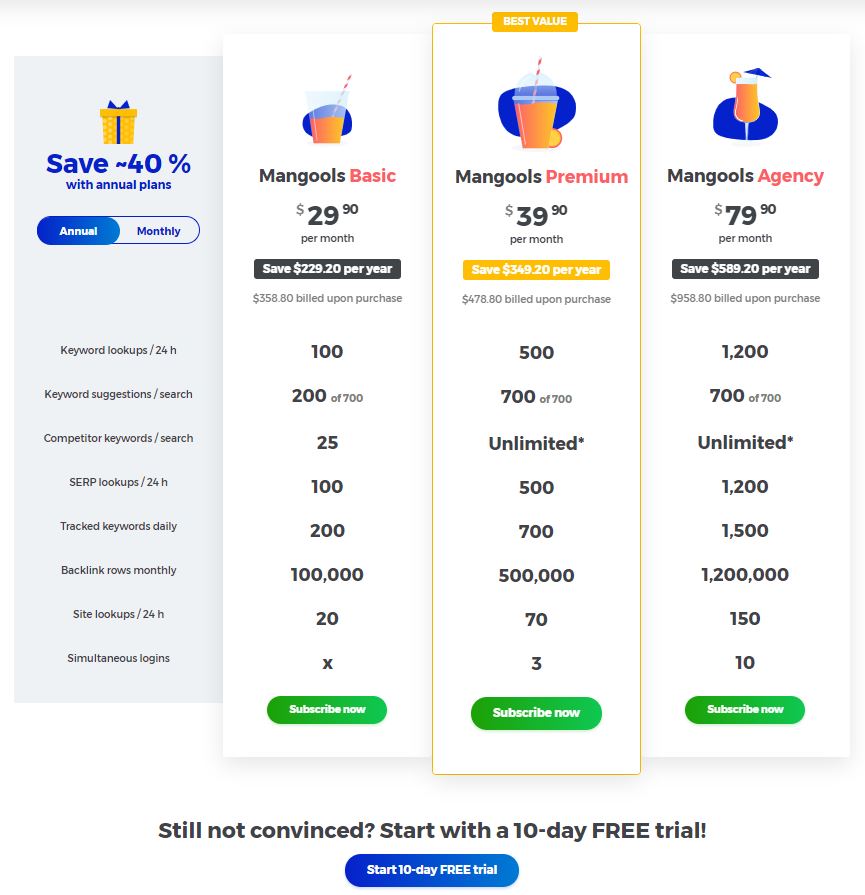
Annual billing is discounted against monthly, and Mangools offers a money-back window on paid plans. Check the current terms on the pricing page before you commit — the length of that window has changed over the years.
Mangools has renamed and repriced its tiers more than once, so treat the figures below as the shape of the ladder rather than today’s exact numbers. Confirm current limits and prices on the official pricing page.
| Limit | Entry plan | Mid plan | Agency plan |
|---|---|---|---|
| Keyword lookups / 24 hours | ~100 | ~500 | ~1,200 |
| Keyword suggestions per search | Capped subset | Full list | Full list |
| Competitor keywords per search | Capped | Unlimited | Unlimited |
| SERP lookups / 24 hours | ~100 | ~500 | ~1,200 |
| Tracked keywords | ~200 | ~700 | ~1,500 |
| Simultaneous logins | 1 | 3 | 10 |
The daily lookup cap is the number that decides whether the entry plan works for you. One planning session can eat ten or fifteen lookups once you start chasing variations, so a hundred a day sounds generous until you are building a content calendar.
KWFinder vs the Alternatives
KWFinder does not compete with Ahrefs or Semrush on data volume, and it does not pretend to. It competes on price and on how quickly you get to an answer.
- Against Ahrefs: Ahrefs has a far bigger keyword and backlink index plus genuine content-gap tooling, and costs several times more. If link building sits at the centre of your strategy, KWFinder will not cover you.
- Against Semrush: Semrush is a whole marketing platform with PPC, site audit and reporting attached. KWFinder does one job cleanly. Choose Semrush if you need the breadth, KWFinder if you resent paying for tabs you never open.
- Against Moz Pro: the closest fight. Moz has stronger link metrics and a longer track record, while KWFinder is faster and cheaper for pure keyword work. We compare the wider field in our guide to Moz Pro alternatives.
- Against free tools: Keyword Planner and Google Trends cost nothing but hand you ranges instead of numbers and no difficulty score at all. Fine to start on, painful once you are publishing weekly.
KWFinder Customer Support
The help section is solid and metric tooltips appear on hover, which covers most first-week questions without you needing to ask anyone.
For anything more advanced there is email support, and reviewers consistently report replies inside a day. There is no phone line and live chat availability varies.
Pros of KWFinder
What KWFinder genuinely does better than tools costing three times as much:
- The cleanest interface in keyword research — no training curve, no unused panels
- A difficulty score that is unusually well calibrated at the low-competition end
- Exact search volumes instead of the wide ranges Keyword Planner hands out
- SERP overview with authority and link metrics on the same screen as the keyword
- Far cheaper than Ahrefs or Semrush, with all five Mangools tools included
- Fast email support and a help section that answers most first-week questions
Cons of KWFinder
Four limitations worth knowing before you pay, none of them dealbreakers on their own:
- Daily keyword-lookup caps. The entry plan limits how many lookups you get per 24 hours, and a single content-planning session can burn through a chunk of them. Heavy researchers hit the wall regularly.
- A smaller index than Ahrefs or Semrush. Obscure long-tail terms and non-English markets sometimes return thin results or nothing at all.
- Thin backlink data. LinkMiner is fine for a sanity check on a competitor, but it is not a substitute for a dedicated backlink tool if outreach is a real part of your strategy.
- You buy the bundle, not the tool. There is no way to pay for KWFinder alone, and there is no free forever plan — only the 10-day trial.
Frequently Asked Questions
Is KWFinder worth it in 2026?
If your job is finding low-competition keywords and publishing against them, yes. If you also need backlink analysis, technical site audits or competitor gap reports, the same money is better spent on a full SEO suite.
Does KWFinder have a free plan?
No. There is a 10-day free trial with limited daily lookups and no card required, but no permanent free tier. Mangools does publish a handful of small free tools outside the trial.
How much does KWFinder cost?
Mangools sells tiered plans billed monthly or annually, with annual noticeably cheaper per month. Prices and plan names have changed more than once, so check the official pricing page rather than trusting a figure quoted in any review.
Is KWFinder better than Ahrefs?
Not on data. Ahrefs has a much larger index and proper backlink tooling. KWFinder wins on price and on how fast you get an answer for pure keyword research. Most small sites need the second thing more than the first.
Can I cancel my Mangools subscription?
Yes, from your account settings, and access runs to the end of the period you paid for. Mangools also offers a money-back window on new purchases, so confirm its current length before you buy.
Is KWFinder good for beginners?
It is probably the best starting point available. Nothing needs configuring, the difficulty score is readable at a glance, and you are not paying enterprise prices while you are still learning how keyword research works.
Can I buy KWFinder without the rest of Mangools?
No. Every plan is a Mangools bundle covering all five tools. If you only want keyword data, you are still paying for rank tracking, SERP analysis and backlink reports you may never open.
Conclusion
Blogger or affiliate marketer chasing long-tail terms on a small budget: KWFinder is the easiest recommendation on this page, and the entry plan will carry you a long way.
Freelancer or small in-house team: worth it, but budget for the mid tier from day one. The entry-level lookup cap will start frustrating you inside a month.
Agency or link-heavy SEO: skip it. You need a bigger index and real backlink tooling, and you will end up paying for both on top anyway.
One warning: do not treat the difficulty score as gospel on high-volume commercial keywords. It is well calibrated where competition is low and gets noticeably less reliable at the top of the market, where the SERP overview tells you far more than the number does.
Next step: run the 10-day trial against ten keywords you already rank for. If the difficulty scores line up with what you actually experienced, the tool is calibrated for your niche and worth paying for. If they do not, you have lost nothing but ten days.
Most keyword tools bury you in data you will never use, then charge enterprise money for the privilege. KWFinder goes the other way: one screen, one question — can I actually rank for this, or am I wasting my time?
That focus is both its strength and its ceiling. This KWFinder review covers what it does well, where the Mangools bundle holds you back, and who should buy something else instead.
Quick Verdict
Bottom line: KWFinder is what you pick when you want a straight answer fast and do not need a full SEO suite. The difficulty score is genuinely useful, the interface stays out of your way, and Mangools costs a fraction of Ahrefs or Semrush. You give up depth: a smaller index, thin backlink data, and daily lookup caps that bite on the cheaper plans.
- Best for: bloggers, affiliate marketers, freelancers and small in-house teams hunting long-tail keywords on a budget.
- Not ideal for: agencies doing competitor gap analysis, technical audits or serious backlink work — you will outgrow it inside a year.
How We Evaluated KWFinder
We ran KWFinder through ordinary research sessions: seed keywords in competitive niches, competitor domains, and the SERP overview for terms we already had ranking data on. Every screenshot below comes from the tool itself.
What we did not test: the Agency tier limits, rank-tracking accuracy in SERPWatcher over a long period, or index coverage measured side by side against a paid Ahrefs account. Where those come up, we are describing what Mangools documents and what reviewers consistently report — not our own measurements.
KWFinder Overview
This keyword research tool helps you to find long-tail keywords with low SEO difficulty. It is a part of Mangools Suite, which actually contains five different tools, including:
- KWFinder — keyword research
- SERPChecker — SERP and competitor analysis
- SERPWatcher — rank tracking
- LinkMiner — backlink analysis
- SiteProfiler — site authority metrics
You cannot buy KWFinder on its own. A Mangools subscription gets you all five tools, which is decent value if you use them and dead weight if you only ever open the keyword tool. A 10-day free trial lets you work out which camp you fall into before paying.
Why KWFinder?
Mangools deliberately kept each tool separate rather than cramming everything into one dashboard, and it pays off. You are never hunting through five menus for the one number you came for. But a tidy interface is not a reason to pay for software.
What justifies the money is the keyword research itself: a large pile of ideas per search, monthly search numbers rather than ranges, and a difficulty score that holds up well at the low-competition end where most people are actually working.
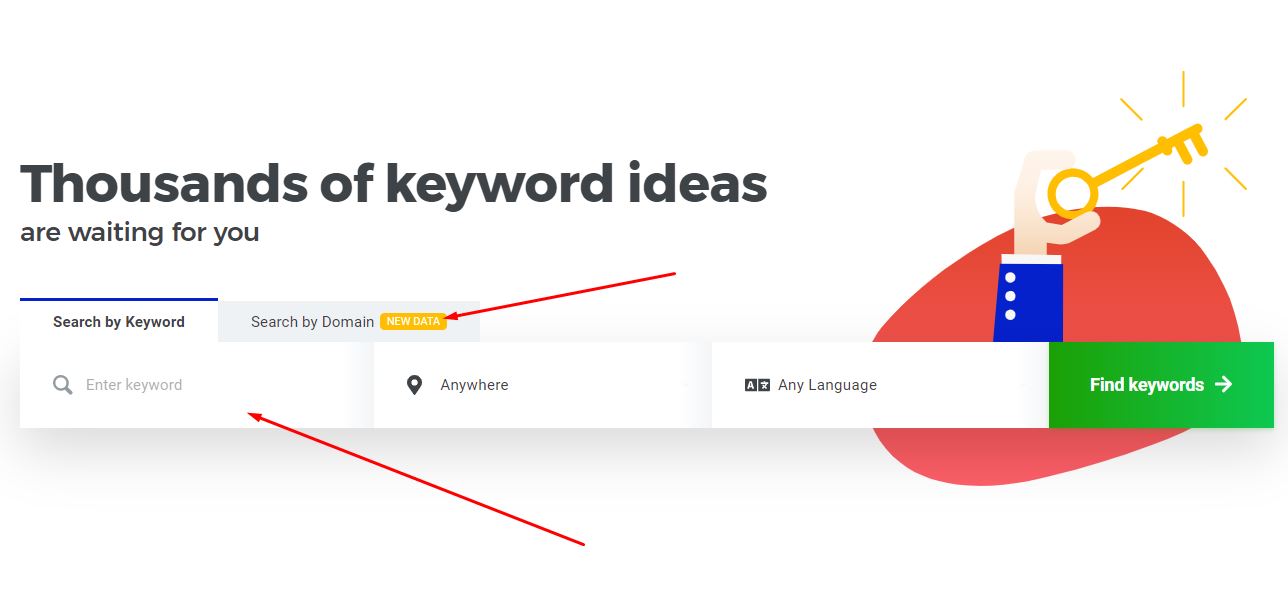
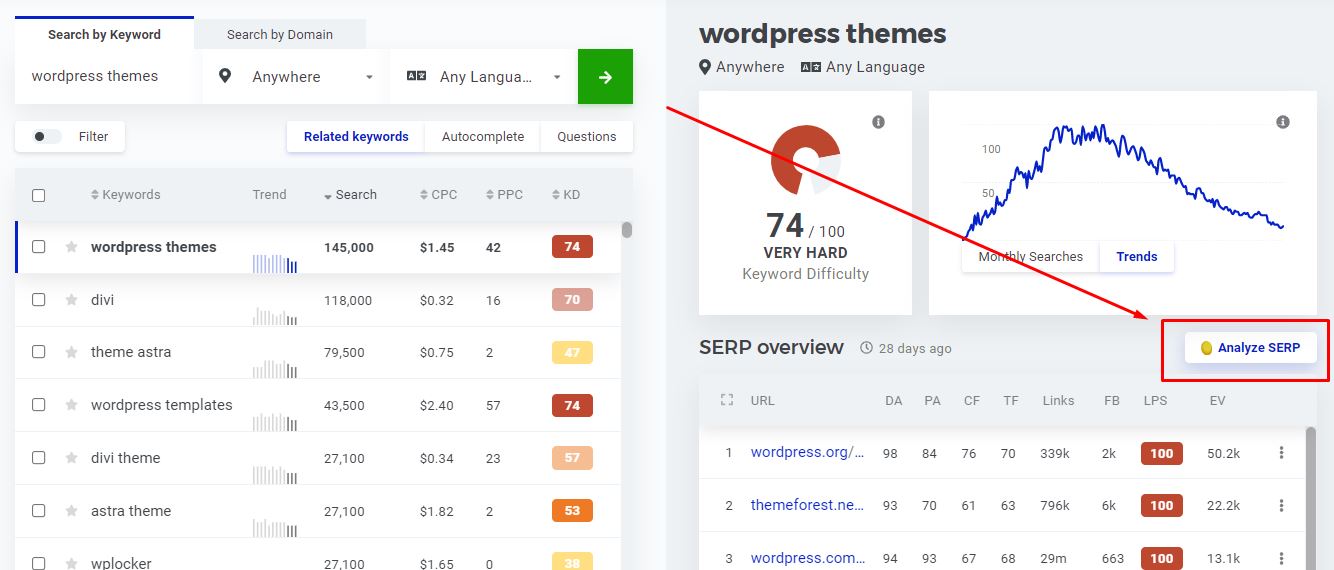
Searching the seed term WordPress themes returns the screen below.
Every suggestion carries trend, search volume, CPC, PPC competition and KD (keyword difficulty) on one row, so you can rule a keyword in or out without clicking through.
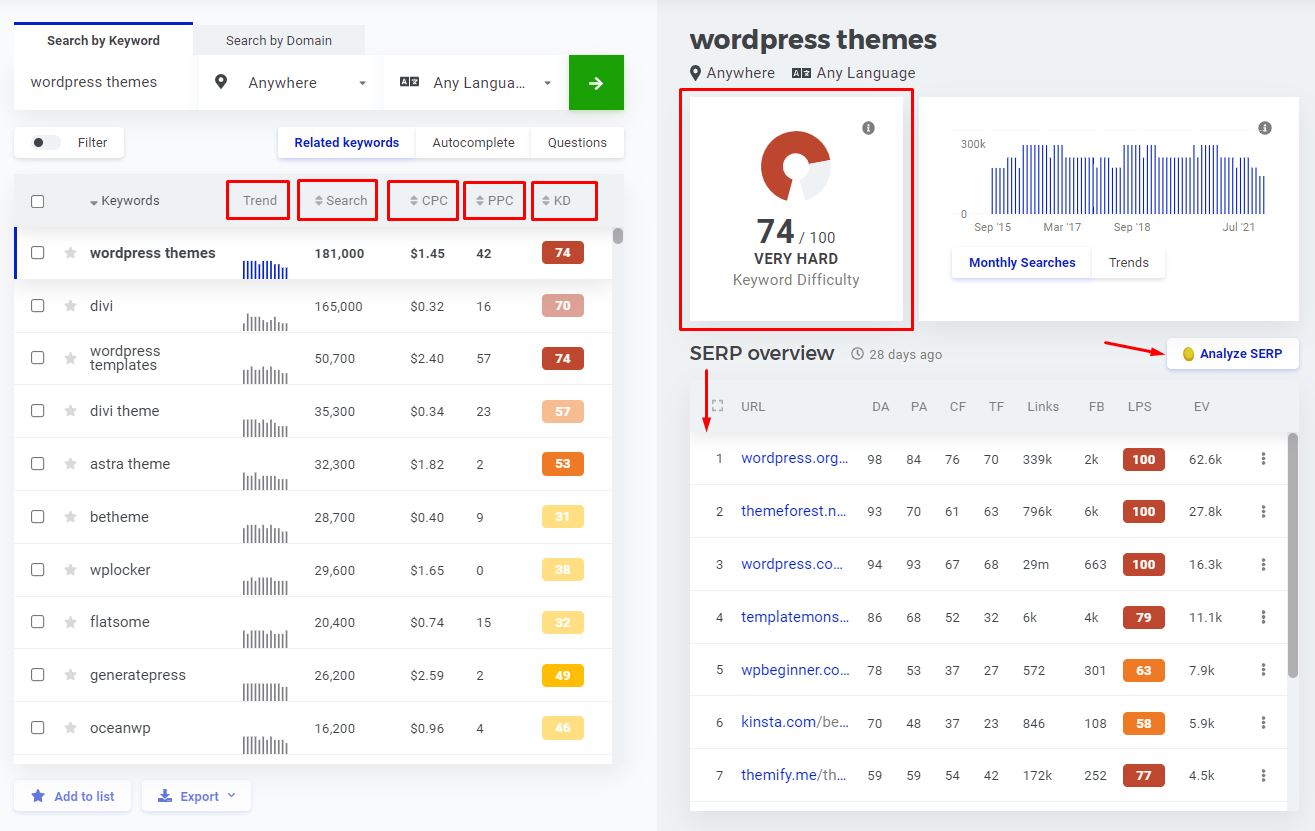
On the right sits keyword difficulty, the monthly volume graph and a SERP overview. New bloggers usually pick keywords on volume and CPC alone, which is exactly how an article ends up buried on page six. Work the other way round: filter by KD first, then open the SERP overview on the low-difficulty survivors and check whether the pages ranking there are actually beatable.
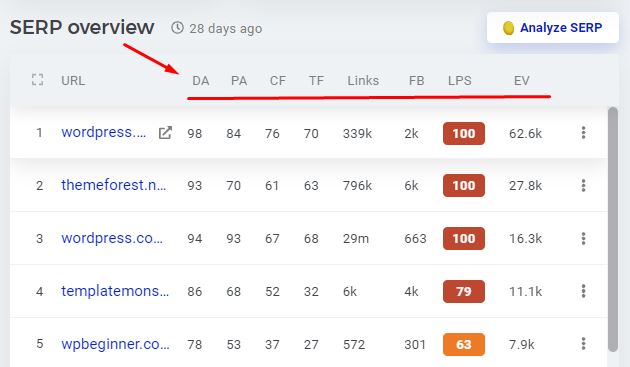
That overview lists the top-ranking pages with their authority and link metrics side by side, which is where you decide whether a keyword is genuinely winnable.
KWFinder Features
By now, you must have had an idea of the features included in KWFinder. However, Having insights about its features and how they work will help you develop an idea about using this tool. Let us go through its features one by one:
Easy to Use
KWFinder is markedly easier to use than its competitors, mostly because Mangools kept the five tools separate instead of building one crowded dashboard.
But again, they are easy to navigate between the tools. So, even if you want to go for indepth SERP analysis while you are looking at SERP overview in kwfinder, you can easily switch to SERPcheker(which is also a tool by Mangools) by clicking on Analyse SERP button.
Export or Add Keywords to List
Select any keywords worth keeping and drop them into a saved list inside the tool, or export the lot to CSV for a writer or client.
Change Time of Average Search Volume
Switch the average monthly volume window between the last 3, 6 or 12 months. Twelve smooths out noise; three is the one to use when you suspect a term is seasonal or newly trending.
Change Currency of CPC
CPC can be shown in the currency you actually bill in. Hover over the CPC column, click the change currency button and pick from the popup.
Monthly Searches and Trends Over Time
Beyond KD, the monthly searches graph and trend line show whether a keyword is growing, flat or quietly dying.
Traditional Keyword Research
Plug in a seed keyword and KWFinder returns the actual search terms your audience types, each with volume, difficulty and CPC attached. This is the bread-and-butter workflow and the thing the tool does best.
The catch is suggestion depth. Lower Mangools plans cap how many suggestions you see per search, so a broad seed term returns a truncated slice rather than the full list. In a crowded niche you notice that ceiling within a week.
Competitor Keyword Research
Feeding a competitor domain into KWFinder instead of a seed keyword shows you what they already rank for. It is the fastest shortcut there is for a new site: let someone else prove a topic has traffic before you spend a week writing about it.
Researching your competitor’s keywords will allow you to produce better content and overtake them. However, KWfinder does not provide an in-depth analysis of your competitor’s keyword research. You cannot get a complete picture because your results are caped in KWfinder.
SERP and SEO analysis
SERP analysis is where you find out whether a keyword is worth the effort. It tells you who you would be up against, how strong their pages are, and what you would need to publish to displace them.
The metrics it puts in front of you:
- Domain authority and page authority
- Citation flow and trust flow
- The number of external backlinks
- The number of Facebook shares
- The link profile’s strength
- The estimated visit per month based on CTR
Google Suggest Keyword Source
KWFinder can pull suggestions from Google Autocomplete rather than only its own database, which surfaces fresher phrasings and question formats than a static index will.
Google builds those predictions from:
- Keywords you are entering to search form
- Relevant keywords based on your search history
- According to your region as well as the language you prefer
Keyword Planner Alternative
Google Keyword Planner stopped showing exact search volumes back in 2016 for accounts that do not spend meaningfully on ads, handing out wide ranges like 1K–10K instead. KWFinder returns a single number, in any country and language, which is the main reason non-advertisers reach for it.
A single keyword request gets you:
- It allows you to search for exact volumes even for closer variant keywords
- Historical search volumes and trend charts
- A keyword difficulty score that is well calibrated for low-competition terms
- Google SERP and analysis with valuable SEO metrics
- Up to several hundred keyword suggestions per search, depending on your plan
KWFinder Pricing Plans
Mangools runs a 10-day free trial with no card required, which is long enough to test the keyword research workflow on your own niche rather than on a demo keyword.
Annual billing is discounted against monthly, and Mangools offers a money-back window on paid plans. Check the current terms on the pricing page before you commit — the length of that window has changed over the years.
Mangools has renamed and repriced its tiers more than once, so treat the figures below as the shape of the ladder rather than today’s exact numbers. Confirm current limits and prices on the official pricing page.
| Limit | Entry plan | Mid plan | Agency plan |
|---|---|---|---|
| Keyword lookups / 24 hours | ~100 | ~500 | ~1,200 |
| Keyword suggestions per search | Capped subset | Full list | Full list |
| Competitor keywords per search | Capped | Unlimited | Unlimited |
| SERP lookups / 24 hours | ~100 | ~500 | ~1,200 |
| Tracked keywords | ~200 | ~700 | ~1,500 |
| Simultaneous logins | 1 | 3 | 10 |
The daily lookup cap is the number that decides whether the entry plan works for you. One planning session can eat ten or fifteen lookups once you start chasing variations, so a hundred a day sounds generous until you are building a content calendar.
KWFinder vs the Alternatives
KWFinder does not compete with Ahrefs or Semrush on data volume, and it does not pretend to. It competes on price and on how quickly you get to an answer.
- Against Ahrefs: Ahrefs has a far bigger keyword and backlink index plus genuine content-gap tooling, and costs several times more. If link building sits at the centre of your strategy, KWFinder will not cover you.
- Against Semrush: Semrush is a whole marketing platform with PPC, site audit and reporting attached. KWFinder does one job cleanly. Choose Semrush if you need the breadth, KWFinder if you resent paying for tabs you never open.
- Against Moz Pro: the closest fight. Moz has stronger link metrics and a longer track record, while KWFinder is faster and cheaper for pure keyword work. We compare the wider field in our guide to Moz Pro alternatives.
- Against free tools: Keyword Planner and Google Trends cost nothing but hand you ranges instead of numbers and no difficulty score at all. Fine to start on, painful once you are publishing weekly.
KWFinder Customer Support
The help section is solid and metric tooltips appear on hover, which covers most first-week questions without you needing to ask anyone.
For anything more advanced there is email support, and reviewers consistently report replies inside a day. There is no phone line and live chat availability varies.
Pros of KWFinder
What KWFinder genuinely does better than tools costing three times as much:
- The cleanest interface in keyword research — no training curve, no unused panels
- A difficulty score that is unusually well calibrated at the low-competition end
- Exact search volumes instead of the wide ranges Keyword Planner hands out
- SERP overview with authority and link metrics on the same screen as the keyword
- Far cheaper than Ahrefs or Semrush, with all five Mangools tools included
- Fast email support and a help section that answers most first-week questions
Cons of KWFinder
Four limitations worth knowing before you pay, none of them dealbreakers on their own:
- Daily keyword-lookup caps. The entry plan limits how many lookups you get per 24 hours, and a single content-planning session can burn through a chunk of them. Heavy researchers hit the wall regularly.
- A smaller index than Ahrefs or Semrush. Obscure long-tail terms and non-English markets sometimes return thin results or nothing at all.
- Thin backlink data. LinkMiner is fine for a sanity check on a competitor, but it is not a substitute for a dedicated backlink tool if outreach is a real part of your strategy.
- You buy the bundle, not the tool. There is no way to pay for KWFinder alone, and there is no free forever plan — only the 10-day trial.
Frequently Asked Questions
Is KWFinder worth it in 2026?
If your job is finding low-competition keywords and publishing against them, yes. If you also need backlink analysis, technical site audits or competitor gap reports, the same money is better spent on a full SEO suite.
Does KWFinder have a free plan?
No. There is a 10-day free trial with limited daily lookups and no card required, but no permanent free tier. Mangools does publish a handful of small free tools outside the trial.
How much does KWFinder cost?
Mangools sells tiered plans billed monthly or annually, with annual noticeably cheaper per month. Prices and plan names have changed more than once, so check the official pricing page rather than trusting a figure quoted in any review.
Is KWFinder better than Ahrefs?
Not on data. Ahrefs has a much larger index and proper backlink tooling. KWFinder wins on price and on how fast you get an answer for pure keyword research. Most small sites need the second thing more than the first.
Can I cancel my Mangools subscription?
Yes, from your account settings, and access runs to the end of the period you paid for. Mangools also offers a money-back window on new purchases, so confirm its current length before you buy.
Is KWFinder good for beginners?
It is probably the best starting point available. Nothing needs configuring, the difficulty score is readable at a glance, and you are not paying enterprise prices while you are still learning how keyword research works.
Can I buy KWFinder without the rest of Mangools?
No. Every plan is a Mangools bundle covering all five tools. If you only want keyword data, you are still paying for rank tracking, SERP analysis and backlink reports you may never open.
Conclusion
Blogger or affiliate marketer chasing long-tail terms on a small budget: KWFinder is the easiest recommendation on this page, and the entry plan will carry you a long way.
Freelancer or small in-house team: worth it, but budget for the mid tier from day one. The entry-level lookup cap will start frustrating you inside a month.
Agency or link-heavy SEO: skip it. You need a bigger index and real backlink tooling, and you will end up paying for both on top anyway.
One warning: do not treat the difficulty score as gospel on high-volume commercial keywords. It is well calibrated where competition is low and gets noticeably less reliable at the top of the market, where the SERP overview tells you far more than the number does.
Next step: run the 10-day trial against ten keywords you already rank for. If the difficulty scores line up with what you actually experienced, the tool is calibrated for your niche and worth paying for. If they do not, you have lost nothing but ten days.
The Review
KWFinder
KWFinder is the keyword research tool to pick when you want a straight answer fast and do not need a full SEO suite. The difficulty score is genuinely useful and the interface stays out of your way, at a fraction of what Ahrefs or Semrush cost. What you trade away is depth: a smaller index, thin backlink data, and daily lookup limits that constrain heavy users on the cheaper plans.
PROS
- Cleanest interface in keyword research, no learning curve
- Difficulty score is well calibrated for low-competition terms
- Exact search volumes, not the ranges Keyword Planner gives
- SERP overview and keyword metrics on one screen
- Far cheaper than Ahrefs or Semrush, all five Mangools tools included
CONS
- Daily keyword-lookup caps bite hard on the entry plan
- Smaller keyword index than Ahrefs or Semrush
- Backlink data is thin next to dedicated backlink tools
- One tool in a bundle: no standalone purchase, no free forever plan




