

Screenwriting software has a taste problem. Most of it looks like it was designed in 2004 and priced like a piece of furniture.
Arc Studio Pro is the reaction to that. Clean interface, proper outlining tools, real-time co-writing, and a subscription that costs less per year than a single Final Draft licence.
It is not the industry default and it never will be. Here is what it does better than the default, what it does worse, and who should switch. Our roundup of the best screenwriting tools covers the rest of the field.
Our verdict in 30 seconds
Arc Studio Pro is the best-looking screenwriting app in this category and the outlining is genuinely useful rather than decorative. The beat board sits next to your pages instead of in another window, which changes how you work far more than a feature list suggests.
The trade-off is that it is a subscription against a market where the leader sells a perpetual licence, the free tier watermarks exports, and several capabilities are priced as add-ons on top of the plan. It is good value if you write regularly. It is poor value if you finish one script every three years.
Best for: writing partnerships, TV writers, anyone who outlines before drafting, and writers who move between a laptop and a tablet.
Not ideal for: writers who refuse subscriptions, anyone whose collaborators mark up in Final Draft revision colours, and producers who need scheduling and budgeting. Full score with pros and cons is in the review box below.
Arc Studio Pro at a glance
- Product
- Arc Studio Pro screenwriting software
- Official Website
- arcstudiopro.com
- Category
- Screenwriting and story outlining software
- Pricing
- Free tier. Essentials $69/year. Pro $99 first year, then $79/year (checked July 2026)
- Free Plan
- Yes 2 scripts, watermarked exports, no mobile or collaborators
- Platforms
- Browser, macOS and Windows desktop apps, iPhone and iPad on paid plans
- Standout Features
- Beat board and outlining, real-time co-writing, version history, industry formatting, FDX and Fountain import and export
- Best For
- Writing partners, TV rooms, and screenwriters who outline before drafting
- Support
- Help centre and email. Priority support on paid tiers
- Backups
- Continuous cloud autosave with version history you can roll back
- Alternatives
- Final Draft, WriterDuet, Celtx, Fade In, Highland
We may earn a commission when you buy through links on this page. This does not affect our reviews.
What Arc Studio Pro gets right
Formatting you stop thinking about
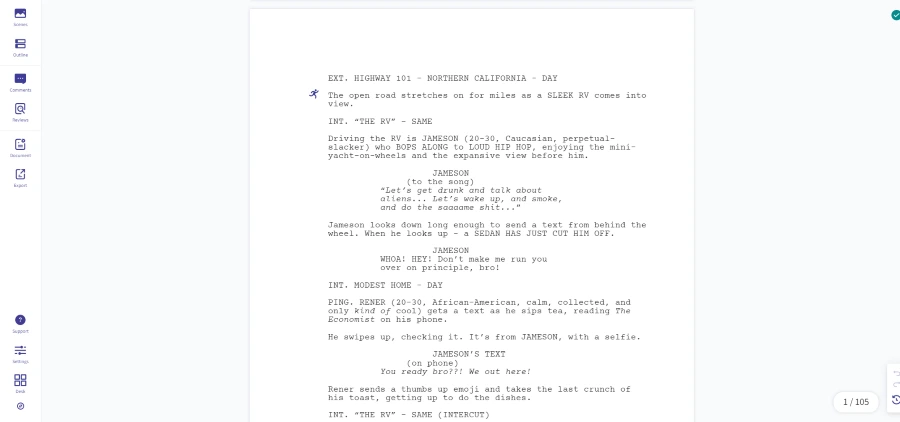
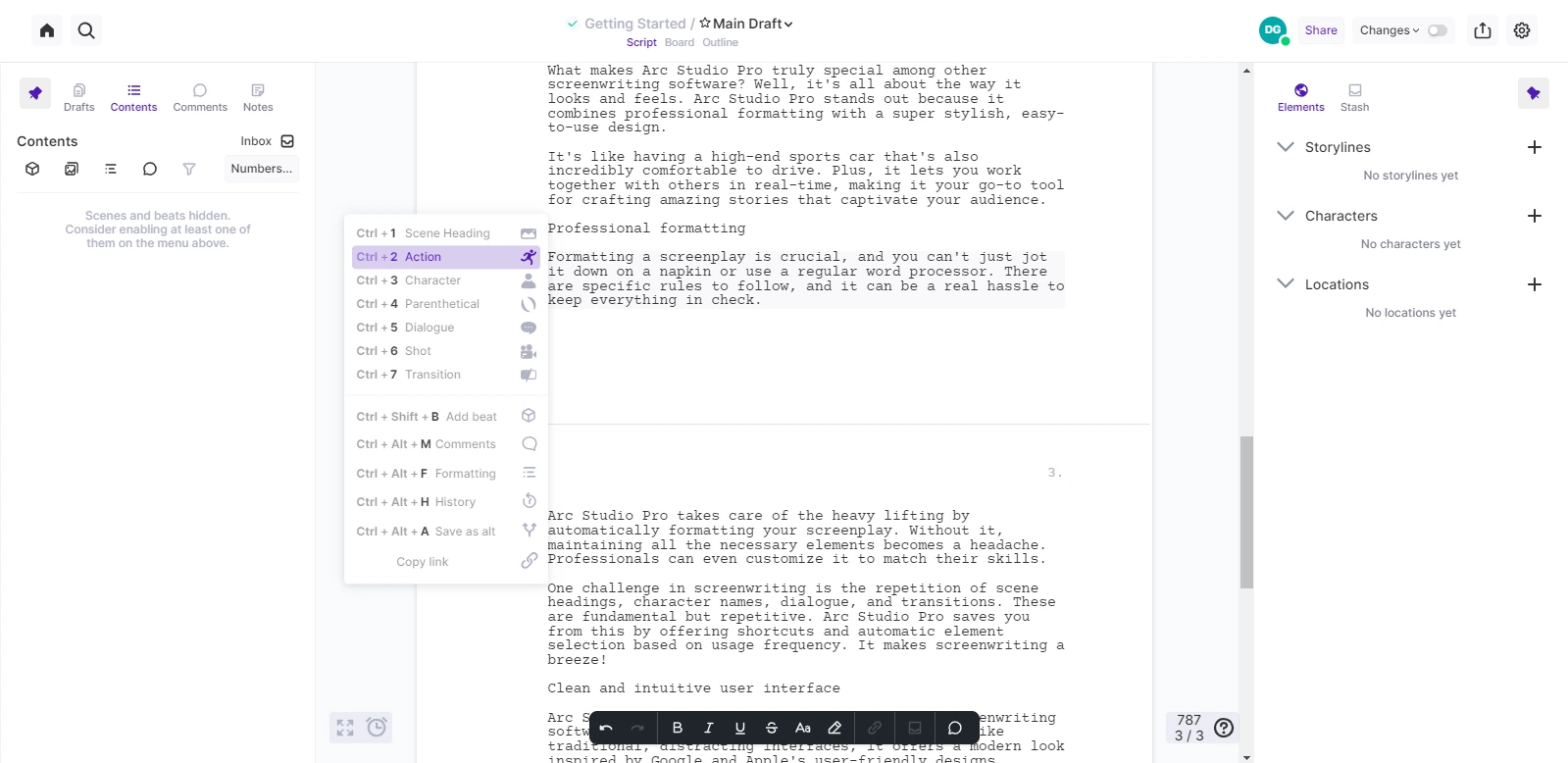
Type and the app handles scene headings, character cues, dialogue and transitions, guessing the next element from what you usually do. Tab and Enter get you almost everywhere. It handles the repetitive mechanics of a screenplay so completely that after a day you forget the feature exists, which is the highest compliment formatting software can earn.
An interface that is not hostile
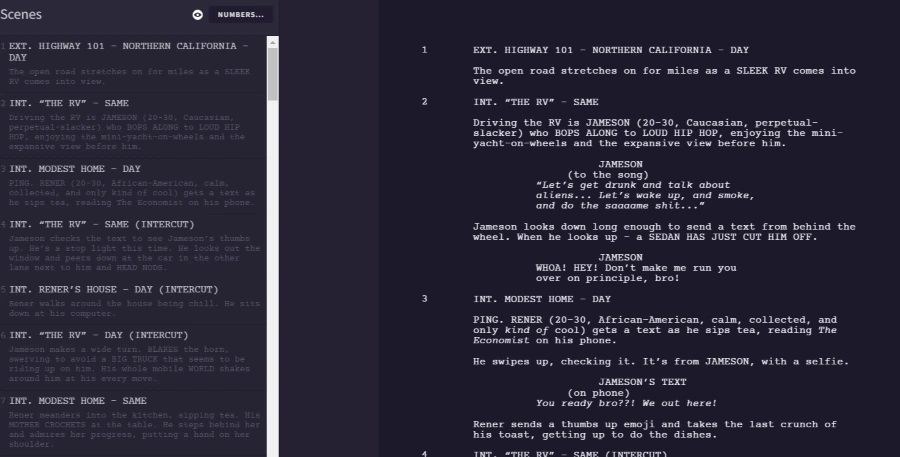
Soft white page, restrained purple accents, a taskbar and dropdowns borrowed from the Google Docs school of design, and a night mode for the 1am sessions. Compared with the legacy tools it looks like it belongs on a modern machine. That matters when you stare at it for six hours.
The beat board is the actual reason to switch
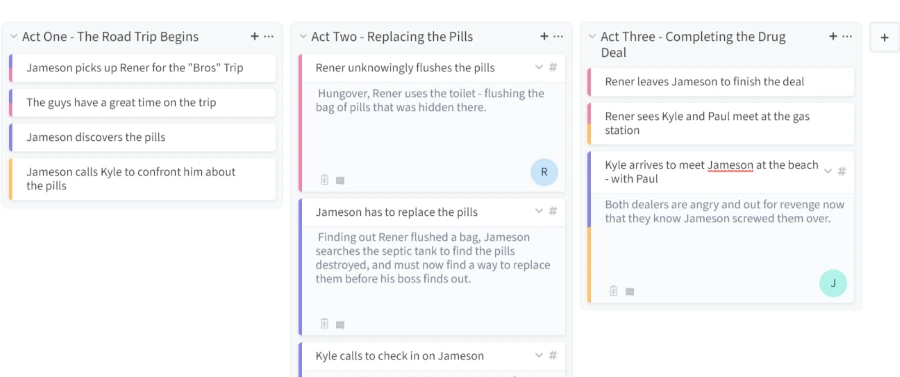
Collect ideas as cards, drag them into acts and sequences, tag them by character or plotline. Because the outline lives beside the script rather than in a separate document, structure stays visible while you draft. It is the difference between spotting a saggy second act now and spotting it on page 70.
This is also the honest test of whether you want the tool. Writers who outline will love it. Writers who discovery-draft will use maybe a fifth of what they are paying for.
Co-writing that behaves like a writers room

Invite a partner and you both edit the same script live, with comments pinned to the line they refer to. No exported drafts named final_v7_REAL, no reconciling two versions by hand. For a writing duo or a TV room this alone justifies the annual cost.
Autosave and version history
Every change saves continuously and you can roll back to an earlier state. Screenwriters lose work in exactly two ways, a crash and a bad rewrite, and this covers both. Desktop apps keep working offline and sync when you reconnect.
It plays nicely with the rest of the industry
Import and export FDX, PDF and Fountain. That matters more than it sounds, because at some point somebody will ask for a Final Draft file and refusing is not an option. Complex revision marks are the one place imports get lossy.
Getting a script moving in Arc Studio
The outline first, the pages second. That order is the point of this tool.
-
Step 1 of 6
Start a project and set the format
Feature, TV drama, sitcom or your own template. Getting this right up front saves a formatting cleanup later, and custom formats are a paid feature.
-
Step 2 of 6
Dump every idea onto the beat board
Cards, no structure, no judgement. Scenes, images, a line of dialogue you cannot lose. This is the bit a plain script editor cannot do for you.
-
Step 3 of 6
Drag beats into acts
Arrange the cards into acts and sequences and tag them by character or plotline. Suddenly you can see whether your B story disappears for forty pages.
-
Step 4 of 6
Write with the outline beside you
The outline stays visible next to the page, so you write the scene you planned rather than the scene you drifted into. Formatting handles itself as you type.
-
Step 5 of 6
Invite your co-writer
Real-time editing with comments attached to the line they refer to, which is the difference between notes you can action and an email thread you cannot.
-
Step 6 of 6
Export the file they asked for
PDF for readers, FDX for producers who live in Final Draft, Fountain if you want plain text. Check the paginated PDF before sending, always.
What Arc Studio Pro costs
Three tiers, priced annually, with a couple of things sold separately.
Arc Studio Pro pricing
- Included: 2 scripts
- Included: Browser and desktop apps
- Not included: Watermark-free exports
- Not included: Collaborators and mobile apps
- Included: Unlimited scripts, no watermark
- Included: Outlining and custom formats
- Included: Collaborators and iPhone/iPad apps
- Not included: Full revision management
- Included: Everything in Essentials
- Included: Revision management
- Included: Priority support
- Not included: Add-ons included in the price
Prices from arcstudiopro.com, checked July 2026. Table Read, Character Images and the Research Assistant are separately priced add-ons on both paid tiers.
We may earn a commission when you buy through links on this page. This does not affect our reviews.
The maths against Final Draft is the whole argument. A perpetual Final Draft licence runs around $250 and upgrades cost extra every few versions. Arc Studio Essentials at $69 a year is cheaper for the first three years and more expensive after that. If you write constantly and value the collaboration, it wins. If you write one script a decade, buy the licence.
Watch the add-ons. Table Read, Character Images and the Research Assistant are priced on top of your plan, so the sticker price is a floor rather than a total.
Where Arc Studio Pro falls short
The free tier is a demo. Two scripts and a watermark on every export means you cannot send anything to a reader, a competition or an agent. Useful for a fortnight of testing, not for finishing anything.
Subscription fatigue is real. Screenwriters have paid once for software for thirty years, and a recurring bill for a text editor is a genuine objection rather than an irrational one.
Not the industry default. Final Draft is what production offices assume. Arc Studio exports FDX cleanly enough, but if your collaborators live in coloured revision pages you will feel the friction.
No production tools. No scheduling, no breakdowns, no budgeting. Celtx exists for that, and Arc Studio makes no attempt to compete.
Add-on pricing muddies the value. Selling assistant features separately on a plan that already costs money is the least likeable thing about the offer.
Arc Studio Pro vs the alternatives
Four tools cover most of this market, and they are genuinely different products rather than variations on one idea.
| Feature |
Final DraftBest for: Industry default |
WriterDuetBest for: Remote collaboration |
CeltxBest for: Production planning |
|
|---|---|---|---|---|
| Cost model | Subscription, $69 to $99 a year | One-off licence, around $250 | Free tier plus subscription | Subscription |
| Built-in beat board and outlining | Yes | Yes | Yes | Yes |
| Real-time co-writing | Yes | No | Yes(winner for this row) | Yes |
| Free tier you can finish a draft on | No | No | Yes(winner for this row) | No |
| Production scheduling and budgeting | No | No | No | Yes(winner for this row) |
| Interface quality | Best on test(winner for this row) | Dated | Functional | Busy |
We may earn a commission when you buy through links on this page. This does not affect our reviews.
Our read: Arc Studio if outlining and co-writing matter and you will use it often. Final Draft if you need the industry standard and hate subscriptions. WriterDuet if remote collaboration is the entire job and you want a usable free tier. Celtx if you are planning a shoot, not just writing one.
Who should buy it
Writing partnerships. Two people in one script, live, with threaded comments. This is the strongest case for the product and it is not close.
TV writers. Episode structure, act breaks and plotline tags map onto how television actually gets built.
Outliners. If you plan before you draft, the beat board will change how you work. If you do not, you are paying for a very pretty formatter.
Writers who move between devices. Cloud sync plus desktop and iPad apps means the script is wherever you are, which for anyone drafting on a commute is worth the money on its own.
If you want a tool that drafts scenes for you, this is not it, and that is deliberate. For that debate, our take on whether AI writing tools are worth using is a better starting point than any feature comparison. For line-level polish on the prose you write elsewhere, see our Grammarly alternatives.
Frequently Asked Questions
How much does Arc Studio Pro cost?
The free tier is 0. Essentials is 69 dollars a year. Pro is 99 for the first year and 79 a year after that. Table Read, Character Images and the Research Assistant are paid add-ons on top. Prices checked July 2026.
What does the free plan actually let you do?
Two scripts, watermarked exports, browser and desktop apps, cloud sync and comments. No mobile apps, no collaborators, no outlining or custom formats. It is enough to test the writing experience and not enough to finish a project.
Do free exports carry a watermark?
Yes. Anything you export on the free tier is watermarked, which rules it out for sending a script to a reader, a competition or an agent. That single limit is what pushes most people to Essentials.
Is Arc Studio Pro better than Final Draft?
Different bets. Final Draft is a one-off purchase and the format the industry defaults to. Arc Studio is a subscription with far better collaboration and outlining and a much nicer interface. If you write alone and hate subscriptions, Final Draft still wins.
Can I open and export Final Draft files?
Yes. Arc Studio imports and exports FDX along with PDF and Fountain, so you can move a script between tools and hand a producer the file they expect. Complex revision marks are where imports get imperfect.
Does it work offline?
The desktop apps keep working without a connection and sync when you reconnect, and offline access sits on the paid tiers. Treat the browser version as the online option and the desktop app as the reliable one.
Which plan should a working writer buy?
Essentials at 69 dollars covers unlimited scripts, mobile apps, collaborators, outlining and custom formats, which is everything most writers need. Move to Pro only if you want the extra pro-tier tools and revision handling.
Is there a mobile app?
Yes, for iPhone and iPad, and it is a paid feature rather than part of the free tier. It is built for reading, note capture and light edits rather than drafting a whole scene on a phone.
Does Arc Studio Pro have AI features?
It has optional assistant tools sold as add-ons rather than an AI writing partner baked into the editor. If you want a model drafting scenes for you, this is not that product, and honestly that is a point in its favour.
The bottom line
Arc Studio Pro is the most pleasant screenwriting app to actually sit in, and the beat board is a real structural tool rather than a bullet point. For a writing partnership or anyone who outlines, it earns the subscription comfortably.
For a solo writer who drafts straight into pages and finishes a script every couple of years, the numbers point at a one-off Final Draft licence instead. Spend a fortnight on the free tier, write one full sequence, and see whether the outline pane changes anything for you. That is the only test that matters when you are choosing screenwriting software.
This review is based on Arc Studio official documentation and its published pricing checked in July 2026. We have not written a full feature-length draft in it, so treat the workflow notes as informed analysis rather than a production diary. Some links on this page are affiliate links.
The Review
Arc Studio Pro
Arc Studio Pro is the nicest screenwriting app to actually work in, and its beat board keeps story structure visible while you draft instead of hiding it in another document. Real-time co-writing is excellent. The catches are a watermarked free tier, subscription-only pricing against a market leader that sells a perpetual licence, and useful features sold as paid add-ons.
PROS
- Beat board sits beside the script, so structure stays visible
- Cleanest interface in screenwriting software, with a proper night mode
- Real-time co-writing with comments pinned to the line
- Continuous autosave and rollback version history
- FDX, PDF and Fountain import and export
- Cheaper than a Final Draft licence for the first few years
CONS
- Free tier is capped at 2 scripts and watermarks every export
- Subscription only, while the market leader sells a perpetual licence
- Table Read, Character Images and Research Assistant cost extra
- Not the industry default, so FDX revision marks can get lossy
- No scheduling, breakdowns or budgeting tools
Arc Studio Pro DEALS
We collect information from many stores for best price available




