

Every creator platform now promises to replace your Facebook group, your course tool and your Zoom link. Circle is one of the few that actually pulls it off, and in 2026 it just had its biggest update ever.
This Circle review covers what the platform does well, where the transaction fees and missing email marketing bite, what the new Circle Eclipse release actually changes, and whether it is worth $89 a month over Skool or Mighty Networks.
How we assessed this: this review is based on Circle’s current product, its Eclipse release notes and pricing page, and how it compares to the community platforms we cover. Where a claim comes from Circle rather than our own hands-on use, we say so.
Quick verdict
Circle is the most polished community platform on the market, and the Eclipse update widens that lead with Circle AI and a proper Inbox. You pay for it: there is no free plan, the cheapest tier is $89 a month, and every plan skims a transaction fee off what you sell. Worth it if community and courses are your core business. Overkill if you just need a chat room.
- Best for: coaches, course creators and brands selling a paid community plus courses under their own brand.
- Not ideal for: hobby communities, the budget-conscious, or anyone who mainly needs email marketing built in.
Circle at a glance
- Product Name
- Circle
- Official Website
- circle.so
- Category
- Community platform for creators, courses and memberships
- Our Rating
- Founded
- 2020, New York, by ex-Teachable founders
- Starting Price
- $89/mo (Professional) (billed annually)
- Transaction Fees
- 2% Professional, 1% Business, 0.5% Plus
- Free Plan
- No 14-day trial, no card
- Money-Back Guarantee
- Yes 30 days
- Members
- Unlimited on every plan
- What is new in 2026
- Eclipse update: Circle AI, Inbox, Discover 2.0, Studios
- Mobile Apps
- iOS and Android; branded apps on higher tiers
- Best For
- Creators and coaches selling courses plus community together
- Top Alternatives
- Skool, Mighty Networks, Kajabi, Discourse
We may earn a commission when you buy through links on this page. This does not affect our reviews.

What Circle Eclipse changes in 2026
Eclipse is the biggest release in Circle’s history, rolled out from June and open to every customer to opt into by August. It is not a redesign you are forced to accept. It is a set of new products you switch on. Five things matter.
The redesigned Circle Courses experience landed in the same release too: a visual curriculum, a better lesson player and AI-assisted course building. That one has no standalone screenshot here, so it feeds into the courses section further down. The four pieces most likely to change your day-to-day get a proper look next.
The features that actually matter
One space instead of four tools
Circle’s core pitch is consolidation. Discussions, courses, events and members live in one place, organised into spaces you can gate by membership tier. In practice that means a member moves from a lesson to a discussion to a live call without ever leaving your branded site, and you stop paying for four separate subscriptions.
The design is the real differentiator. Most community tools feel like a 2010 forum. Circle feels like a modern app, and members navigate it without a tutorial. That sounds soft until you have watched engagement die on an ugly platform.
Courses that sit next to the conversation
Native course hosting is where Circle separates from pure chat tools. Video lessons, drip scheduling, progress tracking and downloadable resources all live inside the community, and every lesson can carry its own discussion thread underneath. Questions get asked and answered in context, which is genuinely better than a course tool bolted onto a separate forum.
Be honest about the ceiling, though. If you need advanced quizzes, certificates, SCORM or serious assessments, a dedicated platform like Kajabi or Teachable still does more. Circle’s courses are very good for a community tool, not a full LMS.

Discussions, events and moderation
Posts, polls, and a question format where the best answers rise to the top build a searchable knowledge base over time. Live events run natively, with RSVPs, reminders and recordings handled in one place rather than duct-taped to Zoom. Moderation is proper too: spam filters, post approval for new members, and moderators with scoped permissions.
None of this is unique on its own. What is unusual is having all of it in a single, well-designed interface instead of five integrations that break.
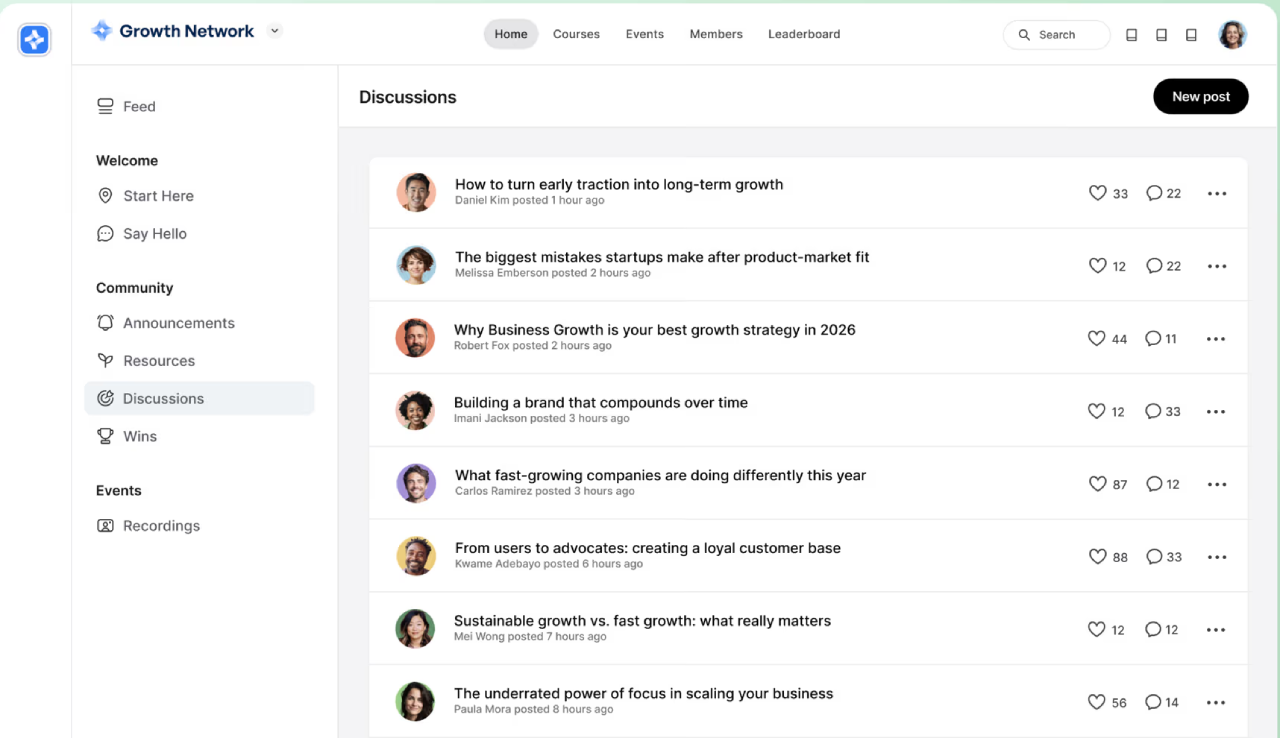
Circle Discover
Discover is a marketplace that points people to communities based on what they want to learn, achieve or become. For a member it is a way to find the right room. For you as a creator it is a potential source of members you did not have to pay for, which is the genuinely interesting part. The catch is the usual marketplace one: how much traffic it sends your way depends on how busy the marketplace gets, and that is outside your control.

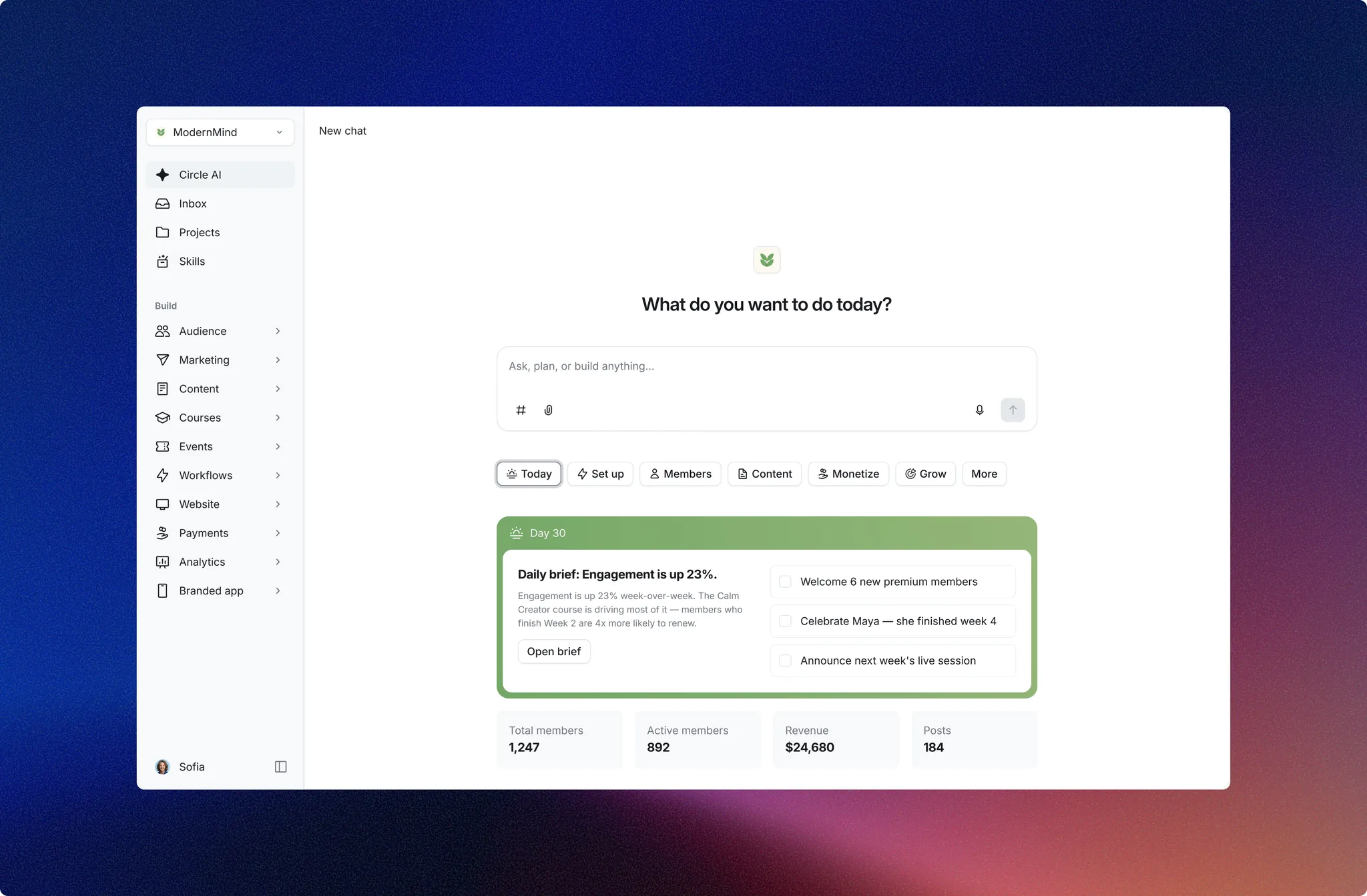
Circle AI
This is the headline of the whole release. Circle AI is pitched as a partner that helps you build, run and grow the community, with more than 50 skills spanning setup, member management, content and monetisation. In practice it shifts Circle from somewhere you host a community to something that helps you operate one. How much it is worth depends entirely on how much you are willing to hand it, so treat the 50-skills figure as scope rather than a promise that every skill is production-ready on day one.
Circle Studios
Studios is the most exclusive announcement and the least relevant to most readers. It is a full-service partnership where Circle’s own team helps build, operate and grow a community business for top-tier creators, so think done-for-you rather than software you run yourself. If you are a large creator who would rather outsource the operational grind, it is worth a conversation. For everyone else it mainly signals that Circle is moving upmarket.

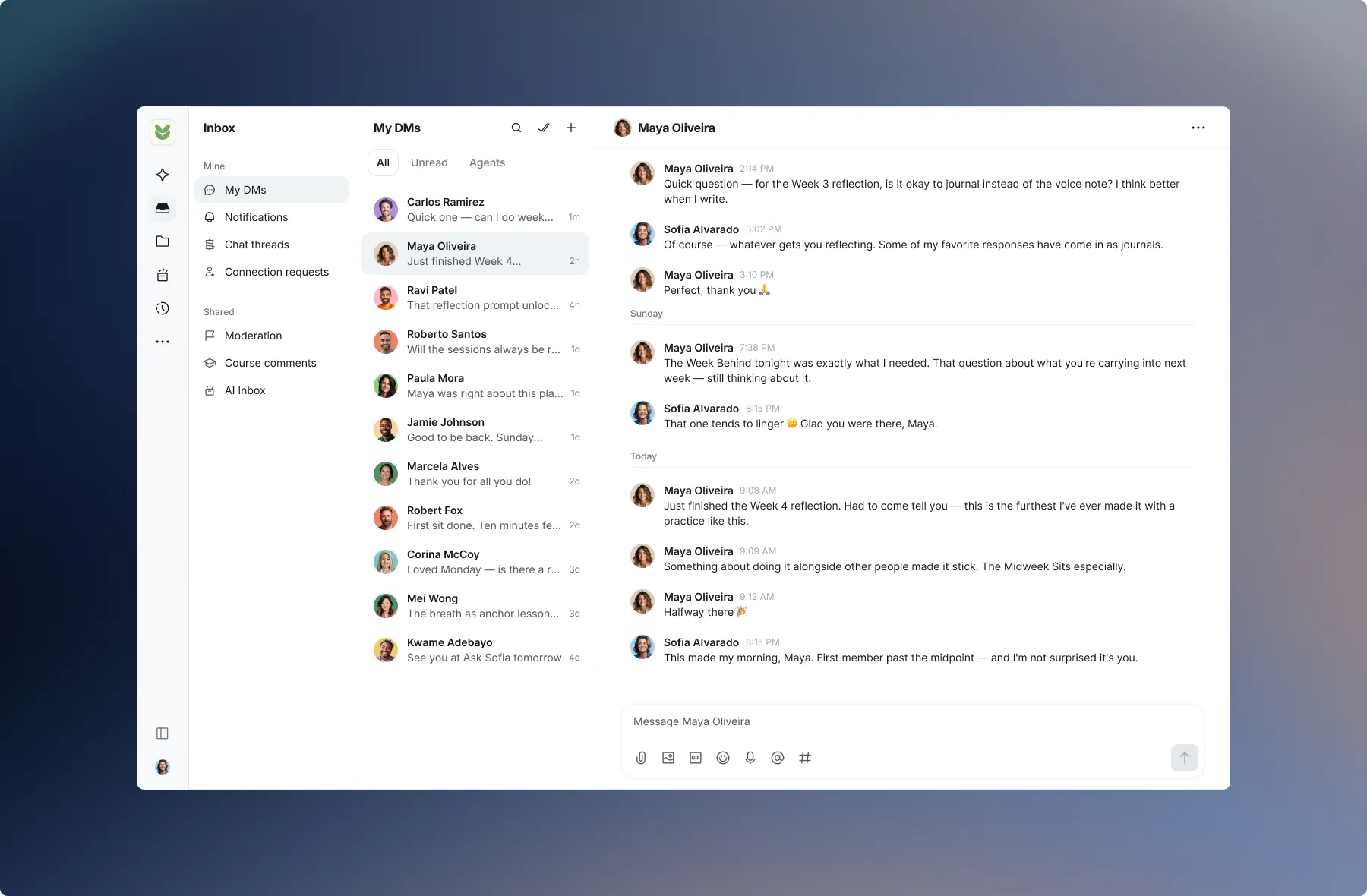
Circle Inbox
Inbox is the quiet workhorse of Eclipse. It pulls DMs, course comments, moderation reports, AI conversations and everything else that needs your attention into one admin view. It sounds mundane next to Circle AI, but if you have ever lost a member’s question between three browser tabs, this is the one you will open every day. Consolidating notifications is exactly the kind of unglamorous fix that stops a busy community leaking engagement.
The mobile apps, and the catch
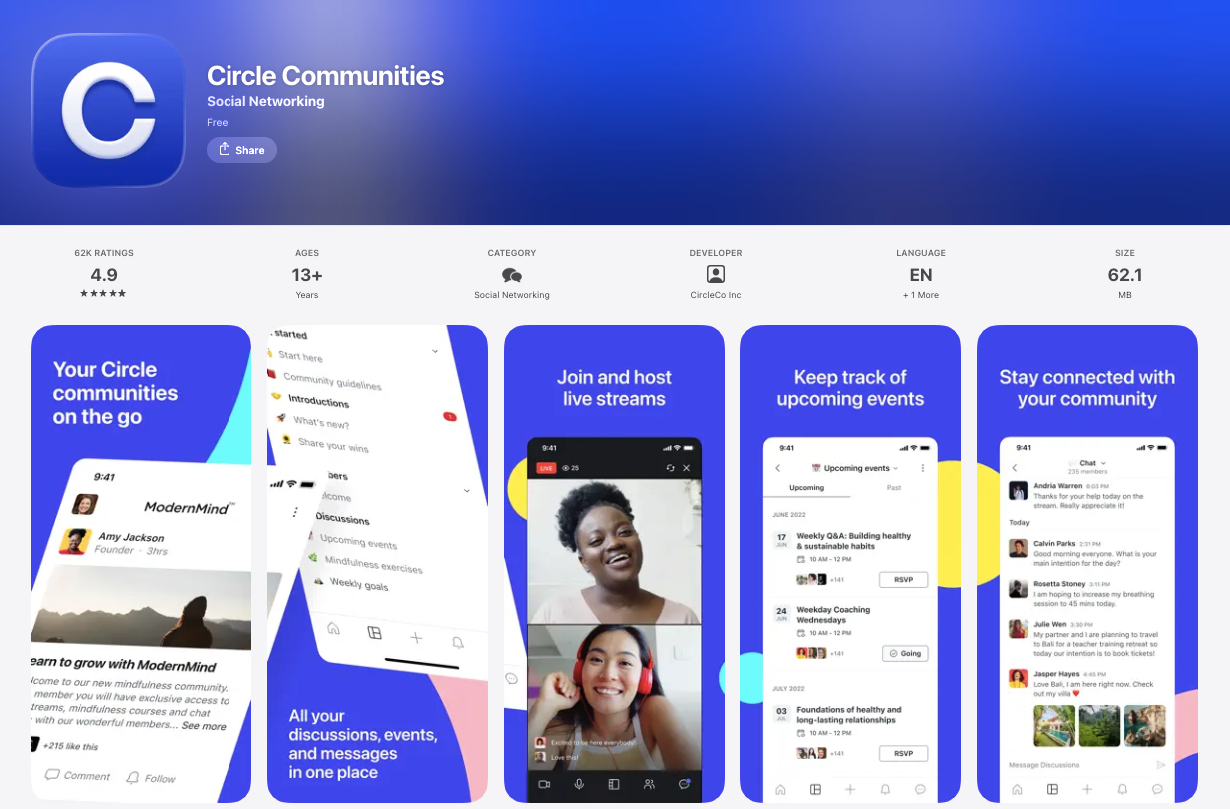
Members get iOS and Android apps, and push notifications on a phone drive far more engagement than email ever will. This is one of Circle’s strongest cards.
The catch is the fully branded white-label app, the one carrying your name instead of Circle’s, sits on the higher tiers. For the feature most likely to lift daily engagement, that is a real gate, and it is worth pricing before you commit to a plan.
The experience is near-identical across iOS and Android, so members on either get the same push notifications and one-tap access.
Members, payments and analytics
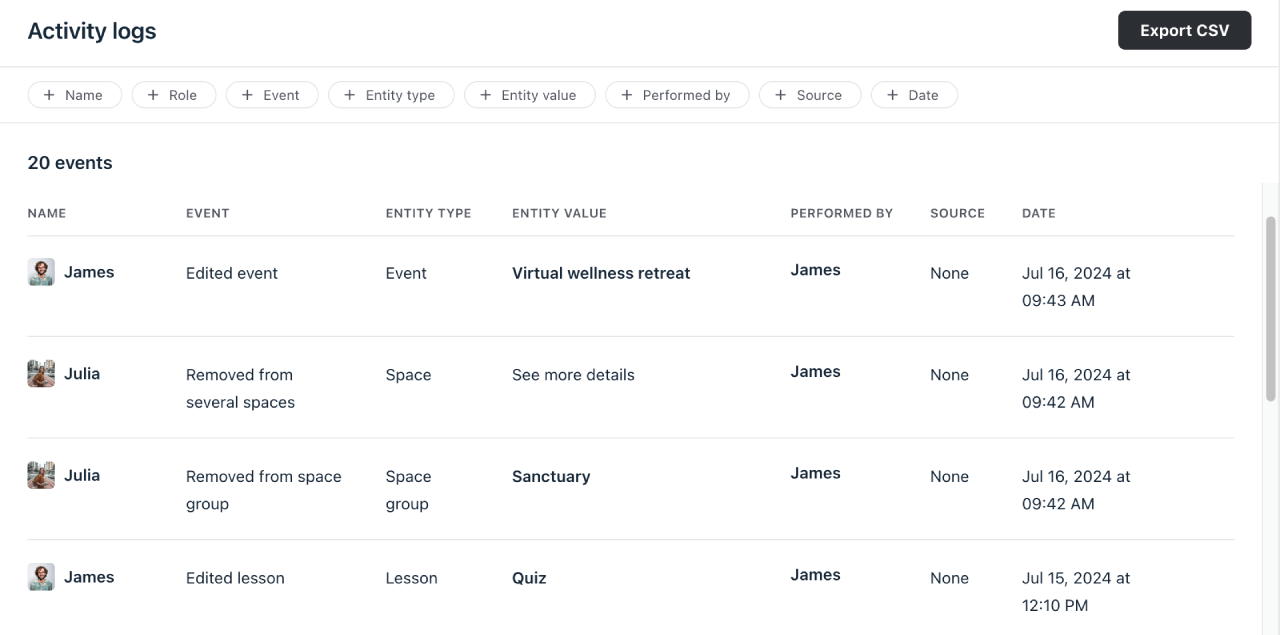
Built-in Stripe payments handle recurring memberships and paywalled spaces, with access granted and revoked automatically, so a failed card does not become a manual chore. Analytics cover engagement, active members, course completion and revenue in one dashboard. Granular permissions let you run different tiers in gated spaces from the same community.
Integrations, and the email marketing gap
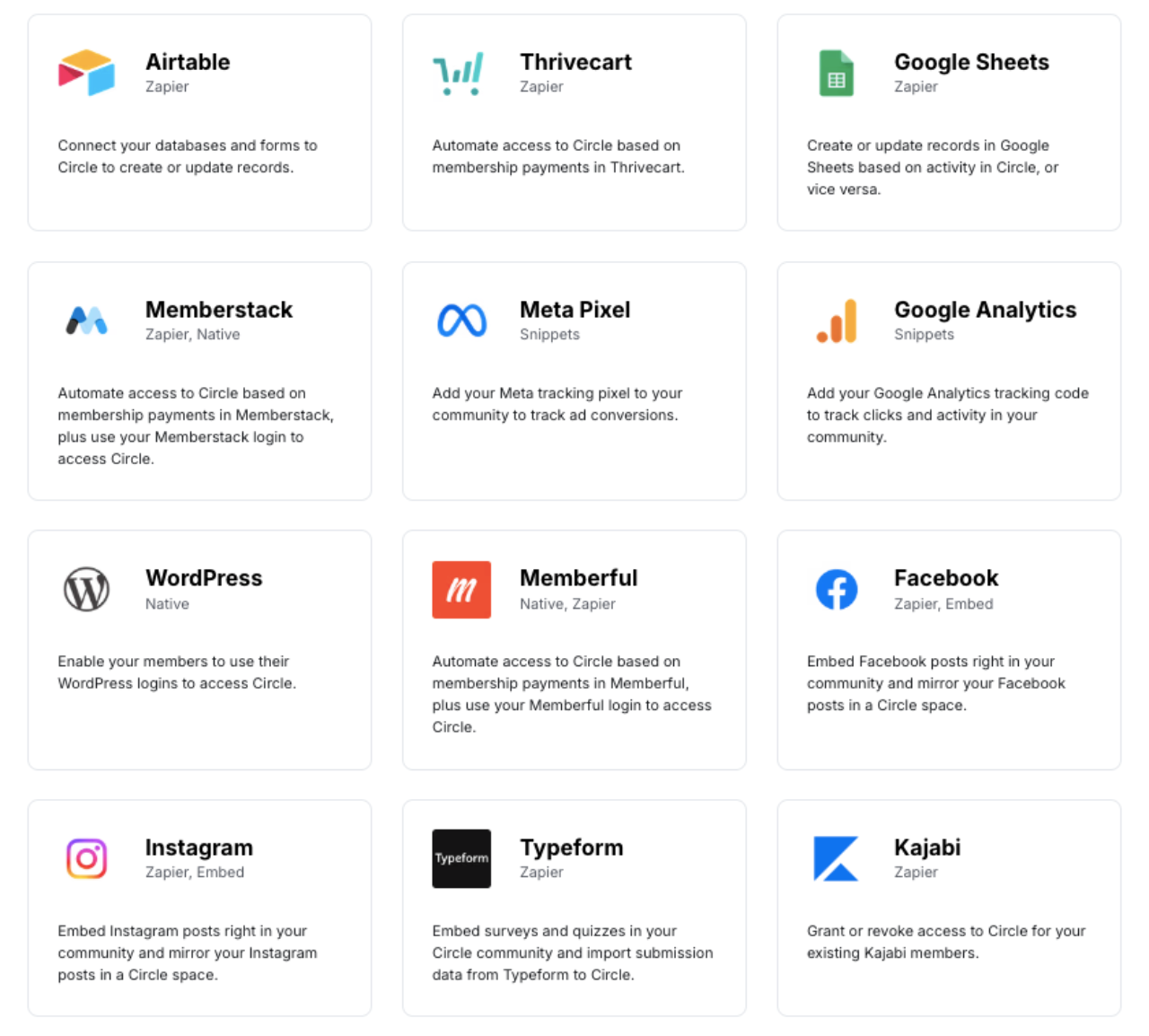
Circle connects to Stripe, Zapier, Slack, Mailchimp, Zoom and more, and Business plans add API access and custom profile fields. For most stacks that is enough, though native integrations are thinner than Kajabi’s and you will lean on Zapier for the long tail.
The real gap is email marketing. Circle sends notifications and digests, but it is not a broadcast tool. Welcome sequences, newsletters and automation still need a dedicated email tool alongside it. Budget for that subscription, because it is the one cost the sales page will not mention.
Circle Pricing
Three plans, all with unlimited members. The transaction fee falls as you move up.
- Included: Unlimited members
- Included: Courses, events, custom domain
- Included: Circle AI included
- Included: 2% transaction fee
- Not included: Workflows and API
- Not included: Branded mobile app
- Included: Everything in Professional
- Included: Workflows and automations
- Included: API and custom profile fields
- Included: Branded email
- Included: Lower 1% transaction fee
- Included: 5 admins, 15 moderators
- Included: Lowest 0.5% transaction fee
- Included: AI agents and custom SSO
- Included: Unlimited admins and moderators
- Included: Optional branded apps
- Included: Dedicated success manager
- Included: Highest usage limits
Monthly-equivalent prices on annual billing, checked at the time of writing. A 14-day trial (no card) and a 30-day money-back guarantee apply. Circle Plus is quote-based.
We may earn a commission when you buy through links on this page. This does not affect our reviews.
Two things decide whether Circle is affordable for you, and neither is the monthly price. The first is the transaction fee: 2% on Professional, 1% on Business, 0.5% on Plus, taken on everything you sell. On $5,000 a month of memberships that 2% is $100, on top of the $89. The second is that there is no free plan, only the 14-day trial. Skool, at a flat $99 with no transaction fee, is the comparison that stings here.
Our pick: most creators should start on Professional and only move to Business when the lower 1% fee plus workflows and the API genuinely pay for the jump. Do that maths on your real revenue, not your hoped-for revenue.
How Circle compares to the alternatives
Prices below are entry rates checked at the time of writing and move often, so confirm before you buy.
| Feature |
Skool$99/moBest for: Simplicity and gamification |
Mighty NetworksFrom ~$41/moBest for: Social-network feel |
KajabiFrom ~$89/moBest for: All-in-one with email marketing |
|
|---|---|---|---|---|
| Free plan | No | No | No | No |
| Members included | Unlimited | Unlimited | Varies by plan | Unlimited |
| Design and UX | Class leading(winner for this row) | Deliberately basic | Busier | Polished but complex |
| Native courses | Yes | Yes | Yes | Yes |
| Built-in email marketing | No | No | No | Yes(winner for this row) |
| Transaction fee (entry plan) | 2% | 0% | 2-3% | 0% |
| Branded mobile app | Yes(winner for this row) | No | Yes | Yes |
We may earn a commission when you buy through links on this page. This does not affect our reviews.
Read that as priorities, not a scoreboard. Skool wins if you want dead-simple and a flat fee with no cut of your sales. Mighty Networks leans more social and starts cheaper. Kajabi is the one to beat if built-in email marketing and funnels matter more than community polish, though it costs more and the community feels secondary. Discourse is the technical, self-hostable route with no course hosting. Circle’s case is the blend: the best design, courses and community together, and now Circle AI on top.
Who should actually use Circle
Buy Circle if a paid community and courses are central to how you make money, you care about your members experiencing your brand rather than someone else’s, and the monthly cost plus transaction fee is comfortably absorbed by your revenue. Coaches, course creators and established brands are the sweet spot.
Skip it if you are validating an idea and have no revenue yet, you mainly want real-time chat, or email marketing is the feature you most need bundled in. A free Discord or a cheaper flat-rate tool will serve you better until the community is genuinely paying its way. If you are still weighing the wider category, our roundup of community and social tools gives the broader map.
Frequently Asked Questions
What is Circle used for?
Running a paid community, courses and events in one branded space you own, instead of scattering members across a Facebook group, a course tool and Zoom. Coaches, course creators and brands use it to keep content, discussion and payments under one roof.
Is Circle free?
No. There is no free plan, only a 14-day trial with no card required and a 30-day money-back guarantee. Paid plans start at $89 a month on annual billing. If free is a hard requirement, Discord or a Facebook group are the usual fallbacks, with the trade-offs that implies.
How much does Circle really cost?
Professional is $89 a month, Business is $199, and Circle Plus is custom-quoted. Every plan also takes a transaction fee on what you sell: 2% on Professional, 1% on Business, 0.5% on Plus. Factor that fee in, because on real revenue it adds up faster than the monthly price suggests.
What is Circle Eclipse?
Eclipse is Circle’s major 2026 release, rolled out between June and August. It adds Circle AI (an assistant with 50+ skills), a unified Inbox, a redesigned course builder, Discover 2.0 for finding communities, and Studios, a done-for-you service for top creators. Existing customers opt in rather than being forced to switch.
Does Circle have a mobile app?
Yes, iOS and Android. Members can use the standard Circle app on any plan, and fully branded white-label apps are available on higher tiers. The branded app is one of Circle’s strongest engagement features, so factor its plan requirement into your budget.
Can I sell courses and memberships on Circle?
Yes. Native course hosting sits right beside the community, so discussion happens under each lesson, and paywalled spaces plus recurring memberships run through built-in Stripe payments. The course builder is good, though a dedicated LMS still beats it on quizzes, certificates and SCORM.
Does Circle do email marketing?
Not really, and this is its biggest gap. Circle sends notifications and digests, but for broadcasts, welcome sequences and automation you still need a separate tool like ConvertKit or Mailchimp. Budget for that extra subscription. Kajabi is the main rival that bundles email in.
Is Circle better than Skool or Mighty Networks?
Different priorities. Circle wins on design and the course-plus-community blend. Skool wins on simplicity, a flat $99 and zero transaction fee. Mighty Networks leans more social. If you want the most polished branded experience and will use the courses, Circle is the pick. If you want cheap and dead simple, Skool is.
The bottom line
Circle is the best-designed community platform you can buy, and the Eclipse update, with Circle AI and the new Inbox, pushes it further ahead on features. If community and courses are your business, nothing else feels this polished.
The honest caveats are cost and focus. No free plan, an $89 floor, a transaction fee on every sale, and no built-in email marketing mean Circle only makes sense once your community earns. If it does, start the 14-day trial and lean on the 30-day money-back guarantee to test it properly. If it does not yet, come back when it does.
The Review
Circle
Circle is the most polished community platform for creators, and the Eclipse update adds Circle AI, a unified Inbox and a redesigned course builder. It is a premium pick: no free plan, an $89 floor and a transaction fee on every sale. Worth it once your community and courses are central to how you earn, and hard to justify before then.
PROS
- Best-in-class design and member experience
- Genuinely all-in-one: community, courses, events and payments
- New Circle AI and Inbox from the Eclipse update
- Branded iOS and Android apps drive real engagement
- Unlimited members and a 30-day money-back guarantee
CONS
- No free plan; $89/mo entry price
- Transaction fee on every plan (2% / 1% / 0.5%)
- No built-in email marketing, needs a separate tool
- Course builder lighter than a dedicated LMS
- Fully branded app is gated to higher tiers




