Your login page sits at /wp-admin. Every bot on the internet knows that, and a fresh WordPress install starts getting probed within hours of going live.
Hide My WP Ghost (now sold simply as WP Ghost) moves that door, hides your theme and plugin paths, and puts a firewall in front of the rest. So does hiding paths actually stop anything? Partly. Here is where this WordPress security plugin earns its licence fee, where it breaks things, and how it stacks up against the other WordPress security plugins we rate.
Quick verdict
Our take: WP Ghost does one job better than any general-purpose security plugin. It stops your site looking like WordPress. That alone kills most of the automated traffic hammering wp-login.php and sniffing around /wp-content/plugins/ for a known hole. What it won’t do is scan for malware or clean an infected site, so treat it as a hardening layer rather than your whole defence.
Best for: bloggers, freelancers and small agencies who want to cut bot noise and login attacks without paying for a managed firewall every month.
Not ideal for: anyone who needs malware scanning, file-integrity checks and incident cleanup from one product. Wordfence or Sucuri fit that job better.
Full score, pros and cons are in the review box below.
Hide My WP Ghost at a glance
- Product
- WP Ghost (formerly Hide My WP Ghost), by Squirrly
- Official Website
- hidemywp.com
- Category
- WordPress security and hardening plugin
- Our Rating
- Starting Price
- $29/year list price for 1 site (Ghost 1)
- Free Version
- Yes 115+ hardening options on WordPress.org
- Active Installs
- 80,000+ (WordPress.org, July 2026)
- Server Support
- Apache, Nginx, LiteSpeed, IIS
- Refund Window
- 30-day money-back guarantee
- Best For
- Bloggers and small agencies cutting bot and login attacks
We may earn a commission when you buy through links on this page. This does not affect our reviews.
Hiding paths is not magic, but bots fall for it
Security people will tell you obscurity isn’t security, and they’re right. Renaming wp-login.php won’t stop somebody who has decided to break into your site specifically.
Here’s the catch: almost nobody is attacking you specifically. The overwhelming majority of hits on a small WordPress site come from scripts that fingerprint the CMS, look for a known vulnerable plugin version, and move on if the fingerprint doesn’t match. Break the fingerprint and most of that traffic never reaches your PHP. That’s a real saving in server load as well as risk, which is why we’d rather run this alongside a decent host than instead of one. Our Hostinger review covers the hosting side of that equation.
What you actually get
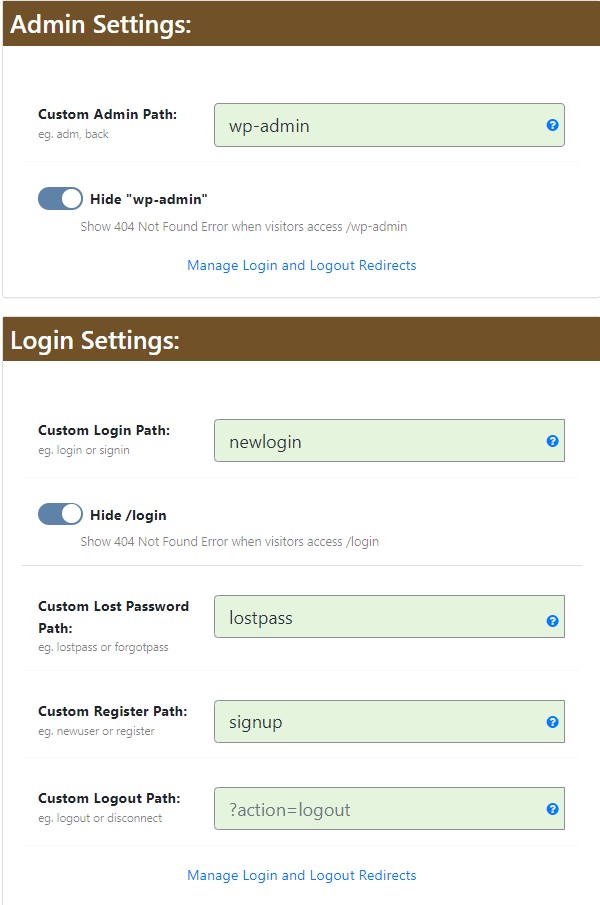
Changing and hiding the common paths
This is the headline feature. You pick new URLs for wp-admin, wp-login.php, wp-content, wp-includes, plugin folders and theme folders, and the plugin rewrites them everywhere they appear, including inside your page source. Three presets do the heavy lifting: Default, Safe Mode (compatible with everything, lighter cloaking) and Ghost Mode (aggressive, and the one most likely to need tuning).
Brute force and login protection
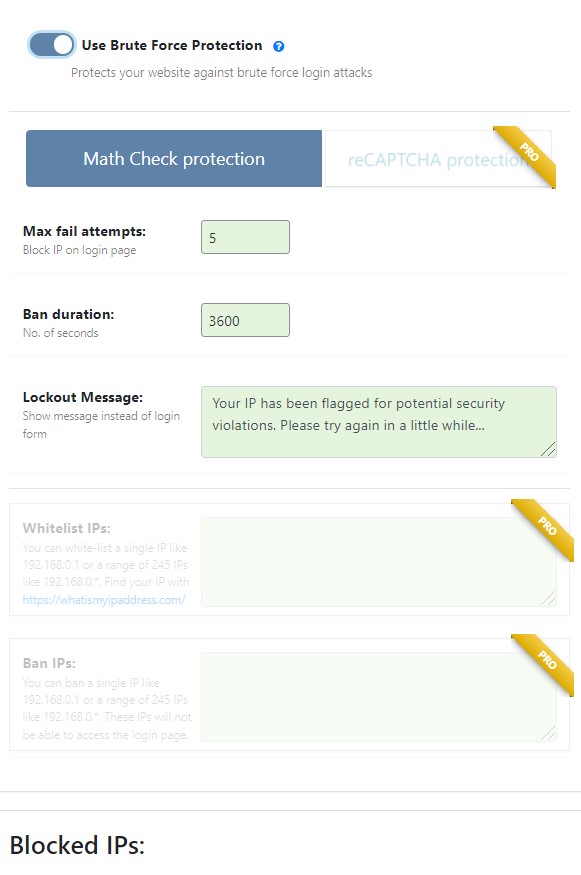
You get login attempt limits, IP blacklisting and whitelisting, country blocking on paid plans, a hidden login URL and email alerts when somebody tries. Two-factor authentication is in there too, which is worth flagging because older reviews of this plugin (ours included) said it wasn’t.
Firewall rules, XML-RPC and injection filters
The plugin adds request filters for SQL injection and cross-site scripting patterns, sets security headers, and lets you disable or restrict xmlrpc.php. If you don’t use the WordPress mobile app or Jetpack, killing XML-RPC outright removes a whole category of brute force amplification. That single toggle is worth the install on its own.
Security check and event log
A one-click audit runs through a long list of hardening checks (file permissions, exposed readme files, directory listing, database prefix, admin username) and tells you what to fix. The paid tiers add unlimited event logging with cloud storage and real-time email notifications. The free build keeps a shorter log.
Real-world tip: run the audit before you switch on Ghost Mode. Fixing the boring stuff first means that if something breaks later, you know it was the cloaking and not a permissions change.
Setting it up without breaking your theme
-
Step 1 of 6
Install the free version first
Grab WP Ghost from the WordPress.org repository and activate it. Do not buy a licence until you know your theme tolerates path changes.
-
Step 2 of 6
Take a backup you can actually restore
Path rewriting touches .htaccess or your Nginx config. If you have never tested a restore, read our roundup of WordPress backup plugins before you continue.
-
Step 3 of 6
Run the security check
Work through the audit list first. Most of those fixes are free, permanent, and unrelated to cloaking.
-
Step 4 of 6
Switch on Safe Mode, not Ghost Mode
Safe Mode changes the login and admin paths while staying compatible with page builders and caching plugins. Save your new login URL somewhere outside the site.
-
Step 5 of 6
Test in a private window, then escalate
Load the homepage, a page-builder page, the cart if you run WooCommerce, and the new login URL. Only move to Ghost Mode once Safe Mode has been stable for a week.
-
Step 6 of 6
Whitelist your own IP
Lock yourself out once and you will understand why this step exists. Whitelisting also stops the brute force counter tripping on your own failed logins.
Hide My WP Ghost pricing
List prices, billed yearly. Checked July 2026.
- Included: 115+ hardening options
- Included: Path changing and login hiding
- Included: Brute force protection and 2FA
- Not included: Country blocking and cloud logs
- Not included: Priority support
- Included: All premium features
- Included: Automated IP and country blocking
- Included: Unlimited event log with cloud storage
- Included: Real-time email alerts
- Included: 1 site licence
- Included: All premium features
- Included: Automated IP and country blocking
- Included: Unlimited event log with cloud storage
- Included: Real-time email alerts
- Included: 5 site licences
- Included: All premium features
- Included: Automated IP and country blocking
- Included: Unlimited event log with cloud storage
- Included: Priority support
- Included: Up to 1,000 sites
WP Ghost discounts these heavily for most of the year and also sells lifetime licences (Ghost 5 LTD upward). Renewals are the number to watch: the second year rarely costs what the first year did. Always confirm on the official pricing page before you buy.
We may earn a commission when you buy through links on this page. This does not affect our reviews.
Our value judgment: at the discounted price WP Ghost usually sells at, a single-site licence costs less than a takeaway and does more for your risk profile than most $99 plugins. At full list price against a $149 Wordfence Premium licence, it’s a harder sell, because Wordfence gives you scanning too. Buy it on discount, or run the free build and spend the money on backups.
Where it falls short
No malware scanner. This is the big one. If a compromised plugin drops a backdoor in your uploads folder, WP Ghost will not find it and cannot clean it. You still need something that reads your files.
Ghost Mode breaks things. Page builders that hardcode asset paths, aggressive caching layers, some CDNs and a handful of themes will misbehave when every URL is rewritten. Safe Mode is the sane default and the docs are honest about that.
The settings screen is dense. Dozens of toggles, no guided onboarding, and terminology that assumes you already know what a security header does. Beginners will switch things on without understanding them.
And obscurity has a ceiling. Determined attackers fingerprint WordPress in a dozen other ways, from REST API responses to feed URLs. WP Ghost plugs many of them, not all.
| Feature |
WordfenceFree or $149/yrBest for: Scanning and cleaning infections |
WPS Hide LoginFreeBest for: Just moving the login URL |
|
|---|---|---|---|
| Hides wp-admin and wp-login | Yes | No | Yes |
| Hides plugin and theme paths | Yes | No | No |
| Malware scanner | No | Yes | No |
| Application firewall | Yes | Yes | No |
| Two-factor authentication | Yes | Yes | No |
| Free version | Yes | Yes | Yes |
| Risk of breaking your theme | Medium in Ghost Mode | Low | Very low |
We may earn a commission when you buy through links on this page. This does not affect our reviews.
Running WP Ghost next to Wordfence works fine in practice, and that pairing is what we’d actually recommend: obscurity from one, scanning from the other. If your budget only stretches to one paid licence, buy the scanner. If you want a second opinion on the scanning side, our Kadence Security Pro (formerly iThemes Security) review covers that route.
Frequently Asked Questions
Does Hide My WP Ghost slow down your site?
Barely. It runs an output filter to rewrite paths, which costs a few milliseconds per request, and it does not load icon fonts or jQuery of its own. On a cached site you will not notice it. Where people do see slowdowns is when Ghost Mode fights a caching plugin that has stored the old paths, so flush your cache after every change.
Is the free version of WP Ghost enough?
For a personal blog, usually yes. The free build covers path changing, login hiding, brute force limits, 2FA and the security audit. You give up automated IP and country blocking, unlimited cloud-stored event logs, real-time alerts and priority support. Start free, upgrade if the logs show you are being hit repeatedly.
Will it lock me out of my own site?
It can, if you enable Ghost Mode and forget your new login URL. Two safeguards: whitelist your own IP before you start, and note the custom login path in your password manager. If you do get locked out, renaming the plugin folder over FTP or in your host file manager disables it and restores the default paths.
Does it work with Nginx or LiteSpeed hosting?
Yes. It supports Apache, Nginx, LiteSpeed and IIS. On Nginx it cannot write rules itself, so it generates a config snippet you paste into your server block and reload. Managed hosts that do not give you Nginx config access will limit you to the PHP-level protections.
Does hiding wp-admin break the WordPress mobile app or Jetpack?
It can. Both talk to your site over XML-RPC or the REST API, and locking those down is one of the selling points here. If you rely on the mobile app, leave XML-RPC enabled and whitelist the relevant endpoints instead of blanket blocking.
Can I get a refund if it breaks my site?
There is a 30-day money-back guarantee on paid licences, bought through Paddle. That window is long enough to run Safe Mode for a couple of weeks and decide. Cancel before renewal if you do not want a second year, because renewal pricing is often higher than the promotional first year.
Is Hide My WP Ghost the same product as WP Ghost?
Yes. Squirrly renamed it to WP Ghost, and the WordPress.org listing now uses the new name while keeping the old hide-my-wp slug. Licences, settings and the plugin folder are unchanged, so older tutorials referencing Hide My WP Ghost still apply.
The bottom line
Hide My WP Ghost is worth installing, and for a lot of small sites the free build is all you need. Hiding your WordPress login URL and plugin paths removes an enormous amount of automated attack traffic, and the security audit catches the hardening jobs most people never get round to.
Buy the paid licence if you want country blocking, real alerts and full logs, and buy it on one of the frequent discounts rather than at list price. Pair it with a scanner: WP Ghost hides you, it does not heal you. And whichever route you take, start in Safe Mode with a tested backup, because a locked-out admin at 2am is a worse problem than the bots you were trying to block.
Prices checked July 2026 against the official pricing page. Some links here are affiliate links, which means we may earn a commission at no extra cost to you. It does not change our score.
The Review
Hide My WP Ghost
WP Ghost, still widely known as Hide My WP Ghost, hides the paths that make a site look like WordPress and blocks the bot traffic that follows. It is a strong hardening layer at a fair price, and the free build is usable on its own. It is not a malware scanner though, so pair it with something that can detect and clean an infection.
PROS
- Free version is genuinely usable, with 115+ hardening options
- Moving wp-admin and wp-login kills most automated login attacks
- Path, URL and text mapping hides plugin and theme fingerprints
- Brute force limits, 2FA, IP blocking and email alerts included
- Works on Apache, Nginx, LiteSpeed and IIS
- Built-in security audit flags the hardening jobs most people skip
- 30-day money-back guarantee on paid licences
CONS
- No malware scanner or file-integrity check, so it cannot clean an infected site
- Ghost Mode can break page builders, caching plugins and some themes until you tune it
- Obscurity slows bots but will not stop a targeted attacker
- Dense settings screen with no guided onboarding
- Renewal pricing is well above the discounted first-year price you usually see
- On Nginx you have to paste config rules in yourself