

You found 300 leads on a directory, and now you’re copy-pasting names, emails and URLs into a spreadsheet — row by soul-crushing row. There’s a faster way, and it doesn’t involve learning Python or wrestling with CSS selectors.
Thunderbit promises to scrape almost any website in two clicks using AI. That’s a bold claim, so we installed the Chrome extension and pointed it at the messy, real-world pages we actually deal with — business directories, marketplace listings, Google Maps results and a few stubborn JavaScript-heavy sites.
Here’s our honest take after running it on live data-collection tasks: what it nails, where it stumbles, what those “credits” really cost, and whether the free plan is enough. Watch our quick demo, then let’s get into it.
⚡ Quick Verdict
Our score: 8.9/10. Thunderbit is the easiest AI web scraper we’ve tested for non-coders — genuinely two clicks to structured data, with smart field detection and one-click export to Sheets, Airtable and Notion.
Best for: marketers, sales/ops teams, realtors and founders who need clean data fast without code. Not ideal for: developers running massive, scheduled scraping pipelines who want raw control.
ℹ️ Disclosure: Some links here are affiliate links — if you buy through them we may earn a commission at no extra cost to you. It never changes our score. We tested Thunderbit ourselves and tell you the catches in plain English.
📌 Key Takeaways
- Thunderbit is a no-code AI web scraper (Chrome/Edge extension) that turns a webpage into a clean spreadsheet in about two clicks.
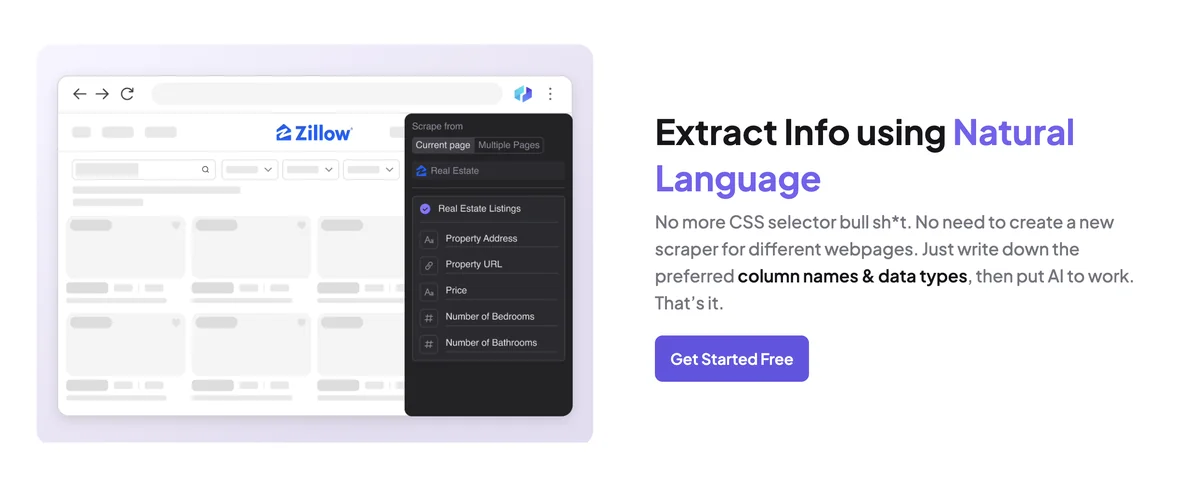
- Its standout is AI Suggest Fields — it figures out the columns for you, no selectors or code.
- Pricing is credit-based (1 credit ≈ 1 row); free tier to start, paid from $9/mo. Heavy/subpage jobs burn credits fast.
- Best for non-coders doing lead gen, ecommerce and research; less ideal for developer-scale pipelines.
Thunderbit Overview
Thunderbit at a Glance
- Product Name
- Thunderbit
- Official Website
- thunderbit.com
- Category
- AI Web Scraper / No-Code Data Extraction
- Our Rating
- Platforms
- Chrome & Edge extension, Web app, API, MCP server
- Key Features
- AI Suggest Fields, subpage & pagination scraping, prebuilt templates, AI transform, scheduled scraping
- Export & Integrations
- Google Sheets, Airtable, Notion, CSV, copy-paste
- Best For
- Sales, marketing, ops, realtors — non-coders who need data fast
- Free Plan
- Yes limited monthly credits + trial
- Starting Price
- $9/mo (Starter, billed yearly; $15 monthly)
- Users
- 200,000+ worldwide
- Alternatives
- Octoparse, Apify, Browse AI, Instant Data Scraper
We may earn a commission when you buy through links on this page. This does not affect our reviews.
What Is Thunderbit?
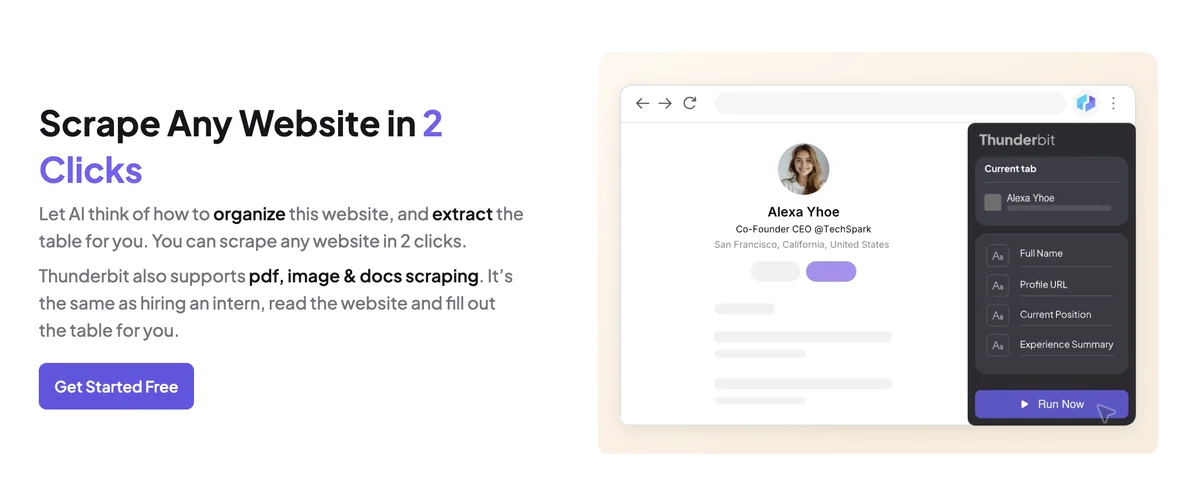
Thunderbit is an AI web scraper that runs as a Chrome (and Edge) extension. Instead of teaching you selectors, it reads the page with AI: you click AI Suggest Fields, it proposes the columns (name, price, email, rating…), you hit Scrape, and it hands you a clean table. It’s built for sales, marketing and ops people who need data, not a coding project.
It’s used by 200,000+ people, and once you’ve run it a few times you understand why: the gap between “I need this list” and “it’s in my spreadsheet” shrinks from an afternoon to a couple of minutes.

How We Tested Thunderbit
We installed the Chrome extension on a live project and used it the way a real user would: building a lead list from a business directory, pulling product rows (title, price, rating) from a marketplace category, scraping a batch of Google Maps results, and testing subpage scraping where the details live one click deeper.
We judged it on four things that actually matter: how accurately the AI guessed the right fields, how it handled pagination and subpages, how fast it exported to Google Sheets, and how quickly the credits drained. Below is what held up — and what didn’t.
Real-world tip: On clean, list-style pages Thunderbit’s field detection was scary good. On a heavily dynamic, lazy-loading page we had to scroll to load the rows first, then scrape — otherwise it only grabbed what was visible.
Thunderbit Features (Tied to Real Use)
✨ AI Suggest Fields — the 2-click magic
This is the headline feature and it earns it. Thunderbit reads the page and proposes the columns for you. On a directory it correctly pulled business name, phone, address and website without us defining a single selector. For non-coders, this is the difference between “I’ll do it later” and “done in two minutes.”
🔎 Subpage & pagination scraping
Real data usually hides one click deeper. Thunderbit can visit each listing’s subpage and pull the extra fields (email, full spec, description), then stitch it all into one table. It also clicks through pagination automatically. The catch: subpage scraping costs 2 credits per row, so a 500-row job with subpages is 1,000 credits — plan for it.

📄 Prebuilt templates for popular sites
For Amazon, eBay, Google Maps, LinkedIn and other big sites, Thunderbit has one-click templates — no AI guessing, no credits wasted on field detection. If you scrape these regularly, the templates alone can justify the tool.
🧮 Scrape and transform with AI in one step
Because it’s AI-native, Thunderbit can summarize, categorize or translate data while it scrapes. We had it tag listings by category and clean up messy address formats in the same pass — a genuine time-saver that plain scrapers can’t match.
✉️ AI Autofill & data enrichment
Beyond scraping, Thunderbit can enrich rows — finding emails or extra details per record — and autofill online forms. It’s handy for building warmer outreach lists, but enrichment is the priciest action at roughly 30 credits per query, so use it selectively.
⏱️ Scheduled scraping & monitoring
You can set scrapers to run on a schedule — great for tracking competitor prices, stock levels or new listings without lifting a finger. Higher plans unlock more scheduled scrapers and tighter monitoring frequency.
📥 Export, integrations & formats
Export goes straight to Google Sheets, Airtable, Notion or CSV with no faffing about — and it’s not limited to web pages: Thunderbit also pulls structured data out of PDFs and images. For developers, there’s an API and even an MCP server to wire scraping into your own apps.
How to Use Thunderbit (Step by Step)
The whole appeal is that there’s almost nothing to learn. Here’s the exact flow we used to build a lead list:
-
Step 1 of 6
Install the extension & sign in
Add Thunderbit to Chrome or Edge and create a free account — no card needed.
-
Step 2 of 6
Open the page you want
Navigate to the list, directory, marketplace category or search results you need.
-
Step 3 of 6
Click AI Suggest Fields
Thunderbit reads the page and proposes the columns. Add, rename or delete fields to match what you need.
-
Step 4 of 6
Hit Scrape
It pulls the rows into a table. Turn on pagination to grab multiple pages in one run.
-
Step 5 of 6
Go deeper (optional)
Enable subpage scraping for details one click in, and add AI transforms to summarize, translate or categorize as it scrapes.
-
Step 6 of 6
Export or schedule
Send the data to Google Sheets, Airtable, Notion or CSV in one click — or schedule the scraper to run automatically.
⚠️ Real-world tip: Before scraping infinite-scroll pages, scroll down to load all the rows first, then run the scrape — otherwise Thunderbit only captures what’s currently rendered.
Thunderbit vs Alternatives
Thunderbit is our pick for fast, no-code AI scraping — but it isn’t the only option. Here’s how it stacks up against the tools people compare it with most:
| Feature |
OctoparseBest for: Visual point-and-click |
ApifyBest for: Custom dev scraping |
Browse AIBest for: No-code + change monitoring |
|
|---|---|---|---|---|
| Skill needed | None (2 clicks)(winner for this row) | Low–medium | High (code) | Low |
| Pricing model | Free + from $9/mo | Free + paid plans | Free credit + usage-based | Free + paid plans |
- Skill needed
- None (2 clicks)
- Pricing model
- Free + from $9/mo
- Skill needed
- Low–medium
- Pricing model
- Free + paid plans
- Skill needed
- High (code)
- Pricing model
- Free credit + usage-based
- Skill needed
- Low
- Pricing model
- Free + paid plans
We may earn a commission when you buy through links on this page. This does not affect our reviews.
Our take: for non-coders who want data now, Thunderbit is the quickest to results. If you need huge, code-driven pipelines, Apify wins; if you mainly want scheduled change-monitoring, Browse AI is worth a look. See the full field in our roundup of the best web scraping tools.
Who Thunderbit Is For (and Who Should Skip It)
✅ Best for: lead generation, sales prospecting, realtors aggregating listings, ecommerce price/stock monitoring, marketers building outreach lists, and anyone who’d rather click than code.
❌ Not ideal for: engineers building large-scale, always-on scraping infrastructure, or scraping millions of rows on a tight budget — the credit model gets pricey at volume.
Thunderbit Pricing
Thunderbit is credit-based: 1 credit ≈ 1 scraped row. Paid plans bill yearly for a 20% saving (monthly is higher). Here’s the lay of the land, checked against the official pricing page in mid-2026:
- Included: Small monthly credit quota
- Included: Core no-code scraping
- Included: Export to Sheets & CSV
- Included: 5,000 credits per year
- Included: AI Suggest Fields
- Included: Subpage & pagination scraping
- Included: All export integrations
- Included: 30,000 credits per year
- Included: Everything in Starter
- Included: Higher-volume scraping
- Included: High-volume credits
- Included: Everything in Pro
- Included: Custom limits & support
Credits work out to about 1 per scraped row; subpage scraping costs 2 credits/row. Confirm current pricing on the official site.
We may earn a commission when you buy through links on this page. This does not affect our reviews.
Do the credit math first. A quick reality check: scraping 1,000 list rows ≈ 1,000 credits. Add subpages and it’s ~2,000 (2 credits/row). Enrich each row with emails and you’re adding ~30 credits a query. So Starter’s 5,000 credits a year vanish quickly if you scrape deep — shallow-but-wide scraping is where it’s most economical.
Our take on value: the free plan is a real trial, not a teaser — enough to scrape a few pages and see the magic. For most solo users and small teams, Starter at $9/mo is the sweet spot. Scrape heavy subpages or enrich a lot? Jump to Pro or pair Thunderbit with cheaper bulk tools.
Real-World Use Cases
- Lead generation: pull names, emails and phone numbers from directories and listings into a ready-to-use outreach sheet.
- Ecommerce monitoring: track competitor prices and stock with scheduled scrapers. Pair it with our guide on scraping Amazon without IP bans.
- Real estate: aggregate property listings from multiple portals into one comparable sheet.
- SEO & research: collect SERP or directory data — see how to scrape Google results safely.
Thunderbit Alternatives & Proxies
If Thunderbit isn’t the right fit, compare it against the full field in our roundup of the best web scraping tools. And for any serious volume, understand the role of proxies in web scraping and pick from the best residential proxy providers to avoid getting blocked.
Frequently Asked Questions
Is Thunderbit free?
Yes, Thunderbit has a free plan with a small monthly credit allowance plus a trial of paid features. It is enough to test the AI scraper on a few pages. Heavier or scheduled scraping needs a paid plan, which starts at $9 per month billed yearly.
Is Thunderbit good for non-coders?
Yes. Thunderbit is built for non-technical users. You click AI Suggest Fields, then Scrape, and it pulls structured data with no CSS selectors or code. It is one of the easiest web scrapers to learn if you are not a developer.
How does Thunderbit pricing work?
Thunderbit uses credits, where one credit is roughly one scraped row. Paid plans start at $9 per month billed yearly for 5,000 credits, with Pro at $16.5 for 30,000. Subpage scraping and enrichment cost extra credits, so heavy jobs add up quickly.
Can Thunderbit scrape any website?
Thunderbit handles most standard sites, lists, tables, PDFs and images, plus pagination and subpages. Very complex, heavily protected or constantly changing sites can still need tweaks or a proxy, and no AI scraper bypasses every anti-bot wall.
Is Thunderbit better than Octoparse or Apify?
For non-coders who want fast, simple extraction, Thunderbit is easier and quicker to set up than Octoparse or Apify. For massive-scale, developer-driven scraping pipelines, Apify and similar tools offer more raw power and control.
Does Thunderbit need proxies?
Not for everyday scraping. For large volumes or sites that block repeat visits, pairing Thunderbit with proxies reduces bans. Our guide on proxies for web scraping explains when you actually need them.
Where can Thunderbit export data?
Thunderbit exports in one click to Google Sheets, Airtable and Notion, plus CSV and copy-paste to other apps. That makes it easy to move scraped leads or product data straight into your existing workflow.
Is Thunderbit safe and legal to use?
Using Thunderbit is legal for scraping public data, but what you do with the data matters. Respect each site terms, avoid private or copyrighted data, and follow privacy laws. Thunderbit is a tool; responsible, compliant use is on you.
The Bottom Line
Thunderbit delivers on its core promise: it makes web scraping feel effortless for people who don’t code. The AI field detection, subpage scraping and one-click exports genuinely saved us time on real lead and product-data tasks, and the free plan lets you prove it on your own pages before paying a cent.
If you’re a marketer, in sales/ops, a realtor or a founder who needs clean data fast, Thunderbit is an easy recommendation — start free, then grab Starter at $9/mo. If you’re a developer running huge, always-on scraping jobs, you’ll likely want a more code-driven tool. And whatever you pick, watch the credit math on subpage and enrichment jobs — that’s the one place a cheap-looking plan can surprise you.
The Review
PROS
- Truly 2-click AI scraping, no code or selectors
- AI Suggest Fields detects columns accurately
- Subpage and pagination scraping built in
- Prebuilt templates for Amazon, eBay, Google Maps, LinkedIn
- Summarize, translate and categorize while scraping
- One-click export to Sheets, Airtable and Notion
- Scrapes PDFs and images too
- Free tier to start; Starter from $9/mo
CONS
- Credit model adds up fast (subpage 2/row, enrichment 30/query)
- Browser-extension approach less suited to massive-scale jobs
- AI can need tweaking on complex, dynamic pages
- Heavy automation and credits require paid tiers
- Not a full developer framework like Apify
DEALS
We collect information from many stores for best price available




