

Hubstaff and Time Doctor are the two names every remote team weighs up when it is time to track hours — and they pull in different directions. One leans on GPS and automated payroll; the other on productivity analytics and distraction alerts. Pick wrong and you either overpay for features you will never use, or annoy your team with monitoring they did not need.
So here is the straight comparison — what each does best, where each frustrates, the real pricing, and who should pick which. No fluff, just the decision.
Quick verdict: Hubstaff wins for field teams, agencies, and anyone who needs GPS tracking plus automated payroll at a lower entry price (from $4.99/user/mo, and it keeps a free single-user plan). Time Doctor wins for desk-based remote teams that live on productivity analytics, distraction alerts, and detailed client reports — for a higher price and no free plan. Neither is flatly better; they are built for different jobs.
Hubstaff vs Time Doctor Overview
Both tools launched in 2012, during the remote-work boom, but took different paths to get where they are today.
Hubstaff Overview

Hubstaff was founded in 2012 by Dave Nevogt and Jared Brown in Indianapolis, Indiana. What began as a time tracking tool for their own agency has grown into a workforce-management platform used by more than 95,000 businesses worldwide. The company runs fully remote and bootstrapped its way to profitability, expanding beyond time tracking into GPS, payroll and project budgeting. Our full Hubstaff review digs deeper into how the platform holds up day to day.
Time Doctor Overview

Time Doctor, also launched in 2012 by Liam Martin and Rob Rawson (founders of the Running Remote conference), was built for distributed teams that needed detailed productivity analytics. It serves over 200,000 users and leans heavily on distraction management and productivity reporting — helping people stay focused rather than simply logging hours.
The two share a founding era but differ in philosophy: Hubstaff pushes toward broad workforce management, while Time Doctor focuses on productivity optimization and cutting distractions.
How we compared: This comparison is based on each vendor’s official documentation, pricing pages, published feature lists and public user feedback — not a fabricated live deployment. Where we call a winner on a feature, it reflects the documented capabilities and how each product is positioned, so you can weigh them against your own workflow.
- Starting price
- $4.99/user/mo
- Free plan
- Yes
- Free trial
- 14 days, no card
- GPS & geofencing
- Full GPS + geofencing
- Monitoring depth
- Optional screenshots
- Distraction alerts
- No
- Automated payroll
- Built-in, automated
- Integrations
- 30+
- Money-back guarantee
- None
- Starting price
- $7/user/mo
- Free plan
- No
- Free trial
- 14 days, no card
- GPS & geofencing
- Limited
- Monitoring depth
- Screenshots + web/app + video
- Distraction alerts
- Yes
- Automated payroll
- Basic
- Integrations
- 60+
- Money-back guarantee
- 30 days
We may earn a commission when you buy through links on this page. This does not affect our reviews.
Hubstaff vs Time Doctor Features
Here’s how the two stack up feature by feature. Three things separate them in practice: how tracking is captured, how deep the monitoring goes, and whether the platform leans toward payroll or productivity — keep those in mind as you read.
⏱️ Time Tracking
Hubstaff: A lightweight desktop app that starts with one click and runs quietly in the background. It tracks time across several projects at once, detects idle time (pausing after a customizable few minutes of inactivity), and accepts manual entries with notes. A weekly timesheet view makes reviewing hours simple.
Time Doctor: Tracking is more intentional — starting a timer prompts you to pick a task and project. Its interactive mode asks what you’re working on when you switch tasks, which some find useful for accountability and others find disruptive; an automatic mode records quietly instead. It can also suggest tasks based on the apps in use.
Winner: Tie — Hubstaff for simplicity, Time Doctor for accountability.
📸 Screenshots & Activity Monitoring
Hubstaff: Screenshot capture is configurable (1 to 3 per 10 minutes) and blurred by default for privacy. Activity levels are calculated from keyboard and mouse input and shown as percentages. Team members can delete screenshots before they’re submitted, which helps build trust.

Time Doctor: This goes deeper. Beyond screenshots it captures the active window title and URL, building a detailed timeline of the applications and sites used through the day. Distraction alerts flag long stretches on non-work sites, and optional webcam snapshots are available. That depth can feel intense for some teams.
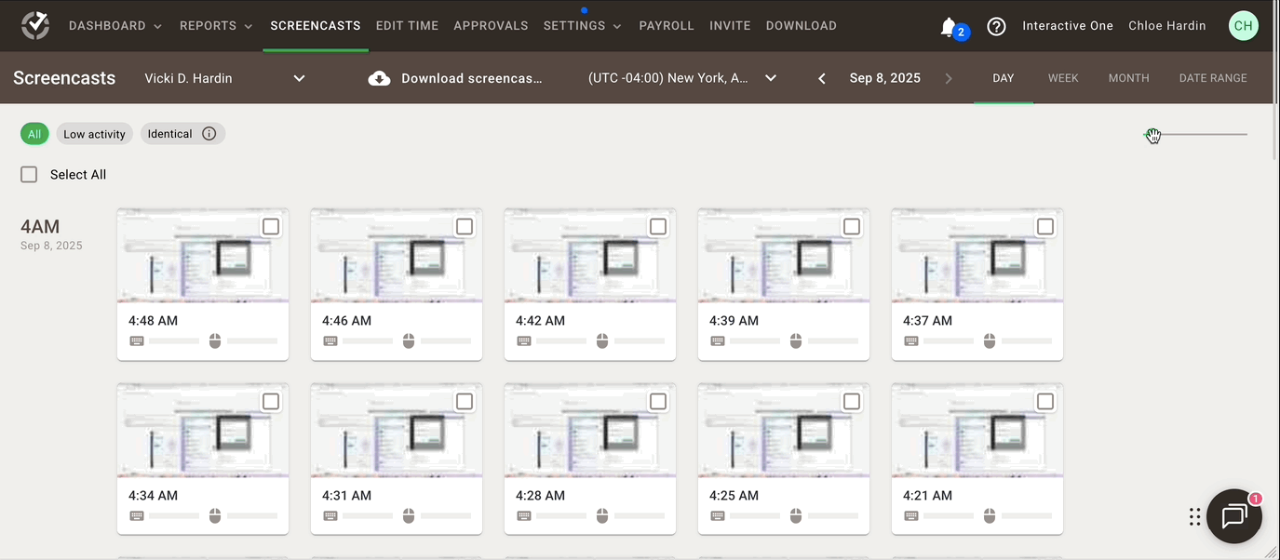
Winner: Time Doctor (for detail), with a privacy caveat.
📊 Productivity Tracking & Reports
Hubstaff: Clear dashboards for hours, activity levels and project progress, plus a color-coded Timeline view of the day and weekly email summaries. Custom reports filter by team member, project, date range or client. One gap: it does not automatically classify apps and sites as productive or unproductive — that’s manual.

Time Doctor: This is its strongest area. Productivity ratings are automatic — categorizing tools like Notion, Asana and GitHub as productive while flagging social media as unproductive, all customizable. Poor Time Use reports, website blocking during work hours, and week-over-week comparisons make it a genuine productivity system, and a Work-Life Balance report flags excessive hours.
Winner: Time Doctor (by a clear margin).
💰 Payroll & Invoicing
Hubstaff: Its standout feature. Connect payment accounts such as Wise and PayPal, set hourly rates, and Hubstaff calculates pay automatically from tracked hours for you to review and approve. It handles multiple currencies cleanly (USD, EUR and others). Client invoicing is equally strong, generating professional invoices with detailed time breakdowns, and the QuickBooks integration keeps accounting in sync.
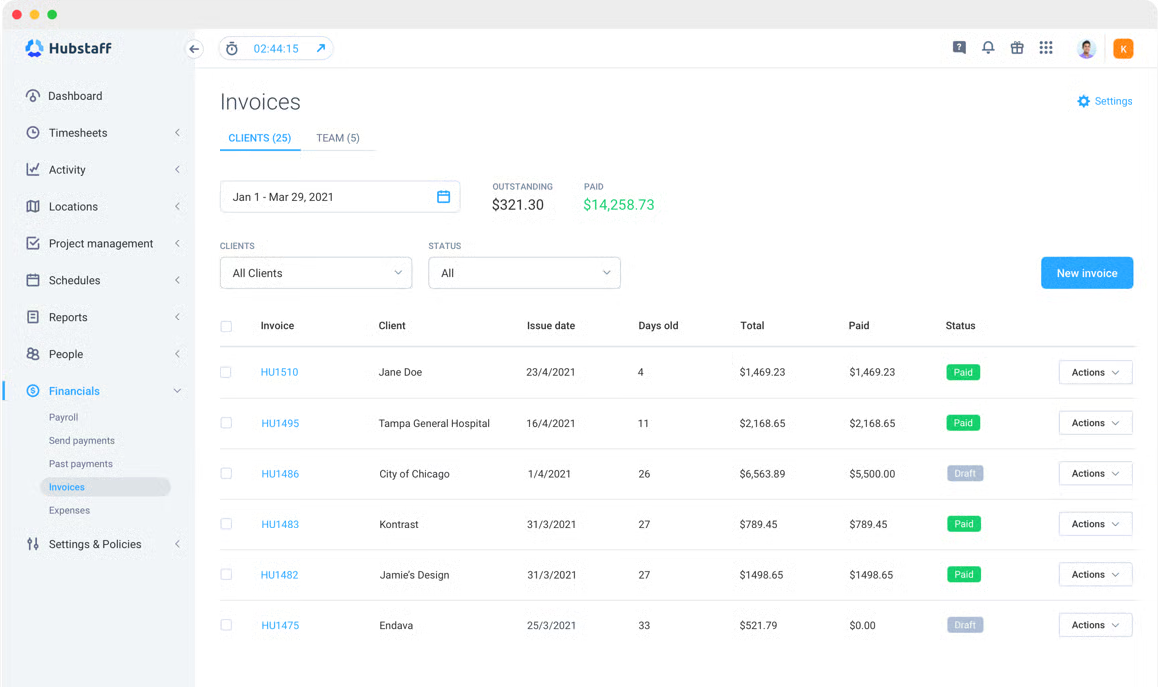
Time Doctor: Offers basic payroll calculation but is less integrated — it exports CSV reports of hours and rates that you then process through your own payroll system, with no direct payments. It does integrate with Gusto and ADP for enterprise payroll.
Winner: Hubstaff (decisively).
📍 GPS Tracking & Geofencing
Hubstaff: Built for delivery drivers and field technicians — the mobile app tracks routes and shows where team members are during work hours. Geofencing sets virtual boundaries around client sites so people are clocked in on arrival and out on departure, and location breadcrumbs map the full route, which is useful for optimizing travel and verifying visits.

Time Doctor: Its mobile app records basic clock-in and clock-out locations, but there is no route tracking or geofencing. Fine for simple location verification, not for full field-service management.
Winner: Hubstaff (no contest for field teams).
🔔 Alerts & Notifications
Hubstaff: Minimal and unobtrusive — alerts for approaching project budgets, timesheets needing approval, and scheduled shift starts. Admins can add custom alerts, such as when a member exceeds 40 hours in a week or forgets to track time.
Time Doctor: More notification-heavy. Distraction alerts nudge users off non-work sites, and there are alerts for long breaks, working outside scheduled hours, and low-productivity periods. A periodic “pulse” check-in can be switched off, and everything is highly customizable.
Winner: Depends on management style — Hubstaff for autonomy, Time Doctor for structure.
🔗 Integrations
Hubstaff: With 30+ integrations it covers the essentials. The Asana integration is a highlight: tasks sync automatically and you can start tracking time straight from an Asana card. GitHub links commits to tracked time, and Slack pushes timesheet and approval notifications. CRM coverage is thin.
Time Doctor: More integrations (60+) with deeper functionality — Salesforce, Zoom (auto-starting tracking when meetings begin), Google Calendar, and Zapier for custom flows. If you lean on connected apps, that breadth makes it easier to build automated workflows around your time data.
Winner: Time Doctor (for variety and depth).
🖥️ Desktop & Mobile Apps
Hubstaff: Clean, lightweight apps for Windows, Mac, Linux, iOS and Android. The desktop app sits in the menu bar and starts or stops instantly; the mobile app is strong for GPS and on-the-go logging. Offline tracking works smoothly, syncing automatically when you reconnect. Users do report the occasional Linux-app crash.
Time Doctor: Feature-rich apps with a slightly heavier footprint. The desktop apps carry the full productivity toolset, including site and app tracking, while a Silent mode limits monitoring for privacy-conscious users. The mobile apps handle offline tracking, and the Chrome extension embeds tracking into web-based tools.
Winner: Tie — both are solid; choose on feature preference.
👥 Team Management
Hubstaff: Straightforward for small and mid-sized teams — add members, group them into projects, set permissions, and build shifts with reminders. Capacity planning shows who is overloaded and who has availability, and timesheet approval workflows are clear, with obvious pending, approved and rejected states.
Time Doctor: A more granular Projects & Tasks structure suits complex work, and client portal access lets clients view their own project reports. A Work-Life Balance dashboard flags overwork to help prevent burnout. Setup takes a little more configuration. Note that its shift scheduling manages staff rotas, not client bookings — if you also need to take appointments, a dedicated booking tool like Trafft is a better fit.
Winner: Time Doctor (for larger, complex teams).
🔒 Privacy & Security
Hubstaff: Transparency is built into the design — members can pause tracking, delete screenshots, and see exactly what is collected, and a private mode covers sensitive work. Data is encrypted in transit and at rest, and the platform is GDPR and SOC 2 compliant. The catch: you cannot disable screenshots entirely while keeping other tracking.
Time Doctor: Offers more granular controls. Silent mode tracks time without screenshots or site monitoring, and members can take private time that is logged but not detailed. It is GDPR, HIPAA (healthcare plans) and SOC 2 compliant, with monitoring levels set per team member.
Winner: Time Doctor (more granular privacy controls).
🧭 Ease of Use & Onboarding
Hubstaff: Setup is quick and the interface is uncluttered, so new members can usually install the app and start tracking with little training. Permissions, projects and hourly rates are simple to configure, which keeps admin overhead low for small teams.
Time Doctor: More capable, but more to learn. The wider feature set means more configuration decisions upfront — monitoring levels, productivity ratings and task structures — so teams typically need a day or two to settle in. The payoff is finer-grained control once it is dialed in.
Winner: Hubstaff (faster to get running).
🎟️ Customer Support
Hubstaff: Offers email and live chat support plus a detailed help center and knowledge base, with priority support reserved for higher tiers and Enterprise. Coverage is dependable for a self-serve product.
Time Doctor: Provides email and chat support across plans, with VIP and 24/7 support on Premium and a dedicated account manager for larger Enterprise deployments. Agencies running monitoring around the clock will value the always-on option.
Winner: Time Doctor (for higher-tier, always-on support).
🗓️ Time Off & Attendance
Hubstaff: Includes time-off management, scheduling and shift reminders, so holiday and leave approvals sit alongside timesheets. Attendance is inferred from tracked shifts, which is enough for most remote teams.
Time Doctor: Adds structured attendance tracking, required break time and shift scheduling on higher tiers, with the Work-Life Balance view flagging overwork. It suits teams that need formal attendance records rather than informal tracking.
Winner: Time Doctor (more formal attendance and break controls).
Hubstaff vs Time Doctor Pricing
Pricing often decides it, especially as you scale a team. Here is how the plans line up.
Hubstaff Pricing

Hubstaff offers a free plan and three paid tiers, all billed per user per month:
- Free (Starter) — $0, 1 user: Unlimited projects, basic time tracking, screenshots, activity tracking and basic reports. It covers basic needs for a solo user, but the single-user cap rules out teams.
- Grow — $4.99/user/mo annual ($7 monthly): Adds unlimited members, more screenshots, app and URL tracking, online timesheets, payments, invoicing, scheduling and time-off management. This is where Hubstaff becomes genuinely useful, and it stays affordable.
- Team — $7.49/user/mo annual ($10 monthly): Adds GPS tracking, geofencing, timesheet approvals, project budgeting and IP restrictions. Essential if you manage field teams or need detailed budgeting.
- Enterprise — custom: Adds a dedicated account manager, priority support, SSO, audit logs and custom contracts for larger organizations.
💳 Time Doctor Pricing

Time Doctor has no free plan and structures pricing into three main tiers plus Enterprise:
- Basic — $6.67/user/mo: Time tracking, screenshots, app and website tracking, payroll reporting, mobile apps and client login. Costs more than Hubstaff Grow but includes fuller monitoring from the start.
- Standard — $11.67/user/mo: Adds video screen recording, productivity ratings, distraction alerts, site and app blocking, attendance, projects & tasks, payroll & invoicing and all integrations. This is Time Doctor’s sweet spot if productivity is the priority.
- Premium — $16.70/user/mo: Adds client and project reporting, VIP and 24/7 support, required break time, shift scheduling and API access. Best for agencies with complex client reporting.
- Enterprise — custom: SSO, advanced security, compliance certifications, dedicated infrastructure and a custom SLA.
One billing detail worth knowing: Hubstaff’s paid plans generally require a minimum of two seats, so a solo user wanting paid features effectively pays for two — which makes the tiers better value for small teams than for lone individuals. Both vendors discount annual billing by roughly 30% versus paying monthly, so commit annually only once you’ve settled on a platform.
| Feature |
Hubstaff |
Time Doctor |
|---|---|---|
| Free / starter | $0 (1 user) | No free plan |
| Entry paid plan | $4.99/user/mo (Grow)(winner for this row) | $6.67/user/mo (Basic) |
| Mid plan | $7.49/user/mo (Team)(winner for this row) | $11.67/user/mo (Standard) |
| Top plan | Custom (Enterprise) | $16.70/user/mo (Premium) |
| Money-back | None | 30 days(winner for this row) |
- Free / starter
- $0 (1 user)
- Entry paid plan
- $4.99/user/mo (Grow)
- Mid plan
- $7.49/user/mo (Team)
- Top plan
- Custom (Enterprise)
- Money-back
- None
- Free / starter
- No free plan
- Entry paid plan
- $6.67/user/mo (Basic)
- Mid plan
- $11.67/user/mo (Standard)
- Top plan
- $16.70/user/mo (Premium)
- Money-back
- 30 days
We may earn a commission when you buy through links on this page. This does not affect our reviews.
🎯 Which Plan Should You Choose?
Here’s who each plan actually fits:
- Hubstaff Grow ($4.99/user/mo): small teams (3–15) on a tight budget that want basic tracking plus payroll automation and invoicing, working mostly autonomously without GPS.
- Hubstaff Team ($7.49/user/mo): field teams needing GPS tracking, plus anyone who wants project budgeting, cost control and timesheet approval workflows.
- Time Doctor Basic ($6.67/user/mo): agencies wanting client portal access and comprehensive monitoring from day one, where screenshots and activity tracking matter.
- Time Doctor Standard ($11.67/user/mo): teams whose main goal is productivity — automatic ratings, distraction alerts and site blocking for people who struggle to stay on task.
- Time Doctor Premium ($16.70/user/mo): agencies with complex client reporting, larger teams, and anyone needing API access, VIP support and required breaks.
By use case: for lean budgets and automated payroll, Hubstaff Grow is the value pick; for field operations, Hubstaff Team’s GPS features are the deciding factor; and where productivity insight justifies the spend, Time Doctor Standard tends to earn its premium. If all you really need is a simple clock-in and clock-out for hourly staff, a lighter time-clock like Buddy Punch may be enough.
Both platforms offer 14-day free trials with no credit card, so test your shortlist before committing. Annual billing saves roughly 30%, and Time Doctor’s 30-day money-back guarantee adds a little extra security.
Hubstaff vs Time Doctor Alternatives
Neither tool is the only option. We focused on the four time-trackers most directly comparable to Hubstaff and Time Doctor — each one solves a specific pain point better than a do-everything suite. Here are the ones worth a look, and who each suits best.
1. Toggl Track 🔴
Toggl Track is the simplicity champion. Where Hubstaff and Time Doctor are full monitoring systems, Toggl is the minimalist’s pick: a beautiful, intuitive interface, one-click tracking, and a browser extension that integrates cleanly with tools like Asana, Trello and Notion. The free plan (up to 5 users) is genuinely generous, and there is no screenshot or surveillance layer. The trade-off is that it is tracking only — no screenshots, activity monitoring, GPS or productivity ratings, and payroll is lighter than Hubstaff’s. Best for: freelancers, creative agencies and small trust-based teams. Pricing: free up to 5 users; Starter $10/user/mo; Premium $20/user/mo.
2. DeskTime ⏰
DeskTime sits between Toggl’s simplicity and Time Doctor’s depth as an automatic productivity tracker. It records applications and websites in the background without start/stop timers, then generates accurate, customizable productivity reports. A Private Time feature lets users pause tracking for personal tasks, and shift scheduling and attendance are solid — all without screenshots, so it feels less invasive. Limits: no GPS, limited screenshots, and a smaller integration set. Best for: office-based remote teams wanting productivity insight without heavy surveillance. Pricing: Pro $7/user/mo; Premium $10/user/mo; Enterprise $20/user/mo.
3. Clockify ⏱️
Clockify is the most generous free tracker available: its free plan supports unlimited users and projects, with time tracking, reporting, timesheets and invoicing, plus 80+ integrations. For basic tracking and billing, the free tier may be all a small team ever needs, and paid upgrades are cheap. Limits: no screenshots, activity tracking or GPS, and reporting is lighter than Time Doctor or Hubstaff. Best for: startups and small teams on tight budgets. Pricing: free (unlimited users); paid plans from $3.99/user/mo.
4. Timely 🤖
Timely uses AI to track time automatically — it records the apps, documents, websites and meetings you touch, then drafts time entries you review and approve, so nobody has to remember a timer. It is anti-surveillance by design, with no screenshots and user control over what is kept. Limits: it is pricier, the AI occasionally miscategorizes activity, and team-management features are lighter than Hubstaff or Time Doctor. Best for: consultants, agencies and knowledge workers who bill by the hour and dislike manual entry. Pricing: Starter $8/user/mo; Premium $14/user/mo; Unlimited $20/user/mo.
Which Alternative Fits You?
A quick way to narrow the four down:
- Want the simplest, most polished tracker? Toggl Track, for its one-click timing and clean reports.
- Need automatic productivity insight without screenshots? DeskTime, which measures focus in the background.
- Growing team on a tight budget? Clockify, whose free plan covers unlimited users and projects.
- Tired of manual timers? Timely, which drafts your time entries with AI for you to approve.
Hubstaff vs Time Doctor Pros & Cons
The short version of each platform’s strengths and weaknesses:
✅ Hubstaff Pros
- Affordable — Grow starts at $4.99/user/mo, and the solo free plan is genuinely usable rather than a disguised trial.
- Best-in-class GPS and geofencing for field teams, delivery drivers and mobile workers at this price.
- Automated payroll and invoicing — calculate, approve and send payments through the platform via PayPal, Wise and Gusto.
- Lightweight and fast desktop app that runs comfortably on older hardware.
- Privacy-conscious — deletable, blurred-by-default screenshots build trust.
- Minimal learning curve, plus strong mobile apps with offline sync and project budgeting with alerts.
❌ Hubstaff Cons
- Shallower productivity analytics — apps and sites must be classified manually.
- Fewer integrations (30+) and thin CRM coverage.
- No distraction alerts, site blocking or focus mode.
- No client portal, and screenshots only — no video recording.
- Occasional Linux-app instability and basic break management.
✅ Time Doctor Pros
- Best-in-class productivity analytics — automatic productive/unproductive categorization and detailed ratings.
- Distraction management — alerts plus website blocking during work hours.
- Client portal access that lets clients view their own project reports.
- 60+ integrations plus Zapier, with optional video screen recording.
- Granular team management — detailed Projects & Tasks and a burnout-flagging dashboard.
- Deeper reporting, structured break management and a 30-day money-back guarantee.
❌ Time Doctor Cons
- Higher price (from $6.67/user/mo) and no free plan.
- More intrusive monitoring — window titles and URLs can feel like surveillance.
- Steeper learning curve and more setup decisions upfront.
- No true GPS, route tracking or geofencing for field work.
- Payroll reporting only — no direct payments — and it is heavier on system resources.
- Notification-heavy by default and can feel micromanage-y if handled poorly.
The Verdict: Which Is Actually Better?
Here’s the honest bottom line:
Choose Hubstaff if you prioritize simplicity, affordability, GPS tracking, automated payroll and a trust-based culture with minimal surveillance. It fits field teams, small agencies and businesses wanting solid time tracking with excellent payment automation.
Choose Time Doctor if you need deep productivity insight, struggle with team distractions, manage multiple clients needing detailed reporting, or run a larger desk-based team where comprehensive monitoring justifies the higher cost.
By use case: desk-based teams focused on output usually get their money’s worth from Time Doctor’s analytics; field operations point to Hubstaff for GPS and geofencing; and lean budgets that still want automated payroll land on Hubstaff Grow. Neither is objectively superior — they are built for different jobs.
FAQs
Does Hubstaff have a free version for solo users?
Yes, Hubstaff offers a free-forever plan specifically designed for solo freelancers. This plan includes basic time tracking, activity levels, and limited screenshot capabilities, though it lacks more advanced features like automated payroll, GPS tracking, and deep integrations which are reserved for their paid tiers.
Is there a minimum seat requirement for Hubstaff’s paid plans?
Most of Hubstaff’s paid plans, including the Starter, Grow, and Team tiers, require a minimum of two seats. This means that even if you are a solo user looking for advanced features, you will effectively be paying for two users, making it more cost-efficient for small teams than for individual practitioners.
Does Time Doctor offer GPS and geofencing for field teams?
No, Time Doctor does not currently offer specialized GPS tracking or geofencing features for mobile or field-based workers. It is primarily built for desk-based remote or hybrid teams, whereas Hubstaff is the superior choice if you need to track the physical location and automated clock-ins of employees at specific job sites.
Can I use Time Doctor without the screenshot monitoring feature?
Absolutely. Both Time Doctor and Hubstaff allow administrators to fully customize or even disable the screenshot feature. You can choose to blur screenshots for privacy, reduce the frequency of captures, or turn them off entirely to focus purely on time tracking and app usage data without visual monitoring.
How do distraction alerts work in Time Doctor?
Time Doctor features an active “nudge” system that detects when a user has spent an excessive amount of time on websites or applications marked as “unproductive,” such as social media or streaming sites. A pop-up will appear asking the user if they are still working, which helps keep team members focused on their actual tasks without manual intervention.
Do Hubstaff and Time Doctor track time when I am offline?
Yes, both applications are capable of tracking time even if you lose your internet connection. The data is stored locally on your device and will automatically sync with the cloud servers once you are back online, ensuring that your work hours are accurately recorded regardless of your connectivity.
What is the money-back guarantee for these tools?
Hubstaff provides a 30-day money-back guarantee on their annual plans, allowing you to request a refund if you are not satisfied with the service. Time Doctor generally operates on a 14-day free trial basis with no credit card required, which serves as a risk-free period to test all premium features before committing to a subscription.
Which tool offers better integrations with project management software?
While both tools integrate with popular apps like Asana, Trello, and Jira, Time Doctor currently leads with over 60 native integrations. Hubstaff offers around 30+ integrations but provides a more streamlined experience for accounting and payroll-specific workflows through its built-in Hubstaff Pay and Wise integrations.
Can employees delete their own tracked time in these apps?
This depends on the settings configured by the account owner or manager. Usually, users can be given the permission to edit or delete their own manual time entries or blocks of tracked time, but most companies keep this restricted to ensure the integrity of the data for payroll and client billing purposes.
Conclusion
Choosing between Hubstaff and Time Doctor isn’t about which tool is objectively “better” — it’s about which one fits your team’s needs, culture and budget. Hubstaff is the affordable, lightweight workforce-management pick, with standout GPS tracking and automated payroll that suit small teams, agencies and mobile workforces on lean budgets. Time Doctor is the productivity-analytics powerhouse for desk-based teams that want distraction control and detailed client reporting, and are willing to pay more for it.
Both offer 14-day free trials with no credit card, so shortlist by priority — budget and field work point to Hubstaff, productivity insight and client reporting point to Time Doctor — then trial your top choice before committing. Whichever you pick, roll it out with clear communication and a focus on improvement rather than surveillance, and time tracking becomes something your team benefits from rather than resents.




