

One flagged login and Facebook can freeze an ad account with live campaigns and a card attached. For agencies juggling ten clients across five countries, that risk is a daily reality, and the right proxy is what keeps access clean and consistent.
This guide cuts to what actually matters: which proxies for Facebook ad accounts are worth using, why residential and mobile proxies beat cheap datacenter IPs here, the mistakes that get accounts flagged, and the exact providers we’d pick. No fluff, just what works.
How a proxy actually works here
Connect to Facebook normally and Meta sees your real IP, which hands it your rough location and internet provider. It uses that, plus a pile of other signals, to secure accounts and flag anything that looks off. A proxy slips in between and shows Facebook its own IP instead of yours.
The practical win is location and consistency. An agency in India managing a client in Germany can work from a German IP, so the account always logs in from the market it advertises to, instead of pinging Facebook from a different continent every day.
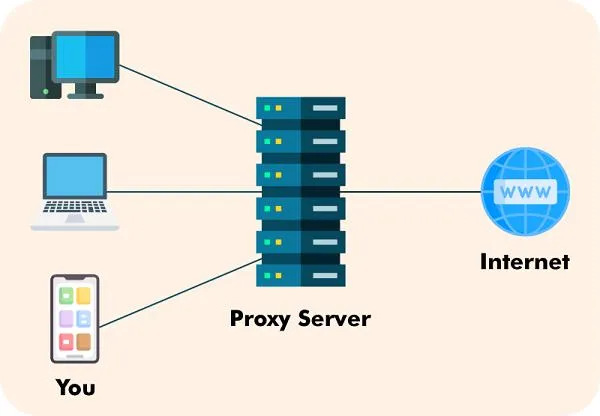
How a proxy sits between you and Facebook
-
Step 1 of 5
You connect through the proxy
Instead of hitting Facebook directly, your browser or ad tool routes the request through the proxy server first.
-
Step 2 of 5
The proxy takes the request
It receives what you asked for and prepares to pass it on under its own identity.
-
Step 3 of 5
It forwards to Facebook
The proxy makes the request to Facebook on your behalf, from its own IP and location.
-
Step 4 of 5
Facebook sees the proxy, not you
Meta logs the proxy’s IP and approximate location instead of your real one. That is the whole point.
-
Step 5 of 5
The response comes back to you
Facebook’s reply travels back through the proxy to your device, usually in a fraction of a second.
Why advertisers bother with proxies
Consistent access. Facebook trusts predictable patterns. Logging into the same account from the same country and network, rather than a new city every session, is exactly the stability its systems reward, especially for distributed or remote teams.
Real international targeting. If you advertise in several countries, a local IP lets you see the localised experience, check regional ad delivery and verify what real users in that market actually see.
Privacy and separation. A proxy masks your company’s real network, and for agencies it keeps each client’s account in its own clean environment. That separation is the difference between one client’s problem staying contained and it spreading across your whole roster. Agencies running social at scale should read our guide on proxies for social media management too.

The four proxy types, ranked for Facebook ads
Four categories matter, and for Facebook they are not equal. Here is the honest ranking.
Residential proxies are the default pick. They use real IPs from actual households, so Facebook reads them as ordinary user traffic. Trust is high and detection risk is low, which is why agencies and most advertisers land here. The trade-off is price and slightly variable speed. Our roundup of residential proxy providers covers the strongest options.
Mobile proxies carry the highest trust of all. Because thousands of real phones share a single carrier IP, Facebook almost never blocks them, which makes mobile the tool for a high-value or already-flagged account. They cost the most, so use them where it counts. See our explainer on mobile proxies for the detail.
ISP proxies are the quiet favourite for one steady account. They are datacenter-hosted but registered to a real ISP, so they read as legitimate and stay static and fast, giving an account the same trusted IP for months. If you are torn, our ISP vs residential comparison settles it.
Datacenter proxies are cheap and fast, and wrong for live ad accounts. Facebook recognises datacenter IP ranges easily, so detection risk is high. Use them for general testing, never for the account holding your budget.
| Feature |
ResidentialFrom ~$3.50/GBBest for: Agencies and most advertisers |
MobileFrom ~$117/moBest for: High-value or flagged accounts |
ISP (static residential)From ~$1.80/proxyBest for: Long-term single-account management |
DatacenterFrom ~$1/proxyBest for: Testing only, not live ad accounts |
|---|---|---|---|---|
| Trust with Facebook | Very high | Highest(winner for this row) | High | Medium |
| Ban / detection risk | Low | Very low(winner for this row) | Low | High |
| Speed | Moderate | Moderate | Fast | Very fast(winner for this row) |
| Cost | High | Very high | Medium | Low(winner for this row) |
| Stability for a single account | Good | Good | Excellent(winner for this row) | Good |
| IP style | Rotating or sticky | Rotating (carrier IPs) | Static | Static |
| Our verdict for FB ads | The default pick | Best trust, premium price | Best for one steady account | Avoid for live accounts |
We may earn a commission when you buy through links on this page. This does not affect our reviews.
Which providers we’d actually use
Type matters more than brand, but the provider still has to deliver clean IPs and honest pricing. Two we keep coming back to:
IPRoyal is our go-to for Facebook work because it covers the three types that matter here, residential, ISP and mobile, from one account, and its traffic never expires. That suits agencies who run campaigns in bursts rather than burning a monthly quota. Residential starts around $7/GB, ISP from about $1.80 a proxy. Our full IPRoyal review has the hands-on detail.
Webshare is the budget option, with a free tier to test and residential proxies often on sale from about $3.50/GB. Skip its cheap datacenter proxies for ad accounts and stick to its residential pool. We put the two head to head in our IPRoyal vs Webshare comparison.
Want the wider field before committing? Our roundup of the best proxy networks ranks the premium players too.
What to check before you buy
Price is the worst way to choose a proxy for an ad account. Five things matter more.
IP reputation is everything. A clean IP with no abuse history behaves; a recycled, blacklisted one gets you checkpointed on day one. Reputable providers cull bad IPs, which is half of what you are paying for. Geographic match comes next: pick IPs in the country you actually advertise to, not just anywhere.
Then decide static or rotating. For a single account you manage daily, a static IP is far safer than one that changes each session, since Facebook likes to see the same address. Our guide on rotating vs static proxies breaks down when each fits. Finally, weigh speed and uptime: a proxy that drops mid-session or crawls will slow your work and can itself look suspicious.
Mistakes that get ad accounts flagged
Using free proxies. The single fastest way to lose an account. They are shared, often blacklisted, and sometimes log your traffic. For the difference in practice, see free vs paid proxies.
Hopping locations. Logging in from Germany, then India, then the US within a day screams automation. Pick a country and stay put. Sharing one IP across many accounts is just as bad, because Facebook links accounts on a shared address, so one dedicated proxy per account is the rule. And ignoring browser consistency, mismatched timezone, language or fingerprint, undoes a good proxy entirely. Pair the proxy with a matching browser profile.
Which proxy fits which advertiser
Small businesses running one or two accounts: a couple of ISP or residential proxies in your target country is plenty. Agencies managing many clients: dedicated residential or ISP proxies, one per account, matched to each client’s market. Affiliate marketers working across regions: residential for coverage, mobile for the accounts that keep getting flagged. Enterprise brands: a mix, with mobile reserved for the highest-value accounts and ISP for stable long-term management.
Lock down the account, not just the IP
A proxy protects access, not the account itself. Turn on two-factor authentication, use a unique strong password per account, and check login activity regularly so you spot trouble early. For teams, use Business Manager roles rather than sharing one login, and only ever buy from reputable proxy providers, the ones that own and vet their IP pools. Skip these and the best proxy in the world will not save you.
Frequently Asked Questions
Are proxies allowed for Facebook ad accounts?
Using a proxy is a networking choice, not a banned one in itself. What gets accounts restricted is breaking Facebook’s terms: fake accounts, coordinated inauthentic behaviour, policy-violating ads. A clean residential or mobile proxy used to manage a legitimate account is fine. A cheap datacenter IP shared across ten fake accounts is what triggers bans.
Which proxy type is best for Facebook advertising?
Residential proxies for most people, mobile proxies for high-value or already-flagged accounts. Both look like ordinary users to Facebook. ISP (static residential) proxies are excellent if you manage one account long-term. Datacenter proxies are the cheapest and the riskiest, so keep them away from live ad accounts.
Are mobile proxies really worth the extra cost?
Only for the accounts that justify it. Mobile IPs carry the highest trust because thousands of real phones share each carrier IP, so Facebook rarely blocks them. But they cost several times more than residential. Use mobile for a flagged or high-spend account, and residential for everything else.
Can I use free proxies for Facebook Ads?
Don’t. Free proxies are slow, shared with strangers, often already blacklisted, and some log or inject traffic. For an asset like an ad account with a payment method attached, a free IP is the fastest route to a ban or a security problem. This is the one place not to save money.
Do proxies stop Facebook from banning my account?
No, and anyone promising that is selling you something. A good proxy gives you a stable, trusted access environment, which removes one common trigger. It does nothing about ad content, spending patterns or fake-account signals. Compliance keeps you safe; the proxy just keeps your access consistent.
How many Facebook accounts can share one proxy?
For safety, one account per dedicated proxy. Facebook links accounts that share an IP, so piling several onto one proxy is exactly the footprint its systems look for. A dedicated residential or ISP proxy per account costs more but keeps each one cleanly separated.
What is the difference between ISP and residential proxies?
Both show Facebook an ISP-registered address, so both read as legitimate. The difference is the host: residential IPs come from real home devices and usually rotate, while ISP proxies are datacenter-hosted but registered to an ISP, so they are static and much faster. For one steady account, ISP wins; for scale and rotation, residential.
Should agencies use dedicated proxies per client?
Yes, without question. Mixing client accounts behind shared IPs risks one client’s problem spilling onto another. A dedicated proxy per account, matched to the client’s target country, keeps every environment separate and makes team handovers far cleaner. It is the single biggest thing agencies get wrong.
The bottom line
For proxies for Facebook ad accounts, the answer is simple: residential proxies for most advertisers, mobile proxies for the high-value accounts that keep getting flagged, and ISP proxies when you manage one account long-term. Datacenter proxies stay away from anything live.
Buy one dedicated proxy per account, match the location to your market, pair it with a consistent browser profile, and never touch free proxies. Do that and the proxy becomes what it should be: quiet infrastructure that keeps your access clean while your ads do the talking. Start with a provider like IPRoyal, and scale the type up only when an account demands it.




