Ask GitHub about any public project and it answers in about a second. No login, no key, no browser.
We sent that request with curl, rebuilt it in n8n, and logged every header, status code and limit that came back. One error message even blamed the wrong thing.
That trip is the clearest answer to what is an API we’ve found. Below, you’ll see each part of a real request, the errors worth knowing, and where SDKs and webhooks fit.
What is an API?
An API (application programming interface) is a set of rules that lets one program ask another for data or actions. You send a request in an agreed format, and the other system replies in an agreed format.
Take the weather on your lock screen. Your phone doesn’t measure the sky. It asks a weather service’s API for your town’s forecast and draws what comes back. “Sign in with Google” works the same way, and neither side needs to know how the other works inside.
That last part is the point.
An API is a contract. The provider promises: send me this, in this shape, and I’ll answer like that. It can rewrite its whole backend, and your app keeps working as long as the contract holds.
Most APIs wait for you to ask. Some push data to you the moment something happens. Those are webhooks, and our guide to how webhooks work in n8n, Make and Zapier sets one up step by step.
How do APIs work? One request, one response
APIs work in a request and response cycle. Your app calls an address. The server checks the request, does the work, and replies with a status code, headers and usually some data.
Every web API request has four parts:
- Endpoint: the address you call, such as
https://api.github.com/repos/n8n-io/n8n. - Method: the verb. GET reads, POST creates, PUT or PATCH changes, DELETE removes.
- Headers: labels on the request, like the format you want back or your API key.
- Body: the data you send. A GET usually has none; a POST that creates an issue carries its title and text.
The response mirrors it:
- Status code: a three-digit verdict. 2xx means it worked, 4xx means you got something wrong, 5xx means the server did.
- Headers: facts about the reply, such as its format, how long you may cache it and how many calls you have left.
- Body: the data itself, almost always JSON on modern APIs.
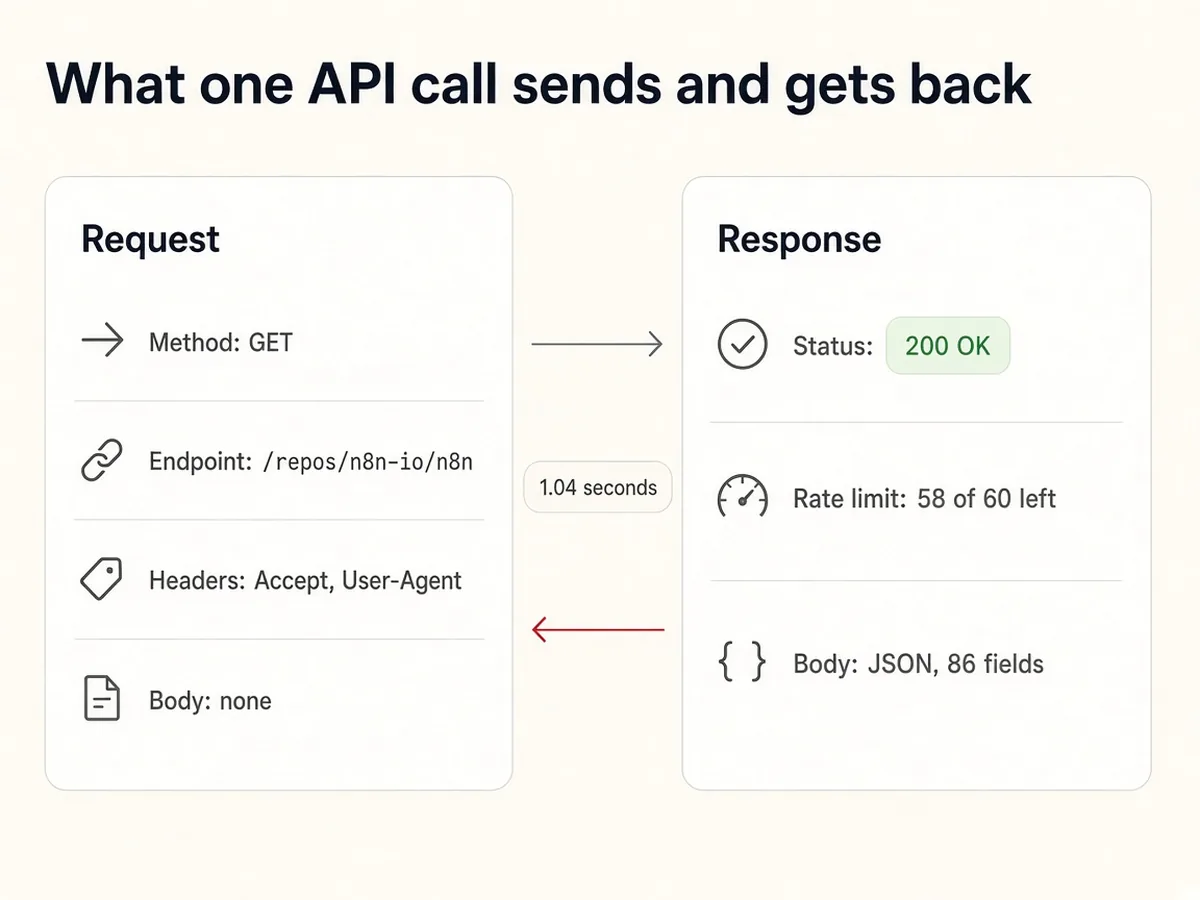
Never plan to write code? Every no-code tool shows these same fields, so reading them turns a broken automation from a mystery into a fix.
We called GitHub’s API with curl: here’s every part, annotated
GitHub’s REST API lets anyone read public data without a key, which makes it a fair test. We asked it about the n8n repository from our test machine.
curl -i https://api.github.com/repos/n8n-io/n8n \
  -H "Accept: application/vnd.github+json" \
  -H "User-Agent: droidcrunch-api-lab"
-i prints the response headers with the body. The two -H lines are request headers. No -X means GET, and there’s no body.
Here’s the reply, trimmed to the lines that matter. The full body had 86 fields, from the repo’s ID to its licence.
HTTP/2 200
content-type: application/json; charset=utf-8
cache-control: public, max-age=60, s-maxage=60
etag: W/"bb9e54d03d83...4c30b2"
x-ratelimit-limit: 60
x-ratelimit-remaining: 58
x-ratelimit-used: 2
x-ratelimit-resource: core
x-ratelimit-reset: 1795523054

{
  "full_name": "n8n-io/n8n",
  "private": false,
  "language": "TypeScript",
  "stargazers_count": 211937,
  "forks_count": 61640,
  "open_issues_count": 1256
}
Line by line, the server told us:
- HTTP/2 200: success. The request was valid and the repo exists.
- content-type: the body is JSON in UTF-8, so your tool reads it as structured data.
- cache-control: max-age=60: you may reuse this answer for 60 seconds.
- etag: a fingerprint of this version of the data. Send it back next time and the server can, in theory, reply “not changed”.
- x-ratelimit-limit 60, remaining 58: 60 calls an hour without a key, two used.
- x-ratelimit-reset: when the counter refills, in Unix seconds. Ours was 17:54 IST, about 50 minutes away.
The whole trip took 1.04 seconds. DNS and the connection took about 2 milliseconds. The TLS handshake finished at 0.49 seconds, and the first byte arrived at 1.04. Three repeat calls took 1.40 to 1.42 seconds each.
So the wait was encryption and GitHub’s servers, not the network. At that pace, 500 calls in a row would take about 10 minutes. That’s why real integrations batch requests or run them in parallel.
One thing broke the textbook. We sent the etag back three times, hoping for a light “304 Not Modified”. We got a full 200 every time, with a new etag each round. Even the body size swung between 6,186 and 6,906 bytes, which suggests different servers answered.
Treat caching headers as a hint, and test them before you count on them.
What do API status codes tell you when it breaks?
The status code tells you who’s at fault before you read the body. A 400-something is your request. A 500-something is the server.
We broke our request on purpose six ways. GitHub’s replies:
GET  /user                       (no token)    401  "Requires authentication"
GET  /repos/n8n-io/n8n           (fake token)  401  "Bad credentials"
GET  /repos/n8n-io/this-repo-does-not-exist-dc 404  "Not Found"
GET  /search/repositories        (no q=)       422  "Validation Failed" (field: q, code: missing)
POST /repos/n8n-io/n8n/issues    (no token)    401  "Requires authentication"
POST /graphql (no token) 403 "API rate limit exceeded for <our IP>"| Code | What it means | What to do |
|---|---|---|
| 200 OK | It worked | Read the body |
| 401 Unauthorized | No key, or a bad one | Add or replace the token |
| 403 Forbidden | Known caller, not allowed, or out of quota | Check scopes and rate-limit headers |
| 404 Not Found | Wrong path, or no access to it | Check spelling and permissions |
| 422 Unprocessable | Valid format, bad or missing values | Fix the field the body names |
| 429 Too Many Requests | Rate limit hit | Wait for the reset, then retry |
| 500-504 | The server failed | Retry later with a back-off |
Look at line two. With no token, that repo URL returned 200. With a made-up token, it returned 401 Bad credentials, though the data is public.
A wrong key is worse than no key. If an automation suddenly fails on data it used to read fine, look for an expired token first.
The 422 is the friendliest error of the lot. It names the field (q, the search query) and the problem (missing). When an API doesn’t, its docs’ error list is the next stop.
Rate limits: the headers that tell you when to stop
A rate limit caps how many calls you can make in a time window. GitHub allows 60 calls an hour per IP address without a key, and 5,000 an hour with a personal access token.
Go over and GitHub returns 403 or 429, with x-ratelimit-remaining at 0. Its docs say to wait for the reset time, and warn that integrations which keep hammering can get banned.
Our counters misbehaved. Across 12 quick search calls, remaining jumped around: 2, 8, 7, 6, 4, 2, 6. Our test machine shares its outbound IPs with other traffic. GitHub’s docs also admit the count varies with the region that answers.
So back off at 0 or a 429, and never build logic around an exact remaining number.
Then the error that lied.
Our anonymous POST to GitHub’s GraphQL API came back 403: “API rate limit exceeded”. We hadn’t called it once. The headers told the truth: x-ratelimit-limit: 0. GitHub’s GraphQL endpoint gives anonymous callers zero calls, so you need a token from the first request.
Read the headers, not only the message. That habit would have saved us ten minutes.
The search call hid one more trap. Its Link header pointed to a last page of 1,000, while total_count said 32,102 matches. At one result per page, everything past result 1,000 was out of reach. Our guide to idempotency, pagination and retries covers paging limits and safe retries.
What is an API endpoint?
An API endpoint is one address plus one method that does one job, like “get a repository” or “create an issue”. The base URL is shared; the path and the verb pick the job.
Three GitHub endpoints from our test:
GET /repos/{owner}/{repo}reads a repository. Public, no key needed.GET /userreads the account behind your token. Without one, 401.POST /repos/{owner}/{repo}/issuescreates an issue and needs a token with write access.
The first and third share a path stem but do different jobs with different permissions. That’s why API docs list endpoints as method plus path.
How do APIs know who’s calling?
Most APIs identify you with a key or token sent in a header. Some use OAuth, where you approve access on the provider’s site and your app gets a token it can renew.
API keys are long random strings tied to your account: quick to set up, easy to leak. Bearer tokens look similar but often expire, which limits the damage when one escapes. OAuth adds a consent screen and scopes, so a Sheets integration can read one spreadsheet without touching your Gmail.
Our guide to API keys, OAuth, JWT and bearer tokens shows what each looks like in a real request.
REST, GraphQL, SOAP and webhooks: what kind of API is this?
Most APIs you’ll meet are REST: many URLs, standard HTTP methods, JSON back. GraphQL uses one URL where you list exactly the fields you want. SOAP is older and wraps everything in XML.
| Style | How you call it | Data format | Where you meet it |
|---|---|---|---|
| REST | Many URLs, standard HTTP methods | JSON | Most SaaS APIs: GitHub, Stripe, Shopify |
| GraphQL | One URL, you list the fields you want | JSON | GitHub, Shopify, Facebook Graph-style APIs |
| SOAP | One URL, strict XML envelopes | XML | Banks, airlines, older enterprise systems |
| Webhook | The service calls your URL when something happens | Usually JSON | Payments, form tools, Git pushes |
Which should you pick? Usually the provider picks for you. GitHub offers both, and as our test showed, their rules differ even on one site. If you’re building an API yourself, our REST vs GraphQL vs SOAP comparison covers when each style earns its complexity.
API vs SDK: do you need both?
An API is the set of rules for talking to a service over the network. An SDK (software development kit) is a ready-made code library, in one language, that sends those API requests for you.
GitHub’s official SDK family is Octokit. In JavaScript, octokit.rest.repos.get({ owner, repo }) sends the same GET we sent with curl. The SDK adds the headers and hands you the JSON as an object.
So when is raw HTTP the better call?
- Pick the SDK when your language has one and you’ll call the API often. It handles auth and pagination you’d otherwise write yourself.
- Pick raw HTTP for a one-off call, a language with no SDK, or a no-code tool. Nothing to install, and you see exactly what’s sent.
Here’s the catch with SDKs: they lag. A new endpoint is live in the API on day one. The SDK gets it with its next release.
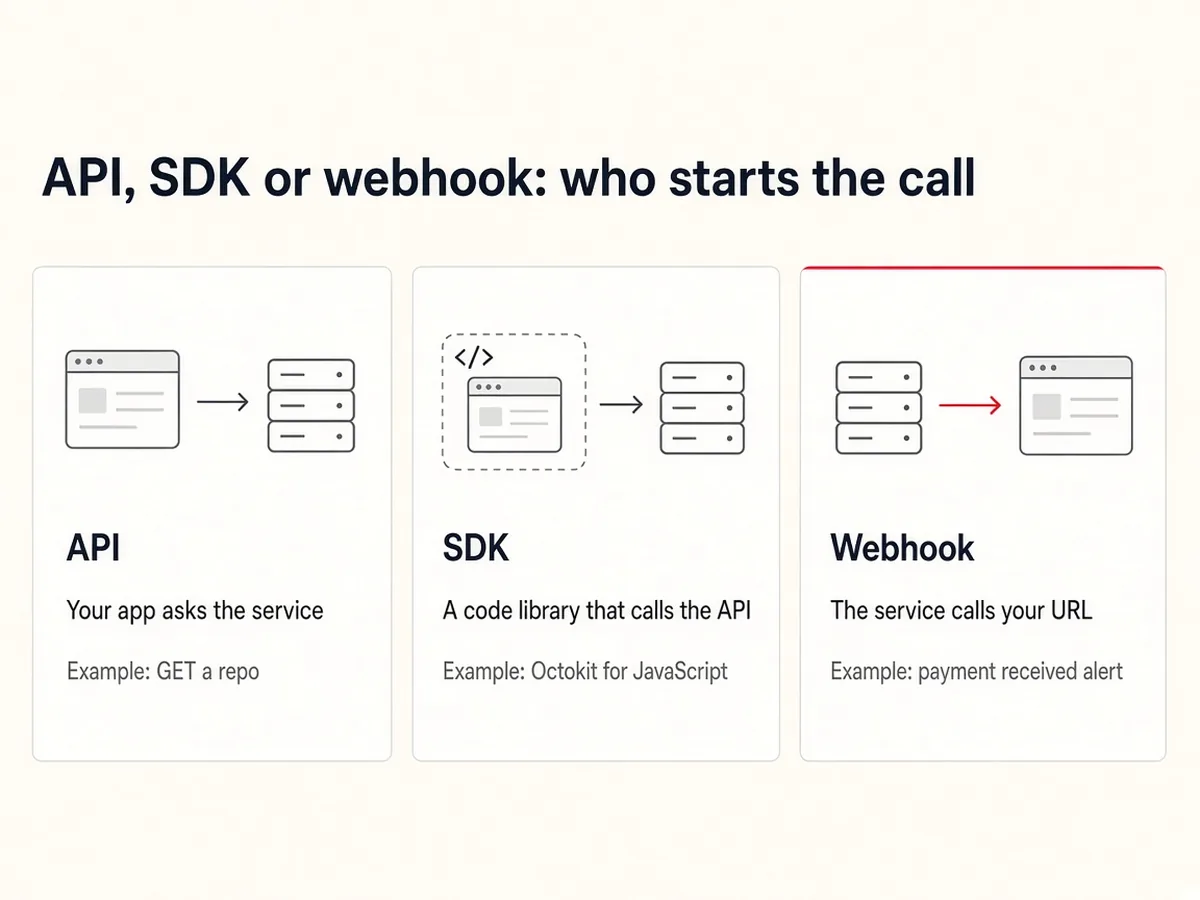
Can you use an API without writing code?
Yes. Automation tools like n8n and Make have an HTTP request block with boxes for the method, URL, headers and body. It’s the same request as curl, minus the flags.
Heads-up: our n8n and Make links are affiliate links. If you buy a plan through them, DroidCrunch earns a commission at no extra cost to you.
We rebuilt our GitHub call in n8n 2.46.6, self-hosted on our test machine, with the HTTP Request node. It returned 200 and the same repo data in 1,525 milliseconds. The star count had gone up by one since our curl call.
Then we pointed a second HTTP Request node at a repo that doesn’t exist.
On default settings, the 404 stopped the whole workflow: “The resource you are requesting could not be found”. With Never Error on, the node succeeded and passed the 404 along as data:
{
  "statusCode": 404,
  "statusMessage": "Not Found",
  "headers": {
    "x-ratelimit-limit": "60",
    "x-ratelimit-remaining": "57"
  },
  "body": {
    "message": "Not Found",
    "status": "404"
  }
}
That setting decides whether one missing record kills a 500-row run or gets logged and skipped. Our full n8n review covers the rest of the platform.
How to make the same API call in n8n
The settings we used, plus the two that decide how errors behave.
-
Step 1 of 5
Add an HTTP Request node
Put it after a Manual Trigger while you test. You can swap the trigger for a schedule or a webhook later without touching the request.
-
Step 2 of 5
Fill in the request, or import the curl command
Method GET, the URL, and two headers: Accept and User-Agent. n8n’s Import cURL button fills these fields from a pasted command. We typed ours straight into the workflow.
-
Step 3 of 5
Turn on Include Response Headers and Status
By default the node returns only the body. With this option on, you also get the status code and the
x-ratelimitheaders, which you need for any retry logic. -
Step 4 of 5
Decide what an error should do
Out of the box, a 404 stops the whole workflow. Turn on Never Error and the 404 flows on as data, so an IF node can branch on
statusCode. -
Step 5 of 5
Add your key the safe way
For an API that needs a key, use a credential (Header Auth for most keys) instead of pasting the key into a header field, so it doesn’t sit in plain sight in the workflow.
We didn’t test Make for this guide. Its HTTP app has a “Make a request” module with the same four fields. The curl call above maps across field by field.
Where APIs show up next: testing tools, data APIs and MCP
Curl is fine for one request. Testing dozens of endpoints with a team calls for a proper client, and our roundup of the best API testing tools compares them.
Some APIs are the product. A SERP API returns Google results as JSON, so you don’t scrape them yourself. Our list of the best SERP APIs compares the main providers.
AI tools add one more layer. MCP (Model Context Protocol) lets an AI assistant find and call tools, and most of those tools are API calls underneath. Thinking of wrapping an API in MCP? Our MCP vs API breakdown built both for the same job.
Frequently asked questions
What is an API key, and is it the same as an API?
No. The API is the service and its rules; the key is a password-like string that identifies your account to it. One API can issue thousands of keys, one per customer. Keep keys out of browser code and public repos, because anyone holding one can spend your quota.
Are APIs free to use?
Many have a free tier, but most charge past a limit. GitHub’s public data is free within 60 calls an hour, while data APIs usually bill per request or per thousand results. Find out what counts as one call before you build, since some APIs charge more for heavier endpoints.
Which programming language do I need to use an API?
Any language that can send an HTTP request works, including Python, JavaScript, PHP and Go. The API doesn’t care what called it. If you don’t code at all, curl in a terminal or an HTTP block in n8n or Make sends the same request.
What’s the difference between a public, private and partner API?
A public API is open to any developer who signs up. A private API is used only inside one company, such as a mobile app talking to its own backend. A partner API is shared with approved businesses under a contract, often with higher limits and extra data.
Is it legal to use any public API?
Usually, as long as you follow the provider’s terms of service. Those terms often cap request rates, ban reselling the data, or require attribution. Breaking them can get your key revoked even when the data itself is public, so read the terms before building anything commercial on an API.
What is an API call, and how is it counted?
An API call is one request and its response. Most providers count each request as one call, but some weigh them: GitHub counts most write requests as five points against its secondary limit. Retries and paginated pages each count as separate calls, which is how bills grow quietly.
Can an API be hacked?
Yes. Common holes are leaked keys, endpoints that skip permission checks, and APIs that return more data than the app shows. Providers defend with scoped tokens, rate limits and logging. On your side, rotate keys, give each integration the smallest scope it needs and never commit keys to code.
What happens when an API changes or shuts down?
Well-run APIs version their endpoints and announce changes months ahead, so old integrations keep working until a stated end date. GitHub, for example, pins responses to an API version header. Badly run ones change without notice, which is why you should watch error rates on any automation that depends on an outside API.
The bottom line
An API is a contract between two programs: a request in an agreed shape, and a response with a status code, headers and data. That’s the whole answer to what is an API, and our GitHub test showed every piece.
New to this? Start with curl on a public API, because you see the raw request and reply with nothing in between. Automate for a living? Learn the status codes and rate-limit headers, because that’s where workflows break.
One warning: trust the headers over the error message. Our “rate limit exceeded” was really a missing token.
Your next step: pick an app you already use, find its API docs, and make one GET request today.