Over 35% of all active websites run on WordPress, making it a common target for fraudsters and hackers. And to protect websites from frequent dangers, Kadence Security Pro can be used with confidence. No security add-on can shield users from every threat. Prevention is always better than cure and thus you can safeguard your site against threats and mitigate the risk of hacking in a very simple way by using this plugin.
Kadence Security prevents your site from various risks and attacks. It can quickly ban their IPs, locks them, and prevents brute-forcing. It will notify you about site lockouts, file changes, unrecognized logins, passwordless logins, magic links lockout bypasses, and much more.
It also resolves frequent problems that you might not be aware of and gives you comfort and surety while managing your website. Using this you can focus on other aspects of your business knowing that your WordPress site is protected from hackers, vulnerabilities, and threats. Thanks to its added degree of protection that lets you concentrate on developing your website and raising sales, which is important.
A note on the name: this plugin has changed names twice. iThemes Security became Solid Security after iThemes rebranded as SolidWP, and the Pro version is now sold as Kadence Security Pro under the Kadence brand. The free version on WordPress.org is now called Kadence Security. It is the same plugin, so this review uses the new names, though some screenshots below still show the older iThemes interface.
Kadence Security Pro Overview
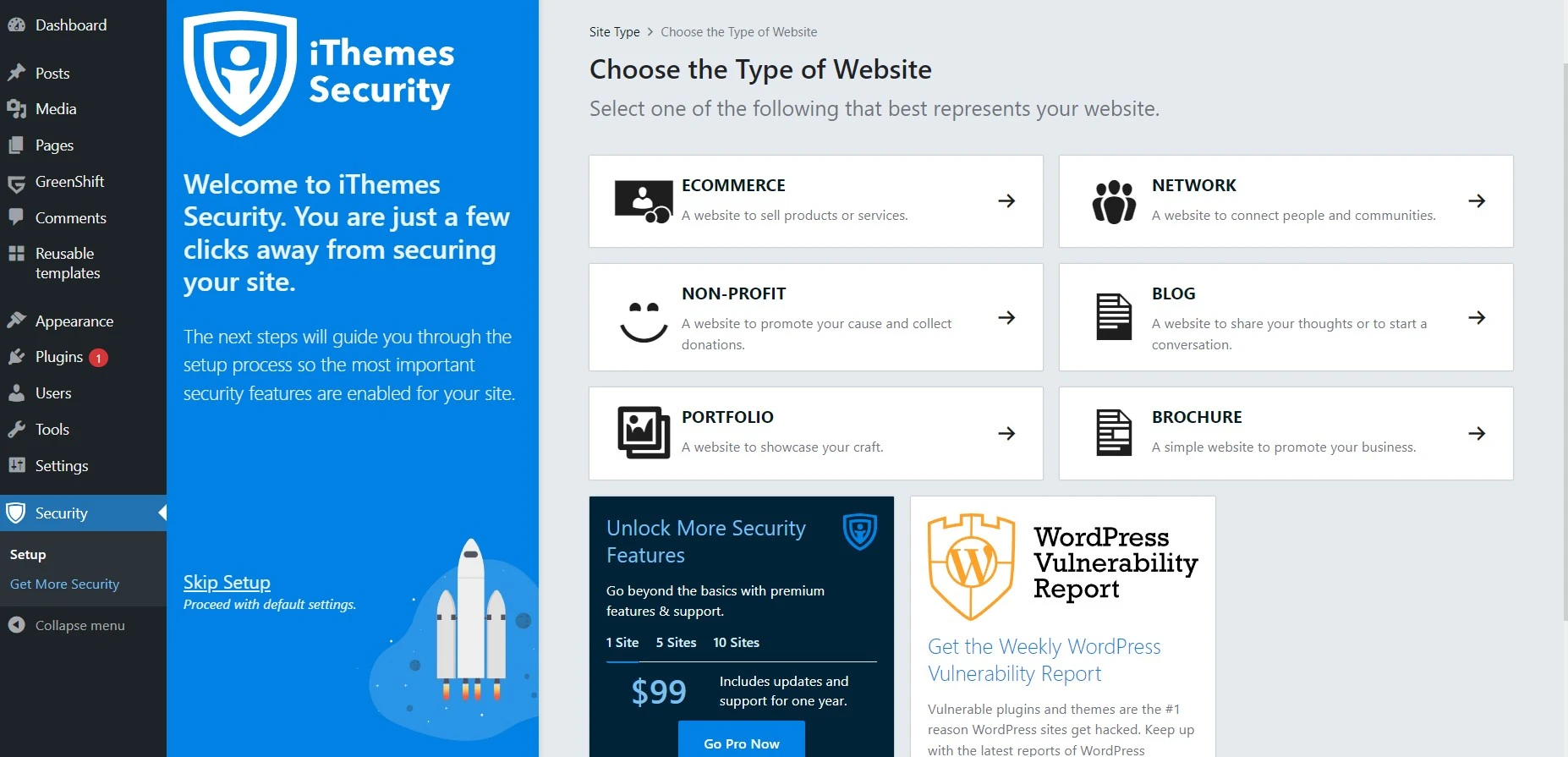
With over 30 options to prevent hackers and unwanted intruders, the Kadence Security plugin (previously iThemes Security and Solid Security, and first released as Better WP Security) is one of the most amazing solutions to safeguard your website.
It focuses on detecting plugin vulnerabilities, outdated software, and weak passwords, making Kadence Security a comprehensive security plugin for all sorts of WordPress sites.
The free Kadence Security plugin on WordPress.org covers the basics, including two-factor authentication, password rules and brute-force protection. The Pro version adds a real-time firewall with automatic rule updates and Patchstack virtual patching. Kadence now lists it as part of its Pro and Elite plans rather than as a plugin with its own licence tiers.
Kadence Security Pro’s key features include rigorous password enforcement, the locking out of bad users, database backups, and two-factor authentication.
Kadence Security Pro Features
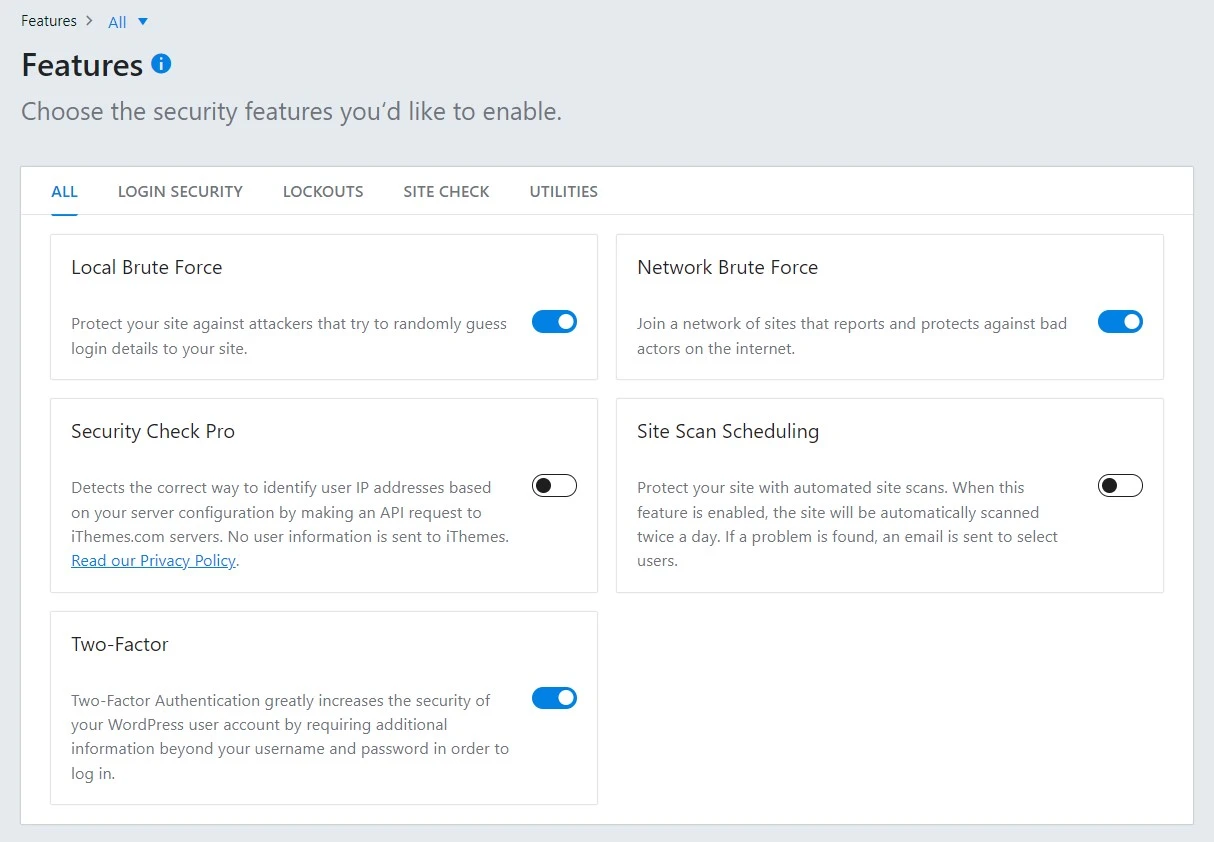
Protection Against Hackers
It provides advanced protection against hackers, malware, brute force attacks, and other security threats. It also offers a two-factor authentication feature to help protect your WordPress site from unauthorized access.
Database Security
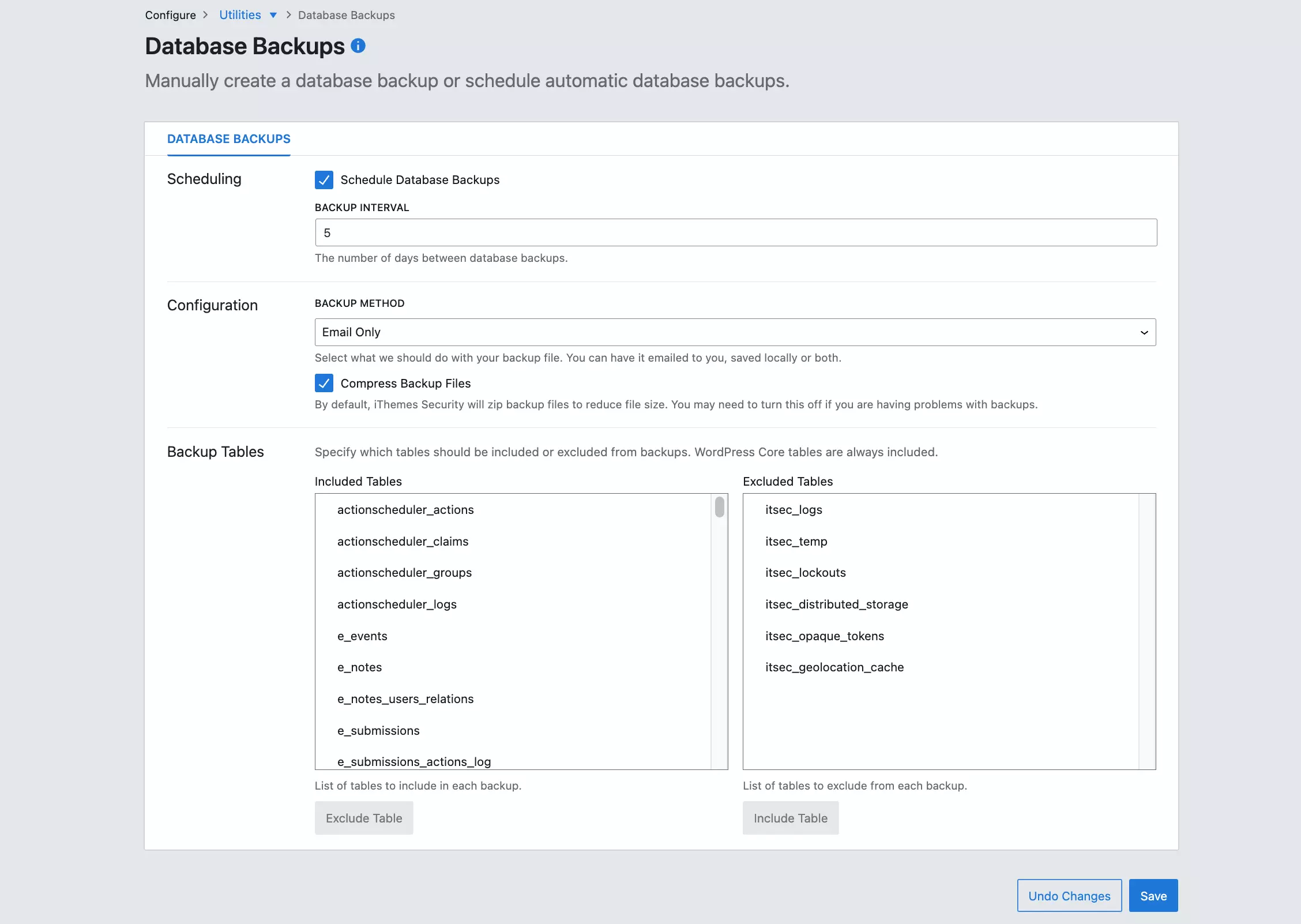
Kadence Security Pro provides an advanced database security feature that helps protect your WordPress site from malicious attacks and data theft. It scans the database for potential vulnerabilities and provides notifications and reports to help you identify and resolve any issues.
You can configure the backup method, schedule the database backup interval, and easily exclude specific tables from the backup.
Actionable Dashboard
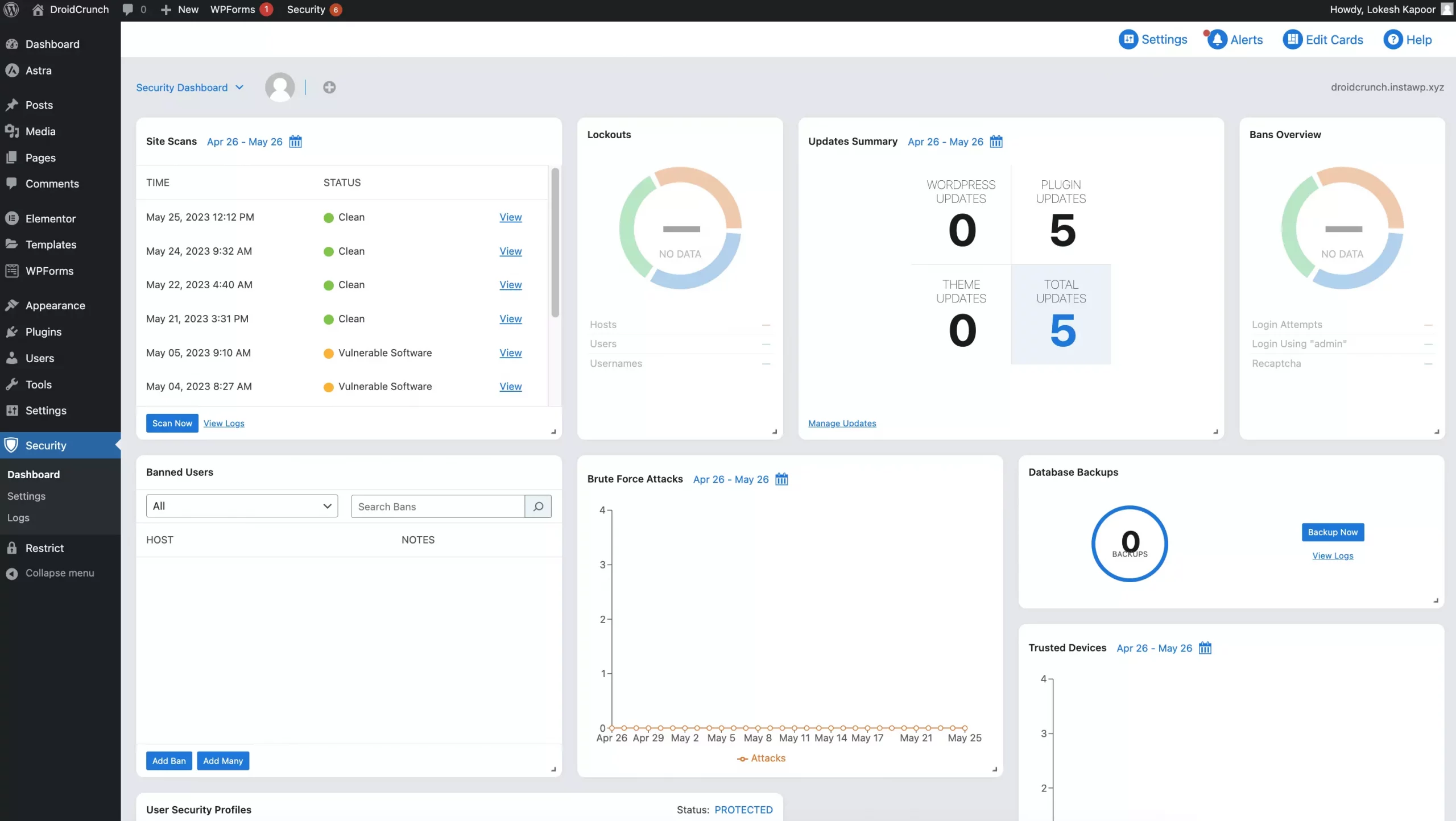
Automated Security Scans
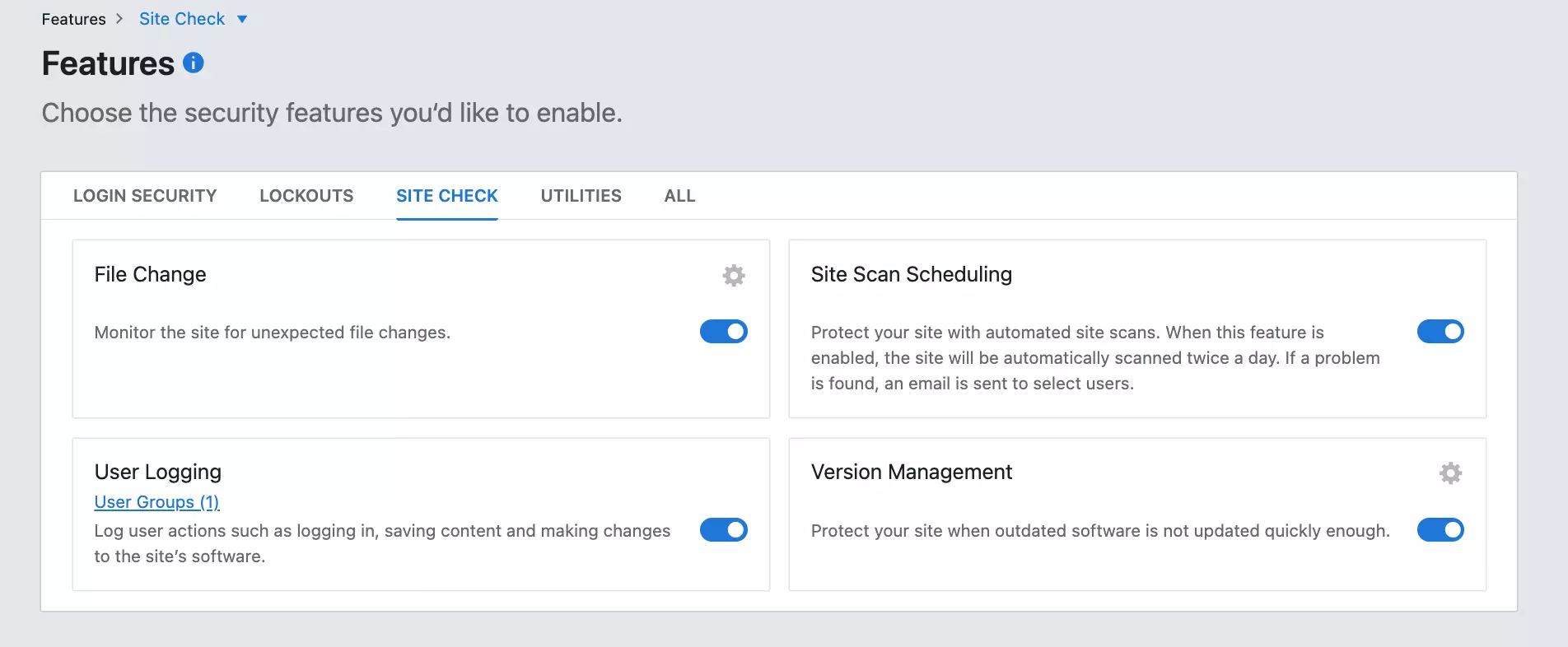
The plugin includes an automated security scanning feature that will regularly scan your WordPress site for potential vulnerabilities and threats. It will also provide you with reports to help you identify any issues and take action to resolve them.
File Change Detection
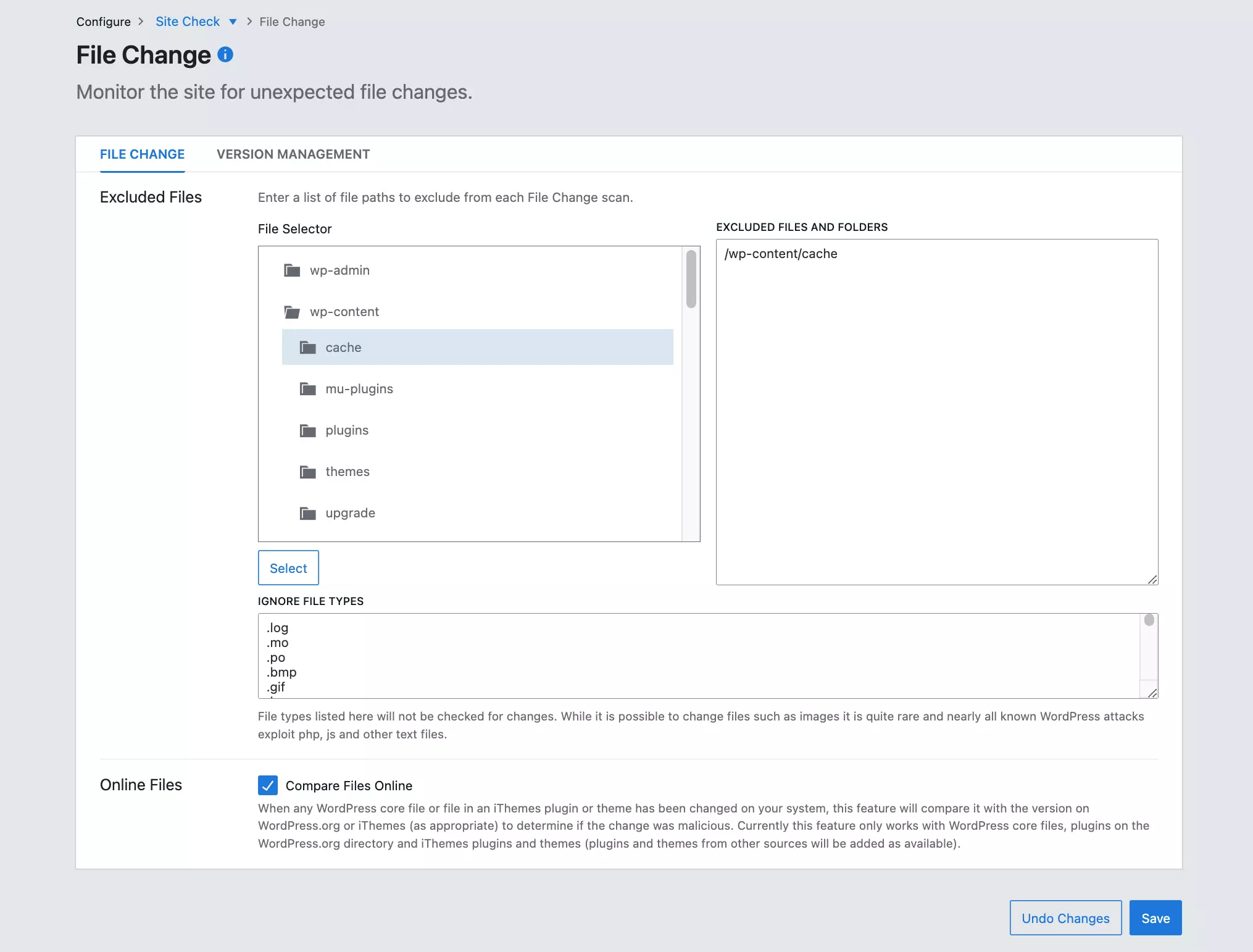
It includes a file change detection feature that monitors your WordPress site for any changes in the core files, plugins, and themes. If it finds any modifications, it will alert you immediately so you can take action to protect your site.
Strong Passwords
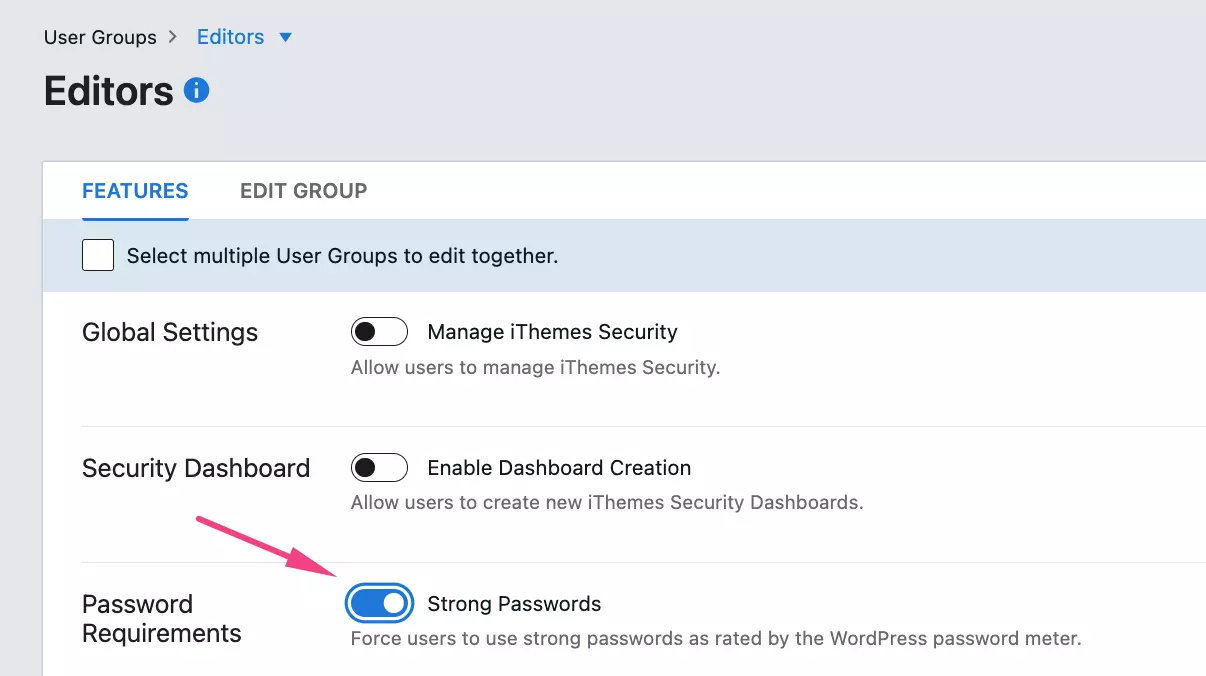
Kadence Security includes a password security feature for user roles that helps you force them to use strong passwords and keep your WordPress site secure. It also helps prevent brute force attacks and other types of malicious attempts.
Passwordless Login
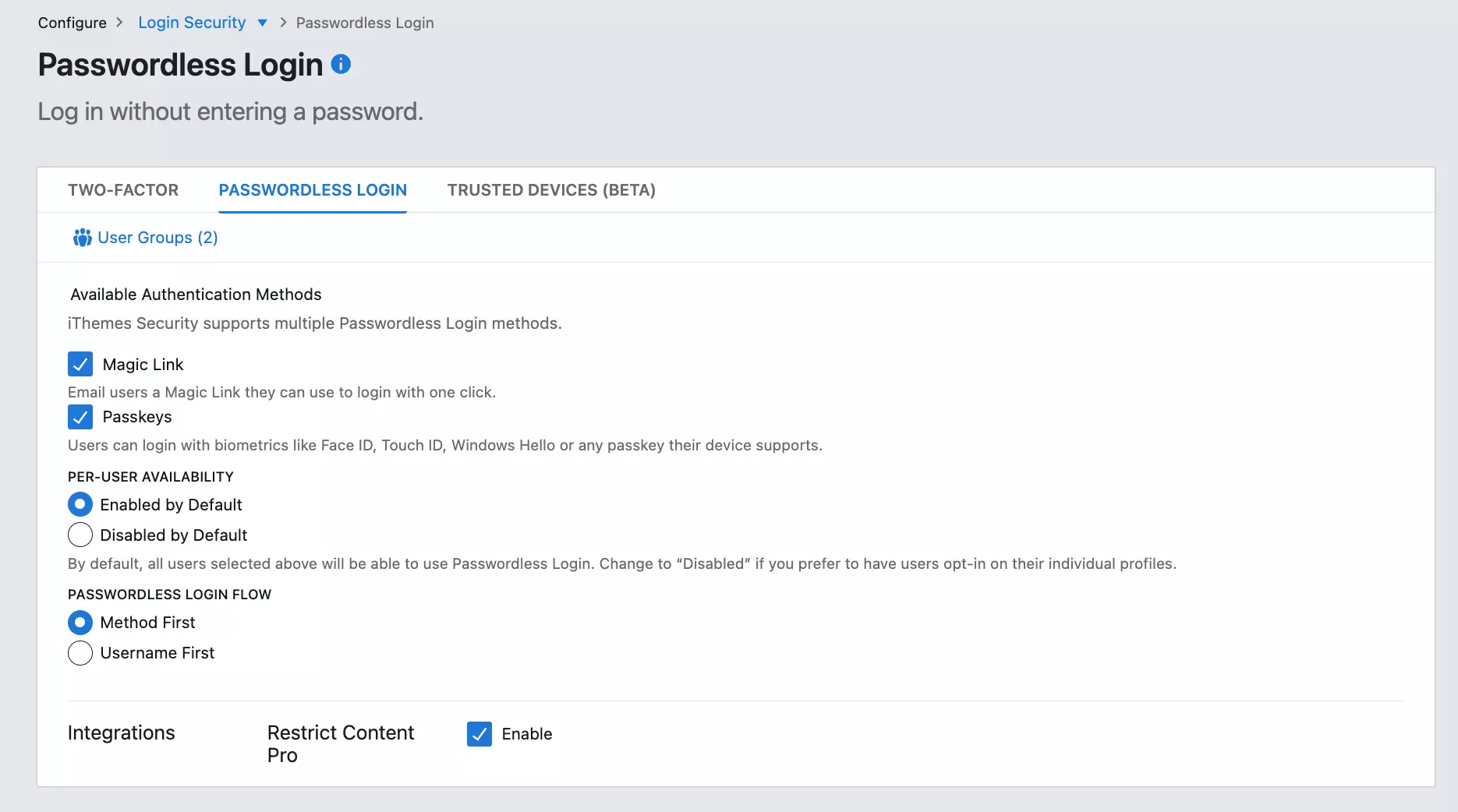
With the passwordless login feature offered by Kadence Security Pro, you will get an email with a link that will enable one-click access to your WordPress account. It necessitates access to that particular user’s email account, adding a degree of protection.
File Change Detection
No security measure is perfect. Even the greatest systems occasionally experience failure. How do you tell whether a stranger has viewed your website? Usually, it’s a result of a change they’ve made. When anything changes in your WordPress installation, the File Change Detection feature will let you know so you can figure out which modifications you made and which ones you didn’t.
Magic links
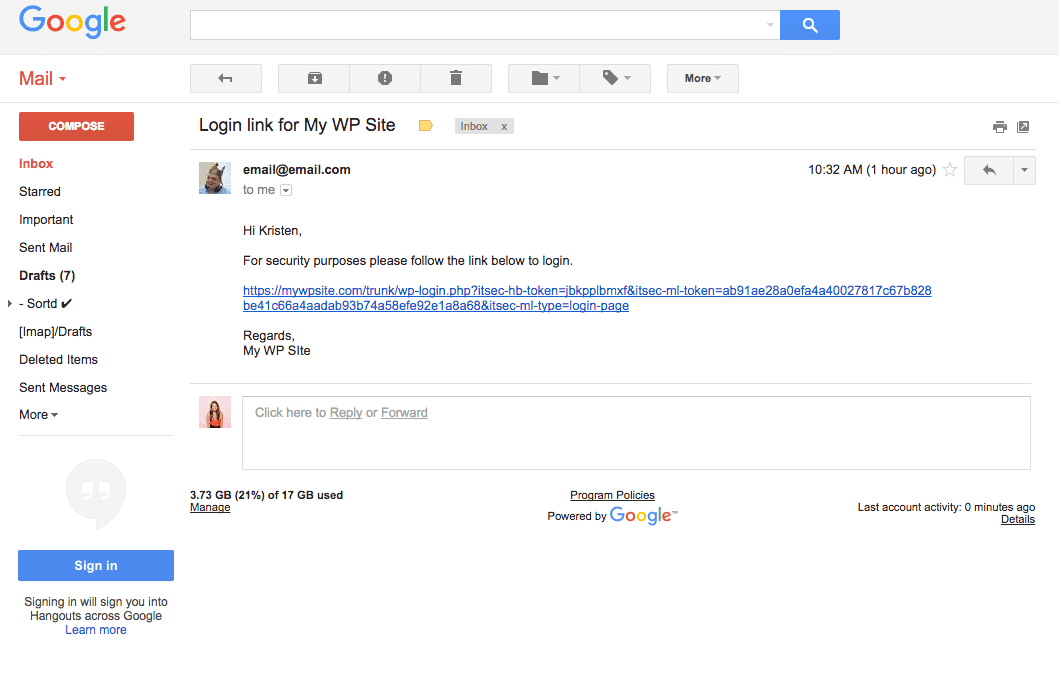
Another cool feature that may be quite useful to website owners and users is magic links.
You can ask for an email with a customized message and instructions on how to get back via a link if the Local Brute Force Protection function has locked you out.
The main goal of Magic Links is to access the dashboard of your website when the username is locked by the plugin.
Away Mode
Simply said, Away Mode prevents anyone from accessing your WordPress dashboard and logging in. Nobody can access the system until Away Mode is manually or automatically switched off, not even other trusted users or prospective hackers.
You may set a defined time for the dashboard to be unreachable so that nobody can access it while you are away. If you don’t like a set schedule, you may manually toggle Away Mode on and off, just like the other options.
If creating your website is your profession and you only want people to view it during working hours, Away Mode is a fantastic feature.
Version management
It makes sense that upgrading new plugins might be difficult. If a theme or plugin is old, it might be compromised. This is because they provide openings for hackers to later exploit.
Version Management is a function of Kadence Security Pro. To ensure that you are always using the most recent versions, this function will automatically locate and install any new updates to WordPress, plugins, and themes.
How to use Kadence Security Pro?
1. Install and Activate Kadence Security Pro– Start by installing and activating the Kadence Security Pro plugin on your WordPress website.
2. Configure the Settings Once activated- You should see the Kadence Security Pro menu item in your WordPress dashboard. Click on it to configure the settings for your website.
3. Set Up Two-Factor Authentication- Two-factor authentication is a great way to add an extra layer of security to your site. In Kadence Security Pro, you can set up two-factor authentication using Google Authenticator or Duo Mobile.
4. Monitor your Site– Kadence Security Pro also includes a powerful monitoring feature. With this feature, you can track user logins, check for malware, and even receive notifications if something suspicious happens on your site.
5. Set Up Brute Force Protection- Brute force attacks are one of the most common security threats on WordPress sites. Kadence Security Pro helps protect your site from these types of attacks by limiting the number of failed login attempts a user can make.
6. Enable Additional Security Features- Kadence Security Pro also includes many other security features, such as a real-time firewall, Patchstack virtual patching and file change detection.
Kadence Security Pro Pricing
Kadence no longer lists separate Basic, Plus and Agency licences for the security plugin. Here is what it costs now:
- Kadence Security (free): $0 on WordPress.org, with two-factor authentication, password rules and brute-force protection.
- Kadence Pro plan: $299 a year. This is where Kadence Security Pro lives: Kadence lists the security firewall, 2FA and virtual patching among the things Pro adds.
- Kadence Elite plan: $499 a year. Everything in Pro, plus Kadence Central for managing many sites (priced per site).
We checked these prices on Kadence’s pricing page in October 2026. The page doesn’t state how many sites each plan covers or mention a money-back guarantee, so confirm both at checkout.
Kadence Security Pro Alternatives
Wordfence
Wordfence is a popular WordPress security plugin that provides a robust suite of security features, including malware scanning, live traffic monitoring, two-factor authentication, login security, and more. The plugin also features a constantly updated firewall to protect your site from malicious traffic.
Sucuri
Sucuri is a cloud-based security platform that provides website protection from malware, DDoS attacks, and other threats. It offers a range of security services, including malware scanning and removal, server-side scanning, malware prevention, and more.
All In One WP Security & Firewall
All In One WP Security & Firewall is a comprehensive security plugin for WordPress sites. It includes features such as login security, user registration security, malware scanning, file integrity monitoring, and a comprehensive firewall.
Security Ninja
It is a WordPress plugin that assists users in securing their websites from potential attackers. It provides a suite of security tools that can be used to scan for vulnerabilities, detect suspicious behavior, and harden WordPress installation.
The plugin also includes a security audit feature, which allows users to quickly identify weak spots in their security setup and take corrective action. Security Ninja also allows users to monitor their websites for changes, block malicious attempts to access the server, and generate detailed reports of their security posture.
Kadence Security Pro FAQs
Kadence doesn’t list Kadence Security Pro as a separate purchase anymore. Its firewall, two-factor authentication and virtual patching come with the Kadence Pro plan ($299 a year) and the Elite plan ($499 a year), and the basic Kadence Security plugin is free on WordPress.org. Kadence’s pricing page doesn’t mention a money-back guarantee, so check the refund terms before you buy.
It’s important to take security seriously. Your website, your company, and your reputation weren’t built overnight, yet an unforeseen hacker may take them all down in a matter of seconds. Every day, several websites are hacked. In light of this, you must handle your WordPress website as if it were a piece of tangible property.
The WordPress plugin called Kadence Security Pro was created and developed by IT professionals with expertise in both WordPress and internet security. It is made to prevent intruders from breaking into your websites. All you need to do is simply get Kadence Security Pro and install it.
Kadence Security offers 36 solutions to protect your website from hacker threats, including preventing known hackers’ IP addresses, requiring secure passwords, checking files for illegal modifications, locking users after failed logins, notifying users via email, requiring SSL for dashboards and posts, and checking for malware and viruses.
Kadence Security is a reliable solution to protect WordPress websites from security flaws and vulnerabilities. It does offer Bruteforce protection to ban suspicious login activities and stop spam login attempts.
Your WordPress website gains an essential additional degree of security with two-factor authentication. By requiring a password and an additional time-sensitive code to log in, it secures access to your website. It is highly beneficial and is very easy to set up with the Kadence Security plugin.
Kadence Security Pro is widely regarded as a trusted WordPress security plugin. It offers a range of features designed to secure and protect WordPress websites. However, it’s important to note that no security plugin can guarantee 100% security. While Kadence Security Pro can enhance the security of your website, it is essential to follow best practices and regularly update your website to ensure maximum protection against potential vulnerabilities.
Enhanced WordPress security, advanced features, user-friendliness, and automatic updates make Kadence Security Pro a reliable plugin choice. If not Kadence Security, you should definitely rely on one of the security plugins for WordPress to make sure your Website is secured.
The free version of Kadence Security offers a range of features that can enhance your site’s security, such as strengthening user credentials, scanning for vulnerable plugins/themes, and blocking bad bots. However, it may not be as comprehensive as the Pro version. The Pro version provides additional security features and support which the free version does not offer. Therefore, while the free version can help make your site more secure, for complete peace of mind and maximum protection, the Pro version would be a better choice.
Both Kadence Security and Wordfence offer strong security features for WordPress. Kadence Security is known for its user-friendliness and basic protection against common threats. Wordfence, however, provides more comprehensive security measures, including robust firewall protection and scans for malicious codes and URLs. The choice between the two depends on your specific needs and preferences.
What makes Kadence Security Pro stand out?
- Since most web administrators fail to notice when a file is altered, the security plugin provides file change detection, which is essential.
- To increase the security of your login, use two-factor authentication and the Google reCAPTCHA integration
- You can install an “Away Mode” if you don’t frequently update your website and want to completely block all people from accessing your WordPress dashboard.
- Additional requirements include 404 error detection, brute force avoidance, and strict password enforcement.
- Users can be barred to stop brute force assaults.
- The plugin provides SSL enforcement along with partial website backups.
- To detect whether anything harmful has been introduced, the plugin compares your WordPress core files to the most recent release of WordPress.
Over to you
Kadence Security Pro is an excellent security package for any website that needs an extra layer of protection. It’s easy to use and still actively maintained. The catch is the price: Kadence now bundles it into its Pro plan at $299 a year, which is good value if you also use Kadence’s other tools and steep if security is all you need. In that case, start with the free Kadence Security plugin or compare the alternatives above.
Simply put, Kadence Security Pro’s goal is to make sure that only you and other potential workers have access to your dashboard and may interact with its contents.
The Review
Kadence Security Pro
Kadence Security Pro, formerly iThemes Security Pro and Solid Security Pro, protects WordPress sites with a real-time firewall, two-factor authentication, Patchstack virtual patching, brute-force protection and file change detection. Kadence no longer lists it as a separate licence: it comes with the Kadence Pro plan ($299 a year) and the Elite plan, so it is the best value if you also use other Kadence tools.
PROS
- Easy to install and configure.
- Provides advanced security features such as two-factor authentication, password expiration, and brute-force protection.
- Patchstack virtual patching for known plugin vulnerabilities.
- Offers a suite of tools to help identify and fix security weaknesses.
- Utilizes a variety of techniques to protect against malicious code and malware.
- Includes an activity log to help you monitor your site's security.
- Includes a full-featured firewall to block malicious traffic.
- Offers a range of options to customize its security settings.
CONS
- Full featured suite can be expensive for smaller sites.
- Some features require technical knowledge to configure properly.
- No standalone licence: Kadence lists it only in its Pro and Elite plans.