

You want a website’s words, not its menus, cookie banners and script tags.
Short version of this Firecrawl tutorial: get a free API key, scrape one page, and map a site to list its URLs. Then crawl or batch-scrape only what you need. The free plan’s 1,000 credits cover about 1,000 pages.
We checked every call against the current docs and Python SDK, and priced each step in credits.
The catch? Your first crawl can fail before it scrapes a page. Here’s why, and the one-line fix.
What do you need before your first request?
Three things: a free Firecrawl account, its API key, and Python 3 on your machine. If you’d rather not install anything, a terminal with curl works too.
Best for: developers and AI builders who want clean page text for an LLM, a search index or a one-off dataset. You skip running your own browsers and proxies.
Not ideal for: people who want a point-and-click scraper with a schedule and a spreadsheet at the end. You’ll write a few lines of code here, and Firecrawl expects you to.
Money first, because it shapes every choice below. The Free plan needs no card. Hobby costs $19 a month for 5,000 credits, and Standard $99 for 100,000. Our Firecrawl pricing breakdown works out when each paid plan starts to pay for itself.
How we checked: every endpoint, setting and price here comes from Firecrawl’s v2 documentation and pricing page, read on October 17, 2026. We ran all four scripts against version 4.50.0 of the Python SDK with a placeholder key. Each one built a valid request and stopped at the API’s login check. We didn’t spend credits on paid crawls for this post.
Heads-up: we earn a commission when you upgrade through some links on this page. It never decides what we recommend.
Which Firecrawl endpoint does your job need?
Use scrape for one page and map to list a site’s URLs. Crawl follows links through a section, and a JSON format gives you named fields instead of text.
| Your job | Call | Credits |
|---|---|---|
| One article, doc or product page | scrape | 1 per page |
| Every URL on a site, as a list | map | 1 per call, however many URLs |
| A blog archive or docs section | crawl | 1 per page |
| 50 URLs you already have | batch scrape | 1 per page |
| Prices, titles or specs as fields | scrape with JSON | 5 per page (1 + 4) |
| A web search with page text | search | 2 per 10 results, plus scraping |
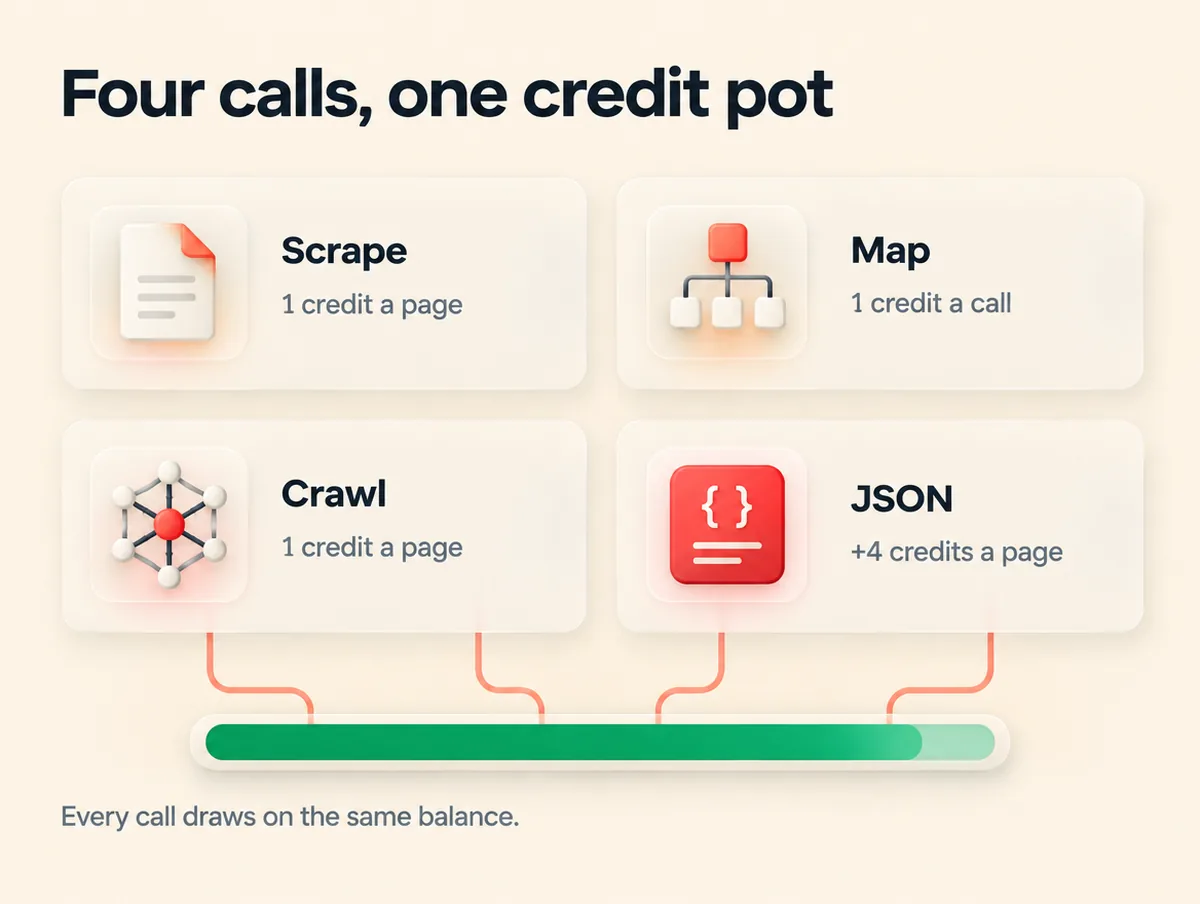
All of these draw on one balance. That matters more than it looks. A JSON crawl of 200 pages costs 1,000 credits: your whole free month in a single call.
Start with scrape. It’s the building block every other call reuses.
Scrape your first page in five minutes
A scrape takes a URL and returns the page as clean Markdown. You also get metadata like the title and status code, all for 1 credit.
Your first Firecrawl scrape
Account, key, SDK, one request
-
Step 1 of 5
Create a free account
Sign up for Firecrawl’s Free plan. Stay on it until a real project outgrows it.
-
Step 2 of 5
Copy your API key
Keys start with
fc-. Treat it like a password: it never goes in front-end code or a public repo. -
Step 3 of 5
Install the SDK
Run
pip install firecrawl-py. Using Node instead? It’snpm install firecrawl, with the same method names. -
Step 4 of 5
Store the key in an environment variable
Run
export FIRECRAWL_API_KEY=fc-your-keyin your terminal. The script reads it from there, so the key stays out of your code. -
Step 5 of 5
Run the scrape and read two status codes
A successful API call only means Firecrawl did its job. The page’s own answer sits in
metadata.status_code, and a 404 page still comes back as a successful scrape.
import os
from firecrawl import Firecrawl

app = Firecrawl(api_key=os.environ["FIRECRAWL_API_KEY"])

doc = app.scrape(
    "https://books.toscrape.com/",
    formats=["markdown"],
    only_main_content=True,
)

print(doc.metadata.status_code)   # 200 means the page itself loaded
print(doc.markdown[:500])         # first 500 characters of clean Markdown
Run it with python scrape_one.py. Setting only_main_content drops navigation, headers and footers, which is usually what an LLM wants. Why keep the key in a variable rather than the file? Our API keys and auth explainer covers what happens when one leaks.
Prefer the terminal? This is the same request with curl:
curl -s -X POST "https://api.firecrawl.dev/v2/scrape" \
  -H "Authorization: Bearer $FIRECRAWL_API_KEY" \
  -H "Content-Type: application/json" \
  -d '{"url": "https://books.toscrape.com/", "formats": ["markdown"]}'
Real-world tip: Firecrawl’s docs say the API answers some requests with no key at all. From our cloud server it refused, with a 403 saying our IP address looked like a VPN or proxy. Servers and VPNs trip that check, so get the free key first.
How do you crawl a whole site without burning credits?
Give crawl a starting URL and a limit. Firecrawl follows the links under that path, scrapes each page for 1 credit, and hands back every page when the job ends.
Remember the catch from the top? Here it is.
The default limit is 10,000 pages, and Firecrawl checks that your balance covers the limit before it starts. A Free account holds 1,000 credits. So a crawl with no limit fails at once with a 402 Payment Required error, before it touches a single page.
Set the limit to the number of pages you expect, and the crawl runs.
import json, os
from firecrawl import Firecrawl

app = Firecrawl(api_key=os.environ["FIRECRAWL_API_KEY"])

job = app.crawl(
    "https://books.toscrape.com/catalogue/category/books/travel_2/",
    limit=25,                      # never leave this at the 10,000 default
    max_discovery_depth=2,
    scrape_options={"formats": ["markdown"], "only_main_content": True},
)

print(job.status, job.completed, "pages,", job.credits_used, "credits")

with open("crawl.jsonl", "w") as f:  # results expire from the API after 24 hours
    for page in job.data:
        f.write(json.dumps({
            "url": page.metadata.source_url,
            "status": page.metadata.status_code,
            "markdown": page.markdown,
        }) + "\n")
Four rules decide what a crawl reaches. Most empty or bloated crawls break one of them:
- Children only. Crawl
/blog/and you get pages under/blog/, not/pricing. Setcrawl_entire_domain=Trueto include sibling and parent paths. - Path filters match the path, not the full URL.
include_pathsandexclude_pathsare regex patterns on the part after the domain, without query strings. - Your start URL must pass your own filter. If it doesn’t match
include_paths, the crawl can return 0 pages. - Depth counts link hops, not slashes. With
max_discovery_depth=2, pages two clicks from the start are scraped, but their links aren’t followed.
Pages that failed aren’t in the results at all. Timeouts and pages blocked by robots.txt show up only in the crawl’s error list (get_crawl_errors in the SDK). Check it before you trust a crawl as complete.
Is it cheaper to map first, then scrape?
Yes, when you need some pages rather than all of them. Map lists a site’s URLs for 1 credit per call. You keep the ones you want, and a batch scrape fetches only those.
Say a docs site has 300 pages, and you need the 40 about authentication. Crawling the lot costs 300 credits. Map plus a 40-page batch costs 41. On the Free plan, that’s 30% of your month against about 4%.
import os
from firecrawl import Firecrawl

app = Firecrawl(api_key=os.environ["FIRECRAWL_API_KEY"])

# 1 credit, however many URLs come back
site = app.map("https://docs.firecrawl.dev", search="crawl", limit=200)
urls = [link.url for link in site.links][:20]

# 1 credit per page, only for the pages you picked
batch = app.batch_scrape(urls, formats=["markdown"], only_main_content=True)
print(batch.completed, "pages,", batch.credits_used, "credits")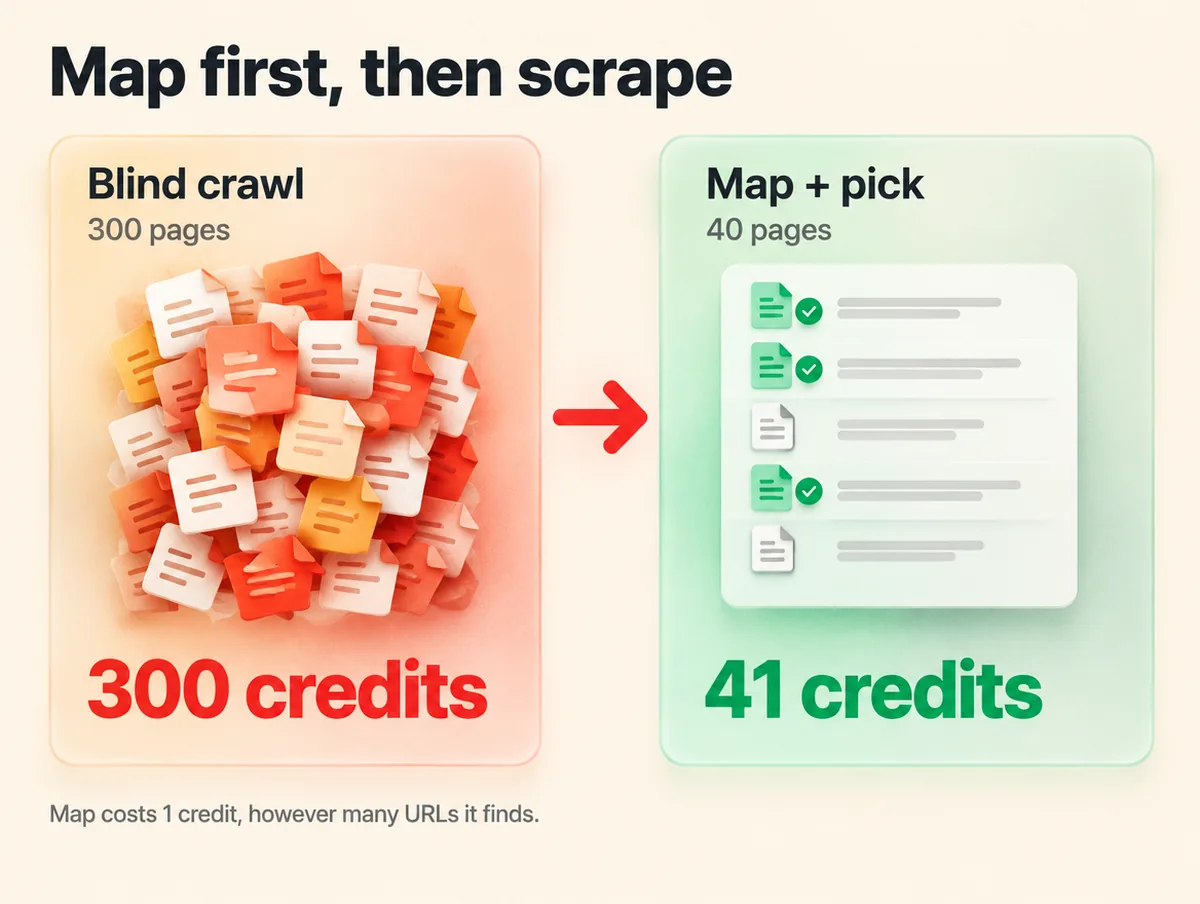
The trade-off: map is fast, not exhaustive. It leans on the sitemap, search results and Firecrawl’s cache, so a site with no sitemap can come back thin. When you need every page, crawl it.
How do you turn a page into JSON fields?
Add a JSON format with a schema, and Firecrawl’s model fills in your fields from the page. Each page then costs 5 credits instead of 1.
import os
from typing import List, Optional
from pydantic import BaseModel
from firecrawl import Firecrawl

class Book(BaseModel):
    title: str
    price: Optional[str] = None
    in_stock: Optional[bool] = None

class BookList(BaseModel):
    books: List[Book]          # an array, so you get every book, not just one

app = Firecrawl(api_key=os.environ["FIRECRAWL_API_KEY"])

doc = app.scrape(
    "https://books.toscrape.com/catalogue/category/books/travel_2/",
    formats=[{
        "type": "json",
        "schema": BookList.model_json_schema(),
        "prompt": "Extract every book on the page. Use null if a field is missing.",
    }],
)

for book in doc.json["books"]:
    print(book["title"], book["price"])
That price gap is a design decision, not a footnote. Say you track prices on 2,000 product pages every week. JSON mode uses about 43,000 credits a month, which puts you on Standard at $99.
Pull plain Markdown and parse the prices yourself, and it’s about 8,700 credits. That’s Hobby plus four $5 top-ups, or $39.
When you do use JSON, five habits keep the output honest:
- Lists need an array. A schema with a plain object returns one item. Wrap repeating things, like books or reviews, in an array.
- Say what to do when a field is missing. A line like “use null if it isn’t on the page” stops the model guessing.
- Don’t force a count. Firecrawl’s docs warn that
minItemscan make the model invent entries to reach the number. - It can’t see HTML attributes. Extraction reads the Markdown version of the page, so values hidden in attributes like
data-idvanish. RequestrawHtmland parse those yourself. - Split big schemas. Past about 30 fields, results get less consistent. Two or three smaller requests work better.
Scraping pages strangers submit? Turn on check_prompt_injection. It screens the page for hidden instructions before the model reads it, for 4 more credits a page.
Four mistakes that quietly waste credits
Trusting success: true. It means Firecrawl processed your request, nothing more. A dead page comes back with status_code 404 and still costs a credit, so filter on that field before you store anything.
Reading stale pages. Firecrawl serves cached copies up to two days old by default, and a cached page still costs 1 credit. For prices or stock levels, pass max_age=0 to force a fresh scrape.
Firing requests in parallel on Free. The Free plan allows 10 scrapes and 2 crawls a minute. Go past that and you get a 429 error. Our guide to retries, pagination and idempotency shows how to back off and try again without double-charging yourself.
Letting results expire. Crawl results stay on Firecrawl’s API for 24 hours after a job finishes. That’s why the crawl script writes every page to a file the moment it returns.
Where does “any website” stop?
Firecrawl renders JavaScript and brings its own proxies for anti-bot pages. It stops at logins, robots.txt rules and a few sites it won’t touch directly.
- JavaScript-heavy pages render by default, at the same 1 credit. Our browser automation vs web scraping test shows how much heavier a real browser is when you run one yourself.
- Logins, clicks and forms need Interact, which keeps a browser session open after a scrape. It bills 2 credits per browser minute.
- robots.txt is respected. Blocked pages land in the error list, and ignoring robots.txt is an Enterprise-only setting.
- LinkedIn profiles and company pages aren’t scraped at all. Firecrawl answers those URLs with records from third-party data providers.
And public isn’t the same as permitted. Read the site’s terms before you collect anything at scale, especially personal data.
Is Firecrawl the right tool for your project?
Stay with Firecrawl when the text is headed for an AI app. If it’s feeding a chatbot over your own documents, our RAG explainer covers what happens after the scrape. Rather skip the code entirely? Firecrawl’s MCP server plugs into Claude, Cursor and ChatGPT, and our guide to MCP explains how those connections work.
Switch to Apify when you need a ready-made scraper for a big platform like Google Maps. It also wins for jobs that run on a schedule and store their own results.
Our Firecrawl vs Apify comparison runs the cost maths for five common jobs, and the cheaper pick changes with the page type. Weighing a third option? Our Firecrawl vs Cloro vs Apify breakdown adds Cloro to the mix.
Frequently asked questions
What happens when my free Firecrawl credits run out?
Requests stop working until your credits refresh at the start of the next month. The Free plan has no pay-as-you-go option. Paid plans can add credits in $5 steps, up to a monthly limit you set. Unused plan credits don’t roll over, except on Scale.
Can Firecrawl scrape PDF files?
Yes. Point scrape or crawl at a PDF URL and Firecrawl returns its text as Markdown, billed at 1 credit per PDF page. A 40-page report costs 40 credits. For files on your own computer, such as DOCX or XLSX, use the separate Parse endpoint instead.
Can I scrape the version of a site shown in another country?
Yes. Add a location setting with a two-letter country code, such as DE or JP, and optional languages. Firecrawl then routes the request through a proxy in that country when one is available. Without the setting, every request behaves as if it came from the United States.
Does this Firecrawl tutorial work with Node.js?
Yes. Install the package with npm install firecrawl and the calls keep the same names: scrape, crawl, map and batchScrape. Options switch to camelCase, so only_main_content becomes onlyMainContent. Firecrawl also offers a command-line tool and SDKs for other languages.
Can Firecrawl tell me when a long crawl finishes?
Yes. Add a webhook URL to the crawl request, and Firecrawl posts an event when the crawl starts. It sends another for each page it scrapes, and a last one when the crawl completes or fails. Check the X-Firecrawl-Signature header against your webhook secret before trusting a payload.
Is it safe to put my Firecrawl API key in a website or mobile app?
No. Anyone can read a key shipped in front-end code and spend your credits. Call Firecrawl from your own server and keep the key in an environment variable or a secrets manager. If a key ever leaks, replace it with a new one straight away.
Can I self-host Firecrawl instead of paying for credits?
Yes, Firecrawl is open source, so you can run it on your own servers. You then pay for those servers and supply your own proxies, and some newer hosted features may not be available. For a first project, the free hosted plan is much faster to set up.
Which call should you make first?
This Firecrawl tutorial comes down to four calls. Scrape one page when that’s all you need. Map first when you want a handful of pages from a big site. Crawl a section you need whole, and add JSON extraction only when you need fields, because it costs five times as much.
One warning: give every crawl a limit, or a Free account fails with a 402 before it starts.
Your next step: grab a free Firecrawl key and run scrape_one.py on a page you care about. Then read the Markdown it returns.




