

Your support inbox is a mess, and most of the tools that promise to fix it want $50 a seat before you have sent a single reply. Ticksy takes the opposite bet: strip a helpdesk back to tickets, a knowledge base and purchase verification, then charge accordingly.
Whether that trade works depends on what you sell and how big your team is. This Ticksy review shows you exactly where the line falls.
Ticksy Review: The Quick Verdict
Ticksy is a deliberately small helpdesk: ticketing, a knowledge base, custom branding and purchase verification for Envato and Easy Digital Downloads. No live chat, no phone channel, no mobile app, and reporting stops at the basics. If your support load is a few dozen tickets a month from people who bought your theme, that narrowness is the point. If you need routing rules or SLA timers, you will outgrow it fast.
- Best for: Envato and EDD sellers, solo developers and small agencies who want a branded support portal without a per-seat bill that grows faster than revenue.
- Not ideal for: teams needing live chat, messaging channels, automation rules, SLA tracking, or reporting detailed enough to hand to a manager.
- Skip it if: support is your product rather than an obligation attached to it. Ticksy is a tidy front desk, not a support operation.
How We Evaluated Ticksy
Here is what this review is and is not. It rests on Ticksy’s public site and published pricing, plus what the product documents about its features and marketplace verification. We have not run Ticksy as the primary helpdesk for a high-volume product over a full year, so we do not measure its uptime here. Where reliability comes up below, it summarises what public feedback says rather than a benchmark we ran.
Ticksy Overview
Ticksy is a lightweight help desk built for freelancers, small businesses and digital product sellers, especially Envato authors. It launched in 2013, founded by developer and designer Justin Scheetz, as a deliberate reaction to the bulk of bigger platforms.
It is still run by a small team, and it is known for a clean interface, straightforward pricing, and tight marketplace integration with Envato, Freemius and Easy Digital Downloads. The result is a clutter-free, branded support environment at low cost.
| Product Name | Ticksy |
| Official Website | ticksy.com |
| Developed By | Justin Scheetz (Founder & Developer) |
| Launched In | 2013 |
| Company Size | Small team (headcount not publicly disclosed) |
| Headquarters | Likely U.S.-based (exact details not publicly disclosed) |
| Category | Help Desk / Support Ticket System |
| USPs | Flat pricing, marketplace verification, lightweight UI, public ticket option |
| Best For | Freelancers, digital product sellers, small agencies |
| Integrations | Envato, Freemius, Easy Digital Downloads |
| Support Channels | Email, Documentation, In-app Ticketing |
| Documentation | Comprehensive knowledge base available online |
| Pricing | From about $9 per agent per month, tiered for larger teams |
| Free Trial | Yes, 14-day trial |
| Money-Back Guarantee | No direct money-back guarantee, trial available |
| Affiliate Program | Yes |
| Affiliate Commission | Not publicly disclosed |
| Mobile App | Not available (only browser-based mobile access) |
| Custom Domain | Not supported; only subdomain branding |
| Alternatives | Zendesk, Freshdesk, Zoho Desk, Help Scout, LiveAgent |
Ticksy Features
Ticksy’s feature list is short, and that is intentional. What follows is close to everything you get: a ticket queue, a knowledge base, branding controls and marketplace integrations. No built-in live chat, telephony, macros, automation rules or SLA policies. Email and web tickets are the entire channel list.
One feature deserves early billing, because rivals do not ship it out of the box: tickets can be made public. Answer one buyer’s question and every future customer with the same problem reads the thread instead of opening a new ticket.
Multilingual
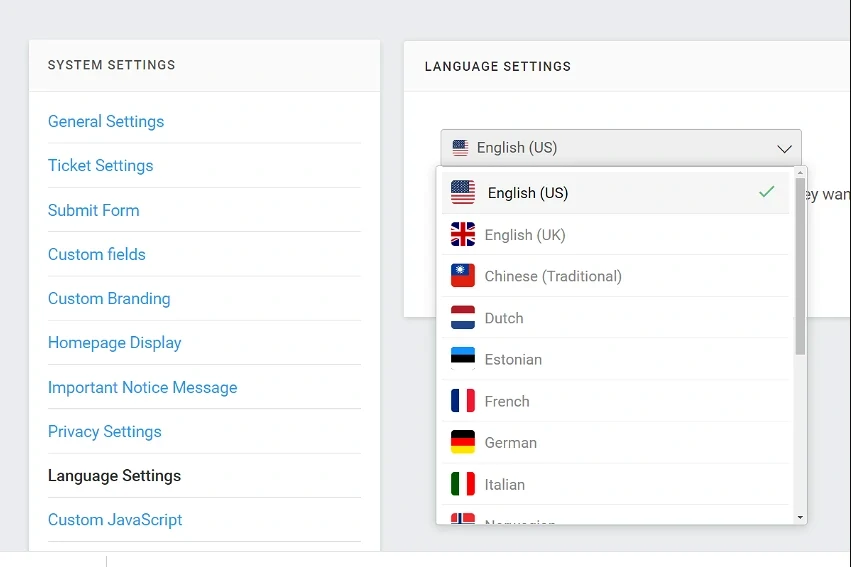
The interface can be translated, so the portal reads in your buyer’s language and one account serves a mixed audience. Be clear on what this is, though: it translates the interface, not your replies. Answer in English and customers read English answers inside a French-labelled portal. Useful, but not a substitute for hiring someone who speaks the language.
Integrations
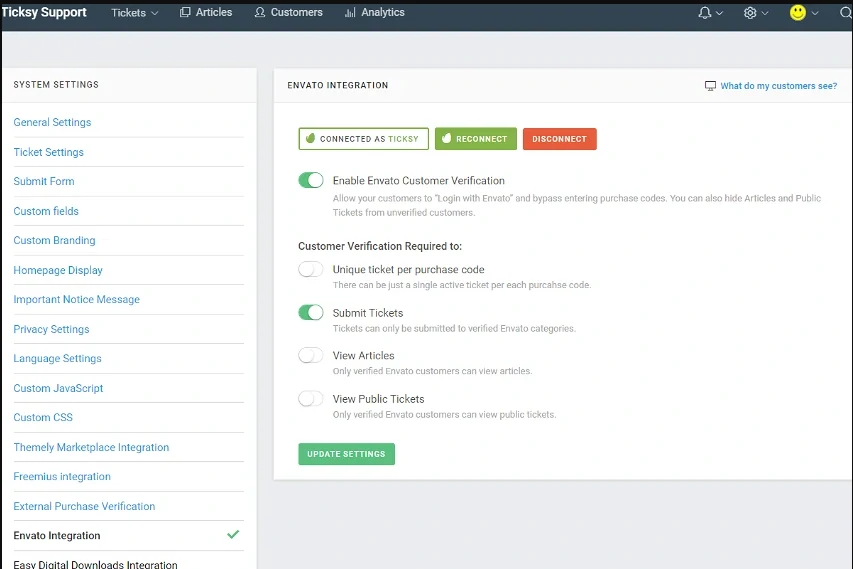
This is why most people choose Ticksy. Connect your Envato account, Easy Digital Downloads store or Freemius products and Ticksy checks a purchase code before letting anyone open a ticket, so people who never bought from you are filtered at the door. It also surfaces which item a buyer owns, so you stop asking which theme this is about.
The catch is that the list stops roughly there. No Slack, Jira, HubSpot, Zapier or CRM connections of the kind Freshdesk and Zoho Desk offer, so anything that needs a ticket to trigger something elsewhere is manual work.
Knowledge base
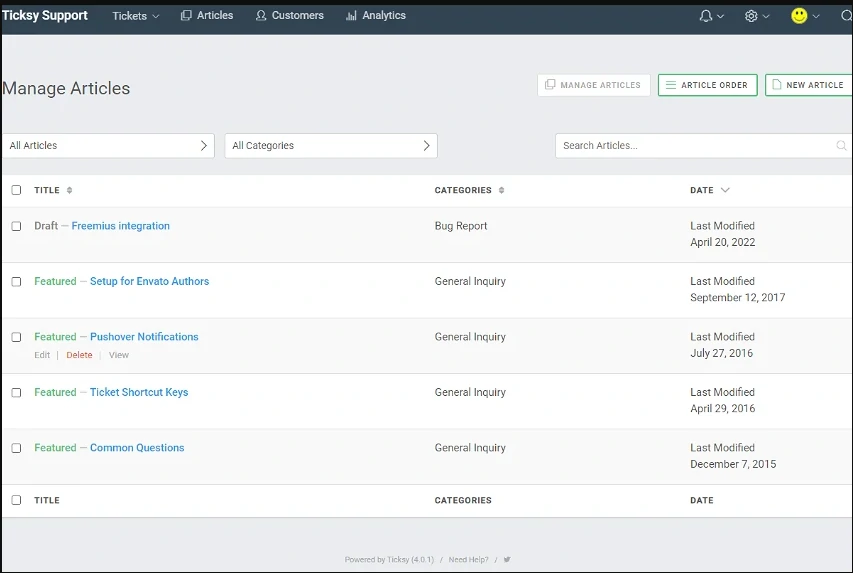
Every account includes a knowledge base organised into categories and articles on the same branded portal as your tickets, and search runs across it as a customer types a subject line, deflecting repeat questions before they reach you. The editor is basic, which is the honest word for it: formatting, images and embeds, but no versioning, approval workflows or article-level analytics. Enough for documenting a theme, thin for a knowledge base a content team maintains as a product.
Branding Option
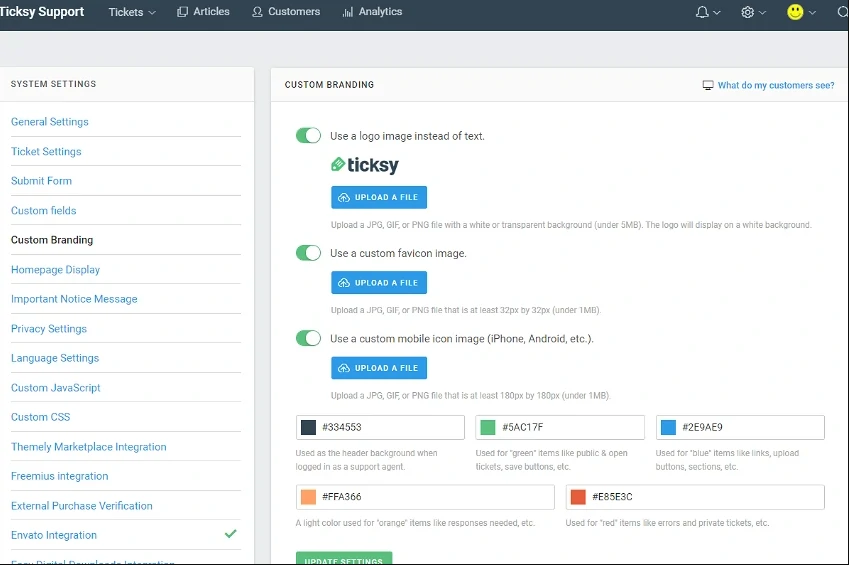
You can apply your logo, colours and custom CSS to the portal, so customers do not feel handed off to an unrelated tool mid-purchase. For a freelancer that consistency does real work: a branded portal reads as an established business, not a side project run from an inbox. The limitation is the address bar. Ticksy gives you a subdomain on its own domain, so the URL still says Ticksy. Most customers will not care, but if your brand guidelines insist otherwise, this is where Ticksy stops being an option.
Ticksy Pricing
Ticksy charges per support agent in tiers rather than a flat per-seat rate, and the jump between tiers is steep: adding a fourth agent is not an incremental cost, it moves you into a different bracket. The figures below reflect published pricing at the time of writing, so check the official pricing page before you budget.
| Plan | Billed Monthly | Billed Annually | Best For |
|---|---|---|---|
| Single Support Agent | $9/month | $8.3/month | Solo freelancers and small teams |
| 1–3 Support Agents | $15/month | $12/month | Businesses offering limited client support |
| 4–9 Support Agents | $49/month | $40/month | Teams requiring shared ticket management and collaboration |
| 10+ Support Agents | $149/month | $120/month | Large support departments needing team-level workflows |
- Every tier includes the full feature set. You are paying for seats, not for unlocking capabilities.
- A 14-day free trial is available for new accounts. There is no money-back guarantee, so treat the trial as your real evaluation window.
- Annual billing shaves a small percentage off the monthly rate. It is a modest discount, so there is little penalty in starting monthly.
- Watch the tier boundaries. A solo seller pays very little. A four-person team pays several times what a three-person team pays. Run the maths on the headcount you expect in a year, not the one you have today.
Ticksy Alternatives
Ticksy suits people who want simplicity, low cost and Envato integration, but it lacks automation workflows, deeper analytics and omnichannel support.
If you need mobile apps, SLA management or deeper integrations, these are the Ticksy alternatives worth comparing in 2026. Prices below link to each vendor’s page and reflect the lowest paid tier when this was written; confirm before you commit.
| Tool | Starting Price | Best For | Key Features | Free Plan | Mobile App | SLA & Automation |
|---|---|---|---|---|---|---|
| Freshdesk | Free tier; paid from $19/agent | Small to mid-sized businesses | Omnichannel, automation, analytics | ✅ | ✅ | ✅ |
| Zoho Desk | Free tier; paid from $7/user | Teams using Zoho ecosystem | AI support, SLAs, multi-department support | ✅ | ✅ | ✅ |
| Zendesk | Support from $19/agent, Suite from $55 | Large businesses, enterprise-level | Highly scalable, automation, integrations | ❌ | ✅ | ✅ |
| Help Scout | Free tier; paid from $25/user | Email-first customer support teams | Shared inbox, docs, workflows | ✅ | ✅ | ✅ |
| LiveAgent | From $15/agent | Teams needing live chat + support suite | Live chat, call center tools, ticketing | ❌ | ✅ | ✅ |
| HelpDesk | From $19/agent | Mid-sized teams looking for UI simplicity | Tickets, tags, automation, reporting | ❌ | ✅ | ✅ |
Ticksy Use Cases
Ticksy fits a narrow set of jobs extremely well and the rest badly. These are the situations where it earns its keep.
- WordPress theme and plugin developers. The flagship case. Envato and EDD verification means only paying buyers can open tickets, the knowledge base absorbs repetitive setup questions, and public tickets turn one answer into permanent documentation.
- Freelancers and small agencies. A branded portal beats a tangle of client email threads, and it works especially well for retainers and care plans where clients submit requests you can track against hours.
- Early-stage SaaS. Fine for onboarding questions, bug reports and feature requests while you are small. Expect to migrate once support becomes someone’s full-time job.
- Small internal help desks. It works as a lightweight IT or HR request queue, though purpose-built tools fit better.
What Real Ticksy Users Report
Ticksy has a small public review footprint. It is a niche tool from a small team, so there is nothing like the volume of verified reviews you would find for Zendesk. What exists skews positive, and the themes repeat often enough to be useful.
What the positive feedback highlights: the speed and simplicity of the interface, the absence of bloat compared with enterprise helpdesks, and responsive support from Ticksy’s own team. Fast setup comes up often too, which tracks with how little there is to configure.
What the critical feedback centres on: reliability. The complaints that surface most describe occasional downtime and tickets that arrived late, a bad failure mode because the customer tends to blame you rather than your vendor. Some also mention purchase-code verification stalling, which is at least partly down to Envato’s own API rather than Ticksy. This summarises what public feedback says, not uptime we measured, and the pool of reviews is small.
| Aspect | What users report |
|---|---|
| Ease of use | Consistently the strongest praise: intuitive, fast, no bloat |
| Support quality | Prompt and professional, handled by email and the knowledge base |
| Reliability | Generally dependable, with periodic reports of downtime and delayed tickets |
| Envato integration | Highly valued, occasionally unpredictable due to external API limits |
| Reporting | The most common feature complaint: enough to see volume, not enough to manage a team |
What Ticksy Does Better Than Bigger Helpdesks
Two things. The first is purchase verification: if you sell on Envato or through Easy Digital Downloads, Ticksy checks the licence before a ticket opens, and no mainstream helpdesk does that without a plugin, a developer, or both. For a theme author, that alone can justify the subscription.
The second is restraint. Zendesk and Freshdesk assume someone on your team configures the helpdesk. Ticksy assumes nobody does, and its dashboard opens on tickets rather than a settings tree. Features you never use carry a real cost, paid in setup time and in hunting for the three things you need.
Where Ticksy Falls Short
Four limitations matter enough to change a buying decision.
- Integrations stop at the marketplace. Deep on Envato, EDD and Freemius; effectively nothing for Slack, CRM tools or Zapier. Anything that needs a ticket to talk to another system becomes manual work.
- Reporting is thin. You can see tickets and their status, but not which agent resolves fastest, which product generates the most tickets, or whether response times improved this quarter. Fine for a solo seller, a genuine gap for anyone reporting upward.
- Per-agent tier pricing scales awkwardly. Cheap at one seat, then it steps up in brackets rather than smoothly. A growing team can watch its bill multiply off the back of a single hire.
- No live chat, and no mobile app. Ticksy is asynchronous ticketing only. If buyers expect a chat bubble on your site, or you want to clear tickets from a phone app rather than a mobile browser, this is not the tool.
Frequently Asked Questions
How much does Ticksy cost per month?
Ticksy prices per support agent in tiers, starting at roughly $9 a month for one agent and stepping up in brackets as you add seats. Annual billing trims a small percentage. Check the official page for current rates.
Does Ticksy have a free plan?
No permanent free plan. New accounts get a 14-day trial with the full feature set, and since there is no money-back guarantee, that trial is your real evaluation window.
Is Ticksy worth it if I only get a few tickets a month?
Usually yes if you sell on Envato or Easy Digital Downloads, because purchase verification saves more time than the single-agent price costs. With no marketplace to verify against, a free Freshdesk or Zoho Desk tier may suit you better.
Ticksy vs Freshdesk: which should I choose?
Pick Ticksy for marketplace purchase verification, a simpler interface and a lower price at one or two agents. Pick Freshdesk if you need live chat, automation rules, SLA tracking, a mobile app or real reporting.
Can I cancel Ticksy, and will I get a refund?
You can cancel rather than being locked into a fixed contract, but there is no money-back guarantee on time already billed. Decide during the trial rather than after.
Is Ticksy good for beginners?
It is one of the easiest helpdesks to start with. There is little to configure, the dashboard opens on tickets instead of settings, and most people have a branded portal running inside an afternoon.
Does Ticksy have live chat or a mobile app?
No to both. Ticksy is asynchronous email and web ticketing only. It works in a mobile browser, but there is no native app and no chat widget for your site.
Is Ticksy good for Envato authors?
This is its strongest use case. It verifies Envato purchase codes before a ticket opens, so support goes only to genuine buyers, and public tickets let one answer serve future customers.
Ticksy Review Verdict: Who Should Actually Buy It
Ticksy is a good tool with a narrow brief, so the verdict depends entirely on which of these you are.
- Envato or EDD seller, one to three people: buy it. Purchase verification alone saves more time than the subscription costs, and nothing else does it this cheaply.
- Freelancer or small agency: strong fit, provided you are content with a Ticksy subdomain rather than support on your own domain.
- Early-stage SaaS: workable at first, but plan the exit. The moment you need automation, SLAs or usable reporting you are migrating.
- Team of four or more, or anyone needing live chat: look at Freshdesk or Zoho Desk instead. The tier pricing stops being a bargain and the missing channels start costing you customers.
One warning. The recurring complaint from long-term users is reliability, not features, and an outage in your support portal looks to customers like you ignoring them. Publish a fallback contact address on your own site that does not depend on Ticksy being up, and you remove most of that risk for free.
Next step: start the 14-day trial, write your five most-asked questions up as knowledge base articles, and connect your marketplace account on day one. If verification and deflection are both working by week two, the decision makes itself. Try Ticksy free for 14 days.
The Review
Ticksy
Ticksy is a simple, affordable help desk tool built for freelancers and digital product sellers. With features like Envato integration, public/private tickets, and a built-in knowledge base, it delivers fast, clutter-free support. Its $9 flat-rate pricing and intuitive UI make customer service easy and accessible for small teams.
PROS
- Built-in Envato and EDD purchase verification
- Genuinely simple, near-zero setup
- Very cheap for a single agent
- Public tickets double as documentation
- Knowledge base and custom branding included
- Every tier includes the full feature set
CONS
- Integrations stop at the marketplace: no Slack, Zapier or CRM
- Reporting is too basic to manage a team
- Per-agent tier pricing jumps steeply as you grow
- No live chat, no phone channel and no mobile app




