

Your scraper sailed through 200 pages. Then every response came back 403.
The fix is about 30 lines of Python requests code. Route traffic through a rotating proxy gateway and open a new connection per page. Pin one IP only for logins, and retry blocks on a fresh IP.
We ran every script below through a live test gateway. One result surprised us: a plain requests.Session() quietly switches proxy rotation off.
Provider links below are affiliate links. They never change a test result.
Gateway or proxy list: which one are you setting up?
Check your dashboard first. The code depends on what you bought.
| What you got | Who rotates the IP | Best for |
|---|---|---|
One gateway address, like gate.example.com:7000 | The provider, each time you open a connection | Residential scraping at scale, with no list to babysit |
| A list of IP:port lines | You, in your own code | Cheap datacenter or ISP proxies, and free plans |
Residential plans usually come as a gateway, datacenter plans as a list. Not sure which IP type the job needs? Our residential vs datacenter proxies guide settles it.
And if you’re wondering whether to rotate at all, read rotating vs static proxies first.
How we tested this code
We didn’t buy a residential plan for this tutorial. We built a stand-in gateway on our server that acts like a provider’s. It checks a password, gives each new connection a new exit IP, and holds one IP when the username carries a session ID.
Its exits are real Tor relays, so the IPs and failures below are real. Everything ran on Python 3.13 and requests 2.34.2 on 27 October 2026, the day we checked every price and session format.
You need Python 3.8 or later and one install: pip install requests.
The five steps at a glance
Each one builds on the last. Skip to the one your scraper needs.
-
Step 1 of 5
Send one request through the proxy
Put the proxy URL in a
proxiesdict, withhttp://for both keys, and check the exit IP. -
Step 2 of 5
Rotate through a gateway
Open a new connection per page. One reused
requests.Session()keeps a single IP. -
Step 3 of 5
Keep one IP when the site needs it
Add a session ID to the proxy username for logins, carts and pagination.
-
Step 4 of 5
Rotate your own proxy list
Cycle through your IP:port lines and bench any proxy that fails.
-
Step 5 of 5
Retry on a fresh IP, with backoff
Wait longer each time, switch to a new IP, and give up after a few tries.
Step 1: send one request through the proxy, and prove it
A proxies dict is all requests needs. Keep the proxy URL in an environment variable so the password stays out of Git.
import os
import requests

PROXY = os.environ["PROXY_URL"]  # e.g. http://USER:[email protected]:7000
proxies = {"http": PROXY, "https": PROXY}

real_ip = requests.get("https://api.ipify.org", timeout=10).text
proxy_ip = requests.get("https://api.ipify.org", proxies=proxies, timeout=30).text

print("Real IP: ", real_ip)
print("Proxy IP:", proxy_ip)
print("Proxied" if proxy_ip != real_ip else "NOT proxied: check the proxies dict")
Run it with PROXY_URL='http://USER:[email protected]:7000' python check_ip.py. Ours printed this:
Real IP:  [hidden]
Proxy IP: 185.220.100.241
Proxied
Notice both keys point to an http:// URL. That trips people up.
The key is the scheme of the website you visit. The value’s scheme is how you talk to the proxy. Nearly every provider runs a plain HTTP proxy, and it still carries HTTPS pages inside an encrypted tunnel.
Common mistake: writing the proxy URL as
https://USER:PASS@.... Our script hung for the full 20-second timeout, then failed withProxyError('Unable to connect to proxy'). Usehttp://unless your provider sells an HTTPS proxy endpoint.
Two more day-one snags. A password containing @ or : breaks the URL, so wrap it in quote(password, safe='') from urllib.parse.
And a 407 Proxy Authentication Required error means wrong credentials or an IP that isn’t whitelisted. No retry will fix it.
Step 2: rotate through a gateway (and dodge the Session trap)
With a gateway, the provider rotates. Every new connection gets a new exit IP, so your code just opens new connections.
Sounds automatic. It isn’t, if you follow the most common requests habit.
import os
import requests

PROXY = os.environ["PROXY_URL"]
proxies = {"http": PROXY, "https": PROXY}
URL = "https://api.ipify.org"

# 1) A new connection per request: the gateway can pick a new IP each time
print("requests.get():", [requests.get(URL, proxies=proxies, timeout=30).text for _ in range(5)])

# 2) A Session keeps the HTTPS tunnel open, so every request leaves from one IP
with requests.Session() as s:
    s.proxies.update(proxies)
    print("Session():     ", [s.get(URL, timeout=30).text for _ in range(5)])

# 3) Same Session, but closing the connection after each request rotates again
with requests.Session() as s:
    s.proxies.update(proxies)
    s.headers["Connection"] = "close"
print("Session+close: ", [s.get(URL, timeout=30).text for _ in range(5)])requests.get(): ['109.70.100.12', '192.42.116.18', '193.189.100.199', '185.220.101.21', '192.42.116.101']
Session(): ['23.191.200.104', '23.191.200.104', '23.191.200.104', '23.191.200.104', '23.191.200.104']
Session+close: ['147.90.235.17', '204.8.96.86', '45.66.35.21', '192.42.116.18', '204.8.96.88']Five calls, five IPs. Then the Session made five calls from one IP.
Why? An HTTPS page travels through a CONNECT tunnel. The gateway picks your exit IP once, when the tunnel opens, and can’t see the requests inside it.
A Session pools connections, so it keeps reusing that tunnel. Our gateway log confirmed it: 11 tunnels for 15 requests.
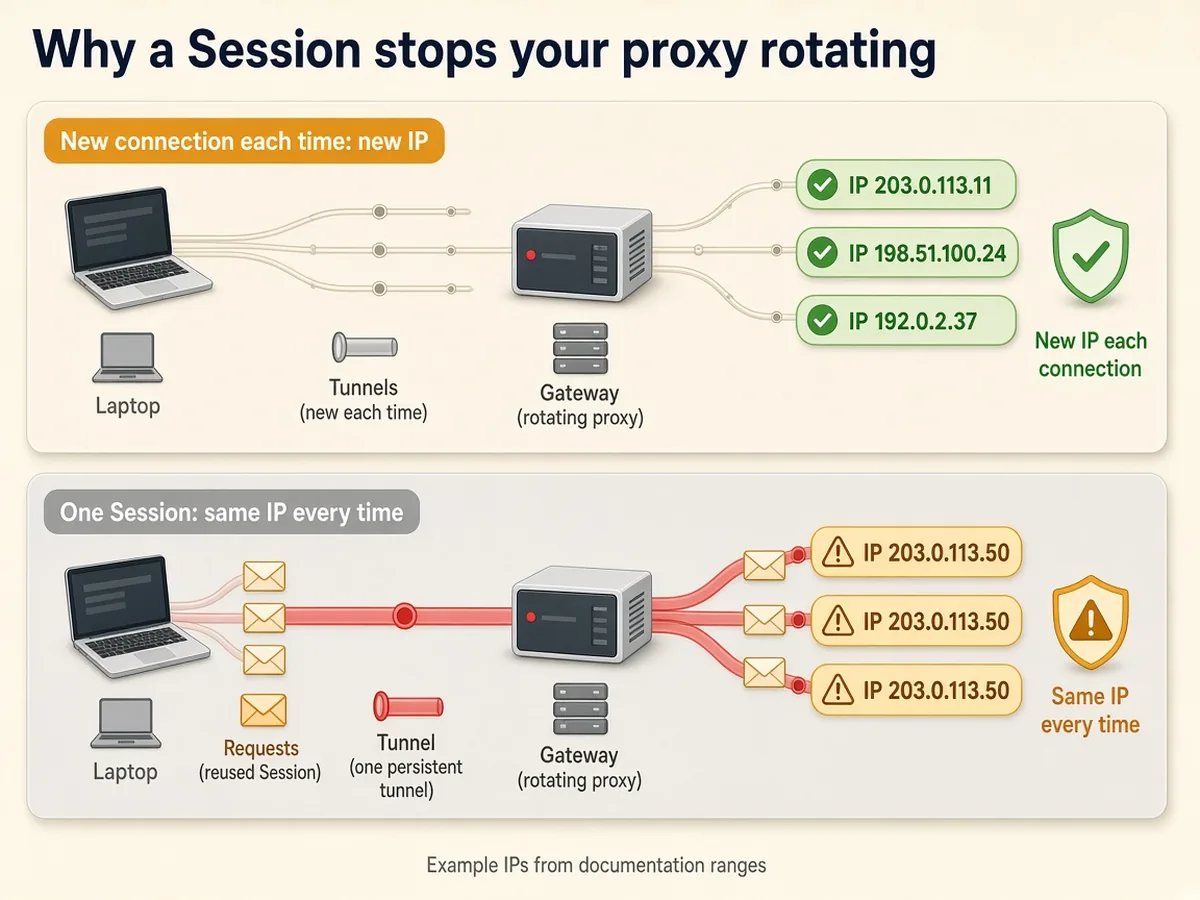
So which one? Let the pages decide.
- Independent pages such as product pages, search results and listings: call
requests.get(), or keep the Session and addConnection: close. Each page leaves from a new IP. - Many pages on one forgiving site: keep the Session. It’s cheaper, because rotating per request pays for a fresh TLS handshake every time.
We measured that handshake. A 3.7 KB test page cost 10.2 KB per request on fresh connections and 4.8 KB on one reused tunnel.
Across 100,000 small pages, that’s roughly 1 GB of proxy data against 0.5 GB. On JSON endpoints, per-request rotation can double your bill.
Step 3: keep one IP when the site needs it
A sticky session holds one exit IP across many requests. Use one for anything with state: a login, a cart, a multi-page form, or pagination that breaks when the IP changes.
Providers read a session ID from your credentials. Change the ID, and you get a new IP.
import os
import uuid
import requests

USER, PASS = os.environ["PROXY_USER"], os.environ["PROXY_PASS"]
GATEWAY = os.environ["PROXY_GATEWAY"]  # host:port from your dashboard

def proxy_for(session_id=None):
    # Decodo-style: the session ID rides in the username. Check your provider's format.
    user = f"{USER}-session-{session_id}" if session_id else USER
    url = f"http://{user}:{PASS}@{GATEWAY}"
    return {"http": url, "https": url}

def sticky_session():
    sid = uuid.uuid4().hex[:8]
    s = requests.Session()
    s.proxies.update(proxy_for(sid))
    s.exit_ip = s.get("https://api.ipify.org", timeout=30).text  # note it before you start
    return s

if __name__ == "__main__":
    s = sticky_session()
    print("Session exit IP:", s.exit_ip)
    for page in range(1, 4):
        ip = s.get("https://api.ipify.org", timeout=30).text
print(f"page {page}: {ip}", "(same IP)" if ip == s.exit_ip else "(IP CHANGED)")Session exit IP: 192.42.116.42
page 1: 192.42.116.42 (same IP)
page 2: 192.42.116.42 (same IP)
page 3: 192.42.116.42 (same IP)Wait. Didn’t Step 2 show that a Session already keeps one IP?
Only per website. A Session opens a separate tunnel for each host, and each tunnel can get its own IP.
We hit two hosts from one Session without a session ID and got two different IPs, twice in a row. With a session ID, both hosts saw the same IP.
That matters on any site that logs you in on one subdomain and serves pages from another.
The catch: every provider writes the session ID differently.
| Provider | Where the session goes | How long it holds |
|---|---|---|
| Decodo | Username: user-USERNAME-session-abc123 | 10 minutes by default, up to 24 hours with -sessionduration-1440 |
| IPRoyal | Password: PASSWORD_session-abcd1234_lifetime-10m (the ID must be 8 characters) | From 1 second up to 7 days |
| Webshare | Username: USERNAME-1, USERNAME-2 to stick, -rotate to rotate | 1 minute to 24 hours on residential, set in the dashboard |
Our proxy_for() follows the Decodo shape. For IPRoyal, move the session text into the password.
Real-world tip: sticky IPs can still change early. Decodo’s docs warn that a residential IP drops when the home device behind it goes offline, and one of our three test sessions switched after its first request. So
sticky_session()records the exit IP up front. IPRoyal’s_killswitch-1flag returns an HTTP 410 error instead of swapping silently.
Step 4: rotate your own proxy list
No gateway? Then rotation is your job, and the hard part is pulling dead proxies out of the line without stopping the run.
import random
import time
import requests

class ProxyPool:
    """Round-robin over a static list, benching proxies that fail."""

    def __init__(self, urls, cooldown=300):
        self.urls = list(urls)
        self.cooldown = cooldown
        self.benched = {}  # url -> time it can come back
        self.i = 0

    def get(self):
        now = time.time()
        for _ in range(len(self.urls)):
            url = self.urls[self.i % len(self.urls)]
            self.i += 1
            if self.benched.get(url, 0) <= now:
                return url
        raise RuntimeError("Every proxy is benched. Slow down or add proxies.")

    def bench(self, url):
        self.benched[url] = time.time() + self.cooldown

pool = ProxyPool([
    "http://USER:[email protected]:8080",
    "http://USER:[email protected]:8080",
    "http://USER:[email protected]:8080",
])

for n in range(6):
    p = pool.get()
    try:
        r = requests.get("https://api.ipify.org", proxies={"http": p, "https": p}, timeout=20)
        r.raise_for_status()
        print(n, r.text)
    except requests.RequestException as e:
        print(n, "failed, benching", p.split("@")[-1], type(e).__name__)
        pool.bench(p)
    time.sleep(random.uniform(1, 3))
We pointed it at three test proxies, one of them deliberately dead:
0 204.8.96.172
1 failed, benching 127.0.0.1:8999 ProxyError
2 192.42.116.48
3 204.8.96.172
4 192.42.116.48
5 204.8.96.172
The dead proxy failed once, sat out its five-minute cooldown, and the run carried on. Round-robin beats random.choice() here, because random picks can send three requests in a row through one IP.
Our take: a list is fine up to a few dozen proxies. Past that, health checks become a project of their own, and a gateway costs less than your time.
Got a SOCKS5 list instead of HTTP? Install requests[socks] and use socks5h:// URLs. Our HTTP vs SOCKS5 proxies comparison explains why that h matters for DNS.
Step 5: retry on a fresh IP, with backoff
A blocked request should come back later, from a different IP. The standard requests retry tool gets that wrong.
We tested it. A Session with urllib3’s Retry adapter made four attempts at a failing URL in 8.4 seconds. Our gateway saw one tunnel, so all four attempts left from the same blocked IP.
This helper asks for a new session ID on every attempt. It waits about 2, 4, then 8 seconds with random jitter, and obeys a Retry-After header when the site sends one.
import random
import time
import uuid
import requests

RETRY_STATUS = {403, 429, 500, 502, 503, 504}

def fetch(url, proxy_for, max_tries=4, base=2.0, cap=30.0):
    """GET url, switching to a fresh proxy identity and backing off after each failure."""
    for attempt in range(1, max_tries + 1):
        proxies = proxy_for(uuid.uuid4().hex[:8])  # new session ID = new exit IP
        wait = None
        try:
            r = requests.get(url, proxies=proxies, timeout=(10, 30),
                             headers={"User-Agent": "Mozilla/5.0"})
            if r.status_code not in RETRY_STATUS and "captcha" not in r.text[:5000].lower():
                return r
            reason = f"HTTP {r.status_code}"
            ra = r.headers.get("Retry-After", "")
            wait = float(ra) if ra.isdigit() else None
        except (requests.ConnectionError, requests.Timeout) as e:
            reason = type(e).__name__
        if attempt == max_tries:
            break
        wait = wait or min(cap, base * 2 ** (attempt - 1)) * random.uniform(0.5, 1.0)
        print(f"attempt {attempt}: {reason}, retrying in {wait:.1f}s")
        time.sleep(wait)
    raise RuntimeError(f"gave up on {url} after {max_tries} tries ({reason})")
Pair it with proxy_for() from Step 3. Against a URL that always fails, it gave up cleanly:
attempt 1: HTTP 503, retrying in 1.4s
attempt 2: HTTP 503, retrying in 2.0s
attempt 3: HTTP 503, retrying in 4.6s
RuntimeError: gave up on https://httpbin.org/status/503 after 4 tries (HTTP 503)
Our gateway log showed four different identities for those four attempts. Exactly what you want.

Keep the retry list short. A 404 means the page doesn’t exist, so retrying only burns data, and a 407 is a password problem.
Retry GET requests only, too, because a repeated POST can submit a form twice. Our guide to idempotency, pagination and retries explains the trap.
Four mistakes that still get rotating proxies blocked
Rotation hides your IP, not your behaviour. Sites check both.
- Keeping the default User-Agent. requests announces itself as
python-requests/2.34.2on every call. Send a real browser string, asfetch()does. - Rotating mid-login. An IP change between the password page and the dashboard looks like a stolen cookie. Use Step 3.
- Treating more IPs as permission to go faster. Ten IPs firing 50 requests a second still hammer a small site. Add a delay per domain, and read our plain-English answer on whether web scraping is legal before you scale.
- Skipping the IP test after checkout. Run Step 1 and the checks in our proxy testing guide while the refund window is open.
Big targets add rules of their own. See where this code fits in our walkthroughs on scraping Amazon without IP bans and scraping Google search results safely.
Which proxy plan does this code need?
Start free, then buy residential traffic by the gigabyte. We haven’t run a paid plan through this tutorial, so this section comes from pricing pages, not our own bills.
| Plan | Price checked 27 Oct 2026 | Pick it if |
|---|---|---|
| Webshare free plan | 10 shared proxies and 1 GB a month, no card | You want to try this code tonight for nothing |
| Webshare rotating residential | $3.50 per GB on the 1 GB plan, down to $1.40 at 3,000 GB | You want the cheapest first gigabyte of residential traffic |
| Decodo residential | $3.75 per GB on 3 GB ($11.25), $4 per GB pay as you go, 3-day trial with 100 MB | You need long sticky sessions, up to 24 hours |
| IPRoyal residential | $7.35 per GB pay as you go, $5.25 per GB on a 10 GB subscription | A silent IP swap would corrupt your data, because of its killswitch flag |
Now a real job. A news homepage we measured weighs about 75 KB compressed, plus roughly 5 KB of handshake per fresh connection. Ten thousand such pages come to about 0.8 GB.
That fits in one gigabyte everywhere: $3.50 at Webshare, $4 at Decodo pay as you go and $7.35 at IPRoyal. Double the page weight, though, and a 1 GB plan runs dry before the job ends.
Frequently asked questions
How do I use rotating proxies in Python with httpx or aiohttp?
Both take one proxy URL, and the same gateway rules apply. In httpx 0.28, pass proxy= to the Client, because the old proxies= argument now raises a TypeError. In aiohttp, pass proxy= to each request. Both pool connections, so a long-lived client sticks to one IP per host.
Can I rotate proxies in Scrapy the same way?
Yes. Set request.meta['proxy'] to the gateway URL with credentials included, and Scrapy’s built-in HttpProxyMiddleware sends them. Put a session ID in that URL for sticky pages, or swap the URL per request in a downloader middleware to rotate a list. The retry-on-a-new-IP idea carries over unchanged.
Why does requests say Missing dependencies for SOCKS support?
Plain requests can’t speak SOCKS. Run pip install requests[socks], which adds PySocks, and the same proxies dict accepts socks5h:// URLs. We hit this exact error in a clean virtual environment.
Does requests pick up proxy settings from environment variables?
Yes. requests reads HTTP_PROXY, HTTPS_PROXY and NO_PROXY automatically, which can proxy traffic you never meant to. Set session.trust_env = False when you want your proxies dict to be the only source of truth.
Can I use these rotating proxies with Playwright or Selenium?
Yes, with one difference. Playwright accepts a server, username and password when it launches the browser, so gateway credentials work as they are. Chrome under Selenium has no flag for a proxy password, so whitelist your IP in the provider dashboard instead. Browsers keep connections open, so expect sticky behaviour.
Is it safe to share one requests Session across threads?
Not reliably. The requests project has never promised that a Session is thread-safe. Give each thread its own Session, or use plain requests.get() calls, which also rotate IPs on a gateway. For heavy concurrency, an async client is cleaner.
Will rotating proxies get me past a CAPTCHA or a login wall?
No. A new IP resets rate limits tied to the old one, but CAPTCHAs also react to behaviour, headers and browser signals. A login wall needs an account, and scraping behind one adds legal and terms-of-service risks that rotation does nothing to reduce.
The setup we’d ship
For independent pages, use a gateway and plain requests.get(), so every page leaves from a new IP. For logins and carts, use a sticky session ID and check the exit IP first. Wrap both in the retry helper, so a block costs one attempt instead of the whole run.
One warning: requests.Session() quietly turns rotating proxies in Python into sticky ones. Your next step: open Webshare‘s free plan and run Step 1 tonight.




