

Are you wondering around to see the Livecanvas review? If yes, then stay relax and I will review LIvecanvas Bootstrap Page Builder for you where I will discuss about Livecanvas Page Builder Features, Pricing and will also discuss whether it is really worth for you.
If you are a WordPress user you might have definitely used Elementor or Elementor Pro on your website. If you are only design focused and stay happy with the clean and custom design, you are innocent. Because you overlook a lot of things.
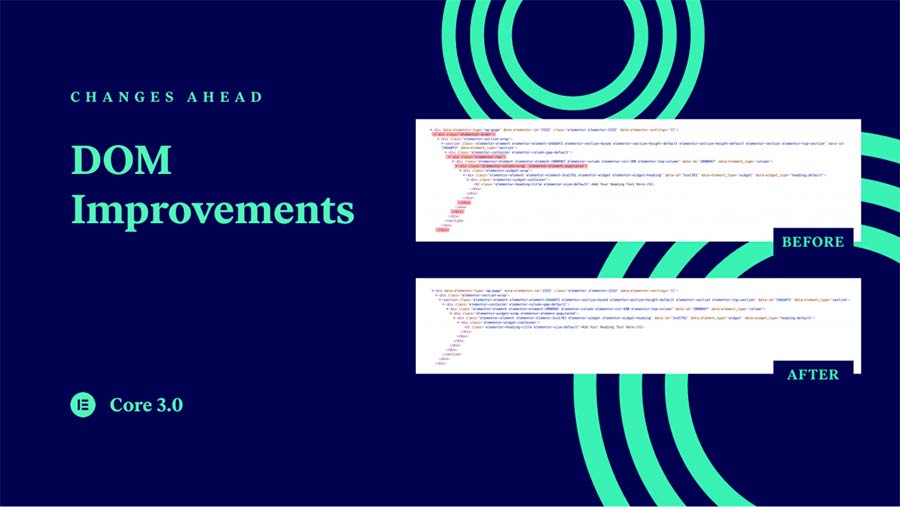
While designing pages with elementor builder, or most other builders out there, we also add a lot of wrapper elements(with dynamic.ooo you can unwrap elements easily) which can make our pages heavy and make them load slow sometimes. It is all due to the impact on DOM.
With the elementor update 3.0, elementor had introduced DOM improvements and they called it a major update.
Moving on with Livecanvas Builder, it uses Bootstrap HTML/CSS that helps keeping your code very clean and easy for the developers to make edits.
With Livecanvas WordPress PageBuilder Plugin, you can create Bootstrap Pages very quickly with a drag and drop visual interface. You don’t need to learn Bootstrap to make/edit the pages as you can edit the pages visually with all the major options available in frontend. But if you know the coding part it is just a plus.
Livecanvas: A Developer Friendly PageBuilder?
Definitely, Livecanvas is a developer friendly page builder for WordPress with which you can create better web pages. The builder uses HTML and CSS to create the pages and uses Bootstrap Framework. The best thing about this combination is that, the plugin does not add its own elements to the code but allows you to use the already existing framework that is bootstrap, visually on your WordPress website.
Secondly, if you have made page with the livecanvas builder and you uninstall the plugin for some reason, the page will function properly and design will not be affected. Isn’t that exciting?
Lets move on to some of the best features of Livecanvas Builder Plugin.
Livecanvas Pagebuilder Features
Below are some of the exciting features of Livecanvas Pagebuilder that really help you create exciting websites using WordPress
Very Lightweighted Plugin
Since the plugin uses HTML and CSS and does not extra elements to the code, it helps it keep lightweighted and fast to load while you edit.
Build for performance
Who doesn’t need faster websites these days? Definitely, there are few exceptions but most of us need faster websites that can load in less time even with unhealthy strength internet connections. Keeping that in mind, Livecanvas is the best choice to make clean websites without the knowledge of code.
Higher Level of Freedom
With the builder you get higher freedom in term of designs and development when compared to other builder plugins.
Fully Frontend
Livecanvas is a fully frontend plugin which means that you can create complete websites on the frontend builder and don’t need to edit code from the backend. Though there is option to edit the code even on frontend but that is basically a utility for the developers who want to achieve more flexibility.
Include shortcodes
With Livecanvas page builder, it is possible to add shortcodes inside the code as is possible in other page builders. So, there is no barrier to that.
Build your local library of custom HTML
With Livecanvas, you can also add custom HTML and add that code to the library for reuse on any page you may want. As such, you don’t have to find a code every time or copy that from the previous.
UnSplash Photo Stock
There is a stock photo feature in livecanvas pagebuilder that lets you add royalty free images from Unsplash. You can easily search right on the editor page and import the image in your code.
Cool Animations
To add animations you don’t need to code even a little. All the crazy animations that you find on bootstrap, can be used easily in Livecanvas.
Design your footer inside LiveCanvas
With livecanvas you can easily create header and footer. There are also some pre built templates for creating the same.
Over to you
Livecanvas is definitely one of the best plugins for bootstrap designing on WordPress. It’s ease of use and utmost flexibility allows you can to create anything with fast performance on WordPress.
The Review
LiveCanvas Builder
Livecanvas is undoubtedly the best plugin out there if you are looking for faster web pages with clean and sophisticated designs. It is recommended to use Livecanvas if you want to use Bootstrap framework in your wordpress site.
PROS
- Easy to use
- Flexibility
- Drag and Drop
- Unsplash Photo Stock
- Cool Animations
- Fully Frontend
CONS
- Lacks Advance Widgets
- Not compatible with ACF
Review Breakdown
-
Flexible
-
Features
-
Performance
-
Ease of Use
-
Value for money
LiveCanvas Builder DEALS
We collect information from many stores for best price available




