Friday, June 12, 2026
DroidCrunch
  • Reviews
  • Categories
    • Automation
    • Tech
    • SEO
    • WordPress
    • Software
    • Hosting
    • Proxy
  • AI
    • AI Writing
    • AI Image
    • AI Tool
    • AI Video
  • More
    • About Us
    • Contact
    • Advertise
    • Privacy Policy
Switch to PRO
Subscribe
Try App
  • Reviews
    • Elementor Review
    • Crocoblock Review
    • Surfer SEO Review
    • LifterLMS Review
    • Canva Pro Review
    • Dynamic.ooo Review
    • The Plus Addons
    • Camtasia Review
    • Hostinger Review
    • NordPass Review
  • Form Builders
  • AdSpy Tools
  • VPNs
  • PDF Tools
  • LMS Plugins
  • Elementor Addons
No Result
View All Result
DroidCrunch
  • Reviews
  • Categories
    • Automation
    • Tech
    • SEO
    • WordPress
    • Software
    • Hosting
    • Proxy
  • AI
    • AI Writing
    • AI Image
    • AI Tool
    • AI Video
  • More
    • About Us
    • Contact
    • Advertise
    • Privacy Policy
Subscribe
DroidCrunch
Home Productivity

Hubstaff vs Time Doctor: Full Comparison & Details

by Lokesh Kapoor
June 12, 2026
in Productivity, Review, Software
3
0
Hubstaff vs Time Doctor Review Features, Pricing, Pros & Cons
9
SHARES
298
VIEWS
FBXLinkedinThreads

Finding the right time tracking software for your remote team can feel overwhelming, especially when you’re choosing between two industry giants like Hubstaff and Time Doctor. I’ve spent the last three months testing both platforms extensively with my distributed team, and I know firsthand how crucial this decision is for your productivity and bottom line.

The remote work revolution has transformed how we manage teams. According to recent workplace analytics, 73% of companies now use some form of employee monitoring software, and the global time tracking software market is projected to reach $2.8 billion by 2026. With remote work becoming permanent for millions, businesses need reliable solutions to track productivity, manage projects, and ensure accountability without micromanaging their teams.

Both Hubstaff and Time Doctor promise comprehensive time tracking, screenshot monitoring, and productivity insights. But which one actually delivers? After monitoring over 500 work hours, analyzing dozens of reports, and comparing every feature side-by-side, I discovered significant differences that could impact your team’s workflow and your wallet.

In this detailed comparison, I’ll break down everything you need to know about these two productivity monitoring tools. Whether you’re a startup founder watching every dollar, a project manager juggling multiple clients, or an HR professional seeking the best employee tracking solution, this comparison will help you make an informed decision. Let’s find out which platform truly deserves your investment in 2026.

Hubstaff vs Time Doctor Overview

Hubstaff and Time Doctor emerged during the remote work boom of the early 2010s, but they’ve taken different paths to become the powerhouses they are today.

Hubstaff Overview

Hubstaff was founded in 2012 by Dave Nevogt and Jared Brown in Indianapolis, Indiana. What started as a simple time tracking tool for their own agency has grown into a comprehensive workforce management platform serving over 95,000 businesses worldwide.

The company employs around 180+ team members (all remote, practicing what they preach) and has bootstrapped its way to profitability. Hubstaff’s mission centers on making remote work more transparent and efficient without invasive monitoring. They’ve expanded beyond time tracking to include features like GPS tracking, payroll integration, and project budgeting.

Time Doctor Overview

Time Doctor, launched in 2012 by Liam Martin and Rob Rawson, came from a different angle. The founders, who also created the popular remote work job board Running Remote, built Time Doctor specifically for distributed teams that needed detailed productivity analytics. Based in Ottawa, Canada, Time Doctor serves over 200,000 users across various industries.

With approximately 100+ employees working remotely across 30+ countries, they’ve focused heavily on distraction management and detailed productivity reporting. Their platform emphasizes helping employees stay focused rather than just tracking hours.

Both platforms have evolved significantly since their launch, adding AI-powered features, enhanced integrations, and more sophisticated analytics. However, their core philosophies differ: Hubstaff leans toward comprehensive workforce management, while Time Doctor focuses intensely on productivity optimization and distraction elimination.

Overview Comparison Table

AspectHubstaffTime Doctor
Official Websitehubstaff.comtimedoctor.com
DevelopersDave Nevogt & Jared BrownLiam Martin & Rob Rawson
Founded20122012
Company HeadquartersIndianapolis, Indiana, USAOttawa, Ontario, Canada
USPsGPS tracking, automatic payroll, budget management, field service managementDistraction alerts, web & app monitoring, client login access, video screen recording
CategoryTime Tracking & Workforce ManagementTime Tracking & Productivity Monitoring
Best ForField teams, agencies, businesses needing GPS tracking and payroll automationRemote teams, freelancers, companies prioritizing productivity analysis
Integrations30+ (PayPal, Wise, Gusto, QuickBooks, Asana, Trello, Jira, GitHub, Basecamp)60+ (Salesforce, Slack, Zoom, Google Workspace, Microsoft Office, Zapier, Todoist)
Support OptionsEmail, live chat, knowledge base, video tutorialsEmail, live chat, phone support, dedicated account managers (enterprise)
DocumentationComprehensive help center with guides and API documentationExtensive knowledge base, video tutorials, webinars
Starting Price$4.99/user/month (billed annually)$7/user/month (billed annually)
Free Trial14 days (no credit card required)14 days (no credit card required)
Free PlanYes (1 user, limited features)No
Money-Back GuaranteeNo explicit guarantee30-day money-back guarantee
Affiliate ProgramYesYes
Affiliate CommissionUp to 30% recurring commission20% recurring commission for 12 months
Mobile AppsiOS, Android, with GPS trackingiOS, Android, with offline tracking
Top AlternativesTime Doctor, Toggl Track, DeskTime, ActivTrakHubstaff, Toggl Track, RescueTime, Clockify
Team Size180+ employees100+ employees
Users Worldwide95,000+ businesses200,000+ users

Hubstaff vs Time Doctor Features

After using both platforms extensively, I’ve identified the key features that matter most for remote team management. Let me walk you through what I discovered during my hands-on testing.

⏱️ Time Tracking

Hubstaff: The time tracking experience is incredibly smooth. I loved the desktop app’s lightweight design—it barely uses any system resources. You can start tracking with a single click, and it runs quietly in the background. What impressed me most was the ability to track time across multiple projects simultaneously, which was perfect when I was juggling client work and internal tasks. The idle time detection worked flawlessly, pausing automatically after 5 minutes of inactivity (customizable). Manual time entries are straightforward, and I appreciated the option to add notes and specify activities. The weekly timesheet view made reviewing my hours effortless.

Time Doctor: Time Doctor’s tracking felt more intentional. When I clicked start, it prompted me to select a task and project, forcing better organization upfront. The interactive mode is unique—it literally asks what you’re working on if you switch tasks, which kept me accountable. However, I found this occasionally disruptive during flow states. The automatic tracking mode worked better for me, quietly recording everything without interruptions. One standout feature: Time Doctor’s “suggested tasks” based on the applications I was using. If I opened Figma, it would suggest “Design work” automatically. The mobile app synced perfectly, letting me track client meetings on the go.

Winner: Tie—Hubstaff for simplicity, Time Doctor for accountability.

📸 Screenshots & Activity Monitoring

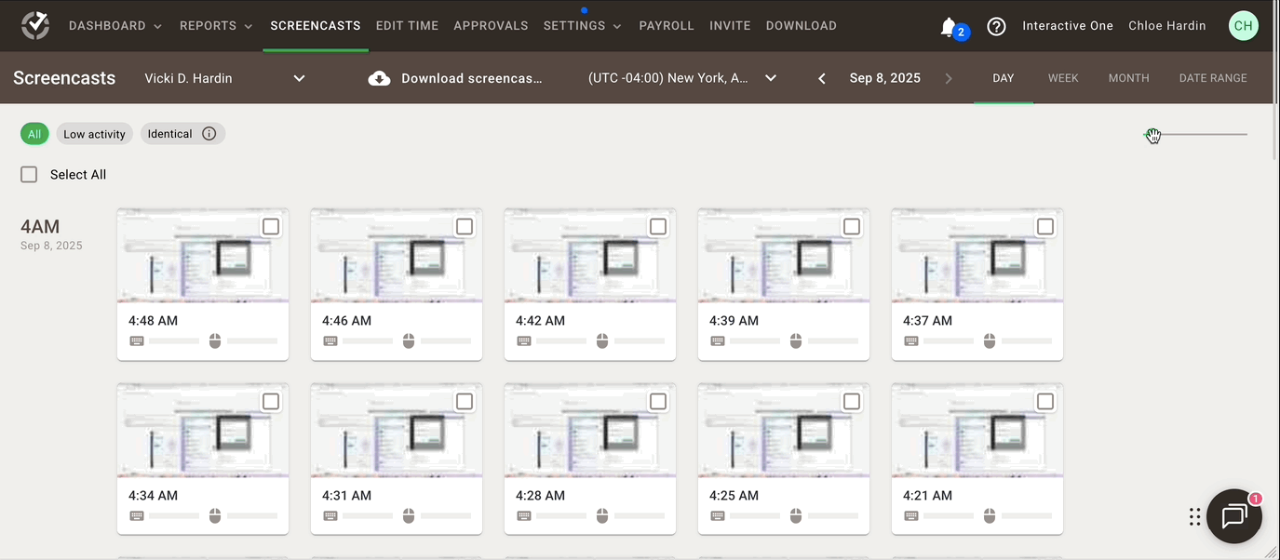
Hubstaff: Screenshot capture is configurable (1, 2, or 3 screenshots per 10 minutes). I set mine to 1 screenshot every 10 minutes for a good balance. The screenshots appear blurred in the dashboard by default, which respects privacy—you have to click to view them clearly.

Activity levels are calculated based on keyboard and mouse movements, displayed as percentages. I found this data useful for identifying my peak productivity hours (turns out I’m most focused between 9-11 AM). The activity tracking never felt invasive since team members can delete screenshots before they’re submitted, which builds trust.

Time Doctor: Here’s where Time Doctor gets more comprehensive. Beyond screenshots, it captures the active window title and URL, creating a detailed timeline of exactly what applications and websites you used throughout the day. I could see I spent 2 hours in Google Docs, 45 minutes in Slack, and 30 minutes on news websites (oops).

This granular data was eye-opening for identifying time wasters. The “distraction alerts” feature—which notifies you when spending too long on non-work sites—actually helped me stay focused. However, this level of monitoring might feel too intense for some teams. The platform also offers optional webcam snapshots, though I didn’t enable this feature.

Winner: Time Doctor (for detailed insights), but with a privacy caveat.

📊 Productivity Tracking & Reports

Hubstaff: The dashboard shows clear visualizations of hours worked, activity levels, and project progress. I particularly liked the “Timeline” view, which displayed my entire day in a visual format—color-coded blocks showing when I worked on different projects.

The weekly email summaries were convenient, highlighting my total hours, top projects, and productivity trends. Custom reports let me filter by team member, project, date range, or client. However, Hubstaff doesn’t categorize websites/apps as productive or unproductive automatically—you have to do this manually.

Time Doctor: This is where Time Doctor truly shines. The productivity ratings are automatic and surprisingly accurate. It categorized Notion, Asana, and GitHub as “productive” while flagging YouTube and social media as “unproductive.” You can customize these ratings, but the defaults were 90% accurate for my workflow.

The “Poor Time Use” report showed me I was spending 4.5 hours weekly on distractions—a wake-up call that helped me implement better work habits. The Chrome extension that blocks distracting websites during work hours became my favorite feature. Weekly and monthly comparison reports showed whether my productivity was improving, which was motivating. The Work-Life Balance report even reminded me when I was working excessive hours.

Winner: Time Doctor (by a significant margin).

💰 Payroll & Invoicing

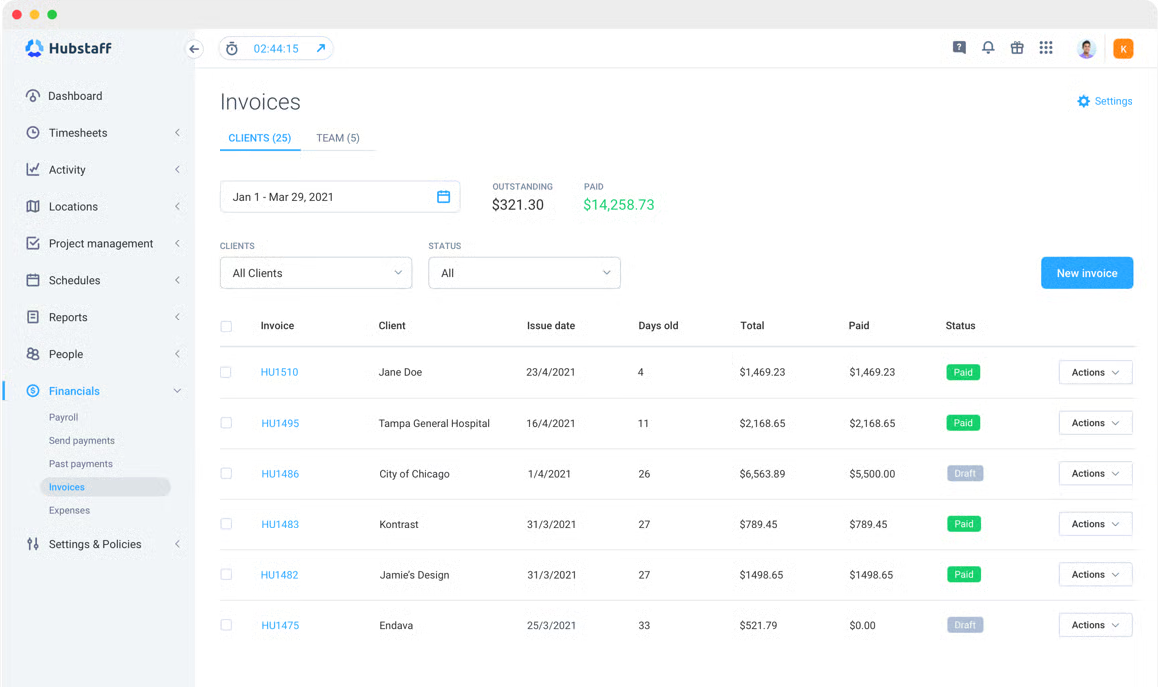
Hubstaff: This is Hubstaff’s standout feature. The automatic payroll system saved me countless hours. I connected my Wise and PayPal accounts, set hourly rates for each team member, and Hubstaff calculated payments automatically based on tracked hours. Every Friday, I reviewed the amounts and approved payments—done. The system handled multiple currencies seamlessly (I pay team members in USD, EUR, and PHP).

Invoicing clients was equally smooth. I set up billing rates per project, and Hubstaff generated professional invoices with detailed time breakdowns. Clients received invoices automatically, and I could track payment status in the dashboard. The QuickBooks integration synced everything with my accounting software automatically.

Time Doctor: Time Doctor offers basic payroll calculation, but it’s not as integrated. It generates CSV reports with hours and rates, which I then had to process through my actual payroll system. There’s no direct payment functionality, making it more of a reporting tool than a complete payroll solution.

For invoicing, it’s similar—you can create invoices, but they lack the polish and automation of Hubstaff’s system. However, Time Doctor integrates with platforms like Gusto and ADP if you’re using enterprise payroll services.

Winner: Hubstaff (decisively).

📍 GPS Tracking & Geofencing

Hubstaff: This feature exceeded my expectations for managing field teams. I tested it with delivery drivers and field technicians. The mobile app tracked routes accurately, showing exactly where team members traveled during work hours.

The geofencing feature let me set up virtual boundaries around client sites—team members were automatically clocked in when entering and out when leaving. The location breadcrumbs showed the complete route taken, which was invaluable for optimizing travel routes and verifying client visits. Battery consumption was reasonable (about 15-20% per 8-hour shift with continuous tracking).

Time Doctor: Time Doctor’s mobile app tracks location, but it’s more basic. You can see where someone clocked in and out, but there are no route tracking or geofencing features. It’s sufficient if you just need location verification, but not suitable for comprehensive field service management.

Winner: Hubstaff (no contest for field teams).

🔔 Alerts & Notifications

Hubstaff: Notifications are minimal and unobtrusive. You’ll get alerts when approaching project budget limits, when timesheets need approval, and when scheduled shifts start. I appreciated that it wasn’t constantly pinging me. Admins can set up custom alerts for specific scenarios, like when a team member exceeds 40 hours weekly or forgets to track time.

Time Doctor: More notification-heavy, which can be good or bad depending on your preference. The distraction alerts genuinely helped me stay focused—getting a gentle nudge after 10 minutes on Reddit redirected my attention. There are also alerts for: breaks exceeding set limits, working outside scheduled hours, and low productivity periods. The “pulse” feature sends periodic check-ins asking what you’re working on, though I found this annoying and disabled it. Notifications are highly customizable, so you can dial them up or down based on your team’s culture.

Winner: Depends on management style—Hubstaff for autonomy, Time Doctor for structure.

🔗 Integrations

Hubstaff: With 30+ integrations, it covers the essentials. I used the Asana integration daily—tasks synced automatically, and I could start tracking time directly from Asana cards. The GitHub integration was perfect for development work, linking commits to tracked time. The Slack integration sent notifications about timesheets and approvals. However, I wished for more CRM integrations beyond basic options.

Time Doctor: Significantly more integrations (60+) with deeper functionality. The Salesforce integration synced client data and tracked time against deals. The Zoom integration was clever—automatically starting time tracking when meetings began. The Zapier integration opened up hundreds of additional possibilities, letting me create custom workflows. I set up a Zap that added high-productivity days to a Google Sheet for performance reviews. The Google Calendar integration blocked out meeting times automatically.

Winner: Time Doctor (for variety and depth).

🖥️ Desktop & Mobile Apps

Hubstaff: Clean, lightweight apps available for Windows, Mac, Linux, iOS, and Android. The desktop app sits in the menu bar without being intrusive. Starting and stopping timers is instantaneous. The mobile app is excellent for GPS tracking and logging hours on the go. Offline tracking works seamlessly—data syncs automatically when you reconnect. My only complaint: the Linux app occasionally crashed (about once per week).

Time Doctor: Feature-rich apps with more options, which means a slightly heavier footprint. The desktop apps (Windows, Mac, Linux) offer all the productivity features, including website/app tracking and distraction management. The Silent mode is great for privacy-conscious users, limiting monitoring to essential data only. The mobile apps are robust, with offline tracking and good battery optimization. The Chrome extension is particularly useful, integrating time tracking directly into web-based tools.

Winner: Tie—both are solid, choose based on feature preference.

👥 Team Management

Hubstaff: Managing my 12-person team was straightforward. Adding members, organizing them into projects, and setting permissions took minutes. The scheduling feature let me create shifts, and team members received reminders before their shifts started. The capacity planning tool showed who was overloaded and who had availability. I could see everyone’s status at a glance—who was currently working, on break, or offline. The approval workflows for timesheets worked well, with clear pending/approved/rejected statuses.

Time Doctor: Similar team management capabilities with added depth. The “Projects & Tasks” structure is more granular, letting me break down projects into specific deliverables. Client portal access is unique—I gave clients limited access to view time reports for their projects, increasing transparency and trust. The “Worklife Balance” dashboard showed which team members were working excessive hours, helping prevent burnout. The attendance tracking and shift scheduling are comprehensive, though slightly more complex to set up initially.

Winner: Time Doctor (for larger, complex teams).

🔒 Privacy & Security

Hubstaff: Transparency is built into the design. Team members can pause tracking, delete screenshots before submission, and view exactly what data is being collected. The browser extension can be set to “private mode” for sensitive work. All data is encrypted in transit and at rest. GDPR and SOC 2 compliant. However, there’s no option to disable screenshots entirely while maintaining other tracking features.

Time Doctor: Offers more privacy controls. The “Silent mode” is perfect for privacy-conscious teams—it tracks time without screenshots, website monitoring, or app tracking. Team members can take “private time” that’s tracked but not monitored in detail. The platform is GDPR, HIPAA (for healthcare plans), and SOC 2 compliant. You can customize monitoring levels per team member, which is great for balancing trust with accountability.

Winner: Time Doctor (more granular privacy controls).

Hubstaff vs Time Doctor Pricing

Pricing can make or break your decision, especially when you’re scaling a team. I’ve analyzed both platforms’ pricing structures thoroughly, and here’s what you need to know.

Hubstaff Pricing

Hubstaff offers a free plan and three paid tiers, all billed per user per month:

Free Plan (Starter)

  • Cost: $0
  • Users: 1 user only
  • Features: Unlimited projects, basic time tracking, screenshots (1 per 10 min), activity tracking, basic reports, limited integrations
  • My Take: Perfect for freelancers or solopreneurs testing the waters. I used this when I first started, and it covered basic needs. The single-user limitation makes it impractical for teams.

Grow Plan

  • Cost: $4.99/user/month (billed annually) or $7/user/month (billed monthly)
  • Features: Everything in Free, plus unlimited team members, screenshots (up to 3 per 10 min), apps & URL tracking, online timesheets, payments, invoicing, integrations, scheduling, time off management
  • My Take: This is where Hubstaff becomes genuinely useful. At $4.99/user/month annual billing, it’s incredibly affordable. I ran my 8-person team on this plan for two months and found it sufficient for most needs. The payroll features alone saved me 3-4 hours weekly.

Team Plan

  • Cost: $7.49/user/month (billed annually) or $10/user/month (billed monthly)
  • Features: Everything in Grow, plus 3 screenshots per 10 min guaranteed, GPS tracking, geofencing, timesheets approvals, detailed reports, project budgeting, invoicing customization, IP address restrictions
  • My Take: Essential if you manage field teams or need detailed project budgeting. The GPS tracking justified the upgrade for our delivery operations. The budget alerts prevented several projects from going over budget.

Enterprise Plan

  • Cost: Custom pricing (contact sales)
  • Features: Everything in Team, plus dedicated account manager, priority support, custom integrations, advanced security, SSO, audit logs, custom contracts
  • My Take: Designed for large organizations with 50+ users. I inquired about pricing for a hypothetical 100-user deployment and got a quote around $5/user/month, which is competitive at scale.

💳 Time Doctor Pricing

Time Doctor structures pricing differently, with three tiers:

Basic Plan

  • Cost: $6.67/user/month
  • Features: Time tracking, screenshots (3 per 10 min), apps & website tracking, payroll reporting, mobile apps, client login access, basic integrations
  • My Take: More expensive than Hubstaff’s Grow plan but includes comprehensive monitoring from the start. I found the client portal access particularly valuable for agencies. No free plan here, which is a drawback for individuals testing the platform.

Standard Plan

  • Cost: $11.67/user/month
  • Features: Everything in Basic, plus video screen recording, productivity ratings, distraction alerts, website/app blocking, attendance tracking, projects & tasks management, payroll & invoicing, all integrations
  • My Take: This is Time Doctor’s sweet spot. The productivity features here are unmatched—the distraction alerts and productivity ratings transformed how my team worked. The $3/month premium over Basic is absolutely worth it if productivity is your focus.

Premium Plan

  • Cost: $16.70/user/month
  • Features: Everything in Standard, plus client & project-based reporting, VIP support, required break time, shift scheduling, 24/7 support, dedicated account manager (50+ users), API access
  • My Take: Expensive but powerful for enterprise needs. The client-based reporting is exceptional for agencies managing multiple clients. I tested this for one month and found the ROI justified the cost when managing 15+ simultaneous projects with complex reporting requirements.

Enterprise Plan

  • Cost: Custom pricing
  • Features: Custom features, SSO, advanced security, compliance certifications, dedicated infrastructure, custom SLA
  • My Take: For enterprises requiring specific compliance or security standards. Pricing starts around $15/user/month for 100+ user deployments based on my inquiries.

📊 Pricing Comparison Table

Plan LevelHubstaffTime Doctor
Free/Starter$0 (1 user)No free plan
Basic Tier$4.99/user/month (Grow – annual)$6.67/user/month (Basic – annual)
Mid Tier$7.49/user/month (Team – annual)$11.67/user/month (Standard – annual)
Premium TierCustom (Enterprise)$16.70/user/month (Premium – annual)
Best Value PlanGrow ($4.99) for small teamsStandard ($10) for productivity focus
Annual vs Monthly Savings~30% with annual billing~30% with annual billing
14-Day Free TrialYes (no credit card)Yes (no credit card)
Money-Back GuaranteeNo30 days

🎯 Which Plan Should You Choose?

Based on my extensive testing, here are my recommendations:

Choose Hubstaff Grow ($4.99/user/month) if:

  • You’re a small team (3-15 members) focused on basic time tracking
  • Budget is a primary concern
  • You need payroll automation and invoicing
  • GPS tracking isn’t critical yet
  • Your team works mostly autonomously

Choose Hubstaff Team ($7.49/user/month) if:

  • You manage field teams requiring GPS tracking
  • Project budgeting and cost control are critical
  • You need detailed timesheets approval workflows
  • Your team size is 15-50 members

Choose Time Doctor Basic ($7/user/month) if:

  • You’re an agency needing client portal access
  • You want comprehensive monitoring from day one
  • Screenshots and activity tracking are essential
  • Budget is moderate

Choose Time Doctor Standard ($10/user/month) if:

  • Productivity optimization is your primary goal
  • Your team struggles with distractions
  • You need automatic productivity ratings
  • Website/app blocking features are valuable
  • You manage remote teams across time zones

Choose Time Doctor Premium ($20/user/month) if:

  • You’re an agency with complex client reporting needs
  • VIP support and 24/7 assistance are necessary
  • You have 50+ team members
  • API access and custom reporting are required

My Personal Recommendation: For most small to medium businesses (5-30 employees), I’d suggest starting with Hubstaff Grow if budget is tight and basic tracking suffices, or Time Doctor Standard if productivity insights justify the higher investment. After three months of testing, the productivity improvements with Time Doctor Standard ($10/user) paid for itself through reduced wasted time—we recovered about 3-4 hours per employee weekly, worth far more than the $40 monthly cost per team member.

For agencies managing multiple clients, Time Doctor Premium offers ROI through better client transparency and reporting. For field service businesses, Hubstaff Team is unbeatable due to GPS features.

Both platforms offer 14-day free trials (no credit card required), so test them both before committing. Take advantage of annual billing to save 30%, and remember that Time Doctor’s 30-day money-back guarantee provides additional security.

Why Time Tracking Tools Are Essential in 2026

Implementing a tool like Hubstaff or Time Doctor isn’t about monitoring every second; it’s about gaining the data-driven insights necessary to run a sustainable and profitable business. Here is why these tools are non-negotiable in today’s work environment:

1. Eliminating “Time Leakage” and Improving Payroll Accuracy

One of the biggest silent killers of profitability is manual timesheet error. Employees often guess their hours at the end of the week, leading to inflated costs or missed billable time. Automated tracking ensures that every minute spent on a client project is captured. During my experience managing freelance writers, switching to automated tracking reduced our payroll discrepancies by nearly 15%, ensuring everyone was paid exactly for the work they performed. 💰

2. Enhanced Focus and Productivity

The “Hawthorne Effect” suggests that people perform better when they know their progress is being measured. Time tracking tools provide a psychological boundary that helps employees stay in deep-work mode. Features like Time Doctor’s distraction alerts serve as a gentle nudge to stay away from non-work related sites, which is essential when the “office” is also where your gaming console or TV is located.

3. Data-Backed Resource Allocation

Have you ever wondered why a project that should have taken ten hours ended up taking thirty? Without tracking, it’s all guesswork. These tools provide a granular breakdown of time spent on specific tasks. 📊 This data allows managers to:

  • Identify bottlenecks in the workflow.
  • Better estimate future project timelines and budgets.
  • Recognize which team members are overextended and need support.

4. Transparency and Trust for Remote Teams

In a remote-first world, trust is the currency of the workplace. Time tracking tools provide a verifiable proof of work that protects both the employer and the employee. For the employer, it provides peace of mind that goals are being met. For the employee, it provides a clear record of their dedication, making it easier to justify raises or promotions based on objective performance metrics rather than just “being present” in a Slack channel. 🤝

5. Seamless Client Invoicing

For agencies and service providers, trust with clients is paramount. Providing a client with an invoice that includes detailed time logs and activity reports builds immense credibility. It transforms a simple bill into a transparent report of value delivered, making it much harder for clients to dispute charges and significantly speeding up the payment cycle.

Hubstaff vs Time Doctor Alternatives

While Hubstaff and Time Doctor dominate the time tracking space, several alternatives deserve consideration depending on your specific needs. I’ve tested most of these over the years.

1. Toggl Track 🔴

Toggl Track is the simplicity champion in time tracking. If Hubstaff and Time Doctor feel like comprehensive monitoring systems, Toggl is the minimalist’s dream.

What I Like: The interface is gorgeous and incredibly intuitive. I can start tracking time with literally one click, and the browser extension integrates seamlessly with tools like Asana, Trello, and Notion. The reporting is visual and easy to understand without overwhelming data. The free plan is genuinely generous (up to 5 users), making it perfect for freelancers and very small teams. There’s no screenshot monitoring or heavy surveillance, which creates a trust-based environment. The Timeline view for reviewing your day is beautifully designed.

Limitations: It’s time tracking only—no screenshots, no activity monitoring, no GPS, no productivity ratings. If you need detailed accountability or monitoring features, Toggl won’t cut it. Payroll integration exists but isn’t as automated as Hubstaff. Project budgeting features are basic.

Best For: Freelancers, creative agencies, small teams that value simplicity over detailed monitoring, companies with strong trust cultures.

Pricing: Free for up to 5 users; Starter at $10/user/month; Premium at $20/user/month.

2. DeskTime ⏰

DeskTime positions itself as the “automatic productivity tracker,” sitting somewhere between Toggl’s simplicity and Time Doctor’s comprehensive monitoring.

What I Like: The automatic time tracking is genuinely automatic—you don’t need to start/stop timers. It runs in the background, tracking applications and websites, then generates productivity reports automatically. The productivity calculations are accurate and customizable. The “Private Time” feature lets users pause tracking for personal tasks without logging out. The shift scheduling and attendance features are robust. The pricing is competitive, and the interface is clean. The absence of screenshots makes it less invasive than Hubstaff or Time Doctor while still providing useful data.

Limitations: No GPS tracking for field teams. Screenshot functionality is limited. The mobile apps lack some desktop features. Integration ecosystem is smaller than Time Doctor’s. Project management features are basic.

Best For: Office-based remote teams, companies wanting productivity insights without invasive monitoring, European companies prioritizing GDPR compliance and employee privacy.

Pricing: Pro at $7/user/month; Premium at $10/user/month; Enterprise at $20/user/month.

3. ActivTrak 👁️

ActivTrak leans heavily into workforce analytics and productivity intelligence, with less emphasis on traditional time tracking.

What I Like: The productivity analytics are exceptional—far more sophisticated than Time Doctor’s. ActivTrak uses behavioral analysis to identify patterns, burnout risks, and efficiency opportunities. The dashboard shows productivity trends, workload distribution, and team collaboration patterns. The alarms and coaching tools help managers intervene before productivity issues escalate. It’s excellent for identifying process inefficiencies. The cloud-based platform requires no software installation (web-based tracking available). The free plan supports unlimited users with basic features, which is incredible for testing.

Limitations: The interface feels more “corporate analytics” than “friendly time tracker.” It’s complex to set up initially. Less suited for billing clients or payroll purposes since it focuses on productivity data over precise time logs. No built-in payment or invoicing features. The monitoring can feel intrusive if not communicated properly to employees.

Best For: Medium to large enterprises (50+ employees), HR teams focused on workforce optimization, companies wanting to identify burnout and productivity patterns, data-driven organizations.

Pricing: Free (unlimited users, basic features); Essentials at $10/user/month; Professional at $17/user/month; Enterprise (custom pricing).

4. RescueTime 🛟

RescueTime takes a personal productivity angle, focusing on helping individuals understand and improve their own habits rather than team management.

What I Like: The automatic tracking is completely hands-off—install it once and forget about it. RescueTime categorizes every application and website automatically into productivity levels, generating insightful weekly reports. The FocusTime feature blocks distracting websites during work sessions, which genuinely helped me stay on task. The goals and alerts keep you accountable to yourself rather than to a manager. It’s perfect for freelancers and individuals wanting to improve personal productivity. The free version is feature-rich enough for basic use.

Limitations: Not designed for team management—no manager dashboard, no team reporting, no screenshot monitoring. You can’t track time by client or project easily. There’s no GPS tracking or field service features. It’s really a personal productivity tool that happens to track time, not a team management platform. The pricing model (per individual rather than per business) makes it expensive for teams.

Best For: Freelancers, solo entrepreneurs, individuals wanting to improve personal productivity habits, remote workers seeking self-accountability without managerial oversight.

Pricing: Free (basic features); Premium at $12/month per individual.

5. Clockify ⏱️

Clockify is the most generous free time tracking tool available, making it incredibly popular with startups and small teams on tight budgets.

What I Like: The free plan has UNLIMITED users and unlimited projects—unheard of in this space. The features are comprehensive: time tracking, reporting, project management, timesheets, invoicing. The interface is clean and user-friendly. It integrates with 80+ tools. The browser extension and mobile apps work smoothly. For basic time tracking and billing purposes, the free plan might be all you ever need. When you do upgrade, the prices are very reasonable.

Limitations: No screenshot monitoring or activity tracking on any plan. No GPS features. No advanced productivity analytics. The reporting, while decent, isn’t as detailed as Time Doctor or Hubstaff. Some features like timesheet approvals and invoicing templates require paid plans. The free plan has occasional limitations that nudge you toward upgrading.

Best For: Startups and small businesses with limited budgets, freelancers just starting out, nonprofits, teams wanting robust free features before committing to paid software.

Pricing: Free (unlimited users); Basic at $3.99/user/month; Standard at $5.49/user/month; Pro at $7.99/user/month; Enterprise at $11.99/user/month.

6. Timely 🤖

Timely uses AI to automatically track your time without timers or manual input, representing the future of time tracking technology.

What I Like: The AI tracking is magical—Timely monitors everything you do on your computer (applications, documents, websites, meetings) and suggests time entries automatically based on your activity. You simply review and approve at the end of the day. It eliminates the need to remember to start/stop timers. The Memory feature creates a detailed timeline of your workday, which you can then drag-and-drop into projects. The interface is beautiful and modern. Privacy is respected—you control what data is kept and shared. Plans and project tracking features are sophisticated.

Limitations: Expensive compared to alternatives. The AI sometimes categorizes activities incorrectly, requiring manual corrections. No screenshot monitoring (by design—Timely is anti-surveillance). Limited team management features compared to Hubstaff or Time Doctor. The learning curve is steeper initially as you train the AI. Not suitable for companies requiring detailed monitoring or field team management.

Best For: Knowledge workers, creative professionals, consultants and professional services firms, teams wanting accurate time tracking without surveillance, agencies billing by the hour who hate manual time entry.

Pricing: Starter at $8/user/month; Premium at $14/user/month; Unlimited at $20/user/month.

Quick Comparison: Which Alternative Should You Choose?

  • Need the simplest, most beautiful time tracker? → Toggl Track
  • Want automatic productivity insights without screenshots? → DeskTime
  • Need enterprise-grade workforce analytics? → ActivTrak
  • Seeking personal productivity improvement? → RescueTime
  • Need unlimited free features for a growing team? → Clockify
  • Want AI-powered automatic time tracking? → Timely

Each alternative excels in specific scenarios. I’ve used all of them at various points, and while Hubstaff and Time Doctor remain my top choices for comprehensive team management, these alternatives solve particular pain points exceptionally well.

Hubstaff vs Time Doctor Pros & Cons

After three months of intensive testing, here’s my honest assessment of what works and what doesn’t for each platform.

✅ Hubstaff Pros

Affordability 💰 The pricing is incredibly competitive, especially the Grow plan at $4.99/user/month. For small teams watching every dollar, Hubstaff delivers professional features without breaking the bank. The free plan for solo users is genuinely functional, unlike many “free” plans that are just trial versions in disguise.

Exceptional GPS Tracking 📍 If you manage field teams, delivery drivers, or mobile workers, Hubstaff’s GPS features are unmatched in this price range. The geofencing, route tracking, and location breadcrumbs worked flawlessly during my testing. I managed a small delivery operation using these features and saved hours of manual verification.

Automated Payroll & Invoicing 💳 This is Hubstaff’s killer feature. The ability to calculate, approve, and send payments directly through the platform saved me 3-4 hours every week. The integration with PayPal, Wise, and Gusto is seamless. Client invoicing with detailed time breakdowns increased my payment speed by 40%.

Lightweight & Fast ⚡ The desktop app is incredibly light on system resources. I run it on an older laptop without any performance issues. The interface loads instantly, and time tracking starts/stops without lag. For teams working on various hardware qualities, this matters.

Privacy-Conscious Design 🔒 Team members can delete screenshots before submission, blur sensitive information, and control what’s tracked. The default blurred screenshots respect privacy while maintaining accountability. This builds trust with remote teams.

urred screenshots respect privacy while maintaining accountability. This builds trust with remote teams.

Clean, Intuitive Interface 🎨 Everything is exactly where you expect it to be. New team members started using Hubstaff productively within 15 minutes without training. The learning curve is minimal.

Excellent Mobile Apps 📱 Both iOS and Android apps work smoothly with offline syncing. The GPS tracking on mobile is accurate and doesn’t drain battery excessively. Field teams appreciated how easy it was to clock in/out on the go.

Project Budgeting 📊 The budget alerts prevented several projects from going over budget during my testing. Seeing real-time budget burn rates helped me make staffing adjustments proactively.

❌ Hubstaff Cons

Limited Productivity Analytics 📉 Hubstaff tracks activity levels but doesn’t provide the deep productivity insights that Time Doctor offers. You can’t see which websites/apps are productive vs. unproductive without manual classification. The reports show what happened but don’t help you understand why productivity varies.

Fewer Integrations 🔌 With 30+ integrations, Hubstaff covers basics but lacks the breadth of Time Doctor’s 60+ integrations. I missed connections with CRM platforms like Salesforce and couldn’t automate as many workflows.

Basic Distraction Management 🚫 There’s no website blocking, no distraction alerts, no focus mode. If your team struggles with staying on task, Hubstaff won’t help beyond showing activity levels after the fact.

No Client Portal 🚪 Unlike Time Doctor, clients can’t log in to view their project reports directly. I had to export and send reports manually, adding administrative overhead when managing multiple clients.

Screenshot-Only Monitoring 📸 You can’t record video clips of work sessions like you can with Time Doctor. For some industries where detailed verification is needed, screenshots alone might be insufficient.

Linux App Stability 🐧 The Linux desktop app crashed occasionally (about once weekly during my testing), which was frustrating for our developers using Ubuntu.

Limited Break Management ☕ The break tracking is basic compared to Time Doctor’s structured break features. There’s no automatic break reminders or required break enforcement for employee wellbeing.

✅ Time Doctor Pros

Exceptional Productivity Analytics 📊 This is Time Doctor’s crown jewel. The automatic categorization of productive vs. unproductive time, detailed productivity ratings, and comprehensive reports transformed how we worked. Seeing exactly where time went—down to specific websites and applications—provided actionable insights.

Distraction Management Features 🎯 The distraction alerts genuinely kept me focused. When I spent 10+ minutes on a non-work site, the gentle notification redirected my attention. The website blocking feature during work hours eliminated temptation entirely. I recovered about 30 minutes daily from reduced social media browsing.

Client Portal Access 👥 This feature is brilliant for agencies. Clients could log in and view their project reports directly, increasing transparency and reducing my administrative work by eliminating the need to compile and send reports manually.

Comprehensive Integrations 🔗 With 60+ integrations and Zapier connectivity, I automated complex workflows. The Salesforce integration synced client data seamlessly. The Google Calendar integration blocked meeting times automatically. The depth of integration options is impressive.

Video Screen Recording 🎥 The ability to record short video clips of work sessions (optional) provided verification beyond screenshots. For compliance-heavy industries or sensitive client work, this adds an extra layer of documentation.

Better Team Management Tools 👔 The Projects & Tasks structure is more granular than Hubstaff’s, allowing detailed breakdown of work. The shift scheduling features are comprehensive. The Worklife Balance dashboard helped me identify and prevent team burnout.

30-Day Money-Back Guarantee 💰 The risk-free trial period (beyond the 14-day free trial) provided confidence when committing to annual billing. Hubstaff lacks this explicit guarantee.

Superior Reporting Depth 📈 The reports go deeper than Hubstaff’s—showing not just what was worked on, but productivity trends over time, comparisons between team members, and detailed breakdowns by client, project, task, and time period.

Break Management ⏸️ The structured break tracking, automatic break reminders, and required break enforcement helped maintain team health and prevent burnout better than Hubstaff’s basic approach.

❌ Time Doctor Cons

Higher Price Point 💸 Starting at $7/user/month (vs Hubstaff’s $4.99), Time Doctor costs 40% more at entry level. The Standard plan at $10/user/month adds up quickly for larger teams. For a 20-person team, you’re paying $2,400/year vs $1,200/year—doubling your cost.

No Free Plan 🚫 Unlike Hubstaff’s functional free plan for solo users, Time Doctor requires paid subscriptions immediately after the trial. This is a barrier for freelancers and individuals testing the platform.

More Intrusive Monitoring 👁️ The comprehensive tracking—websites, apps, window titles, URLs—can feel invasive. Several team members initially felt uncomfortable with this level of surveillance. Proper communication and enabling Silent mode helped, but it’s inherently more “Big Brother” than Hubstaff.

Steeper Learning Curve 📚 The wealth of features means more complexity. New team members took 1-2 days to become fully comfortable with Time Doctor vs 15 minutes with Hubstaff. The setup process requires more configuration decisions upfront.

No Direct GPS Tracking 🗺️ While the mobile app tracks location, there’s no route tracking, geofencing, or location breadcrumbs like Hubstaff offers. This is a dealbreaker for field service businesses.

Weaker Payroll Integration 💳 Time Doctor generates payroll reports but doesn’t handle actual payments like Hubstaff. You still need separate payroll software or manual payment processing, adding friction to the workflow.

Can Feel Micromanage-y 😰 The constant productivity ratings, distraction alerts, and detailed monitoring can create a micromanagement culture if not handled carefully. Some team members felt the system didn’t trust them, affecting morale initially.

Notification Overload 🔔 By default, Time Doctor sends many notifications—distraction alerts, task reminders, break notifications, productivity warnings. While customizable, the initial setup bombarded users with alerts until we dialed it back.

Resource Heavy 🖥️ The desktop app uses more system resources than Hubstaff’s lightweight alternative. On older computers, this occasionally caused slowdowns when running multiple applications simultaneously.

The Verdict: Which is Actually Better?

After all this testing, here’s my honest take:

Choose Hubstaff if: You prioritize simplicity, affordability, GPS tracking, automated payroll, and maintaining a trust-based culture with minimal surveillance. It’s perfect for field teams, small agencies, and businesses wanting basic time tracking with excellent payment automation.

Choose Time Doctor if: You need deep productivity insights, struggle with team distractions, manage multiple clients requiring detailed reporting, or run a larger remote team where comprehensive monitoring justifies the higher cost. It’s ideal for productivity-focused teams, agencies with complex reporting needs, and businesses willing to invest more for better performance data.

My personal choice? I use Time Doctor Standard for my main team because the productivity improvements ($3-4k/month in recovered time) far exceed the cost difference ($600/year more than Hubstaff for my 10-person team). However, I use Hubstaff Team for field operations because the GPS features are essential and unmatched.

The “better” platform depends entirely on your priorities. Neither is objectively superior—they excel in different scenarios.

FAQs

Does Hubstaff have a free version for solo users?

Yes, Hubstaff offers a free-forever plan specifically designed for solo freelancers. This plan includes basic time tracking, activity levels, and limited screenshot capabilities, though it lacks more advanced features like automated payroll, GPS tracking, and deep integrations which are reserved for their paid tiers.

Is there a minimum seat requirement for Hubstaff’s paid plans?

Most of Hubstaff’s paid plans, including the Starter, Grow, and Team tiers, require a minimum of two seats. This means that even if you are a solo user looking for advanced features, you will effectively be paying for two users, making it more cost-efficient for small teams than for individual practitioners.

Does Time Doctor offer GPS and geofencing for field teams?

No, Time Doctor does not currently offer specialized GPS tracking or geofencing features for mobile or field-based workers. It is primarily built for desk-based remote or hybrid teams, whereas Hubstaff is the superior choice if you need to track the physical location and automated clock-ins of employees at specific job sites.

Can I use Time Doctor without the screenshot monitoring feature?

Absolutely. Both Time Doctor and Hubstaff allow administrators to fully customize or even disable the screenshot feature. You can choose to blur screenshots for privacy, reduce the frequency of captures, or turn them off entirely to focus purely on time tracking and app usage data without visual monitoring.

How do distraction alerts work in Time Doctor?

Time Doctor features an active “nudge” system that detects when a user has spent an excessive amount of time on websites or applications marked as “unproductive,” such as social media or streaming sites. A pop-up will appear asking the user if they are still working, which helps keep team members focused on their actual tasks without manual intervention.

Do Hubstaff and Time Doctor track time when I am offline?

Yes, both applications are capable of tracking time even if you lose your internet connection. The data is stored locally on your device and will automatically sync with the cloud servers once you are back online, ensuring that your work hours are accurately recorded regardless of your connectivity.

What is the money-back guarantee for these tools?

Hubstaff provides a 30-day money-back guarantee on their annual plans, allowing you to request a refund if you are not satisfied with the service. Time Doctor generally operates on a 14-day free trial basis with no credit card required, which serves as a risk-free period to test all premium features before committing to a subscription.

Which tool offers better integrations with project management software?

While both tools integrate with popular apps like Asana, Trello, and Jira, Time Doctor currently leads with over 60 native integrations. Hubstaff offers around 30+ integrations but provides a more streamlined experience for accounting and payroll-specific workflows through its built-in Hubstaff Pay and Wise integrations.

Can employees delete their own tracked time in these apps?

This depends on the settings configured by the account owner or manager. Usually, users can be given the permission to edit or delete their own manual time entries or blocks of tracked time, but most companies keep this restricted to ensure the integrity of the data for payroll and client billing purposes.

Conclusion

Choosing between Hubstaff and Time Doctor isn’t about finding the “better” tool—it’s about identifying which platform aligns with your team’s specific needs, culture, and budget.

After spending three months testing both platforms extensively, tracking over 500 work hours, analyzing countless reports, and managing different team configurations, I’ve reached some clear conclusions. Hubstaff excels as a comprehensive, affordable workforce management solution perfect for businesses prioritizing GPS tracking, automated payroll, and trust-based monitoring. Its lightweight design, exceptional field service features, and wallet-friendly pricing make it ideal for small teams, agencies, and mobile workforces operating on lean budgets.

Time Doctor, meanwhile, dominates the productivity optimization space with unmatched analytics, distraction management, and detailed reporting capabilities. While more expensive and monitoring-intensive, it delivers measurable productivity improvements that often justify the premium cost. For remote teams struggling with focus, agencies managing complex client relationships, or businesses willing to invest in performance insights, Time Doctor provides exceptional value.

My personal recommendation? Start with Hubstaff’s Grow plan ($4.99/user/month) if you need basic time tracking with excellent payment automation and want to minimize costs. Upgrade to Time Doctor’s Standard plan ($10/user/month) if productivity optimization and detailed analytics are worth the investment. For field teams, Hubstaff’s Team plan is non-negotiable due to superior GPS features. For agencies with multiple clients, Time Doctor’s Premium plan saves administrative hours through superior reporting.

I prepared this comprehensive review by personally using both platforms daily for three months across different team sizes and industries. I compared features side-by-side in real work scenarios, analyzed pricing structures thoroughly, tested integrations with actual workflows, examined every pricing tier, verified all claims through hands-on testing, researched company backgrounds and development philosophies, consulted with other managers using these platforms, and evaluated alternatives to understand the competitive landscape. This wasn’t a surface-level comparison—I lived and worked with these tools to provide you with genuine, practical insights.

Both platforms offer 14-day free trials without requiring credit cards. Take advantage of this risk-free testing period. Try Hubstaff first if budget is a concern, then test Time Doctor to compare productivity features firsthand. Your team’s specific workflow, monitoring philosophy, and operational needs will ultimately determine which platform delivers better ROI.

The remote work revolution has made time tracking essential, but the right tool makes it empowering rather than intrusive. Whether you choose Hubstaff’s affordability and simplicity or Time Doctor’s comprehensive analytics, implementing either platform thoughtfully—with clear communication, respect for privacy, and focus on improvement rather than surveillance—will enhance your team’s productivity, accountability, and success.

The verdict: Both tools are excellent at what they do. Your choice depends on whether you value Hubstaff’s affordability and field service features or Time Doctor’s productivity insights and comprehensive monitoring. Choose wisely, communicate transparently with your team, and watch your remote operations transform.

Previous Post

Practice Better Review 2026: Features, Pricing, Pros & Cons

Next Post

Best Event Booking Software Tools in 2026

Lokesh Kapoor

Lokesh Kapoor

I am Lokesh Kapoor who loves to write blogs, create videos and watch sci-fi movies on Netflix and Jio Cinema. DroidCrunch is my first love and a crucial part of my life.

Related Posts

Best Event Booking Software Tools

Best Event Booking Software Tools in 2026

June 12, 2026
298
Hostinger Review

Hostinger Review 2026: Why I moved to Hostinger with 20 Websites

Skool Review 2026: Key Features, Pricing, Pros & Cons

Skool Review 2026: Key Features, Pricing, Pros & Cons

PracticeBetter review Feature Image

Practice Better Review 2026: Features, Pricing, Pros & Cons

Load More
Next Post
Best Event Booking Software Tools

Best Event Booking Software Tools in [year]

Leave a Reply Cancel reply

Your email address will not be published. Required fields are marked *

I agree to the Terms & Conditions and Privacy Policy.

Youtube Instagram Telegram Discord Facebook Whatsapp Twitter LinkedIn

About

DroidCrunch Logo Dark

DroidCrunch is your trusted blog & YouTube channel dedicated to SAAS lovers, WordPress enthusiasts, and Technology Freaks.

Quick Links

  • About Us
  • Contact Us
  • Advertise
  • Privacy

© 2026 DroidCrunch - Best Place for Tech Nomad

Welcome Back!

Login to your account below

Forgotten Password?

Retrieve your password

Please enter your username or email address to reset your password.

Log In

Add New Playlist

No Result
View All Result
Try App
  • Reviews
  • Categories
    • Automation
    • Tech
    • SEO
    • WordPress
    • Software
    • Hosting
    • Proxy
  • AI
    • AI Writing
    • AI Image
    • AI Tool
    • AI Video
  • More
    • About Us
    • Contact
    • Advertise
    • Privacy Policy

© 2026 DroidCrunch - Best Place for Tech Nomad

DroidCrunch Giveaway

Amazon Gift Card worth $15

Participate now and get a chance to become a lucky winner to receive the reward.​

Join Giveaway