

You are about to launch a podcast or interview series, and it comes down to two names: Descript and Riverside. One promises studio-quality recordings even when your guest’s Wi-Fi is shaky; the other promises to turn an hour of editing into a few minutes. Choose wrong and you are stuck with painful re-records or painfully slow edits.
So which one deserves your money? We compared both on recording quality, editing speed, transcription, AI tools, and pricing so you can decide fast.
Quick verdict: Riverside wins for recording studio-quality remote interviews and podcasts, thanks to local recording that survives bad internet. Descript wins for fast text-based editing, accurate transcription, and turning long videos into clips.
Pick Riverside if capturing pristine remote guests matters most; pick Descript if you spend more time editing than recording.
Descript vs Riverside Overview
Descript: The Text-Based Editing Pioneer

Descript, founded in 2017 by former Groupon CEO Andrew Mason, treats video editing like editing a document: you cut footage by cutting the transcript. Backed by investors including OpenAI and Andreessen Horowitz, it is used by more than 6 million creators and teams, along with outlets like NPR, VICE, and The New York Times.
Riverside: Studio-Quality Remote Recording

Riverside.fm, founded in 2019 by the Keyson brothers and backed by Reddit co-founder Alexis Ohanian, solves one hard problem: recording studio-quality audio and video remotely no matter how weak the connection. It records up to 4K video and 48kHz audio locally on each participant’s device, and is used by brands like Spotify, Marvel, and Apple.
| Aspect | Descript | Riverside |
|---|---|---|
| Official Website | descript.com | riverside.fm |
| Founded | 2017 | 2019 |
| Founders | Andrew Mason | Nadav Keyson, Gideon Keyson, Jonathan Keyson |
| Headquarters | San Francisco, California, USA | Tel Aviv, Israel |
| Employees | 123-188 | 70-266 |
| Total Funding | $104M | $80M |
| Primary Category | AI-Powered Video/Audio Editor | Remote Recording & Editing Platform |
| Key USP | Text-based editing with AI co-editor “Underlord” | Studio-quality local recording with up to 4K video |
| Best For | Podcasters, YouTubers, video editors needing advanced post-production | Remote interviews, podcasts, live streaming, webinars |
| Starting Price | Free (limited); Paid plans from $24/month | Free (limited); Paid plans from $24/month |
| Integrations | Slack, Zapier, Frame.io, Adobe Premiere Pro | Spotify for Podcasters, HubSpot, YouTube, Facebook, LinkedIn |
| Support Options | Live chat (Mon-Fri), Email, Help Center, Priority Support (Business+) | Email support, Help Center, Live chat |
| Documentation | Comprehensive help center, video tutorials, community forum | Help center, video tutorials, webinar series |
| AI Features | Underlord (AI co-editor), Studio Sound, Eye Contact, Remove Filler Words, Green Screen, AI Voice Cloning, AI Avatars | Magic Audio, AI Eye Contact, Auto-transcription, Magic Clips, AI Repurposing Agent |
| Transcription Languages | 25 languages | Multiple languages supported |
| Max Export Resolution | 4K (Creator+), 1080p (Hobbyist) | 4K (Pro+), 720p (Free) |
| Remote Recording | Yes (2-25 hours/month depending on plan) | Yes (2 hours on Free, 15 hours on Pro) |
| Max Participants | Up to 8 | Varies by plan |
| Alternatives | Riverside, Adobe Premiere Pro, Camtasia, SquadCast, Descript, Reduct | Descript, SquadCast, Zencastr, Zoom, Adobe Podcast |
| Affiliate Program | No public information | No public information |
| Money-Back Guarantee | Not specified; can cancel anytime | Not specified; can cancel anytime |
| Free Plan Available | ✅ Yes | ✅ Yes |
| Cloud Storage | Unlimited (all paid plans) | Varies by plan |
| Notable Clients | NPR, VICE, Washington Post, NY Times | Spotify, Marvel, Apple, Gary Vee |
Descript vs Riverside Features
Here is what stands out on each platform.
Descript Features
🎬 Text-Based Editing
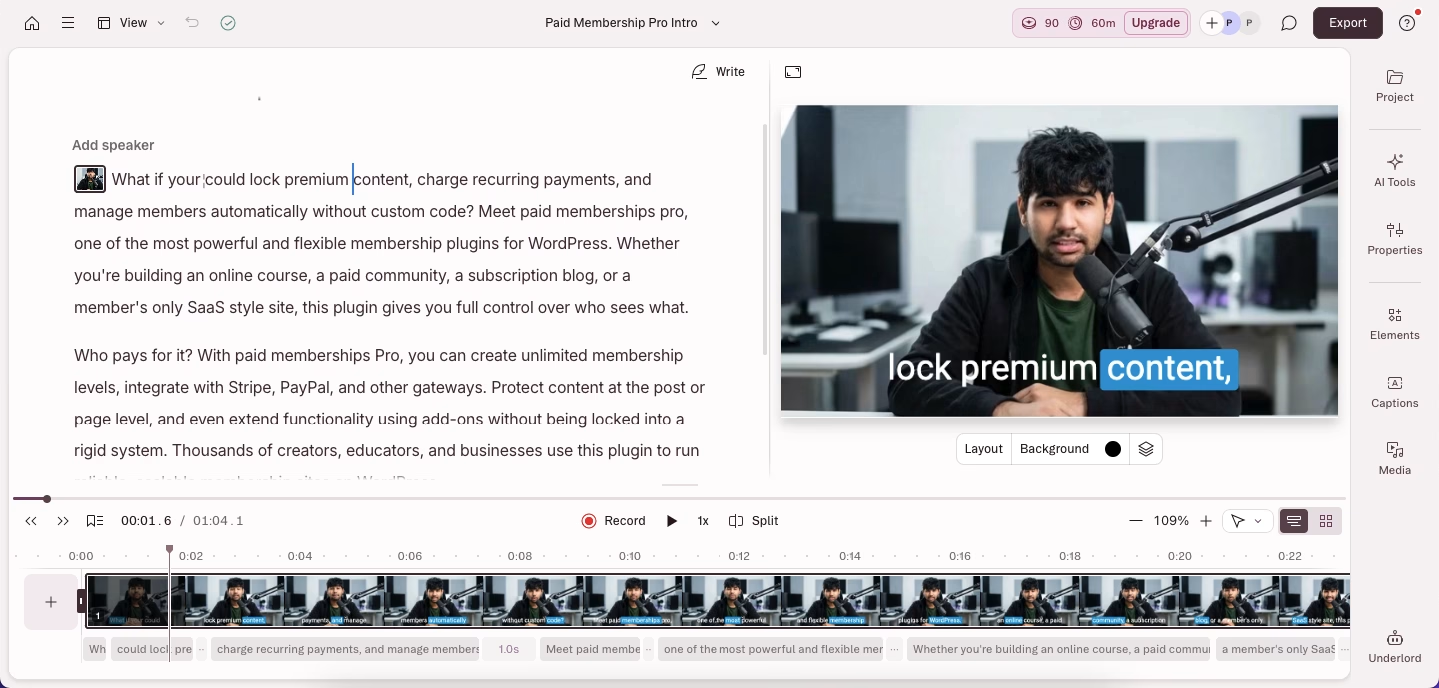
Descript’s signature feature. Instead of a traditional timeline, you edit video by editing the auto-generated transcript: delete a word and that exact moment disappears from the footage. It feels like editing a Google Doc, except you are cutting video.
🤖 Underlord – AI Co-Editor
Underlord is Descript’s AI assistant that understands video editing commands in natural language. I can type prompts like “create a 60-second highlight reel focusing on the funniest moments” or “add captions and b-roll to this section,” and Underlord executes these edits.
🎙️ Studio Sound
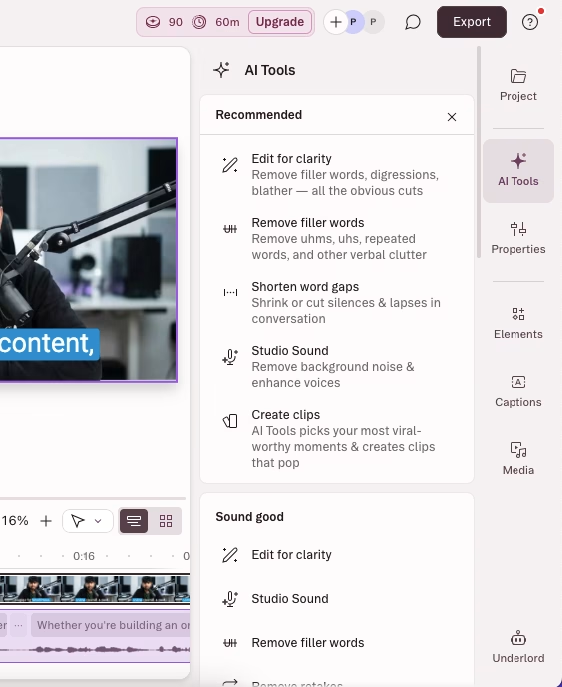
This one-click AI feature dramatically improves audio quality by removing background noise, enhancing speech clarity, and balancing volume levels. It’s like having a professional sound engineer working on every recording.
👁️ Eye Contact Correction

Using AI, Descript adjusts your gaze to make it appear you’re looking directly at the camera, even when you’re reading from notes or a script off to the side.
🎭 Overdub – AI Voice Cloning
After training the AI with samples of your voice, Overdub can generate new speech in your voice from text. This is incredibly useful for fixing mistakes or adding content without re-recording.
🗣️ Remove Filler Words

Automatically detects and removes “um,” “ah,” “like,” “you know,” and other verbal tics from your audio and video.
🟢 AI Green Screen
Removes backgrounds from videos without needing an actual green screen. The AI accurately detects and removes backgrounds even in challenging lighting conditions.
📝 Automatic Transcription
Descript transcribes your recordings in 25 languages with impressive accuracy, including speaker identification and timestamps.
🎨 Custom Voice Library & Stock Voices
Access professionally designed AI voices or create custom voices for narration and text-to-speech generation.
🌐 Translation & Dubbing
Translate and dub your videos into 30+ languages with AI voices that sound like native speakers, complete with proofreading capabilities.
🎬 Create Clips
Underlord analyzes your long-form content and automatically creates short, engaging clips optimized for social media platforms.
🎞️ Multitrack Recording & Editing
Record up to 8 participants simultaneously with separate audio and video tracks for each person, giving you complete control in post-production.
📊 Templates & Layouts
Access professionally designed templates for intros, outros, captions, and full video layouts. You can also create and share custom templates.
☁️ Collaboration Features
Multiple team members can work on the same project simultaneously with timestamped comments, version history, and role-based permissions.
Riverside Features
🎙️ Local Recording Technology
Riverside’s standout feature records video and audio locally on each participant’s device, ensuring studio quality regardless of internet speed. The recordings automatically upload in the background.
🎥 Up to 4K Video Recording

Capture video in resolutions up to 4K (3840×2160) with support for multiple camera angles per participant.
🔊 48kHz Audio Quality
Record audio at professional broadcast standards with 48kHz sample rate, providing exceptional clarity and fidelity.
🎬 Text-Based Editing
Similar to Descript, Riverside offers transcript-based editing where you can edit video by editing the automatically generated transcript.
🪄 Magic Audio
One-click AI audio enhancement that removes background noise, echo, and reverb while balancing EQ settings for professional sound.
✨ Magic Clips
AI automatically identifies the most engaging moments from your recordings and creates short clips optimized for social media.
📺 Live Streaming
Stream directly to YouTube, Facebook, LinkedIn, Instagram, Twitter, and Twitch simultaneously with custom RTMP support.
🎓 Webinar Mode
Host professional webinars with up to 100 registrants (depending on plan), including registration forms, automated email reminders, Q&A, polls, and analytics.
📱 Teleprompter
Built-in teleprompter feature visible only to the host, allowing you to read scripts while maintaining eye contact with the camera.
🎨 Custom Overlays & Lower Thirds
Add professional branding with custom overlays, lower thirds, and graphics during live streams and recordings.
👥 Producer Mode
Add producers who can control recording start/stop and communicate with hosts/guests via push-to-talk without being recorded.
🔄 Separate Audio & Video Tracks
Each participant’s audio and video are recorded on separate tracks, giving complete control in post-production.
💬 AI Repurposing Agent
AI analyzes your content and automatically generates social media posts, video descriptions, show notes with timestamps, and promotional content.
📊 Transcription & Captions
Automatic transcription in multiple languages with the ability to export as SRT files or burn captions directly into videos.
☁️ Cloud Backup Recording
In addition to local recordings, Riverside captures cloud backup recordings that automatically upload, providing a failsafe if local recordings encounter issues.
Descript vs Riverside Pricing
After analyzing both platforms’ pricing structures, here’s what you need to know to choose the right plan.
Descript Pricing

| Plan | Price (Annual) | Price (Monthly) | Best For |
|---|---|---|---|
| Free | $0 | $0 | Testing features, casual creators |
| Hobbyist | $16/month | Higher monthly rate | Solo creators, podcasters |
| Creator | $24/month | Higher monthly rate | Professional creators, small teams (up to 3) |
| Business | $50/month | Higher monthly rate | Growing teams (up to 5), agencies |
| Enterprise | Custom | Custom | Large organizations, custom needs |
Descript Plan Details
Free Plan Includes:
- ✅ Limited transcription and screen recording
- ✅ Basic AI features (limited usage)
- ✅ 720p export
- ✅ Descript watermark on exports
- ✅ Access to basic editing tools
Hobbyist Plan ($24/month billed annually):
- ✅ 10 media hours/month
- ✅ 400 AI credits/month
- ✅ 1080p export, watermark-free
- ✅ Access to Underlord AI co-editor
- ✅ Studio Sound, Remove Filler Words, Create Clips
- ✅ AI Speech with custom voice clones
- ✅ 2 hours remote recording/month
- ✅ Up to 4 participants in recordings
- ✅ 1 editor seat
Creator Plan ($32/month billed annually):
- ✅ 30 media hours/month
- ✅ 800 AI credits/month
- ✅ 4K export, watermark-free
- ✅ Full access to Underlord and 20+ AI tools
- ✅ Generate video with latest AI models
- ✅ Unlimited royalty-free stock media
- ✅ 5 hours remote recording/month
- ✅ Can scale to 3 editor seats
- ✅ Top-ups available for media hours and AI credits
Business Plan ($48/month billed annually):
- ✅ 40 media hours/month
- ✅ 1500 AI credits/month
- ✅ Team-wide Brand Studio access
- ✅ Translate and dub in 24+ languages with proofread
- ✅ Generate custom avatars from photo/text
- ✅ 15 hours remote recording/month
- ✅ Priority support with SLA
- ✅ Can scale to 5 editor seats
- ✅ Advanced collaboration features
Enterprise Plan (Custom Pricing):
- ✅ Advanced Security and SSO/SCIM
- ✅ Granular brand controls
- ✅ Custom AI credits and media minutes
- ✅ Custom legal terms and AI controls
- ✅ Flexible licensing and billing
- ✅ 25 hours remote recording/month
- ✅ Dedicated account manager
- ✅ Custom onboarding and training
My Recommendation: For solo creators serious about content, the Creator plan offers the best value with 4K exports, full AI access, and generous limits. Teams should consider Business for collaboration features and brand consistency tools.
Riverside Pricing

| Plan | Price (Annual) | Price (Monthly) | Best For |
|---|---|---|---|
| Free | $0 | $0 | Testing platform, occasional use |
| Pro | $24/month | $29/month | Professional creators, podcasters |
| Live | $34/month | $39/month | Live streamers, multi-platform broadcasters |
| Webinar | $79/month | $99/month | Webinar hosts, lead generation, events |
Riverside Plan Details
Free Plan Includes:
- ✅ 2 hours multitrack recording
- ✅ Unlimited single-track recording
- ✅ Full editing suite
- ✅ Up to 720p video quality
- ✅ 44.1kHz audio quality
- ✅ Magic Clips
- ✅ Unlimited video calls
- ⚠️ Riverside watermark on exports
Pro Plan ($24/month billed annually, $29/month monthly):
- ✅ 15 hours multitrack recording
- ✅ Unlimited single-track recording
- ✅ Up to 4K video quality
- ✅ Up to 48kHz audio quality
- ✅ No watermark
- ✅ Unlimited text-based editing
- ✅ AI tools (Magic Audio, Eye Contact, unlimited transcriptions)
- ✅ Remove silences & filler words
- ✅ AI Repurposing Agent
- ✅ Magic Clips & Show Notes
- ✅ Teleprompter (for host)
Live Plan ($34/month billed annually, $39/month monthly):
- ✅ Everything in Pro, plus:
- ✅ Live stream in full HD (1080p)
- ✅ Stream to YouTube, Facebook, LinkedIn, Instagram, X & Twitch simultaneously
- ✅ Custom RTMP support
- ✅ Omnichat (unified chat from all platforms)
- ✅ Accept live call-ins
- ✅ Live stream chat integration
- ✅ Custom overlays and lower thirds
- ✅ Backstage speaker management
Webinar Plan ($79/month billed annually, $99/month monthly):
- ✅ Everything in Live, plus:
- ✅ Host webinars with up to 100 registrants
- ✅ Pre-record & stream sessions as if live
- ✅ No time limit on webinar sessions
- ✅ Unlimited scheduled sessions
- ✅ Lead capture tools
- ✅ Custom branded registration forms
- ✅ Automated email reminders & follow-ups
- ✅ Q&A, live call-ins, polls & reactions
- ✅ Webinar analytics
- ✅ HubSpot integration
My Recommendation: For most creators focused on remote recording and editing, the Pro plan provides everything you need. If you’re doing live streams regularly, the Live plan is worth it for multi-platform streaming. The Webinar plan is specifically for those running regular webinars or virtual events with lead generation needs.
Price Comparison Insights
Value for Money:
- Both platforms start at similar price points ($24/month annually)
- Descript charges more as you scale but includes more advanced AI features
- Riverside offers specialized plans (Live, Webinar) for specific use cases
- Descript’s pricing is based on media hours + AI credits; Riverside’s is based on recording hours + features
Which Platform Offers Better Value?
Choose Descript if:
- You spend more time in post-production than recording
- You need advanced AI features like voice cloning and AI video generation
- Text-based editing is your primary workflow
- You create multiple types of content requiring extensive editing
Choose Riverside if:
- Remote recording quality is your primary concern
- You regularly conduct interviews or multi-person recordings
- You need live streaming or webinar capabilities
- Your workflow is more recording-focused than editing-focused
Descript vs Riverside Alternatives
Descript and Riverside are not your only options. Four alternatives worth a look:
- SquadCast: best for podcasters who want rock-solid remote recording (up to 4K/48kHz) without heavy editing. Free plan; paid from $20/month.
- Zencastr: best for podcasters wanting all-in-one local recording plus hosting. Free plan; paid from $20/month.
- Adobe Podcast: best for Creative Cloud users who mainly need one-click AI audio cleanup. Included with Creative Cloud.
- DaVinci Resolve: best for filmmakers needing pro editing and color grading on a budget. Powerful free version; Studio $295 one-time.
Descript vs Riverside Pros & Cons
Descript Pros ✅
- Text-based editing: the fastest way to cut talking-head video and podcasts.
- Underlord AI that helps: removes filler words, levels audio, and auto-generates clips.
- Studio Sound: one-click audio cleanup that rivals paid plugins.
- Voice cloning (Overdub): fix mistakes by typing, without re-recording.
- Strong collaboration: real-time co-editing, comments, and version history.
- Generous free plan for testing the core workflow.
Descript Cons ❌
- Learning curve: the text-based approach takes adjustment.
- Media hours and AI credits run out: heavy users pay for top-ups.
- Lags on large projects: files over two hours can slow down.
- Free plan is watermarked and impractical for professional output.
- Recording is secondary: less capable than dedicated recording tools.
Riverside Pros ✅
- Best-in-class remote recording: local capture stays studio-quality on bad internet.
- Reliable backups: the cloud failsafe has saved full sessions.
- Up to 4K video and 48kHz audio: near-professional quality.
- Easy for guests: minimal setup, no technical know-how needed.
- Live streaming and webinars with multi-platform broadcasting built in.
- Separate tracks per participant: full control in post.
Riverside Cons ❌
- Editing lags Descript: text-based editing works but is less refined.
- Fewer AI tools: no voice cloning or regeneration.
- Recording hours run out: pricey for frequent, long recordings.
- Transcription is slightly less accurate than Descript.
- Basic mobile app: advanced features need desktop.
- Webinar plan is pricey at $79/month for occasional hosts.
FAQs
Which is better for remote interviews?
Riverside is definitively better for remote interviews because it uses local recording to capture high-resolution files independent of internet stability.
Can I use Descript and Riverside together?
Yes. Many creators record their high-quality raw footage using Riverside, export the separate tracks, and then import them into Descript for fast, text-based editing and AI enhancement.
What is Descript’s Underlord?
Underlord is Descript’s AI co-editor introduced to automate tedious tasks like removing filler words (“um,” “uh”), leveling audio, and automatically generating social media clips.
Is Riverside’s free plan completely free?
Yes, the free plan is free forever, but it limits you to 2 hours of recording with a 720p resolution and places a watermark on your exported files.
Do I need a fast internet connection to use Riverside?
You need a stable connection to communicate, but your internet speed does not affect the final recording quality, as the files are recorded locally on your hard drive and uploaded in the background.
Does Descript offer a lifetime deal?
No, Descript operates strictly on a monthly or annual SaaS subscription model.
Conclusion
It comes down to your workflow. For remote interviews and podcasts, where a guest’s connection could ruin the take, pick Riverside and its local recording. For heavy editing, transcription, and repurposing long videos into clips, pick Descript. On a tight budget, both free tiers are genuinely usable for testing, just expect watermarks.
One warning: neither free plan is enough for professional output, and the recording or AI limits on paid tiers can run out faster than you expect, so match the plan to how much you actually record and edit each month.
Next step: start both free plans, run one real recording through each, and see which workflow feels right before you pay.




